
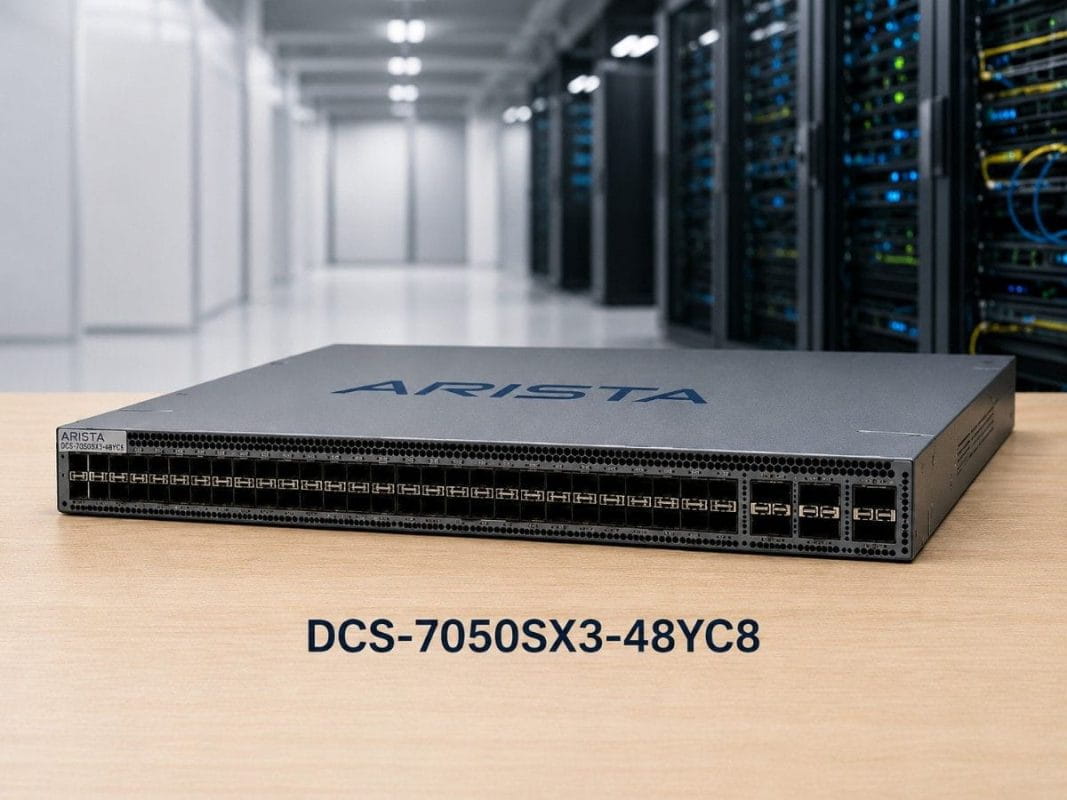
Data center teams are under pressure to increase network speed without overbuilding their infrastructure. As more workloads move across virtualized servers, storage systems, cloud platforms, and AI environments, older 10G access networks can become a bottleneck. The DCS-7050SX3-48YC8 helps solve this problem with 48x25G server-facing ports and 8x100G uplinks in a compact 1RU switch.
This Arista DCS-7050SX3-48YC8 Review explains where the switch fits, how it supports 25G server access and 100G leaf-spine designs, and what buyers should know before choosing new or refurbished hardware. It also covers related optics and cabling options, including SFP-25G-SR, QSFP-100G-SR4, QSFP-100G-LR4, 25G DAC, 100G DAC, and MMF/SMF fiber patch cables.
What problem does the Arista DCS-7050SX3-48YC8 solve?
Many data centers still run older access networks built around 10G server links. That may work for light workloads, but it can slow down modern environments with dense virtualization, storage traffic, AI workloads, and cloud-style applications.
The challenge is not only speed. Buyers also face rising hardware costs, long lead times, optics compatibility issues, and pressure to refresh infrastructure without wasting budget.
The Arista DCS-7050SX3-48YC8 gives buyers a practical middle path. It supports 25G server access while using 100G uplinks into the fabric. That makes it useful for teams that need better performance but do not want to overbuild with a full 100G-to-the-server design.
This switch is especially relevant for:
- Enterprise data center refresh projects
- 10G to 25G migration
- Leaf-spine network builds
- Virtualization clusters
- Storage-heavy racks
- Private cloud environments
- AI and HPC support networks
- New or refurbished Arista sourcing projects
For buyers trying to improve performance while controlling spend, the switch also fits broader network cost planning conversations. The goal is not to buy the biggest switch. The goal is to buy the right switch for the workload, rack layout, and budget.
What is the Arista DCS-7050SX3-48YC8?
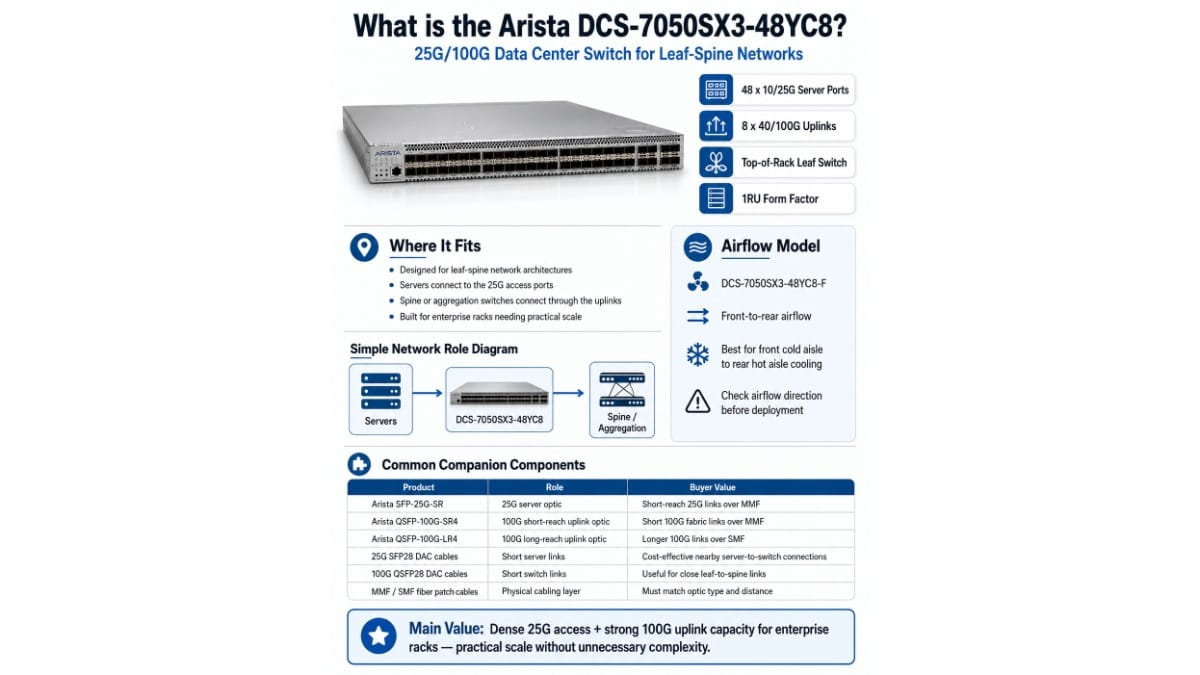
The Arista DCS-7050SX3-48YC8 is a 25G/100G data center switch designed for leaf-spine networks. It provides 48 ports for 10G/25G server access and 8 ports for 40G/100G uplinks.
In most designs, the switch sits at the top of rack as a leaf switch. Servers connect down to the 25G ports. Spine or aggregation switches connect through the 100G uplinks.
The DCS-7050SX3-48YC8-F is the front-to-rear airflow model. This matters because airflow must match the data center’s cooling design. A correct model with the wrong airflow can create deployment issues.
| Product | Role in the design | Buyer value |
| DCS-7050SX3-48YC8 | Main 25G/100G leaf switch | Connects servers at 25G and uplinks at 100G |
| DCS-7050SX3-48YC8-F | Front-to-rear airflow model | Fits racks with front cold aisle to rear hot aisle cooling |
| Arista SFP-25G-SR | 25G server optic | Supports short-reach 25G links over MMF |
| Arista QSFP-100G-SR4 | 100G short-reach uplink optic | Supports short 100G fabric links over MMF |
| Arista QSFP-100G-LR4 | 100G long-reach uplink optic | Supports longer 100G links over SMF |
| 25G SFP28 DAC cables | Short server links | Useful for nearby server-to-switch connections |
| 100G QSFP28 DAC cables | Short 100G switch links | Useful for close leaf-to-spine links |
| MMF / SMF fiber patch cables | Physical cabling layer | Must match optic type and distance |
The main value is balance. Buyers get dense 25G access and enough 100G uplink capacity for many enterprise racks. That makes the platform strong for data centers that need practical scale, not unnecessary complexity.
How does the 48x25G and 8x100G design work?
The 48x25G + 8x100G layout is the core reason buyers evaluate this switch. It gives a clean access-to-fabric model.
The 48x25G ports connect to servers, storage nodes, appliances, or other rack-level systems. The 8x100G ports connect upstream to spine switches, aggregation switches, or another fabric layer.
This design helps teams move from older 10G access to higher-speed 25G access. It also keeps uplink design simple because 100G is widely used in modern data center fabrics.
A common deployment could look like this:
- 25G links from servers to the leaf switch
- 100G uplinks from the leaf to spine switches
- Redundant paths across the leaf-spine fabric
- Fiber or DAC options based on distance
- New or refurbished sourcing based on budget and lead time
The 8x100G uplinks give buyers room to tune oversubscription. A team may not need all eight uplinks active on day one. They can start with fewer 100G uplinks and add more as workload traffic grows.
This matters in real procurement. Many buyers do not want to pay for unused capacity too early. They want a platform that can support growth while keeping the first purchase under control.
Why does 25G server access matter?
25G server access gives data centers more bandwidth without the cost jump of 100G server connections. For many enterprise workloads, 25G is a strong fit because it improves performance while keeping the design practical.
Modern servers carry more workload density than older systems. A single host may run many virtual machines, containers, storage services, or application workloads. That traffic can quickly outgrow 10G access links.
The Arista SFP-25G-SR is a strong option for 25G server links over multimode fiber. It fits short-reach data center connections where fiber gives more flexibility than copper.
25G SFP28 DAC cables also make sense for short links. If the server and switch are in the same rack, DAC can reduce cost and simplify cabling. The main limit is distance, so buyers should confirm cable length before quoting.
Use 25G server access when:
- 10G server links create bottlenecks
- Virtualization density is growing
- Storage traffic needs more bandwidth
- Private cloud nodes need faster east-west traffic
- AI or GPU support systems need stronger access links
- A full 100G server design costs too much
A good 25G design starts with the server count. It should also account for dual-homed connections, spare ports, failover needs, and whether the environment will keep some 10G systems during migration.
How do 100G uplinks support leaf-spine design?
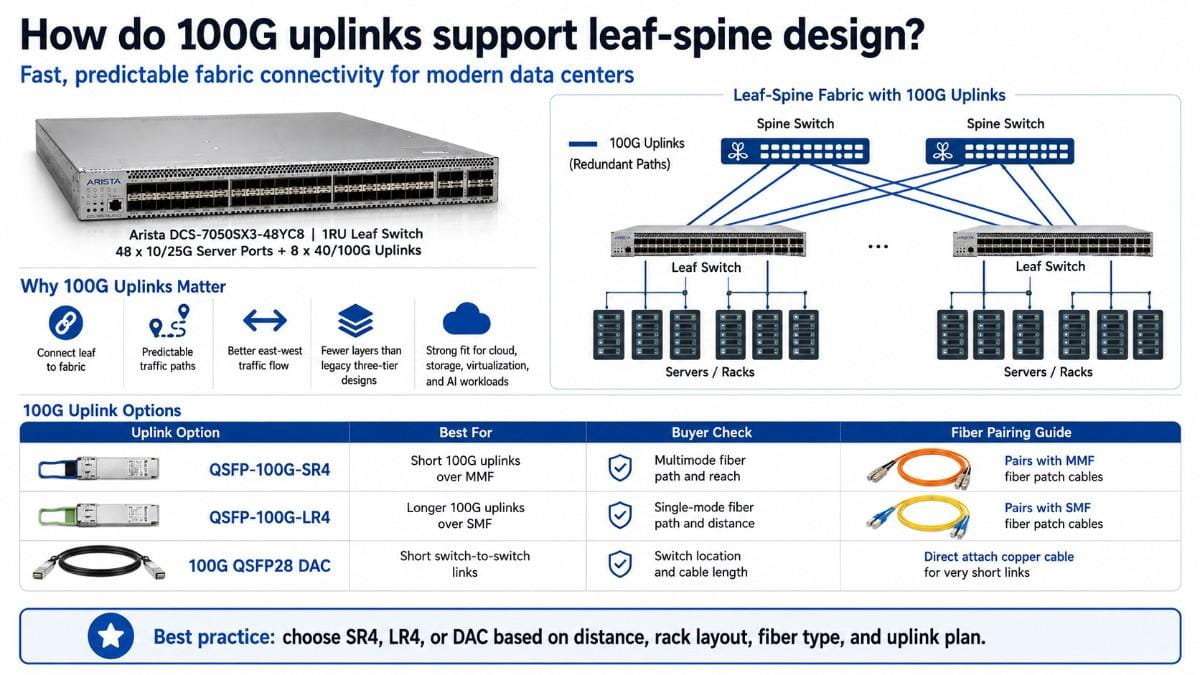
100G uplinks connect the leaf switch to the rest of the fabric. In a leaf-spine design, this helps traffic move across the data center through predictable paths.
Older three-tier designs often forced traffic through more layers. Leaf-spine networks reduce that problem by connecting every leaf to spine switches. This supports east-west traffic, which is common in cloud, storage, virtualization, and AI environments.
For short-reach uplinks, the Arista QSFP-100G-SR4 works well with multimode fiber. For longer uplinks, the Arista QSFP-100G-LR4 fits single-mode fiber designs.
100G QSFP28 DAC cables can also work for short switch-to-switch links. This is useful when the leaf and spine switches sit in the same rack or very close racks.
| Uplink or access option | Best use case | Common buyer check |
| Arista SFP-25G-SR | 25G server access over MMF | Fiber type, distance, server NIC support |
| 25G SFP28 DAC cables | Short server-to-switch links | Cable length and rack layout |
| Arista QSFP-100G-SR4 | Short 100G uplinks over MMF | Multimode fiber path and reach |
| Arista QSFP-100G-LR4 | Longer 100G uplinks over SMF | Single-mode fiber path and distance |
| 100G QSFP28 DAC cables | Short leaf-to-spine links | Switch location and cable length |
| MMF fiber patch cables | SR and SR4 optical links | Connector type and distance |
| SMF fiber patch cables | LR4 optical links | Connector type and path length |
The optic choice should follow the physical design. Buyers should not choose SR4, LR4, DAC, MMF, or SMF in isolation. The right answer depends on distance, rack layout, fiber type, and uplink plan.
Where does the DCS-7050SX3-48YC8 fit in data center architecture?
The DCS-7050SX3-48YC8 fits best as a leaf switch in a modern data center fabric. It is not usually the main spine switch for large-scale 100G-heavy environments. Its strongest role is 25G access with 100G uplinks.
This makes the switch useful for buyers who want to understand how it fits into data center architecture before purchasing. It belongs close to the server layer, where it can aggregate server traffic and pass it into the fabric.
It can support several design patterns:
- Top-of-rack leaf switch
- 25G access layer for server racks
- Private cloud rack switch
- Virtualization cluster switch
- Storage access switch
- AI/HPC support network leaf
- Refurbished expansion switch for existing Arista environments
The switch can also support staged upgrade projects. Some buyers do not refresh an entire data center at once. They may upgrade one rack, one cluster, or one application zone first.
That is where this platform can help. It gives teams a way to add 25G access and 100G uplinks without changing the full architecture in one step.
How does it support AI, virtualization, storage, and cloud networking?
AI, virtualization, storage, and cloud environments all depend on strong east-west traffic paths. The DCS-7050SX3-48YC8 supports these environments by giving servers faster access links and reliable uplinks into the fabric.
For AI and HPC, not every environment needs a high-end 400G or 800G fabric. Some AI labs, GPU support clusters, test environments, and cost-controlled deployments can use 25G server access with 100G uplinks. The right fit depends on GPU scale, storage demand, and traffic pattern.
For virtualization, 25G access helps when hosts run many virtual machines. VM migration, backup, storage access, and application traffic can all compete for bandwidth. A 25G access layer gives more headroom than 10G.
For storage, 25G can help with backup, replication, file storage, object storage, and distributed systems. Storage traffic can be steady and heavy, so access bandwidth matters.
For cloud networking, the switch supports a leaf-spine model that fits modern application traffic. Teams building private cloud or hybrid cloud infrastructure often need predictable paths, flexible growth, and clean uplink design.
This is also where operational planning matters. Network upgrades should align with security, segmentation, and application access goals. In projects where network refresh overlaps with identity or policy changes, Zero Trust planning can help buyers think beyond ports and speeds.
What should buyers check before choosing this switch?
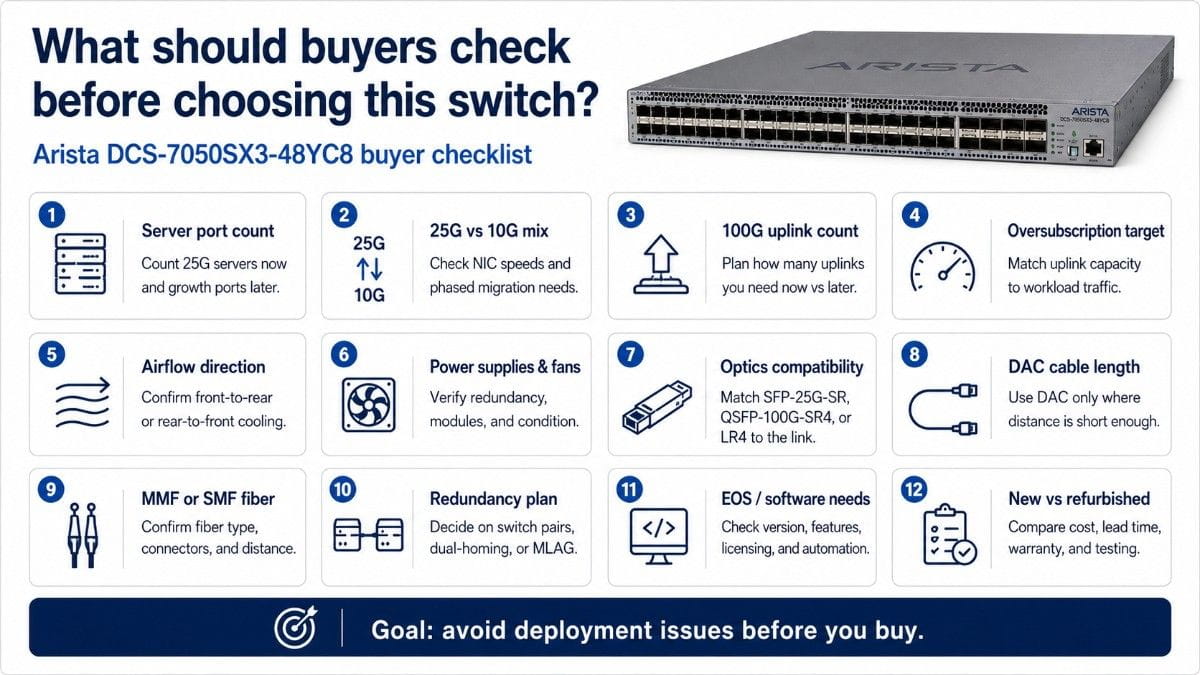
Buyers should review the full deployment plan before choosing the Arista DCS-7050SX3-48YC8. The model may fit the use case, but airflow, optics, cabling, uplink design, and sourcing details can affect the final outcome.
| # | What to check | Why it matters | Buyer guidance |
| 1 | Server port count | The switch provides 48 server-facing 10G/25G ports. | Confirm how many servers need 25G today and how many ports should stay open for growth. |
| 2 | 25G vs 10G server mix | Some refresh projects include both older 10G systems and newer 25G servers. | Check server NIC speeds and plan whether migration will happen all at once or in phases. |
| 3 | 100G uplink count | The switch includes 8x100G uplink ports for fabric connectivity. | Decide how many uplinks you need on day one and how many you may add later. |
| 4 | Oversubscription target | Uplink capacity affects performance under heavy traffic. | Match uplink design to workload type, especially for storage, virtualization, and AI/HPC support. |
| 5 | Airflow direction | Wrong airflow can create rack cooling issues. | Confirm whether the rack needs front-to-rear or rear-to-front airflow before ordering. |
| 6 | Power supplies and fans | Refurbished and secondary-market units may vary by configuration. | Verify power supply type, redundancy, fan modules, and condition before purchase. |
| 7 | Optics compatibility | 25G and 100G links need the right optics. | Match SFP-25G-SR, QSFP-100G-SR4, or QSFP-100G-LR4 to the exact link type and distance. |
| 8 | DAC cable length | DAC cables work well for short links but do not fit every layout. | Use 25G or 100G DAC when the server or switch distance is short enough. |
| 9 | MMF or SMF fiber path | SR/SR4 optics use MMF, while LR4 optics use SMF. | Confirm existing fiber type, connector type, and distance before selecting optics. |
| 10 | Redundancy plan | Most production networks need redundant paths. | Decide whether the design needs switch pairs, dual-homed servers, MLAG, or multiple spine uplinks. |
| 11 | EOS/software needs | Software version and feature support can affect deployment. | Confirm required EOS version, licensing needs, automation tools, and operational standards. |
| 12 | New vs refurbished availability | Budget, lead time, and lifecycle needs may point to different sourcing options. | Compare new and refurbished pricing, warranty, testing, availability, and lead time. |
This checklist helps buyers avoid common deployment issues. A switch can look correct on paper, but the project can still face delays if the airflow, optics, fiber type, or power configuration does not match the data center plan.
Should you buy the DCS-7050SX3-48YC8 new or refurbished?
New and refurbished options can both make sense. The right choice depends on budget, lead time, lifecycle needs, and support requirements.
New hardware usually fits projects where buyers need a longer lifecycle, formal OEM alignment, or a new standard build. It may be the better fit for greenfield production environments or organizations with strict procurement rules.
Refurbished hardware can fit refresh projects, expansions, labs, secondary clusters, and cost-sensitive deployments. It may also help when lead times for new hardware are too long or when buyers need to match an existing Arista environment.
The key is validation. Refurbished does not mean “buy without checking.” Buyers should confirm testing, condition, airflow, power, fans, software needs, optics, and warranty.
| Buying factor | New option | Refurbished option |
| Budget | Higher upfront cost | Often lower cost |
| Lead time | Can vary by channel | Can be faster when stock is available |
| Lifecycle | Strong for new standards | Strong when lifecycle fits the use case |
| Support path | Better for formal OEM plans | Depends on seller and warranty |
| Best fit | Greenfield production builds | Refresh, expansion, lab, secondary sites |
| Main risk | Higher spend or delay | Must verify testing and configuration |
For many buyers, refurbished Arista switching can support cost control without sacrificing practical performance. But the seller must understand enterprise networking, compatibility, and supply constraints.
That is why a buyer should treat the switch, optics, cables, and warranty as one decision. A low-cost switch without the right optics or airflow is not a complete solution.
What should be included in a 25G Leaf Switch Bundle?
A complete 25G Leaf Switch Bundle should include the switch, optics, cables, and fiber needed for the rack design. This avoids a common deployment problem: the switch arrives, but the correct optics or cables are missing.
A practical bundle can include:
- DCS-7050SX3-48YC8 as the main 25G leaf switch
- DCS-7050SX3-48YC8-F when front-to-rear airflow is needed
- Arista SFP-25G-SR for 25G server links
- Arista QSFP-100G-SR4 for short-reach 100G uplinks
- Arista QSFP-100G-LR4 for longer 100G uplinks
- 25G SFP28 DAC cables for short server links
- 100G QSFP28 DAC cables for short switch links
- MMF fiber patch cables for SR and SR4 links
- SMF fiber patch cables for LR4 links
The bundle should match the exact data center layout. If the servers sit in the same rack as the switch, DAC cables may reduce cost. If links run across rows or rooms, optics and fiber may make more sense.
A good quote should define:
- Number of servers
- Number of switch pairs
- Port speed requirements
- Single-homed or dual-homed design
- 25G optic or DAC count
- 100G uplink count
- SR4 or LR4 uplink choice
- MMF or SMF fiber type
- Airflow direction
- New or refurbished preference
- Spare optics and cable needs
This approach gives buyers a clearer outcome. It also reduces the risk of last-minute part gaps during installation.
Is the Arista DCS-7050SX3-48YC8 a good fit for your network?
The Arista DCS-7050SX3-48YC8 is a strong fit when buyers need dense 25G server access and 100G uplinks in a leaf-spine network. It works well for virtualization, storage, private cloud, AI/HPC support environments, and 10G-to-25G refresh projects.
Its value comes from practical design. It gives teams more access bandwidth, fabric-ready uplinks, and flexible cabling options without forcing an oversized architecture.
The switch may not be the best fit for every role. Large AI fabrics, deep-buffer routing designs, or 400G/800G spine layers may need a different platform. But for many enterprise racks, the 7050SX3-48YC8 offers a strong balance of performance, cost, and sourcing flexibility.
For the best result, buyers should evaluate the switch as part of a complete solution. That means confirming the exact SKU, airflow, optics, DAC cables, fiber, uplink plan, warranty, and new or refurbished sourcing path before placing the order.
Need help building an Arista 25G/100G leaf bundle?
Catalyst Data Solutions can help buyers source an Arista 7050SX3 bundle with switches, optics, DAC cables, MMF or SMF fiber patch cables, airflow-matched hardware, and new or refurbished availability.
Request a quote for a DCS-7050SX3-48YC8 bundle with SFP-25G-SR server optics, QSFP-100G-SR4 or QSFP-100G-LR4 uplinks, 25G and 100G DAC options, and fiber patch cables matched to your rack distance.
Catalyst can also help compare new and refurbished options, verify compatibility, check available quantities, and support buyback or trade-in planning for retired data center networking hardware.
FAQs
What is the Arista DCS-7050SX3-48YC8 used for?
The Arista DCS-7050SX3-48YC8 is mainly used as a 25G leaf or top-of-rack data center switch. It connects servers at 25G and uses 100G uplinks to connect into the fabric.
Is the DCS-7050SX3-48YC8 good for leaf-spine networks?
Yes. It fits leaf-spine networks because it provides 25G server-facing ports and 100G uplinks to spine switches. This design supports modern east-west traffic patterns.
What is the difference between DCS-7050SX3-48YC8 and DCS-7050SX3-48YC8-F?
The DCS-7050SX3-48YC8-F is the front-to-rear airflow version. Buyers should match airflow direction to their rack cooling design before purchasing.
Which optic should I use for 25G server access?
The Arista SFP-25G-SR is a good fit for 25G server links over multimode fiber. For very short server-to-switch links, 25G SFP28 DAC cables may also work.
Which optic should I use for 100G uplinks?
Use Arista QSFP-100G-SR4 for short-reach 100G uplinks over multimode fiber. Use Arista QSFP-100G-LR4 for longer 100G uplinks over single-mode fiber.
Can I use DAC cables with this switch?
Yes, 25G SFP28 DAC cables can support short server links, and 100G QSFP28 DAC cables can support short switch-to-switch links. Buyers should confirm cable length and compatibility before quoting.
Should I buy this switch new or refurbished?
Buy new when lifecycle, support alignment, or procurement rules require it. Buy refurbished when cost control, faster sourcing, or expansion of an existing environment matters. Always confirm testing, airflow, power supplies, optics, and warranty.