
Data center teams face a hard mix of problems right now. Network traffic keeps growing, refresh budgets stay tight, and long lead times can slow down projects that cannot wait. At the same time, many buyers need stronger routing, better aggregation, and reliable 100G uplinks without overbuilding the whole fabric.
This Arista DCS-7280SR-48C6-F Review explains where this switch router fits, who should consider it, and how to plan the right optics, cabling, and downstream leaf switches around it. The goal is simple: help enterprise, service provider, and data center buyers make a clear decision before quoting hardware.
The DCS-7280SR-48C6-F is not just another top-of-rack switch. It belongs in conversations about routing-heavy environments, aggregation layers, interconnects, and large network designs that need strong Layer 2 and Layer 3 scale. Arista’s own datasheet positions the 7280R Series for large-scale data centers and service providers, with scalable L2/L3 resources and high-density interfaces.
What Is the Arista DCS-7280SR-48C6-F?
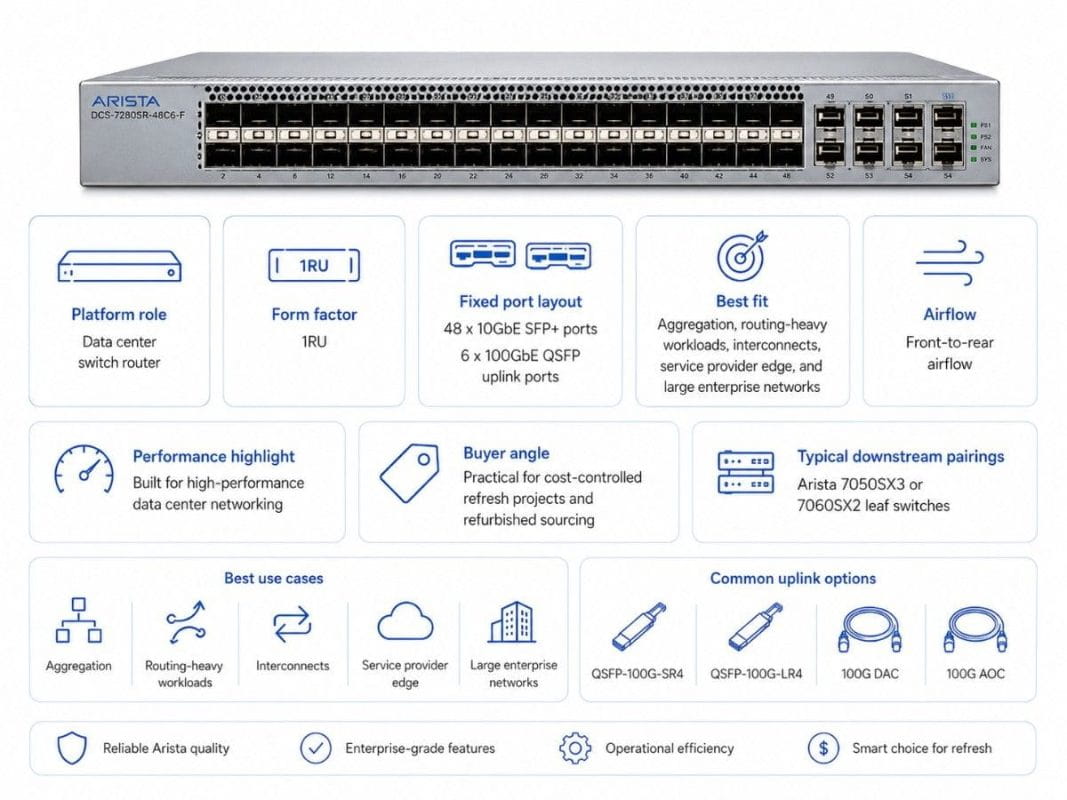
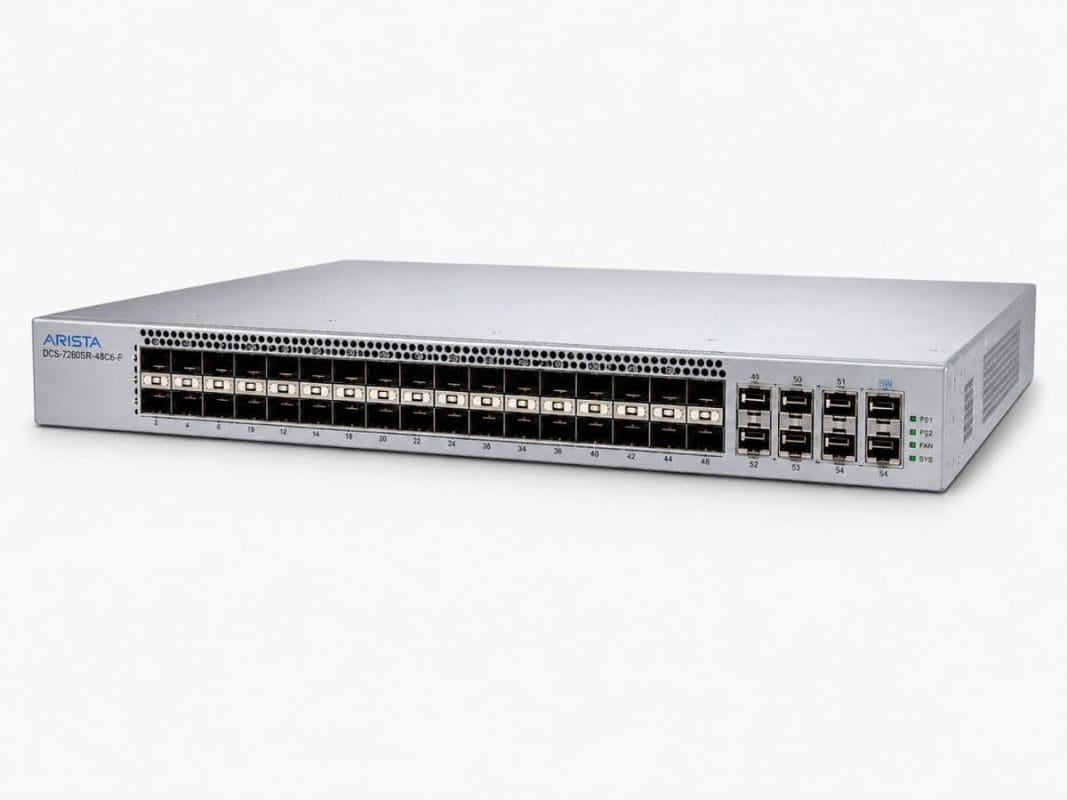
The Arista DCS-7280SR-48C6-F is a 1RU data center switch router with 48 x 10GbE SFP+ ports and 6 x 100GbE QSFP uplink ports. It supports front-to-rear airflow, which matters when matching hot-aisle and cold-aisle rack designs.
For buyers comparing new and secondary-market options, the Arista DCS-7280SR-48C6-F makes the most sense when the network needs more than basic access switching. It is better suited for aggregation, routing, interconnect, and high-performance data center roles.
| Feature | Arista DCS-7280SR-48C6-F Buyer View |
| Platform role | Data center switch router |
| Fixed port layout | 48 x 10GbE SFP+ and 6 x 100GbE QSFP |
| Best fit | Aggregation, routing-heavy workloads, service provider edge, large enterprise networks |
| Airflow | Front-to-rear airflow |
| Common uplink options | QSFP-100G-SR4, QSFP-100G-LR4, 100G DAC, 100G AOC |
| Downstream pairings | Arista 7050SX3 or 7060SX2 leaf switches |
| Buying angle | Strong fit for refurbished sourcing and cost-controlled refresh projects |
Arista lists the DCS-7280SR-48C6-F as a 7280R model with 48 x 10GbE SFP+ and 6 x 100GbE QSFP ports, front-to-rear airflow, and dual AC power. The 7280SR-48C6 model also supports 2.16 Tbps of wire-speed performance with 4GB of buffer.
Why Do Buyers Use the 7280SR-48C6-F as a Switch Router?
A switch router combines high-speed switching with strong routing features. That matters when a network has to move traffic between racks, VLANs, data center zones, WAN edges, service provider links, or cloud-style segments.
The 7280SR-48C6-F fits buyers who need more routing depth than a basic leaf switch can provide. It can support data center aggregation, routed fabric designs, inter-DC links, and environments where traffic patterns do not stay inside one rack.
This is important during refresh projects. Many teams want to reduce network costs but still need hardware that can handle real production traffic. A lower-cost switch that lacks routing scale can create bottlenecks later.
The switch router role usually matters when buyers need:
- Strong Layer 3 routing at the aggregation layer
- 100G uplinks into a spine, core, or interconnect layer
- Deep buffering for bursty workloads
- Better traffic visibility and monitoring
- A platform that fits both enterprise and service-provider-style designs
The 7280SR-48C6-F is not the right choice for every rack. For simple 10G access, it may be more than needed. For a routing-heavy aggregation layer, it can be a practical fit.
How Does the 7280SR-48C6-F Handle Routing-Heavy Workloads?
Routing-heavy workloads appear when traffic moves across many network segments. These designs often include BGP, EVPN, VXLAN gateways, data center interconnects, storage networks, firewalls, load balancers, and service provider handoffs.
In these cases, the switch must do more than forward packets inside one Layer 2 domain. It must help maintain stable routes, support fast path selection, and keep traffic moving during bursts.
The 7280R Series supports wire-speed L2 and L3 forwarding, VXLAN, monitoring features, and broad design flexibility. Arista also highlights deep packet buffers and large routing tables for internet peering, interconnect, and inter-DC networking.
This makes the DCS-7280SR-48C6-F a serious option for:
- Enterprise data center aggregation
- Routed leaf-spine environments
- Service provider edge or aggregation
- Storage-heavy networks
- Content or application delivery networks
- Interconnect points between network domains
Routing-heavy environments also need good planning. Buyers should check current route scale, expected growth, traffic bursts, optics distance, airflow, and software requirements before choosing a final configuration.
Where Does the 7280SR-48C6-F Fit in Data Center Aggregation?
Data center aggregation sits between access or leaf switches and the higher-level core, spine, or routing layer. In many networks, this layer collects traffic from multiple downstream switches and sends it upstream through high-speed links.
The DCS-7280SR-48C6-F can aggregate downstream 10G environments while using 100G uplinks for upstream capacity. This makes it useful when a buyer has many 10G systems but still wants a stronger path toward 100G fabric design.
It also helps during phased upgrades. A company may not replace every switch, server, and cabling path at once. Instead, it may keep 10G access in some areas while adding 100G uplinks where traffic demand is highest.
This is common in large enterprise refresh projects. Buyers need better performance, but they also need controlled spend, shorter sourcing time, and a practical migration path.
In AI, analytics, and storage-heavy environments, aggregation planning becomes even more important. Teams dealing with AI networking challenges often learn that GPUs and servers are only part of the design. The network must also support east-west traffic, storage flows, and fast movement between compute clusters.
Which 100G Optics and Cables Work Best with the 7280SR-48C6-F?
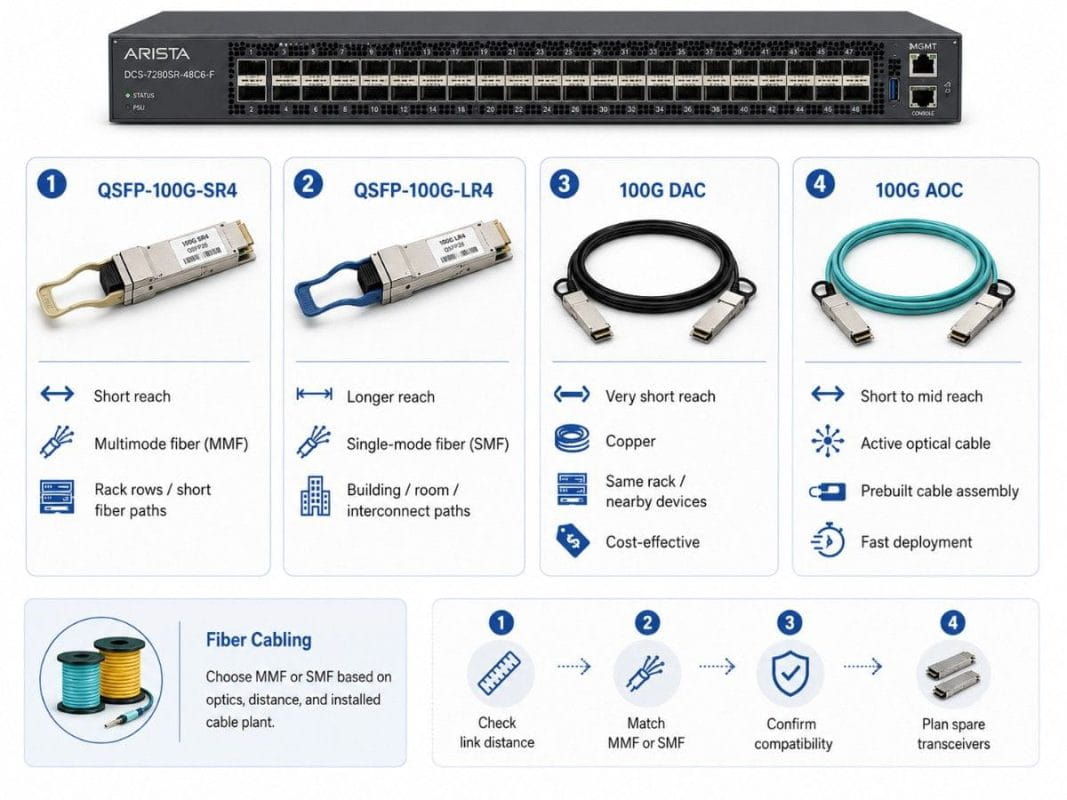
The DCS-7280SR-48C6-F has six 100G QSFP uplink ports. Those ports can connect to upstream switches, spines, aggregation devices, or interconnect equipment. The right 100G connectivity choice depends on distance, cable path, fiber type, and budget.
Use short-reach optics for multimode fiber links inside the data center. Use long-reach optics for single-mode fiber and longer paths. Use DAC or AOC when short runs, fast installation, and cost control matter.
| Connectivity Option | Best Use Case | Buyer Notes |
| QSFP-100G-SR4 | Short-reach 100G links over multimode fiber | Common for data center rack rows and short fiber paths |
| QSFP-100G-LR4 | Longer 100G links over single-mode fiber | Better for longer building, room, or interconnect paths |
| 100G DAC | Very short 100G copper connections | Cost-effective for nearby devices in the same rack or close racks |
| 100G AOC | Short-to-mid 100G active optical cabling | Useful when buyers want a prebuilt cable assembly with optical reach |
| Fiber cabling | MMF or SMF based on optics choice | Must match distance, connector type, and installed cable plant |
Optics planning should happen before the quote, not after. A switch can be available, but the wrong transceiver or cable can delay deployment.
Buyers should confirm:
- Link distance
- MMF or SMF cabling
- Port speed
- Optics compatibility
- Breakout needs
- Rack airflow
- Spare transceiver requirements
A strong quote should include the switch, optics, cables, and any downstream hardware that the design needs.
How Does the 7280SR Compare with Arista 7050SX3 and 7060SX2?
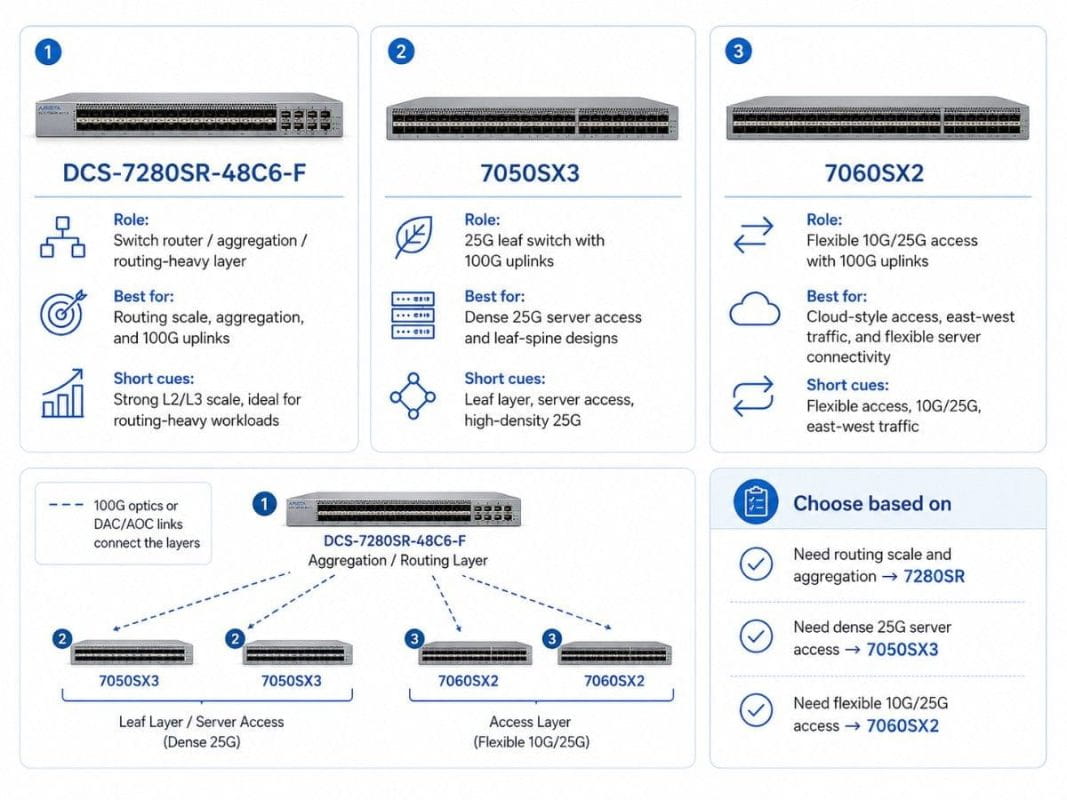
The 7280SR-48C6-F should not replace every 7050SX3 or 7060SX2 use case. These platforms often serve different roles.
The 7050SX3 and 7060SX2 models fit well as downstream leaf switches. They handle server access and 25G/100G leaf-spine designs. The 7280SR fits better where buyers need routing, aggregation, and stronger L2/L3 scale.
| Platform | Best Network Role | When to Choose It |
| DCS-7280SR-48C6-F | Switch router, aggregation, routing-heavy layer | Choose it when routing scale, aggregation, and 100G uplinks matter |
| 7050SX3 | 25G leaf switch with 100G uplinks | Choose it for dense 25G server access and leaf-spine designs |
| 7060SX2 | Flexible 10G/25G access with 100G uplinks | Choose it for cloud-style access, east-west traffic, and flexible server connectivity |
| 7050CX3 / 7060CX | 100G spine or high-density interconnect | Choose it when 100G port density matters more than 10G aggregation |
A practical design may use the 7280SR as an aggregation or routing layer, with 7050SX3 or 7060SX2 switches downstream. This lets buyers keep strong server access while adding a more capable routing point above the leaf layer.
For example:
- 7050SX3 handles 25G server access.
- 7060SX2 supports flexible 10G/25G access with 100G uplinks.
- 7280SR aggregates traffic and handles routing-heavy needs.
- 100G optics or DAC/AOC links connect the layers.
This is where Catalyst can help buyers avoid overbuying. Not every rack needs the same switch. A good design maps each model to the right job.
When Does Refurbished 7280SR-48C6-F Availability Make Sense?
Refurbished availability matters because the DCS-7280SR-48C6 series has moved deeper into the secondary-market conversation. Arista announced end of sale for the DCS-7280SR-48C6 and DCS-7280TR-48C6 Series in June 2023, with the last day to order listed as December 20, 2023. Arista’s posted milestones list the product end-of-life date as December 20, 2028.
That lifecycle status does not make the platform unusable. It means buyers should plan more carefully.
Refurbished 7280SR-48C6-F hardware can make sense when:
- The buyer needs a known platform already used in the network
- Newer models exceed the budget or project need
- Lead time matters more than buying the newest generation
- The design needs tested aggregation hardware
- The buyer wants spares for an installed 7280R environment
- A refresh project needs cost control without a full redesign
A good refurbished networking guide should push buyers to check testing, warranty, optics, airflow, software needs, and return terms. The goal is not just a low unit price. The goal is a switch that arrives ready for the actual environment.
Refurbished networking also supports better lifecycle planning. When buyers reuse tested equipment or sell retired hardware, they reduce waste and support a circular IT model.
What Is the Recommended 7280R Routing / Aggregation Bundle?
Recommended bundle components
A strong 7280R routing and aggregation bundle should include the switch, 100G optics or cables, downstream leaf switches, and the right fiber cabling. This avoids the common problem of buying hardware first and discovering cabling gaps during installation.
Recommended bundle:
- DCS-7280SR-48C6-F
- QSFP-100G-SR4 optics for short-reach multimode 100G links
- QSFP-100G-LR4 optics for longer single-mode 100G links
- 100G DAC or AOC cables for short-distance 100G connections
- Downstream 7050SX3 or 7060SX2 leaf switches
- MMF or SMF fiber cabling based on distance
- Spare optics and cables for maintenance needs
This bundle works well for buyers who need a practical aggregation layer above existing or planned leaf switches. It also helps teams standardize the bill of materials before procurement.
A bundle approach can also support AI cost planning when networking spend competes with GPU, server, and storage budgets. The network must support the workload, but buyers still need control over hardware cost.
What Should Buyers Check Before Quoting a 7280SR-48C6-F?
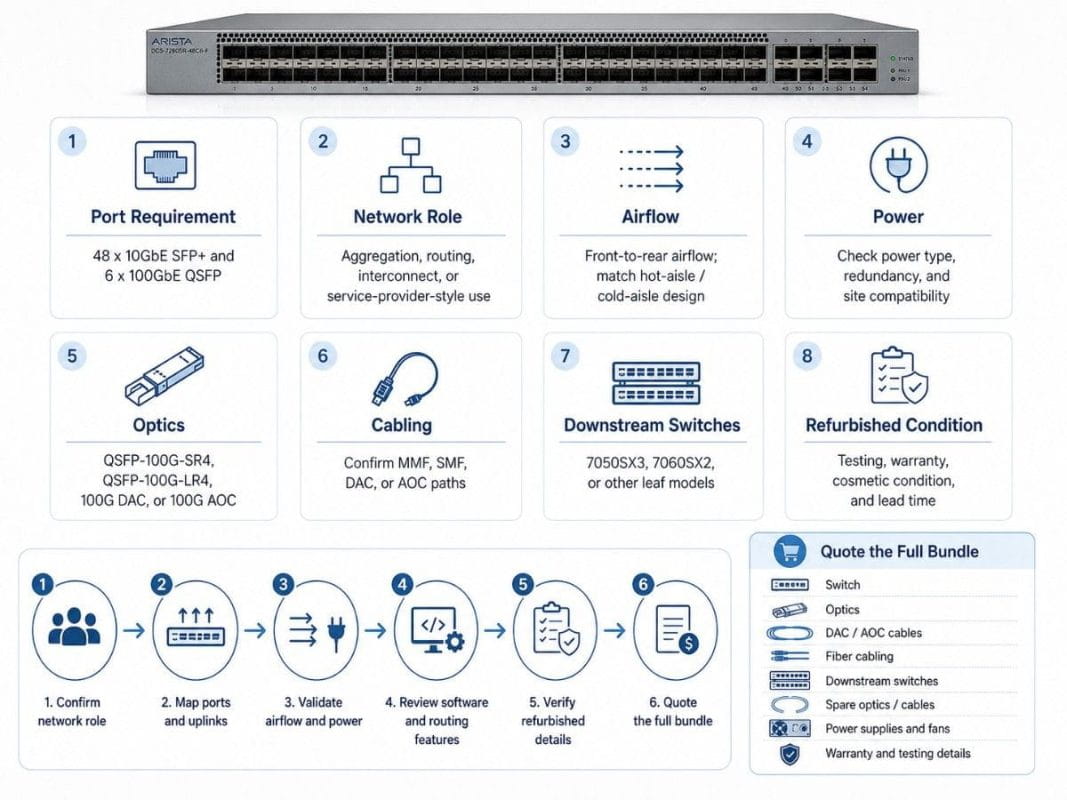
Before quoting the Arista DCS-7280SR-48C6-F, buyers should confirm the technical fit, physical rack requirements, optics plan, and sourcing details. This avoids delays after purchase and helps make sure the switch, transceivers, cables, and downstream hardware match the real deployment.
| Checkpoint | What to Confirm | Why It Matters |
| Port requirement | 48 x 10GbE SFP+ and 6 x 100GbE QSFP ports | Confirms the switch matches the downlink and uplink design |
| Network role | Aggregation, routing, interconnect, or service-provider-style use | Helps avoid using the 7280SR where a leaf switch would fit better |
| Airflow | Front-to-rear airflow on the DCS-7280SR-48C6-F | Prevents hot-aisle / cold-aisle mismatch |
| Power | Power supply type, redundancy, and site power compatibility | Reduces installation risk |
| Optics | QSFP-100G-SR4, QSFP-100G-LR4, 100G DAC, or 100G AOC | Ensures the uplinks match distance and fiber type |
| Cabling | MMF, SMF, DAC, or AOC paths | Prevents last-minute cable or connector issues |
| Downstream switches | 7050SX3, 7060SX2, or other leaf models | Confirms the aggregation layer fits the rest of the fabric |
| Refurbished condition | Testing, warranty, cosmetic condition, and lead time | Helps buyers avoid unreliable secondary-market sourcing |
1. Confirm the Network Role First
Do not quote the 7280SR-48C6-F as a generic access switch. It is better suited for:
- Data center aggregation
- Routing-heavy workloads
- Large enterprise networks
- Service-provider-style environments
- 100G uplink aggregation
- Interconnect or edge routing roles
If the main need is dense 25G server access, a 7050SX3 or 7060SX2 may be a better fit.
2. Check Ports, Optics, and Link Distance
Buyers should map every port before quoting.
- Count how many 10G SFP+ downlinks are needed.
- Count how many 100G QSFP uplinks are needed.
- Measure each 100G link distance.
- Choose QSFP-100G-SR4 for short-reach MMF links.
- Choose QSFP-100G-LR4 for longer SMF links.
- Use 100G DAC or AOC for short switch-to-switch connections.
- Confirm connector type and installed fiber before ordering.
3. Validate Physical Requirements
Physical fit matters as much as port count.
- Confirm front-to-rear airflow.
- Match airflow to the rack’s hot-aisle / cold-aisle design.
- Confirm AC or DC power requirements.
- Check power supply redundancy.
- Confirm fan and power supply condition for refurbished units.
- Make sure rack depth and cable clearance are acceptable.
4. Review Software and Feature Needs
Before quoting, the buyer should confirm the required software and routing features.
Important checks include:
- Layer 2 and Layer 3 scale needs
- Routing protocol requirements
- BGP, OSPF, or EVPN/VXLAN needs
- Monitoring and telemetry needs
- Existing EOS version standards
- Support or maintenance requirements
- Compatibility with the current Arista environment
5. Confirm Refurbished Buying Details
For refurbished 7280SR-48C6-F units, the quote should include more than the switch price.
Buyers should ask:
- Has the unit been tested?
- Are fans and power supplies included?
- Is the airflow direction verified?
- Is there a warranty?
- What is the return policy?
- Are optics tested with the switch?
- Are matching cables available?
- Can the seller provide spares?
- What is the lead time?
6. Quote the Full Bundle, Not Just the Switch
A strong quote should include the full deployment package:
- DCS-7280SR-48C6-F
- QSFP-100G-SR4 or QSFP-100G-LR4 optics
- 100G DAC or AOC cables
- MMF or SMF fiber cabling
- Downstream 7050SX3 or 7060SX2 switches
- Spare optics or cables
- Power supplies and fans
- Warranty and testing details
This approach helps buyers avoid a common issue: receiving the switch on time but waiting on optics, cables, or compatible downstream hardware.
Final Verdict: Is the Arista DCS-7280SR-48C6-F a Good Fit?
The Arista DCS-7280SR-48C6-F is a strong fit for buyers who need a data center switch router for aggregation, routing-heavy workloads, and large enterprise or service-provider-style environments.
It makes the most sense when 10G access still matters, but the network also needs 100G uplinks, stronger L2/L3 scale, and a practical aggregation point. It also works well in refresh projects where buyers want tested refurbished hardware, shorter sourcing cycles, and a bundle that includes optics and cabling.
The best buying decision depends on workload, port count, airflow, link distance, software needs, and available inventory. When planned correctly, the DCS-7280SR-48C6-F can help extend a high-performance data center network without forcing a full redesign.
Need Help Building a 7280R Routing and Aggregation Plan?
Catalyst Data Solutions can help buyers source the DCS-7280SR-48C6-F with matching 100G optics, DAC/AOC options, fiber cabling, and downstream Arista leaf switches.
Request a quote for a 7280R routing and aggregation bundle that includes the switch, QSFP-100G-SR4 or LR4 optics, 100G cabling, and compatible downstream 7050SX3 or 7060SX2 models.
Catalyst can also help compare refurbished availability, lead time, airflow, port count, and compatibility needs. This gives buyers a clearer path before they commit a budget or schedule a deployment window.
FAQs About the Arista DCS-7280SR-48C6-F
Is the Arista DCS-7280SR-48C6-F a switch or a router?
It is a data center switch router. That means it can support high-speed switching and routing-heavy designs. It fits aggregation, interconnect, and large enterprise or service-provider-style environments.
What is the main use case for the DCS-7280SR-48C6-F?
The main use case is high-performance data center aggregation with 10G access and 100G uplinks. It also fits routing-heavy workloads where L2/L3 scale matters.
Which optics should I use with the 7280SR-48C6-F?
Use QSFP-100G-SR4 for short-reach multimode fiber links. Use QSFP-100G-LR4 for longer single-mode fiber links. Use 100G DAC or AOC for shorter connections where cable assemblies make more sense.
Can the 7280SR-48C6-F work with 7050SX3 or 7060SX2 switches
Yes. A common design can place 7050SX3 or 7060SX2 models downstream as leaf switches, while the 7280SR supports aggregation or routing above them.
Is refurbished a good option for this model?
Refurbished can be a strong option when the buyer needs tested hardware, faster sourcing, or a cost-controlled refresh path. Buyers should confirm testing, warranty, airflow, optics, and support needs before purchase.
Who should avoid the 7280SR-48C6-F?
Buyers who only need basic access switching may not need this platform. A 7050SX3 or 7060SX2 may fit better for server access roles.