
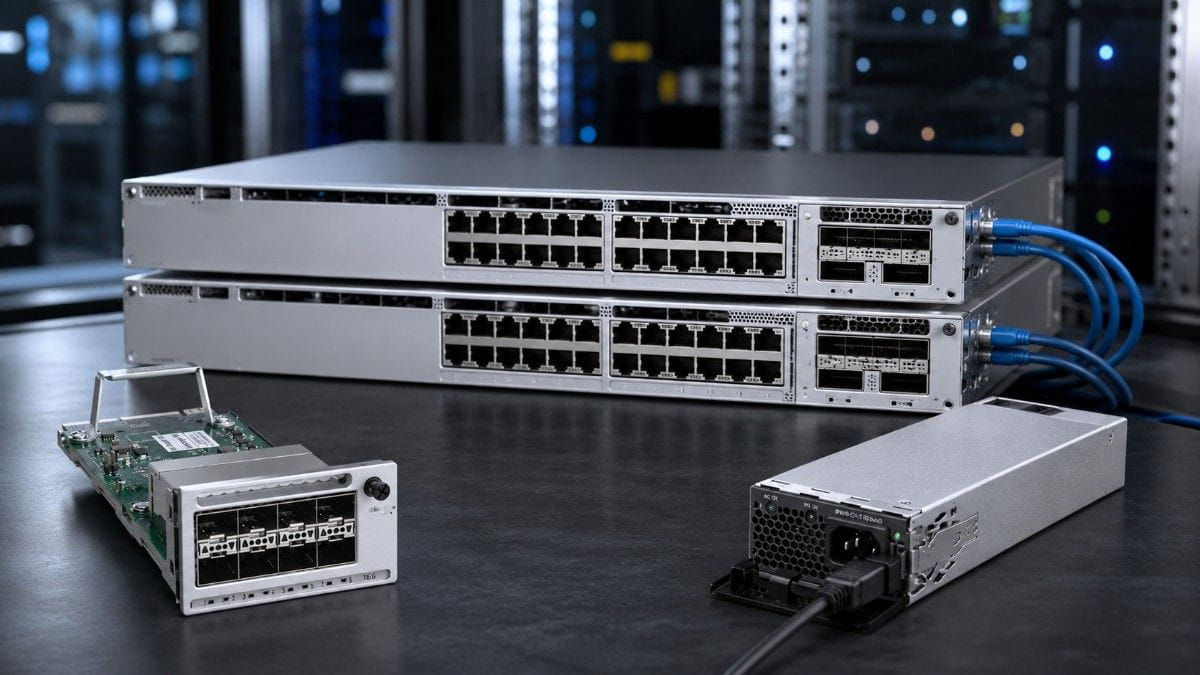
When setting up a network, having the right components in place can make all the difference. A Cisco Catalyst 9300 Bundle takes the guesswork out of sourcing, combining key components like the C9300-24T-A, C9300L-48P-4X-E, C9300-NM-8X, power supplies, and stacking cables into one complete package. This approach ensures everything works together seamlessly, saving you time and eliminating the headache of matching parts individually.
For businesses that need high-density PoE for devices like wireless access points, phones, and cameras, the C9300L-48P-4X-E offers 48 PoE+ ports and four 10G uplinks. On the other hand, the C9300-24T-A is a 24-port data-only switch that works perfectly in environments where PoE isn’t necessary. If you need more flexibility for uplinks, the C9300-NM-8X network module is a game-changer, adding eight 10G SFP+ ports for high-speed connections between access and core switches.
With the PWR-C1-715WAC-P power supply and STACK-T1-1M stacking cables, this bundle ensures your network has reliable power and scalability. Whether you’re building a small office setup or a larger enterprise network, the Cisco Catalyst 9300 Bundle covers all your access-layer needs, making deployment faster, more efficient, and hassle-free.
What Is a Cisco Catalyst 9300 Bundle?
A Cisco Catalyst 9300 Bundle is not just a switch purchase. It is a planned access-layer configuration that includes the hardware needed to connect users, wireless access points, phones, cameras, and other network endpoints.
A basic bundle may include a switch and power supply. A more complete bundle may include uplink modules, stacking cables, StackPower cables, optics, and redundant power planning.
A good bundle helps answer important questions before the order is placed. Which switch model fits the access closet? Is PoE required? Are fixed uplinks enough, or is a modular uplink needed?
This matters because many deployment delays happen after the switch arrives. The missing item is often a cable, power supply, uplink module, or optic that was not included in the first quote.
What Products Are Included in This Catalyst 9300 Bundle?
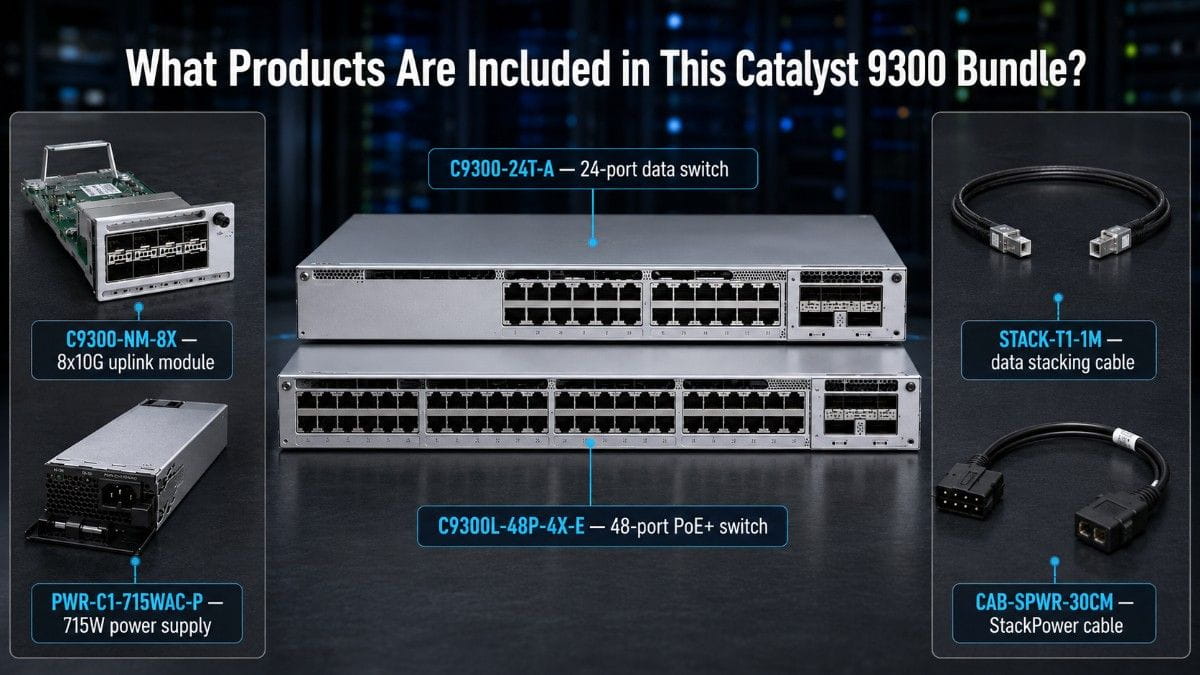
The right Cisco Catalyst 9300 Bundle depends on the use case. A data-only access closet needs different hardware than a PoE-heavy wireless closet.
The table below gives a quick product overview.
| Product | Bundle Role | When to Choose It | Compatibility Note |
| C9300-24T-A | 24-port data access switch | When you need wired data access without PoE | Supports modular uplink options |
| C9300L-48P-4X-E | 48-port PoE+ access switch | When you need PoE for APs, phones, cameras, or IoT | Fixed 4x10G uplinks; does not support StackPower |
| C9300-NM-8X | 8-port 10G SFP+ uplink module | When modular Catalyst 9300 switches need more 10G uplinks | Confirm support with the target switch model |
| PWR-C1-715WAC-P | 715W AC power supply | When the switch needs reliable AC power and PoE planning | Check power budget against endpoint demand |
| STACK-T1-1M | 1-meter StackWise cable | When supported switches need data stacking | Used for StackWise data stacking, not power sharing |
| CAB-SPWR-30CM | 0.3-meter StackPower cable | When supported C9300 models need StackPower links | Do not use for C9300L-only StackPower designs |
The C9300L PoE model is often used when the access layer must power wireless access points, IP phones, security cameras, or other PoE devices. The C9300-24T-A is better when the buyer needs data-only access and modular uplink flexibility.
Why Are Enterprises Building Catalyst 9300 Bundles Now?
Enterprise network refresh projects have become harder to plan. Buyers are dealing with rising hardware costs, long lead times, budget pressure, and more demand for PoE and uplink capacity.
Many teams also need to extend the life of existing infrastructure. They may not want a full redesign, but they still need reliable switching, faster uplinks, and better power planning.
A bundle approach helps because it gives the buyer a complete bill of materials. It also makes it easier to compare new, refurbished, and mixed sourcing options.
This is useful when teams need to support wireless refresh projects, campus access upgrades, branch office expansions, PoE endpoint growth, or aging switch replacement. It also supports access-layer standardization across multiple sites.
For buyers under budget pressure, a bundle can support better network cost planning because the full configuration is reviewed before the purchase. That makes it easier to avoid surprise accessory costs later.
C9300-24T-A vs C9300L-48P-4X-E: Which Switch Fits Your Access Layer?
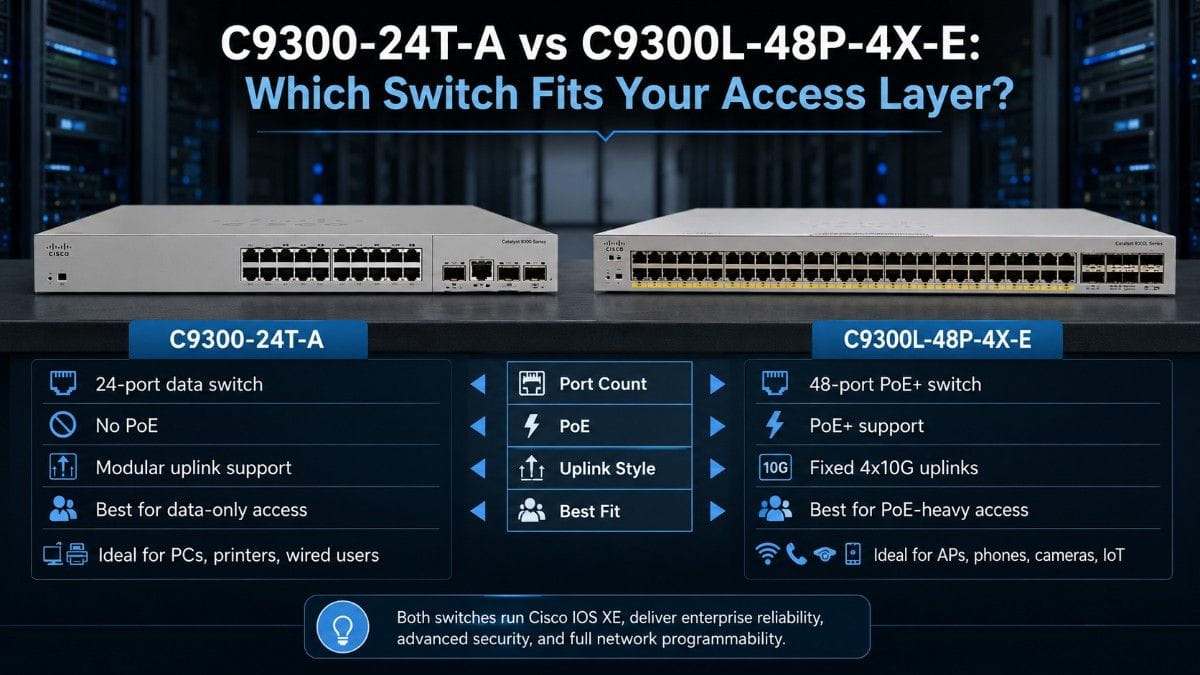
The C9300-24T-A and C9300L-48P-4X-E are both part of the Catalyst 9300 family, but they are built for different access needs.
The C9300-24T-A is a 24-port data switch. It is a good fit for wired endpoints that do not need PoE. It also supports modular uplink planning, which makes it useful when buyers want more control over uplink design.
The C9300L-48P-4X-E is a 48-port PoE+ switch with fixed uplinks. It is better for access closets that support wireless APs, IP phones, security cameras, and similar devices.
| Feature | C9300-24T-A | C9300L-48P-4X-E |
| Access port count | 24 ports | 48 ports |
| PoE support | No PoE | PoE+ |
| Uplink style | Modular uplink support | Fixed 4x10G uplinks |
| Best use case | Data-only access | PoE-heavy access |
| Common endpoints | PCs, printers, wired users | APs, phones, cameras, IoT |
| StackPower support | Supported on compatible C9300 models | Not supported |
| Best buyer fit | Teams needing modular flexibility | Teams needing PoE density and fixed 10G uplinks |
Choose the C9300-24T-A when the access layer needs stable data connectivity and flexible uplinks. Choose the C9300L-48P-4X-E when PoE demand is the main driver.
In many real deployments, both models can appear in the same campus. One closet may need PoE for wireless. Another may only need data access for wired users.
What Does the C9300-NM-8X Add to a Cisco Catalyst 9300 Bundle?
The C9300-NM-8X adds eight 10G SFP+ uplink ports to compatible modular Catalyst 9300 switches. This makes it useful when the access switch needs more uplink capacity or more flexible fiber connectivity.
A 10G uplink module can support connections from the access layer to distribution or core switches. It can also help when the design needs redundant uplinks.
The C9300-NM-8X is a strong fit when buyers need multiple 10G uplinks from the access closet. It also helps when the design needs fiber links to aggregation or core switching.
This module should not be treated as a universal accessory. Buyers should confirm switch compatibility, optics support, and software requirements before ordering.
How Do Power Supplies and Stack Power Cables Work in a Catalyst 9300 Bundle?
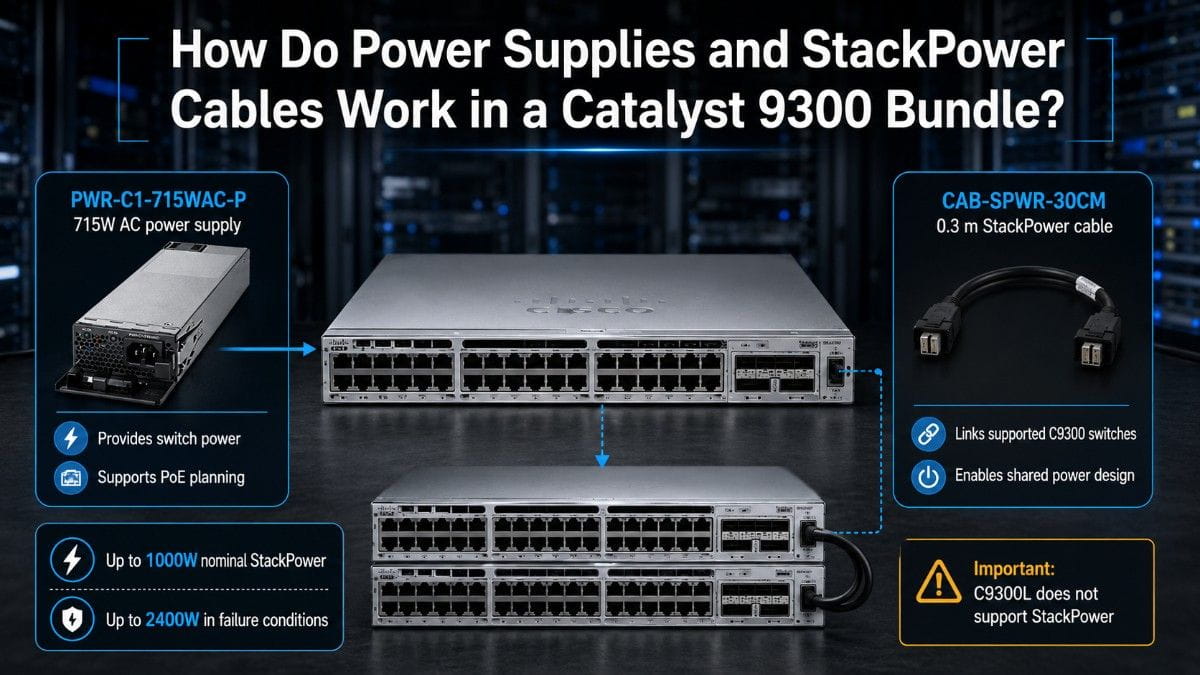
Power planning should happen before the bundle is quoted. The switch model, PoE load, power supply size, and StackPower support all affect the final design. A bundle may look complete on paper, but it can still fail the deployment plan if power capacity or compatibility is not checked early.
PWR-C1-715WAC-P for Switch Power Planning
The PWR-C1-715WAC-P is a 715W AC Platinum power supply used in Catalyst access deployments. It is often selected when buyers need reliable switch power and a practical power option for enterprise access closets. The 715W AC supply should be matched to the switch model, PoE demand, and redundancy plan.
For PoE-heavy closets, power should be calculated against the number of APs, phones, cameras, and other powered devices. A 48-port PoE switch may not use full PoE draw on every port, but the buyer should still plan for peak demand. This is where a complete Cisco Catalyst 9300 Bundle helps reduce risk before the order ships.
CAB-SPWR-30CM for StackPower Resiliency
CAB-SPWR-30CM is a 0.3-meter Cisco StackPower cable designed for Cisco Catalyst 9300 Series StackPower connections. Cisco lists it as “CAB-SPWR-30CM -StackPower Cable- 0.3 meter.” This cable is used when supported Catalyst 9300 switches share power in a StackPower design.
Cisco Catalyst 9300 and C9300X switches support up to 1000W of StackPower in nominal conditions and up to 2400W in failure conditions across a power stack. A StackPower ring topology can include up to four switches, while a star topology can support up to nine switches with XPS-2200. Important compatibility note: C9300L switches do not support StackPower, so CAB-SPWR-30CM should not be included in a C9300L-only StackPower design.
What Is the Role of STACK-T1-1M in Catalyst 9300 Stacking?
STACK-T1-1M is used for StackWise data stacking. It helps supported Catalyst switches operate as one logical switch stack.
This is different from StackPower. StackWise is for data and management stacking. StackPower is for power sharing across supported switches.
Catalyst 9300 modular uplink models support up to 480 Gbps StackWise-480 stacking bandwidth with up to eight switches in a data stack. This makes the platform suitable for scalable enterprise access deployments.
A StackWise cable should be selected based on the switch model, rack layout, and stack design. The cable length must fit the physical rack layout, not just the part list.
In simple terms, STACK-T1-1M supports data stacking, while CAB-SPWR-30CM supports StackPower links. PWR-C1-715WAC-P provides switch power, and C9300-NM-8X adds uplink capacity.
What Compatibility Checks Are Needed Before Buying a Cisco Catalyst 9300 Bundle?
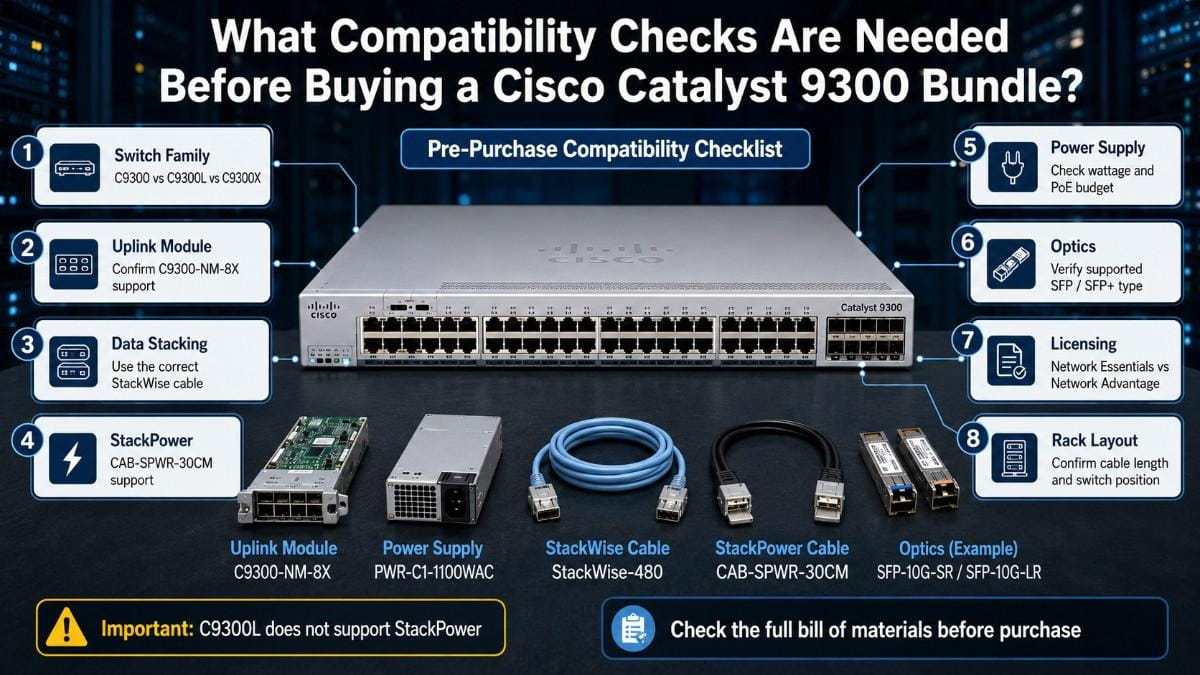
Compatibility is one of the biggest risks in a Catalyst 9300 bundle. A buyer can select strong hardware and still run into issues if the parts do not match the model or deployment plan.
The table below should be reviewed before purchase.
| Area to Check | What to Confirm | Why It Matters |
| Switch family | C9300, C9300L, or C9300X | Features differ by model family |
| Uplink module | C9300-NM-8X support | Fixed-uplink models do not use modular uplink modules |
| Data stacking | Correct StackWise cable | Wrong cable type can delay deployment |
| StackPower | CAB-SPWR-30CM support | C9300L does not support StackPower |
| Power supply | Wattage and PoE budget | PoE-heavy closets may need careful power planning |
| Optics | Supported SFP/SFP+ type | Uplink ports require compatible optics |
| Licensing | Network Essentials or Network Advantage | Feature needs may depend on license level |
| Rack layout | Cable length and switch position | Short cables may not fit all rack layouts |
A StackPower ring topology can include up to four switches. A star topology can support up to nine switches with XPS-2200.
This does not mean every deployment should use the largest possible stack. It means the design should match the access closet, power plan, and uptime requirements.
For security-focused networks, access switch decisions can also affect segmentation and policy control. A stronger security architecture often depends on reliable access switching at the edge.
Which Cisco Catalyst 9300 Bundle Should You Choose?
A Cisco Catalyst 9300 Bundle should match the access problem you are trying to solve. A data-only access closet, PoE-heavy wireless closet, and campus refresh project each need a different bundle.
| Bundle Type | Products Included | Best For | Avoid If |
| Standard Access Switch Bundle | C9300-24T-A, C9300-NM-8X, STACK-T1-1M | Data-only access with modular 10G uplinks | You need PoE for APs, phones, or cameras |
| High-Density PoE Access Bundle | C9300L-48P-4X-E, PWR-C1-715WAC-P, stacking accessories where supported | PoE-heavy access closets with fixed 10G uplinks | You require StackPower on a C9300L-only design |
| Resilient Power Bundle | Compatible C9300 switches, PWR-C1-715WAC-P, CAB-SPWR-30CM, STACK-T1-1M | Access closets where uptime and power sharing matter | You have not confirmed StackPower support |
| Campus Refresh Bundle | Mixed C9300 and C9300L switches, uplink modules, power supplies, stacking cables, optics | Multi-closet refresh projects | You need a single standard model for every site |
The Standard Access Switch Bundle is best for wired access areas where PoE is not needed. It gives buyers a modular access switch with room for 10G uplink planning.
The High-Density PoE Access Bundle is better for wireless, voice, camera, and IoT deployments. The key buying step is to confirm power budget and endpoint demand before ordering.
The Resilient Power Bundle is more specific. It should only be used when the switch model supports StackPower and the design calls for shared power.
The Campus Refresh Bundle is the broadest option. It can combine data-only switches, PoE switches, uplink modules, power supplies, and stacking accessories across multiple access closets.
Should You Buy a New or Refurbished Catalyst 9300 Bundle?
The choice between new and refurbished hardware depends on budget, lead time, lifecycle needs, and risk tolerance. New hardware is often the right fit when the buyer needs the latest lifecycle, standard OEM support, or strict refresh consistency across multiple sites.
Refurbished hardware can make sense when the network already uses Catalyst 9300 equipment, the buyer needs a faster replacement, or new hardware lead times are too long. A refurbished bundle can also help reduce e-waste and support cost control when the hardware is verified properly.
| Buying Option | Best Fit | Main Benefit | What to Verify |
| New Catalyst 9300 Bundle | Standardized refresh projects, long lifecycle planning, OEM-aligned purchases | Predictable lifecycle and support path | Lead time, license level, full accessory list |
| Refurbished Catalyst 9300 Bundle | Replacements, expansions, budget-sensitive refreshes, supply-constrained projects | Lower cost and faster sourcing in many cases | Condition, serials, power supplies, modules, cables, optics |
| Mixed New + Refurbished Bundle | Multi-site projects, phased refreshes, urgent replacement needs | Balances cost, availability, and standardization | Compatibility across all included parts |
A mixed sourcing strategy is often the most practical path. For example, a buyer may choose new switches for a core site and refurbished accessories or replacement units for smaller sites. This approach can help teams cut network costs without changing the full access design.
The key is verification before purchase. Buyers should confirm switch model, license level, power supply, uplink module, stacking cable, StackPower support, and optic compatibility before the bundle ships. A lower-cost bundle only creates value if it arrives ready for the deployment plan.
How Does a Catalyst 9300 Bundle Fit Into Enterprise Access Architecture?
The Catalyst 9300 platform usually sits at the access layer. This is where users and devices connect to the network.
The access layer supports daily business operations. It also affects wireless quality, endpoint security, traffic flow, and uplink performance.
A typical access design may include Catalyst 9300 switches for wired access and Catalyst 9300L PoE switches for APs and phones. It may also include 10G uplinks to distribution or core switches, StackWise cables for data stacking, StackPower cables where supported, and properly sized power supplies.
Access switching also supports larger infrastructure goals. As more workloads become data-heavy, the access layer must move traffic efficiently toward core, cloud, and data center systems.
This is one reason enterprise teams are reviewing AI network demands and uplink capacity together. Even if the Catalyst 9300 is not a data center switch, access-layer bottlenecks can still affect the user experience.
What Should Buyers Ask Before Finalizing the Bundle?
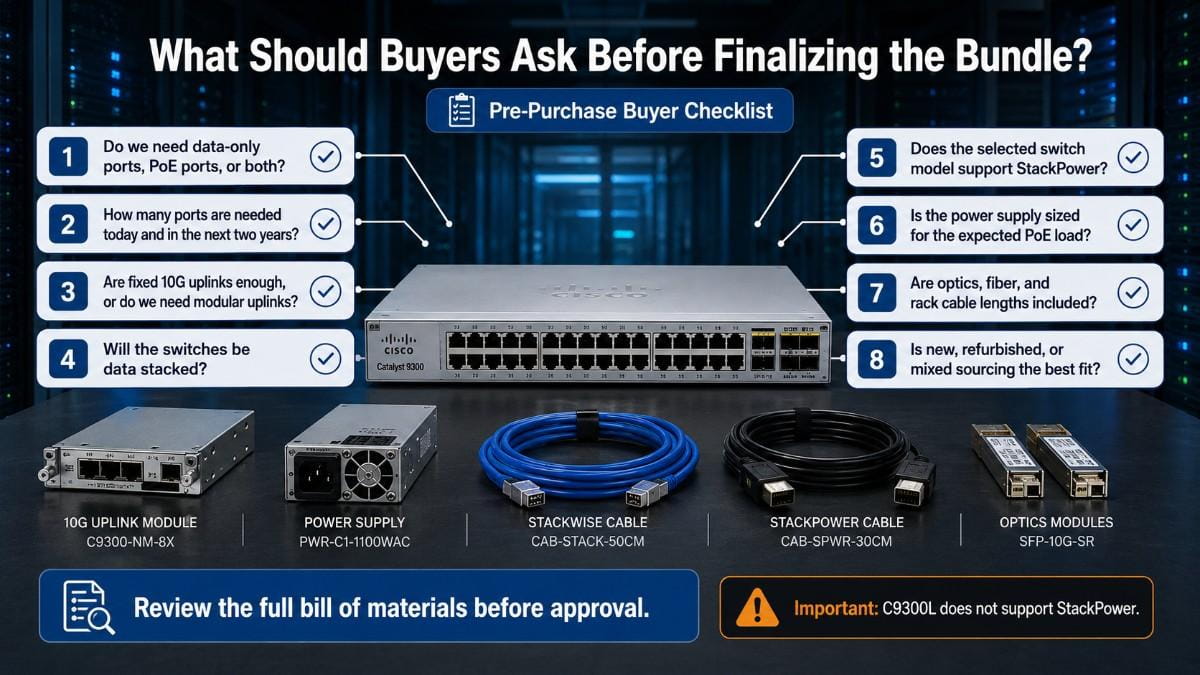
Before buying a Cisco Catalyst 9300 Bundle, buyers should confirm the design, power needs, stacking plan, and sourcing path. These questions help prevent missing parts and wrong accessories. They also make the quote easier to compare across new, refurbished, and mixed availability.
| Step | Buyer Question | Why It Matters |
| 1 | Do we need data-only ports, PoE ports, or both? | This decides whether C9300-24T-A, C9300L-48P-4X-E, or a mixed access design is better. |
| 2 | How many ports are needed today and in the next two years? | Port growth affects switch count, stack size, and refresh planning. |
| 3 | Are fixed 10G uplinks enough, or do we need modular uplinks? | This helps decide whether the C9300-NM-8X should be included. |
| 4 | Will the switches be data stacked? | This determines whether STACK-T1-1M or another supported StackWise cable is needed. |
| 5 | Does the selected switch model support StackPower? | This prevents CAB-SPWR-30CM from being added to an unsupported C9300L-only design. |
| 6 | Is the power supply sized for the expected PoE load? | PoE-heavy closets need careful power planning before purchase. |
| 7 | Are optics, fiber, and rack cable lengths included? | Missing optics or wrong cable lengths can delay deployment. |
| 8 | Is new, refurbished, or mixed sourcing the best fit? | This affects cost, lead time, availability, and lifecycle planning. |
After these questions are answered, the buyer should review the full bill of materials as one system. The switch, uplink module, power supply, stacking cable, StackPower cable, and optics should all match the deployment plan.
For environments moving toward stronger identity and access controls, this access-layer planning can also support a broader zero trust design. Switch selection, segmentation, and endpoint connectivity should not be treated as separate decisions.
Need Help Building the Right Catalyst 9300 Bundle?
A Catalyst 9300 bundle should match your access design, budget, and timeline. It should include the right switch, uplink module, power supply, StackWise cable, StackPower cable where supported, optics, and related accessories.
Catalyst Data Solutions can help buyers compare new and refurbished availability, verify compatibility, and build a practical bundle before purchase. This is useful when lead times are tight, budgets are limited, or the deployment includes a mix of data-only and PoE access needs.
Request a quote for a Catalyst 9300 bundle with switch, uplink module, power, and stacking accessories. The goal is to help your team source the right configuration before the deployment window arrives.
FAQs
What is included in a Cisco Catalyst 9300 Bundle?
A Cisco Catalyst 9300 Bundle may include a switch, uplink module, power supply, StackWise cable, StackPower cable, optics, and related accessories. The exact parts depend on the access design.
Is the C9300-24T-A a PoE switch?
No. The C9300-24T-A is a data-only access switch. It is better for wired endpoints that do not need switch-based power.
When should I choose the C9300L-48P-4X-E?
Choose the C9300L-48P-4X-E when you need 48 PoE+ access ports and fixed 10G uplinks. It is a strong fit for APs, phones, cameras, and IoT devices.
What does the C9300-NM-8X do?
The C9300-NM-8X adds eight 10G SFP+ uplink ports to compatible modular Catalyst 9300 switches. It is useful for access closets that need more uplink flexibility.
Can CAB-SPWR-30CM be used with C9300L switches?
No. C9300L switches do not support StackPower. CAB-SPWR-30CM should only be used with supported StackPower designs.
How many switches can be in a Catalyst 9300 data stack?
Catalyst 9300 modular uplink models support up to eight switches in a StackWise-480 data stack, with up to 480 Gbps stacking bandwidth.
Should I buy new or refurbished Catalyst 9300 hardware?
Buy new when lifecycle, support, and standardization are the priority. Consider refurbished when cost, availability, replacement timing, or sustainability are key factors.
Can Catalyst Data Solutions verify bundle compatibility?
Yes. Catalyst Data Solutions can help verify switch models, uplink modules, power supplies, stacking cables, StackPower support, optics, and availability before purchase.