
Choosing between the Cisco Meraki MR46 and MR36 is not only about picking an access point. It is about building a wireless setup that works well today and does not create problems when the network grows.
Many buyers start with coverage needs, then discover that switch power, port count, uplinks, and hardware availability matter just as much. A strong Wi-Fi refresh needs the right access point and the right PoE switch behind it.
This guide explains when to choose MR46-HW or MR36-HW, how to pair each one with Cisco Catalyst PoE switches, and how new or refurbished sourcing can help control cost and lead time.
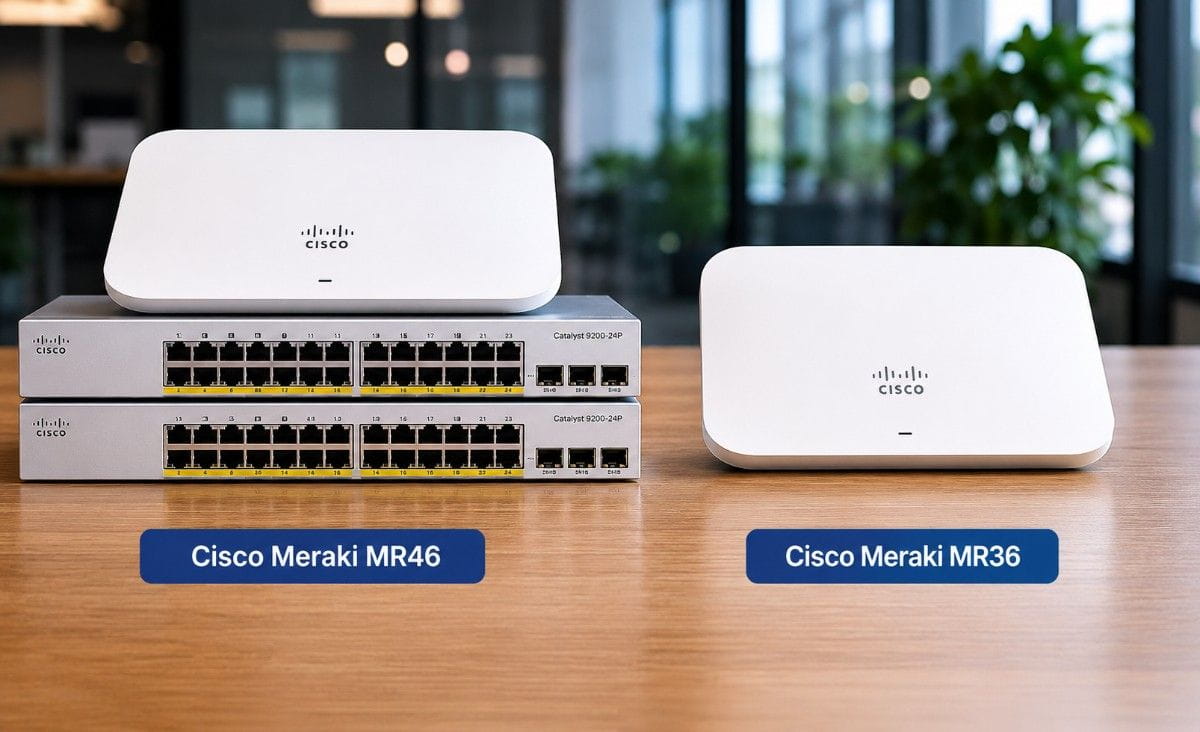
Cisco Meraki MR46 vs MR36
The quick answer: choose MR36-HW for standard Wi-Fi 6 coverage and choose MR46-HW for denser areas with more active users and devices.
Both models support Wi-Fi 6 and Meraki cloud management. Both fit modern offices, schools, healthcare sites, hospitality spaces, and distributed business networks. The main difference is wireless capacity.
MR36-HW works well for smaller offices, branch sites, classrooms, retail back offices, and normal business areas. MR46-HW makes more sense in dense offices, shared workspaces, hotels, healthcare areas, schools, and warehouses where more devices connect at the same time.
Cisco Meraki lists MR46 as a 4×4:4 Wi-Fi 6 access point with up to 2.98 Gbps aggregate frame rate, while MR36 uses a 2×2:2 radio design with up to 1.5 Gbps aggregate frame rate. MR46 also supports a 100/1000/2.5G Ethernet interface, while MR36 uses a 1G Ethernet interface.
| Comparison Point | MR36-HW | MR46-HW | Buyer Takeaway |
| Best fit | Small offices, branches, standard rooms | Dense offices, schools, healthcare, hospitality | Match AP choice to user density |
| Wi-Fi standard | Wi-Fi 6 | Wi-Fi 6 | Both support modern wireless refresh projects |
| Radio design | 2×2:2 | 4×4:4 | MR46 supports more demanding areas |
| Aggregate frame rate | Up to 1.5 Gbps | Up to 2.98 Gbps | MR46 gives more wireless capacity |
| Ethernet interface | 1G | 100/1000/2.5G | MR46 needs stronger uplink planning |
| Power planning | Lower PoE demand | Higher PoE demand | Switch choice matters more with MR46 |
This comparison helps buyers avoid a common mistake: choosing the access point first and checking the switch later. The better path is to plan AP count, PoE power, uplink speed, and budget together.
A small site may not need the extra capacity of MR46. A dense site may regret choosing MR36 only to save on the access point price.
How Should Buyers Think About Wi-Fi 6 Use Cases?
Wi-Fi 6 is useful when a business has more wireless devices, more cloud tools, and more real-time traffic than older wireless networks can handle. It helps support laptops, phones, tablets, barcode scanners, guest devices, medical carts, cameras, and IoT endpoints.
For many sites, the pressure comes from normal daily use. Employees join video meetings, upload files, use cloud apps, and move between rooms. Guests may also connect to a separate wireless network.
MR36-HW fits lower-density use cases where users need reliable Wi-Fi 6 but do not place heavy load on each AP. It is a practical option for small offices, branch sites, standard classrooms, and light-use business areas.
MR46-HW fits higher-density use cases where the network must serve more active devices at once. It is better suited for meeting rooms, school learning areas, hotel lobbies, healthcare spaces, and warehouse zones with mobile scanners.
Buyers trying to control refresh budgets should not look at access point cost alone. They should compare the full wireless bill of materials, including switches, PoE budget, uplinks, licenses, spares, and lead time. A wider view of network cost control can help teams reduce waste without weakening the design.
What PoE Switching Requirements Matter for MR46 and MR36?
Meraki access points need dependable power. In most business networks, that power comes from a PoE switch in the wiring closet. This keeps the design cleaner than using local power adapters or injectors at each AP location.
MR36-HW has a lower power requirement than MR46-HW. MR46-HW needs stronger PoE planning because it supports higher wireless capacity and has higher listed power demand. Cisco Meraki lists MR46 maximum power consumption at 30W and MR36 maximum power consumption at 15W.
For buyers, three checks matter most:
- PoE budget: Can the switch power every AP and other PoE devices?
- Port count: Does the switch support current and future AP counts?
- Uplink speed: Can uplinks carry traffic from many wireless users?
Cisco Catalyst 9200 Series switches support IEEE 802.3at PoE+ up to 30W per port, which fits many wireless access deployments. Cisco also positions Catalyst 9200 switches for cost-effective branch-office access, with full PoE+ capability, stacking options, and uplink choices.
The switch should not be sized only for access points. Many closets also power IP phones, cameras, badge readers, and other devices. Buyers should calculate total PoE load before ordering.
Which Catalyst PoE Switch Pairs Best With Each Meraki AP?
The best Catalyst switch pairing depends on site size, AP count, user density, and uplink needs. A small office may not need the same switch as a dense school or healthcare network.
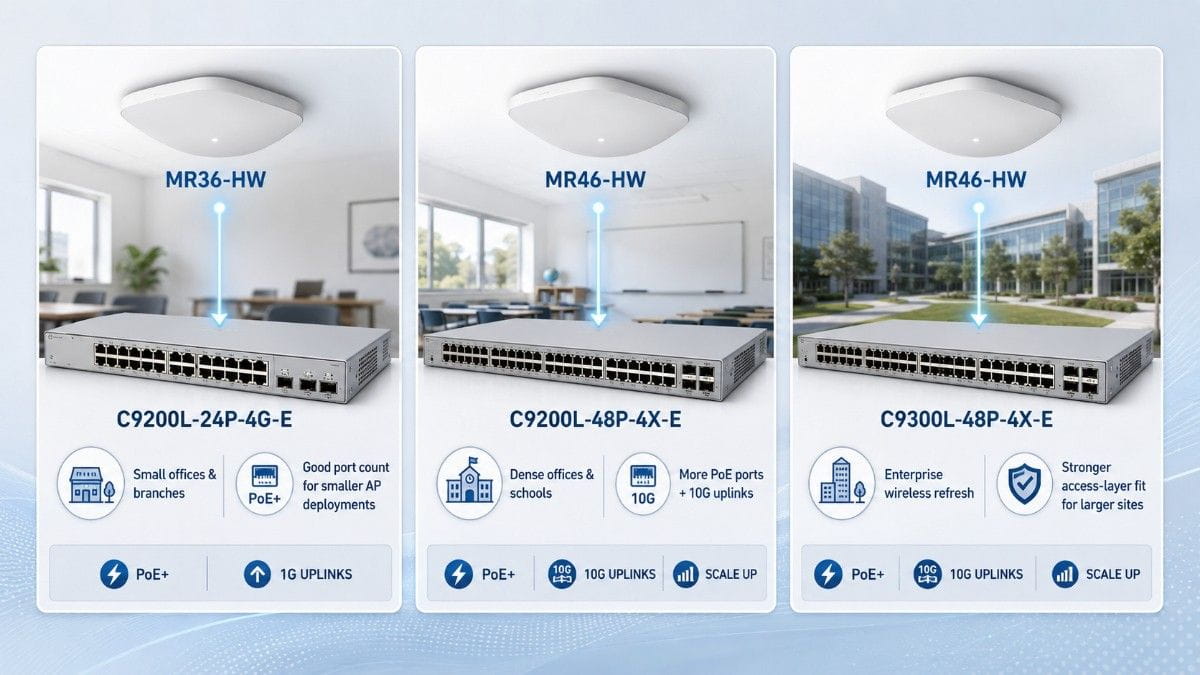
For MR36-HW, a compact Catalyst PoE switch often makes sense. A small office can pair MR36-HW with 24-port PoE access when the site needs Wi-Fi 6, basic wired access, and clean cost control.
For MR46-HW, buyers should consider a larger switch with more ports and stronger uplink options. Many dense office and school projects fit well with 48-port PoE access because it gives more room for APs, phones, cameras, and other access devices.
For larger enterprise refresh projects, enterprise PoE access can make more sense. Cisco describes the Catalyst 9300 Series as its lead stackable enterprise access switching platform, and the series supports management choices across on-premises, virtual, and cloud options.
| Catalyst Switch | Best Meraki Pairing | Best Fit | Why Buyers Choose It |
| C9200L-24P-4G-E | MR36-HW | Small offices and branches | Good port count for smaller AP deployments |
| C9200L-48P-4X-E | MR46-HW or mixed MR46/MR36 | Dense offices and schools | More PoE ports and 10G uplink options |
| C9300L-48P-4X-E | MR46-HW | Enterprise wireless refresh | Stronger access-layer fit for larger sites |
A mixed deployment can also work well. Some buyers use MR46-HW in dense areas and MR36-HW in smaller rooms or lower-use zones. This keeps cost under control while giving more capacity where users need it most.
Where Do MR46 and MR36 Fit by Industry?
Different sites create different wireless needs. The best AP choice depends on how people use the space, how many devices connect, and how important roaming is during the day.
In an office, users may carry laptops and phones while also joining video meetings. MR36-HW can fit smaller offices, while MR46-HW works better for conference rooms and busy floors.
In schools, the right model may change by room. A standard staff area may use MR36-HW. A classroom with many students on tablets or laptops may need MR46-HW.
In healthcare, device movement matters. Staff may move with tablets, carts, phones, and clinical devices. MR46-HW often fits better in busy care areas because the network must support more active clients.
In hospitality, demand can shift quickly. A lobby, meeting space, or guest area may have many users at once. MR46-HW gives the design more headroom for these shared spaces.
In warehouses, wireless design must handle scanners, mobile carts, high ceilings, aisles, and roaming paths. MR46-HW may fit stronger operational zones, but placement and cabling still need careful review.
| Environment | Better AP Fit | Suggested Catalyst Pairing | Practical Reason |
| Small office | MR36-HW | C9200L-24P-4G-E | Good fit for normal device counts |
| Dense office | MR46-HW | C9200L-48P-4X-E | Supports more users and stronger uplinks |
| School | MR36-HW or MR46-HW | C9200L-48P-4X-E | Match AP model to room density |
| Healthcare | MR46-HW | C9300L-48P-4X-E | Better for busy and mobile areas |
| Hospitality | MR46-HW | C9200L-48P-4X-E | Better for guest-heavy shared spaces |
| Warehouse | MR46-HW | C9300L-48P-4X-E | Better for mobile workflows and scale |
Wireless refresh work should also align with the broader access network. Teams that review campus access planning can make better decisions about switching, uplinks, wireless density, and future growth.
What Are the Best Meraki + Catalyst Wi-Fi 6 Bundles?
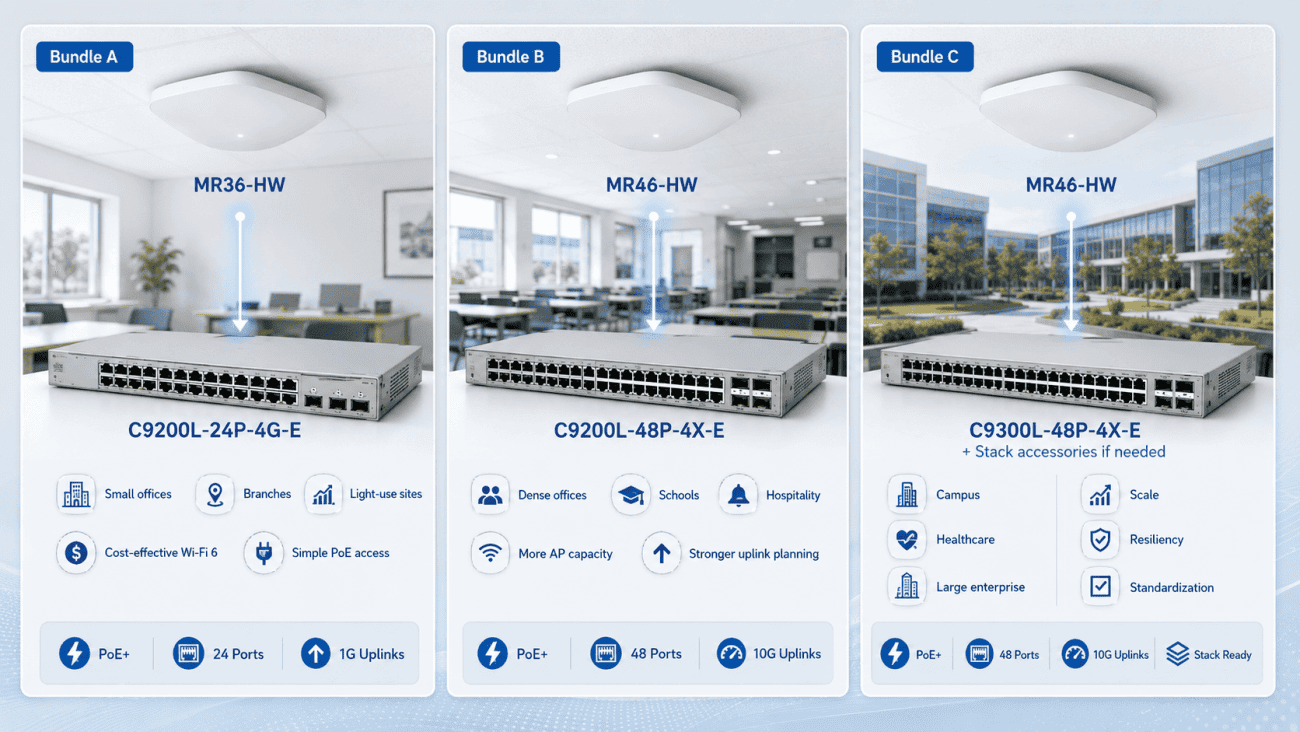
The best bundle should include more than the access point and switch. Buyers should also confirm licenses, uplinks, mounting needs, optics, stack accessories, spare units, and any site-specific power requirements.
A strong bundle reduces delays. It also helps procurement teams avoid partial shipments, missing accessories, or hardware that does not match the final design.
| Bundle | Products Included | Best For | Buyer Notes |
| Bundle A: Small Office Wi-Fi Bundle | MR36-HW + C9200L-24P-4G-E | Small offices, branches, light-use sites | Cost-effective Wi-Fi 6 with simple PoE access |
| Bundle B: Dense Office Wi-Fi Bundle | MR46-HW + C9200L-48P-4X-E | Dense offices, schools, hospitality | More AP capacity with stronger uplink planning |
| Bundle C: Enterprise Wireless Refresh Bundle | MR46-HW + C9300L-48P-4X-E + stack/accessories if needed | Campus, healthcare, large enterprise sites | Better fit for scale, resiliency, and standardization |
Bundle A: Small Office Wi-Fi Bundle
Bundle A includes MR36-HW and C9200L-24P-4G-E.
This bundle fits small offices, branch sites, and lighter-use business areas. It gives buyers Wi-Fi 6 without overbuilding the access layer.
Choose this bundle when AP count is modest, user density is normal, and 1G uplinks fit the site. It also works when budget control matters and the buyer wants a simple new or refurbished switch option.
Bundle B: Dense Office Wi-Fi Bundle
Bundle B includes MR46-HW and C9200L-48P-4X-E.
This bundle fits larger offices, schools, hotels, and shared spaces with many active users. MR46-HW adds more wireless capacity, while C9200L-48P-4X-E gives more PoE ports and 10G uplink options.
Choose this bundle when users rely on video meetings, cloud apps, guest Wi-Fi, and mobile devices. It gives many buyers the best balance between performance, cost, and availability.
Bundle C: Enterprise Wireless Refresh Bundle
Bundle C includes MR46-HW, C9300L-48P-4X-E, and stack accessories if needed.
This bundle fits larger refresh projects where the access layer needs more consistency and growth room. It works well for campus networks, healthcare sites, multi-floor offices, and enterprise wireless upgrades.
Choose this bundle when the buyer needs stacking, stronger access standards, larger AP counts, and better long-term planning. It also supports mixed access environments where wireless, phones, cameras, and other devices share the same closet.
Should You Buy New or Refurbished Switches for a Meraki Wi-Fi 6 Refresh?
New hardware makes sense when the buyer needs the latest lifecycle, standard warranty path, and clean project standardization. Refurbished hardware makes sense when cost, availability, or urgent replacement matters more.
Many buyers choose new Meraki access points and pair them with refurbished Catalyst switches. This can work well when the switch model supports the required PoE, uplinks, software needs, and accessories.
A practical new/refurbished plan may include:
- New MR46-HW or MR36-HW access points
- Refurbished C9200L or C9300L PoE switches
- Tested uplink optics and cables
- Verified power supplies and fans
- Spare APs or switches for faster replacement
This approach can lower project cost and reduce lead-time pressure. It can also support sustainability goals by extending the life of enterprise hardware.
Buyers should still inspect the full sourcing path. Refurbished does not mean “buy whatever is available.” It means checking condition, compatibility, serial status, accessory needs, return terms, and delivery timing.
For teams under budget pressure, broader IT optimization strategies can help compare new, refurbished, and hybrid sourcing across the whole network refresh.
What Compatibility Checks Should Buyers Make Before Ordering?
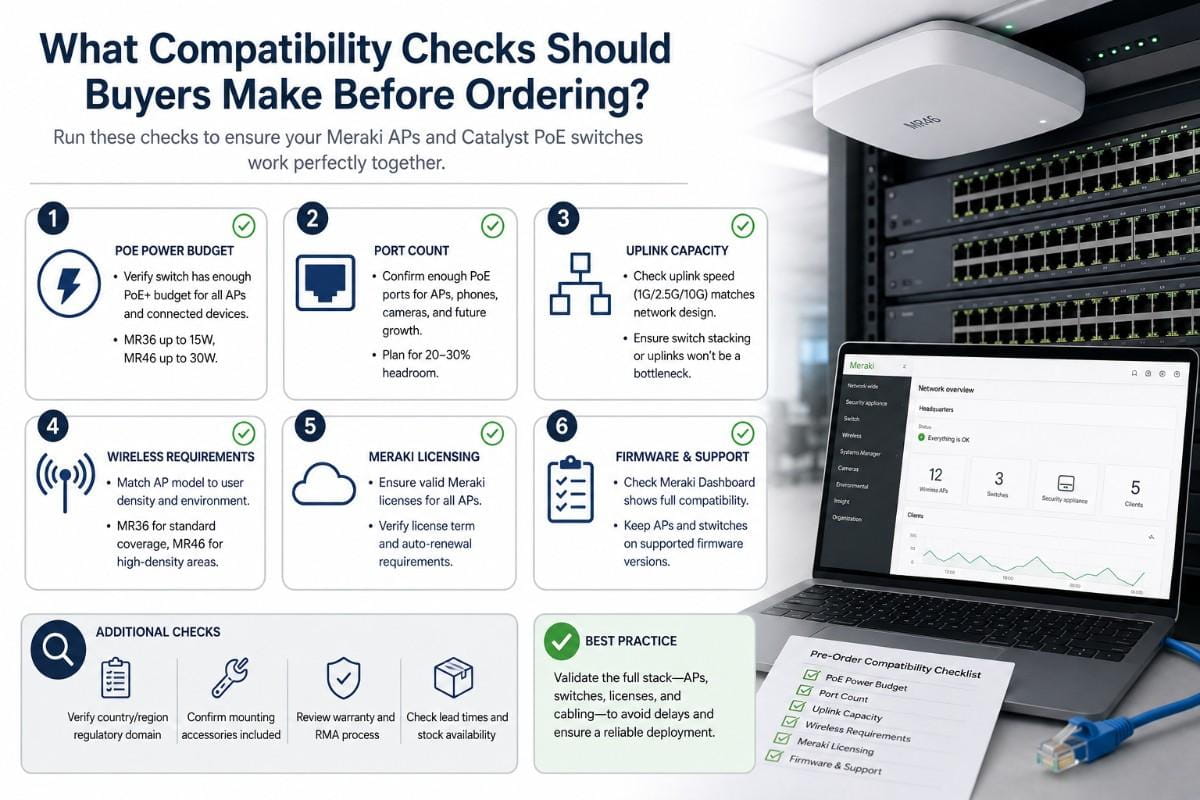
A clean Wi-Fi 6 rollout starts with a complete bill of materials. The access point and switch must match the real site design.
Before ordering MR46-HW, MR36-HW, C9200L-48P-4X-E, C9200L-24P-4G-E, or C9300L-48P-4X-E, buyers should check:
- Total AP count by closet
- PoE wattage per AP
- Total PoE draw across APs, phones, cameras, and other devices
- Uplink speed needs
- Switch port count
- Stack kit and stack cable needs
- Optics and fiber compatibility
- Mounting hardware
- Spare units
- Licensing and support needs
Security planning also belongs in this step. Wireless refresh projects often connect to guest access, user policy, device control, and network segmentation. A practical zero trust rollout should include both wired and wireless access planning.
This check helps prevent last-minute problems. It also gives procurement teams a clearer quote request and helps avoid missing parts after hardware arrives.
Need Help Building the Right Meraki + Catalyst Bundle?
Catalyst Data Solutions helps buyers compare Cisco Meraki MR46 vs MR36, match each AP to the right Catalyst PoE switch, and source the full bundle across new, refurbished, and hard-to-find hardware.
That support matters when the project includes more than one SKU. A real wireless refresh may include access points, PoE switches, optics, stack accessories, licenses, mounting parts, power checks, and spare units.
Request a Meraki + Catalyst bundle quote based on AP count, PoE needs, uplink requirements, and new or refurbished availability.
Cisco Meraki MR46 vs MR36 FAQs
1. Which is better for my budget: Cisco Meraki MR46 or MR36?
MR36-HW is usually the better budget choice for small offices, branches, and lower-density areas. MR46-HW costs more, but it may reduce performance issues in busy spaces where many users connect at the same time.
2. How do I know if my PoE switch can power MR46 or MR36 access points?
Check the switch’s total PoE budget, the number of APs, and any other powered devices like phones, cameras, or badge readers. MR46-HW needs more power than MR36-HW, so dense MR46 deployments need closer PoE planning.
3. Can I mix MR46 and MR36 in the same network?
Yes. Many businesses use MR46-HW in high-traffic areas and MR36-HW in smaller rooms or lower-use spaces. This helps control cost while still giving stronger wireless capacity where users need it most.
4. What happens if I choose the wrong Catalyst switch for my Meraki APs?
The network may run out of PoE power, switch ports, or uplink capacity. This can cause delays, extra purchases, or performance issues after deployment. It is better to check AP count, PoE load, and uplink needs before ordering.
5. Should I buy new or refurbished Catalyst switches for a Meraki Wi-Fi 6 upgrade?
New switches are best when lifecycle and standard warranty coverage matter most. Refurbished Catalyst switches can make sense when budget, availability, or urgent replacement is the main concern, as long as compatibility and condition are verified before purchase.