
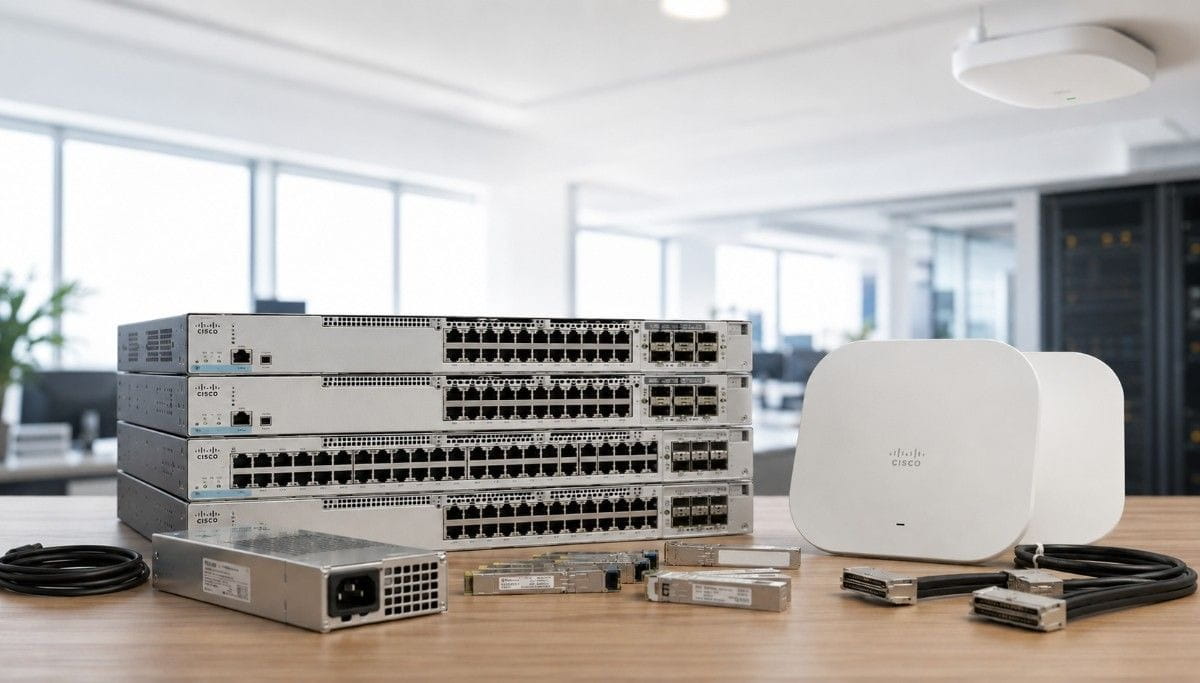
Network refresh projects often become harder than expected. A team may order switches first, then realize later that it also needs stack kits, power supplies, uplinks, optics, cables, or wireless access points.
That kind of piecemeal buying can delay installs, raise costs, and create avoidable compatibility problems. A better plan starts with the full access layer, not only the switch model.
A Complete Enterprise Access Network Bundle helps IT teams match switches, Wi-Fi, power, stacking, and uplinks before the order is placed. The result is a cleaner refresh plan, fewer missing parts, and better control over budget and lead time.
What Is a Complete Enterprise Access Network Bundle?
A Complete Enterprise Access Network Bundle is a planned set of hardware used to connect users, devices, and wireless access points at the network edge.
It usually includes:
- Access switches
- Wireless access points
- Stack kits or stack cables
- Power supplies
- StackPower cables
- Uplink modules
- Optics and cabling
- Spare or replacement hardware
The access network is the part of the network closest to people and devices. It connects laptops, phones, printers, cameras, badge readers, sensors, and Wi-Fi access points.
A complete bundle helps buyers avoid one of the most common network refresh problems: ordering the main switch but missing the parts needed to deploy it.
For example, a switch may arrive without the right stack kit. A PoE switch may not have the right power plan for access points and cameras. A branch refresh may need 10G uplinks, but the ordered model may only support 1G uplinks.
A well-built bundle reduces those risks before the project reaches the installation stage.
What Products Are Included in an Enterprise Access Bundle?
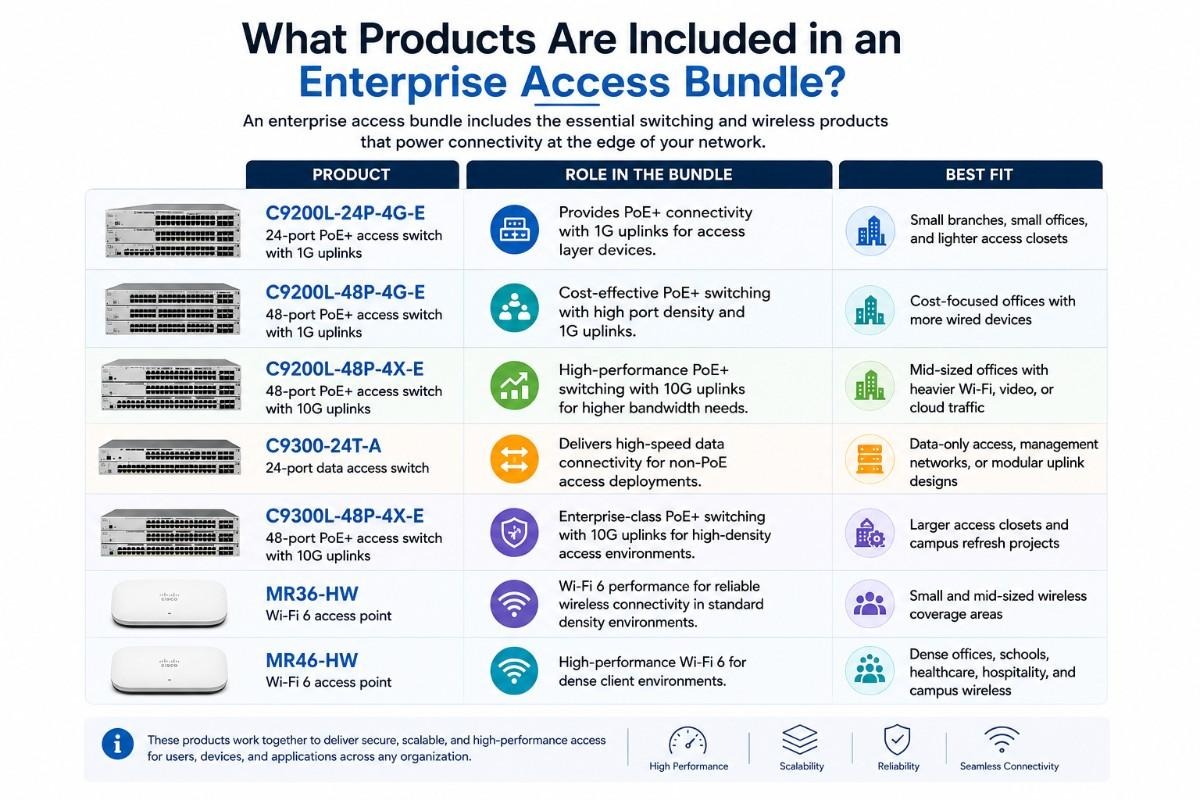
The right bundle depends on site size, port count, PoE demand, wireless density, and uplink needs. A small branch may need one 24-port PoE switch and one or two APs. A campus closet may need 48-port PoE switching, stacking, spare power, and 10G uplinks.
The products below cover the core access switching and wireless layer for this bundle.
| Product | Role in the Bundle | Best Fit |
| C9200L-24P-4G-E | 24-port PoE+ access switch with 1G uplinks | Small branches, small offices, and lighter access closets |
| C9200L-48P-4G-E | 48-port PoE+ access switch with 1G uplinks | Cost-focused offices with more wired devices |
| C9200L-48P-4X-E | 48-port PoE+ access switch with 10G uplinks | Mid-sized offices with heavier Wi-Fi, video, or cloud traffic |
| C9300-24T-A | 24-port data access switch | Data-only access, management networks, or modular uplink designs |
| C9300L-48P-4X-E | 48-port PoE+ access switch with 10G uplinks | Larger access closets and campus refresh projects |
| MR36-HW | Wi-Fi 6 access point | Small and mid-sized wireless coverage areas |
| MR46-HW | Wi-Fi 6 access point | Dense offices, schools, healthcare, hospitality, and campus wireless |
Cisco identifies the C9200L-24P-4G-E, C9200L-48P-4G-E, and C9200L-48P-4X-E as Catalyst 9200L PoE+ models with 24-port or 48-port options and either 1G or 10G uplinks.
A buyer planning a wider access refresh should also check whether the project connects to network modernization, wireless upgrades, or core switch changes. Access hardware rarely works alone.
Which Bundle Fits a Small Branch, Mid-Sized Office, or Enterprise Campus?
The bundle decision should come early in the planning process. This helps the buyer compare site types before choosing exact quantities.
A small site usually needs simple PoE and basic Wi-Fi coverage. A mid-sized office may need more PoE ports, stacking, and 10G uplinks. A campus closet often needs stronger resiliency, cleaner uplink planning, and more spare hardware.
| Bundle | Included Products | Best For | Buyer Notes |
| Bundle A: Small Branch Bundle | C9200L-24P-4G-E, MR36-HW, optional C9200L-STACK-KIT | Small branches, small offices, retail sites, small clinics | Good when the site needs PoE, Wi-Fi 6, and simple 1G uplinks |
| Bundle B: Mid-Sized Office Bundle | C9200L-48P-4X-E, MR36-HW or MR46-HW, C9200L-STACK-KIT | Offices with more users, APs, phones, and cameras | Good when the site needs 48 PoE+ ports and 10G uplinks |
| Bundle C: Enterprise Campus Access Bundle | C9300L-48P-4X-E, C9300-NM-8X, PWR-C1-715WAC-P, STACK-T1-1M, CAB-SPWR-30CM, MR46-HW | Campus access closets and dense wireless projects | Use C9300-NM-8X with compatible modular C9300 models; fixed-uplink C9300L models do not use this module |
Bundle A keeps the design simple. The 24-port PoE switch can support phones, cameras, and a small number of APs. MR36-HW fits branch wireless coverage where density is moderate.
Bundle B gives the site more room to grow. The 48-port 10G uplink switch fits offices that use more cloud apps, video calls, wireless devices, and security cameras.
Bundle C fits larger access closets. The Catalyst 9300L PoE switch supports dense access needs, while MR46-HW fits higher wireless demand.
One important note: the C9300-NM-8X module is for compatible modular Catalyst 9300 models. It should not be treated as a plug-in module for every C9300L fixed-uplink switch. Cisco lists C9300-NM-8X as a Catalyst 9300 Series 8x 10G/1G network module and notes support rules for Catalyst 9300 and 9300X network modules.
How Should Buyers Choose Cisco Catalyst Access Switches?
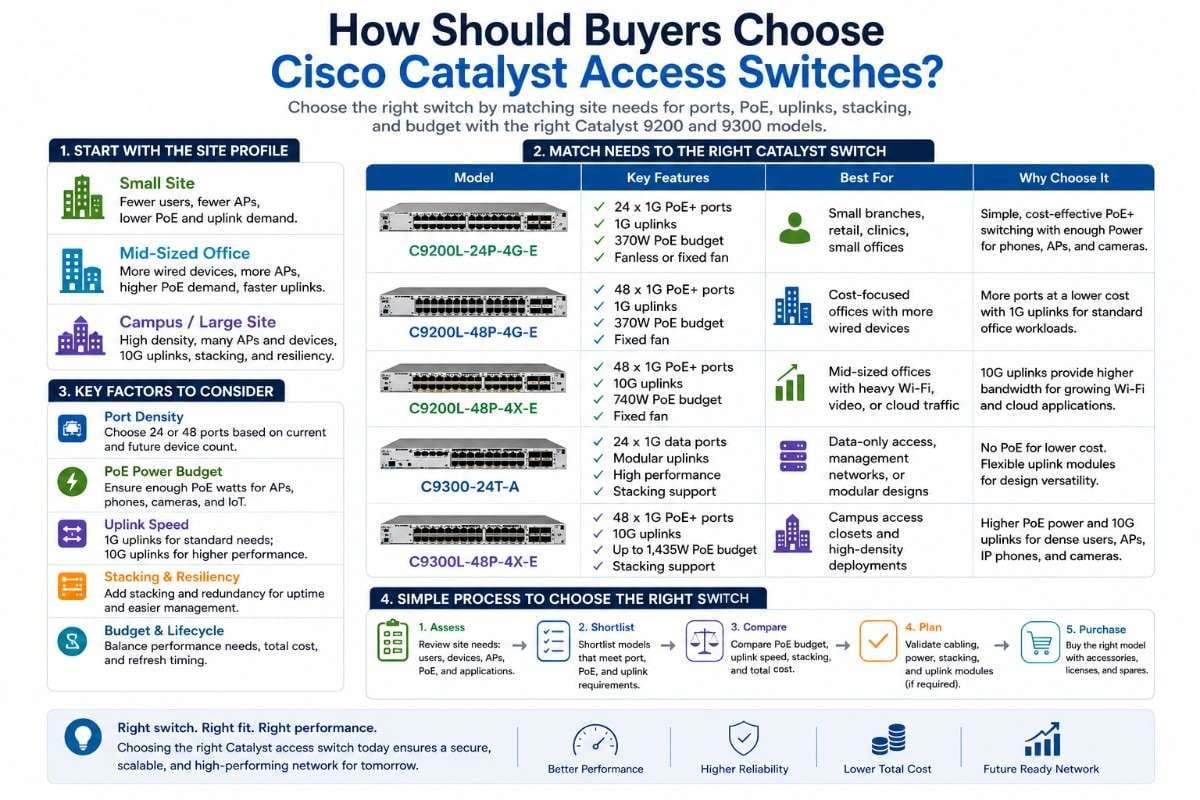
Access switches should match the job of the site. The right model depends on ports, PoE, uplinks, stacking, and refresh timing.
A simple way to choose is to start with the site profile:
- Small site: fewer users, fewer APs, lower uplink demand
- Mid-sized office: more wired devices, more APs, more PoE demand
- Campus access closet: higher density, stronger resiliency, more uplink planning
- Data-only area: wired access without heavy PoE needs
Access switch selection
The C9200L-24P-4G-E is a practical choice for small branches. It fits sites that need PoE for phones, cameras, or APs but do not need 48 ports.
The C9200L-48P-4G-E works for buyers who need more ports but can still use 1G uplinks. This can help control cost in offices where traffic levels remain moderate.
The C9200L-48P-4X-E is better when the site needs 48 PoE+ ports and 10G uplinks. It fits mid-sized offices with more APs, more video use, and more cloud traffic.
The C9300-24T-A fits data access roles where PoE is not the main need. It may support management networks, data-only access, or modular uplink designs.
The C9300L-48P-4X-E suits larger access closets that need 48 PoE+ ports and fixed 10G uplinks. It is a strong fit for campus refresh projects where the access layer needs a longer runway.
Before approving the quote, buyers should ask:
- How many ports do we need now?
- How many ports will we need in two or three years?
- How many devices need PoE?
- Are 1G uplinks enough?
- Does the closet need 10G uplinks?
- Do we need stacking for easier management?
- Do we need spare switches for replacement planning?
Cisco describes the Catalyst 9300 Series as a stackable enterprise access switching platform, with StackWise options, modular uplink choices on supported models, and dual redundant power supply support.
How Do Meraki APs Fit into a Catalyst Access Bundle?
Wireless access points depend on the wired access layer. The AP may provide the user connection, but the switch provides power and backhaul.MR36-HW and MR46-HW both fit Wi-Fi 6 access plans, but they fit different levels of demand.
MR36-HW is a good fit for small offices, branch sites, and standard wireless coverage areas. Cisco lists MR36 with Wi-Fi 6, 2×2:2 MU-MIMO, up to 1.7 Gbps aggregate frame rate, one 1G Ethernet port, and 802.3af PoE.
MR46-HW is better for dense locations. Cisco lists MR46 with Wi-Fi 6, 4-stream UL/DL MU-MIMO 802.11ax, one 2.5 Gbps multigigabit Ethernet port, and 802.3at PoE.
Wireless AP pairing
Pair MR36-HW with C9200L-24P-4G-E when the site is small and the wireless load is moderate. This works for branch offices, small retail sites, and lower-density areas.
Pair MR36-HW or MR46-HW with C9200L-48P-4X-E when the site needs more PoE ports and 10G uplinks. This is often a better fit for mid-sized offices.
Pair MR46-HW with C9300L-48P-4X-E for dense access closets and campus areas. This gives the site stronger PoE access switching and better uplink planning.
Wireless planning should not stop at AP count. The buyer should also check:
- PoE standard
- Total PoE budget
- Uplink speed
- User density
- Mounting needs
- Licensing needs
- Spare AP requirements
- Coverage gaps
- RF design
For broader wireless planning, Catalyst can align the access switch order with the wider wireless network design. This reduces the chance of ordering APs without the right switching, power, or uplink plan.
How Should You Plan Stacking, Power, and Uplinks?
Stacking, power, and uplinks often decide whether an access refresh installs smoothly. These parts may look small compared with switches and APs, but they can delay a project if they are missing or mismatched.
A switch order should not be treated as complete until these items are checked.
| Access Design Area | Relevant Product | What to Check | Common Issue |
| C9200L stacking | C9200L-STACK-KIT | Switch family, stack size, stack cable needs | Ordering stack parts that do not match the switch family |
| Catalyst 9300 stacking | STACK-T1-1M | Supported Catalyst 9300 stack design | Missing stack cable during installation |
| StackPower | CAB-SPWR-30CM | Supported modular C9300 StackPower design | Treating StackPower as supported on every 9300-family model |
| Power planning | PWR-C1-715WAC-P | PoE load, redundancy, spare supply needs | Underestimating AP, phone, camera, or IoT power demand |
| Uplink planning | C9300-NM-8X or fixed uplinks | 1G vs 10G requirements | Buying enough ports but not enough uplink capacity |
Cisco lists C9200L fixed models with StackWise-80, 80 Gbps stacking bandwidth, C9200L-STACK-KIT support, and up to eight stack members. Cisco also notes that mixed stacking between C9200L fixed models and modular C9200 models is not supported.
Stacking, power, and uplink checks
Use stacking when the site needs simpler management and better access closet organization. A stack can help the network team manage several switches as one logical unit.
Use spare or redundant power planning when the site runs many PoE devices. APs, phones, cameras, and IoT devices can create a high power load.
Use 10G uplinks when the site has many users, heavy wireless use, or high cloud traffic. A 48-port switch with several APs can outgrow 1G uplinks quickly.
Use C9300-NM-8X when the design uses compatible modular Catalyst 9300 switches. For fixed-uplink C9300L models, plan around the built-in uplinks instead.
For buyers comparing access hardware across brands or refresh paths, campus switching options can also help frame the decision. The main goal is not brand preference. The goal is a stable access design that fits the site.
Should You Buy New or Refurbished Access Network Hardware?
New hardware often makes sense for major standardization projects, new buildings, and designs with strict lifecycle or OEM support needs.
Refurbished hardware can make sense when the buyer needs faster availability, cost control, spares, or a match for an existing installed base. It can also help teams finish phased refreshes without changing the whole design.
This decision has become more important because IT teams face both cost pressure and sustainability pressure. In 2022, the world generated a record 62 billion kg of e-waste, and only 22.3% was formally collected and recycled. The same report projects e-waste to reach 82 billion kg by 2030.
A practical sourcing plan may include:
- New hardware for long-term standards
- Refurbished switches for branch refreshes
- Refurbished spares for faster replacement
- Trade-in or resale of decommissioned hardware
- Mixed sourcing for budget and lead-time control
Refurbished should not mean uncertain. Buyers should ask for testing, serial checks, condition notes, correct accessories, and configuration review.
Catalyst supports buyers that need hardware procurement across OEM, channel, distribution, and secondary-market routes. This gives IT teams more room to compare cost, timing, and availability before they commit.
For buyers under budget pressure, a blended sourcing plan can also support broader network cost reduction without weakening the access layer.
How Does the Access Bundle Connect to Core and Security?
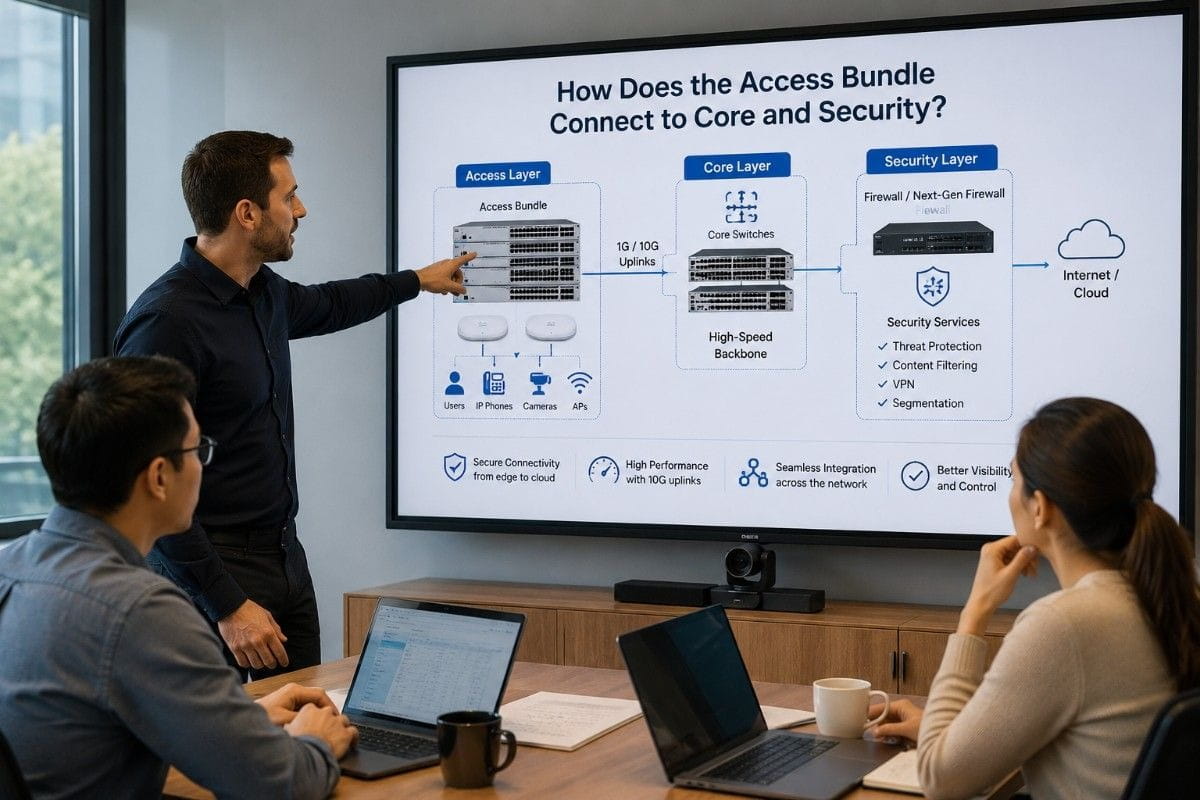
The access network connects users to the rest of the environment. It should align with the core, wireless, WAN, and security design.
For campus networks, access switches often connect upstream to aggregation or core switches. If the buyer is refreshing access closets, it may also need to review core switch planning to make sure uplinks, optics, and capacity match.
For security, the access layer matters because users and devices enter the network there. Segmentation, identity, guest access, and device visibility often depend on access switch and wireless design.
This also connects to zero trust planning. A zero trust project needs more than policy. It needs an access layer that can support device control, segmentation, and reliable connectivity.
A complete bundle helps the buyer align those parts earlier. The network team can check switch models, AP needs, PoE load, uplinks, and lifecycle goals before hardware reaches the site.
Need Help Building the Right Access Network Bundle?
A network refresh can lose time when switches, APs, power supplies, stack kits, and cables come from separate sources. Each missing part can create a new delay.
Catalyst Data Solutions helps buyers build a Complete Enterprise Access Network Bundle around real site needs. That may include Cisco Catalyst switches, Meraki Wi-Fi, stack kits, power supplies, uplinks, optics, cabling, and refurbished availability checks.
Request a complete access network bundle quote for switches, APs, power, stacking, uplinks, and refurbished availability.
FAQs About Complete Enterprise Access Network Bundles
What does a Complete Enterprise Access Network Bundle include?
A Complete Enterprise Access Network Bundle includes the main hardware needed to refresh the access layer, such as switches, wireless access points, power supplies, stack kits, stack cables, uplinks, optics, and cabling. It helps teams avoid placing several separate orders and missing important parts.
How do I know which Cisco Catalyst switch is right for my site?
Start with the site size, number of users, PoE needs, and uplink demand. A small branch may only need C9200L-24P-4G-E, while a larger branch may need C9200L-48P-4X-E or C9300L-48P-4X-E for more ports, PoE, and 10G uplinks.
What happens if I order the switch but forget the stack kit, power supply, or uplink parts?
The project can stall during installation. Missing stack kits, power supplies, optics, or cables can delay deployment, create extra shipping costs, and force the IT team to troubleshoot sourcing instead of completing the refresh.
Should I choose MR36-HW or MR46-HW for Wi-Fi?
MR36-HW is better for smaller or moderate-density areas. MR46-HW is a better fit for denser offices, schools, healthcare spaces, and sites where more users depend on wireless throughout the day.
Do I need 1G or 10G uplinks for my access switches?
Use 1G uplinks for smaller sites with lighter traffic. Use 10G uplinks when the site has many users, several Wi-Fi 6 APs, heavy video calls, cloud applications, or higher traffic between the access closet and core network.
Is refurbished Cisco access hardware worth buying?
Refurbished Cisco access hardware can be worth buying when buyers need faster availability, lower cost, spares, or installed-base consistency. The key is to verify testing, condition, accessories, compatibility, and support needs.
How can I reduce cost on an access network refresh?
Buyers can reduce cost by matching hardware to actual site needs, using refurbished equipment where appropriate, bundling accessories upfront, and selling or trading in decommissioned hardware to offset upgrade costs.