Buying NVIDIA DGX or HGX hardware is not only about choosing the GPUs. The real decision is whether the full platform can support the workload, server design, GPU density, storage speed, networking, cabling, power, and cooling needs.
This NVIDIA DGX / HGX Systems Guide helps buyers compare DGX A100, DGX-1, DGX-2, HGX A100, HGX H100 / H200 systems, and H100 8x SXM servers. It explains what each platform is best for, what to verify before purchase, and what else should be included in the bundle.
What Is an NVIDIA DGX / HGX System?
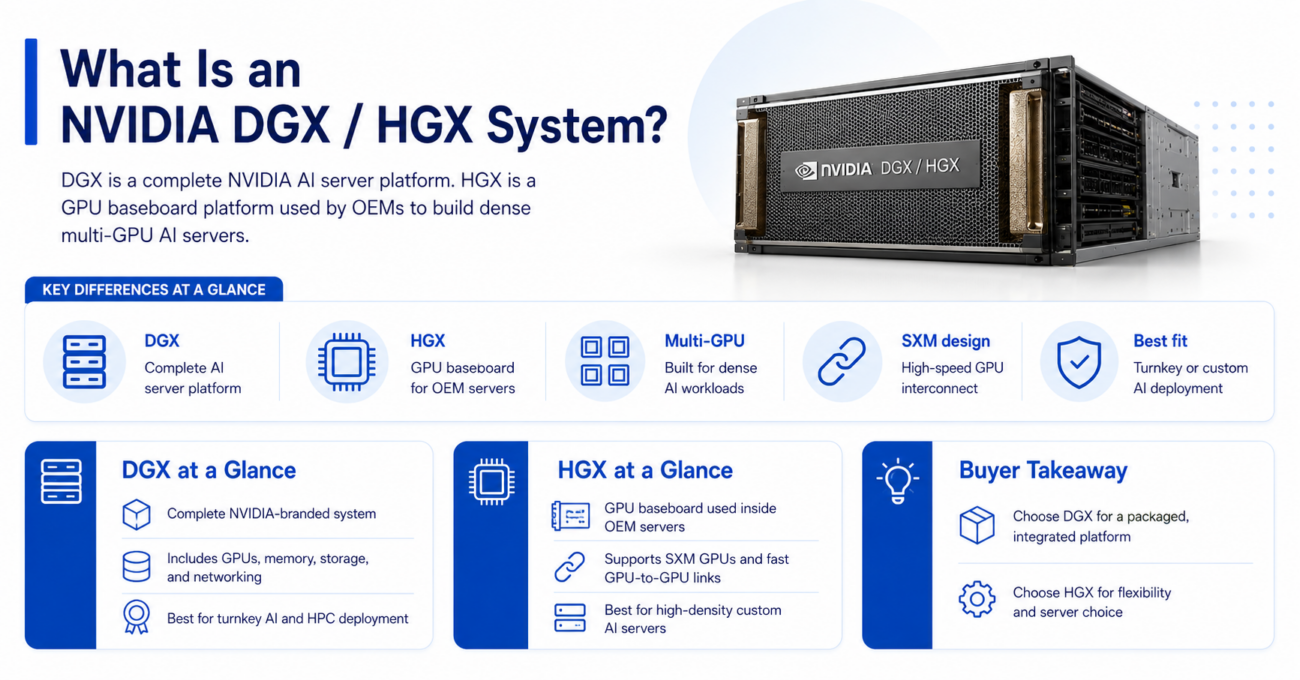
An NVIDIA DGX system is a complete NVIDIA-branded AI server platform. It includes GPUs, server hardware, GPU interconnect, system memory, storage, networking, software support, and platform-level integration. Buyers often choose DGX when they want a more complete AI infrastructure solution instead of building each part separately.
An NVIDIA HGX system is different. HGX is a GPU baseboard platform used by server manufacturers to build high-density AI servers. Buyers may see HGX A100, HGX H100, or HGX H200 systems from OEMs and integrators. These platforms use SXM GPUs and high-speed GPU-to-GPU interconnect for dense AI workloads.
For buyers comparing a complete DGX A100 platform against an HGX server, the main question is control. DGX gives a more packaged NVIDIA system. HGX gives more flexibility through qualified server platforms.
| Platform type | Practical meaning for buyers | Best fit |
| NVIDIA DGX | Complete NVIDIA AI server platform | Turnkey AI and HPC deployments |
| NVIDIA HGX | GPU baseboard platform used inside OEM servers | Custom high-density AI servers |
| H100 8x SXM server | Complete 8-GPU SXM server based on HGX-style design | Dense training and inference |
| Individual GPUs | Separate PCIe or SXM accelerators | Flexible builds and upgrades |
DGX and HGX both solve the same core problem: they help teams run multiple high-end NVIDIA GPUs together. The difference is how much of the system comes pre-integrated and how much the buyer wants to configure.
DGX vs HGX: Which Platform Should Buyers Choose?
DGX is usually better when the buyer wants a complete system with a clear platform identity. It is useful for enterprise AI teams, research labs, HPC groups, and data centers that want a proven system for training, tuning, and shared GPU workloads.
HGX is usually better when the buyer wants a high-density GPU platform inside a server from a specific OEM or integrator. HGX systems are common in modern AI data centers because they support dense SXM GPU configurations, such as H100 and H200 baseboard systems.
A buyer may choose a DGX-1 AI server for legacy AI, lab expansion, or refurbished infrastructure. A buyer may choose HGX H100 or H200 when the workload needs newer Hopper-generation performance and higher memory capacity.
| Decision point | DGX | HGX |
| System model | Complete NVIDIA system | Baseboard platform inside OEM servers |
| Configuration control | Lower, more packaged | Higher, more flexible |
| GPU design | Multi-GPU NVIDIA platform | SXM baseboard architecture |
| Best use | Turnkey AI and HPC | Dense custom AI servers |
| Buying process | System-level purchase | Server and configuration purchase |
| Refurbished value | Strong for DGX-1, DGX-2, DGX A100 | Strong when validated by system type |
DGX is not always better because it is more complete. HGX is not always better because it is more flexible. The best choice depends on how the buyer plans to deploy, manage, scale, and support the system.
How Do NVIDIA DGX Systems Compare?
NVIDIA DGX systems changed over several generations. DGX-1 and DGX-2 remain useful for older AI, research, HPC, and budget-sensitive teams. DGX A100 gives buyers a stronger platform for modern AI training and enterprise workloads.
A refurbished DGX-2 system can still make sense when the workload benefits from many V100 GPUs and the buyer understands power, cooling, and lifecycle needs. It may not be the right choice for teams that need current Hopper or H200 performance.
| System | GPUs covered | Practical buyer use |
| NVIDIA DGX-1 | 8x Tesla V100 SXM2 in common later configurations | Legacy AI, labs, research, refurbished GPU compute |
| NVIDIA DGX-2 | 16x Tesla V100 SXM3 | Large older AI workloads and dense V100 compute |
| NVIDIA DGX A100 | 8x A100 GPUs | Enterprise AI, HPC, model training, shared GPU environments |
| HGX A100 | A100 SXM baseboard platform | Custom A100 server builds |
| HGX H100 / H200 | H100 or H200 SXM baseboard systems | Modern dense AI training and inference |
| H100 8x SXM server | 8x H100 SXM GPUs | High-end AI and HPC acceleration |
DGX-1 and DGX-2 should be evaluated as refurbished or legacy platforms in most buying situations. DGX A100 can still be a strong option for cost-aware enterprise AI. HGX H100 and H200 systems are better for buyers who need current high-end AI performance.
What Is a GPU Baseboard in an HGX System?
A GPU baseboard is the board that connects multiple SXM GPUs inside a dense AI server. Instead of placing GPUs as separate PCIe cards, HGX platforms use SXM modules mounted into a high-speed baseboard design.
This matters because large AI workloads often need fast GPU-to-GPU communication. A baseboard helps GPUs work as a dense group instead of isolated accelerators. That is why HGX systems are common in 4-GPU and 8-GPU AI server designs.
For example, an HGX H100 system can support high-end AI training, large inference, and HPC workloads that need strong GPU density. An HGX H200 platform may be a better fit when memory capacity and bandwidth matter more.
Baseboards affect more than GPU performance. They also shape the server’s power design, cooling path, chassis layout, service process, and network planning. Buyers should confirm the exact server model, GPU count, thermal design, and fabric requirements before purchase.
How Does an 8-GPU AI Server Architecture Work?
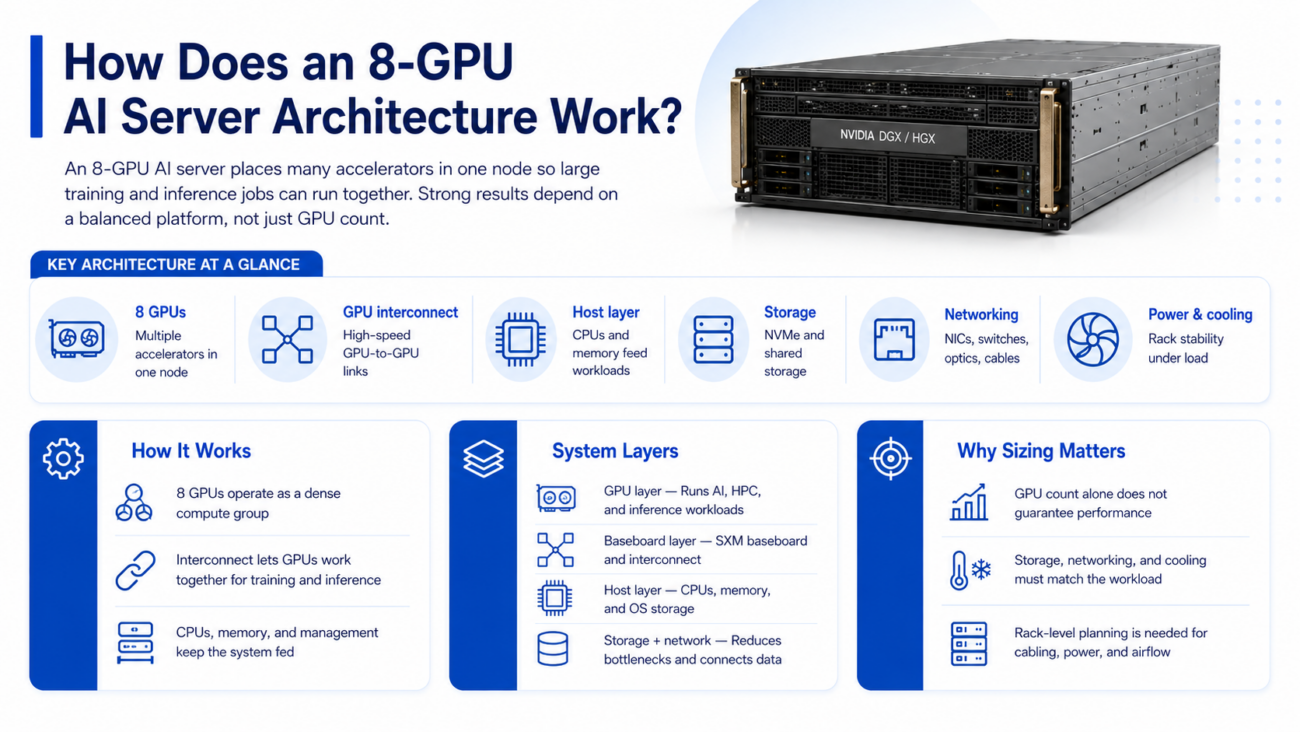
An 8-GPU AI server is built to place many accelerators in one node. In many modern DGX and HGX systems, those GPUs connect through high-speed GPU interconnects so training and inference jobs can use the GPUs together.
The server also needs CPUs, system memory, local storage, NICs, power supplies, fans, and management hardware. If any part of the system is undersized, the GPUs may wait on data instead of running at full value.
A complete H100 8x SXM server usually needs more than the GPU tray. It needs rack-level planning for storage, networking, switch ports, optics, cabling, power draw, and cooling capacity.
| System layer | What it includes | Why it matters |
| GPU layer | A100, H100, H200, or V100 GPUs | Runs AI, HPC, and inference workloads |
| Baseboard layer | SXM GPU baseboard and interconnect | Links GPUs inside the server |
| Host layer | CPUs, memory, OS storage, management | Feeds data and controls workloads |
| Storage layer | NVMe, shared storage, backup storage | Reduces data loading bottlenecks |
| Network layer | NICs, switches, optics, cables | Connects nodes, users, and storage |
| Facility layer | Rack power, cooling, airflow | Keeps the system stable under load |
An 8-GPU server works best when buyers size the full platform. GPU count alone does not guarantee strong performance. Storage, memory, networking, and cooling must match the workload.
When Should You Buy a Complete DGX or HGX Platform?
Buyers should choose a complete DGX or HGX platform when they need a validated multi-GPU system and want to reduce configuration risk. This is common for AI teams that need to deploy quickly, run large training jobs, or support shared GPU users.
A complete platform also makes sense when the team does not want to validate every server part separately. DGX and HGX systems already combine GPU density, interconnect, power design, thermal planning, and system-level architecture.
A complete system is often the better choice when:
- The workload needs 4 or 8 GPUs in one node.
- The team needs strong GPU-to-GPU communication.
- The project has limited time for custom validation.
- The deployment requires predictable server design.
- The buyer needs bundled hardware and support planning.
Buyers building production AI clusters should also think beyond one server. Multi-node DGX or HGX deployments need high-speed network design, storage access, rack layout, and switch capacity. A weak fabric can reduce the value of expensive GPUs.
When Should You Build With Individual NVIDIA GPUs Instead?
Individual NVIDIA GPUs make more sense when the buyer needs flexibility, lower entry cost, or a smaller GPU count. A team may not need a dense SXM system if the workload runs well on one, two, or four PCIe GPUs.
This approach can work for AI development, smaller inference, visualization, rendering, and budget-sensitive lab systems. It also helps buyers reuse compatible servers if those servers support the target GPU, power, airflow, and PCIe layout.
Building with individual GPUs may be better when:
- The workload does not need dense 8-GPU performance.
- The buyer already owns compatible GPU servers.
- PCIe GPUs meet the performance target.
- Budget matters more than peak density.
- The team wants easier part-level upgrades.
However, buyers should not treat individual GPUs as simple drop-in parts. A server must still support card size, power, cooling, firmware, drivers, PCIe lanes, storage, NICs, and rack capacity.
What Should You Buy With NVIDIA DGX or HGX Systems?
A DGX or HGX purchase usually needs more than the system itself. Buyers should plan the full bundle before ordering so the deployment does not stall because of missing network, storage, or cabling parts.
A complete AI server bundle often includes NVIDIA GPUs, DGX or HGX servers, NVMe storage, shared storage, high-speed NICs, switches, QSFP optics, DAC cables, AOC cables, rack PDUs, and cooling support.
The right bundle depends on workload. Training clusters need strong east-west traffic and storage throughput. Inference systems may need stable network access, redundancy, and predictable service performance. HPC systems may need low latency and balanced CPU-to-GPU topology.
| Bundle item | Why it matters | Buying guidance |
| DGX/HGX server | Hosts dense GPUs | Match system to workload and rack limits |
| NVIDIA GPUs | Main accelerator layer | Choose A100, H100, H200, or V100 by use case |
| NVMe storage | Speeds data loading | Size for datasets and checkpoints |
| High-speed NICs | Moves data between nodes | Match 100G, 200G, or faster fabric needs |
| Switches | Connects servers and storage | Plan port count and growth |
| Optics/cabling | Completes physical links | Confirm speed, reach, and connector type |
A useful AI infrastructure plan should also include management access, monitoring, spare parts, firmware policy, and support expectations. These details matter when the platform moves from testing to production.
What Networking, Storage, Switches, and Cabling Do DGX/HGX Systems Need?
DGX and HGX systems can move large datasets between servers, storage, and users. If the network is too slow, GPUs may sit idle. Buyers should size the network around training data, checkpoints, model serving, shared storage, and cluster traffic.
Many AI server environments use high-speed Ethernet or InfiniBand. The exact choice depends on workload, latency needs, storage architecture, existing data center standards, and budget.
For broader planning, Catalyst’s guide to AI networking challenges helps explain why AI clusters place heavy demands on the network. Buyers should also map every switch port, NIC, optic, DAC, and AOC cable before hardware ships.
Storage needs the same attention. Local NVMe can help with fast data staging and checkpoints. Shared storage helps teams manage datasets across nodes. Backup storage protects models, results, and training data.
Cooling and power should not come last. Dense GPU servers can place high thermal and electrical loads on a rack. Catalyst’s guide to data center cooling explains why airflow, heat removal, and rack planning matter for AI systems.
Should Buyers Choose New or Refurbished DGX/HGX Systems?
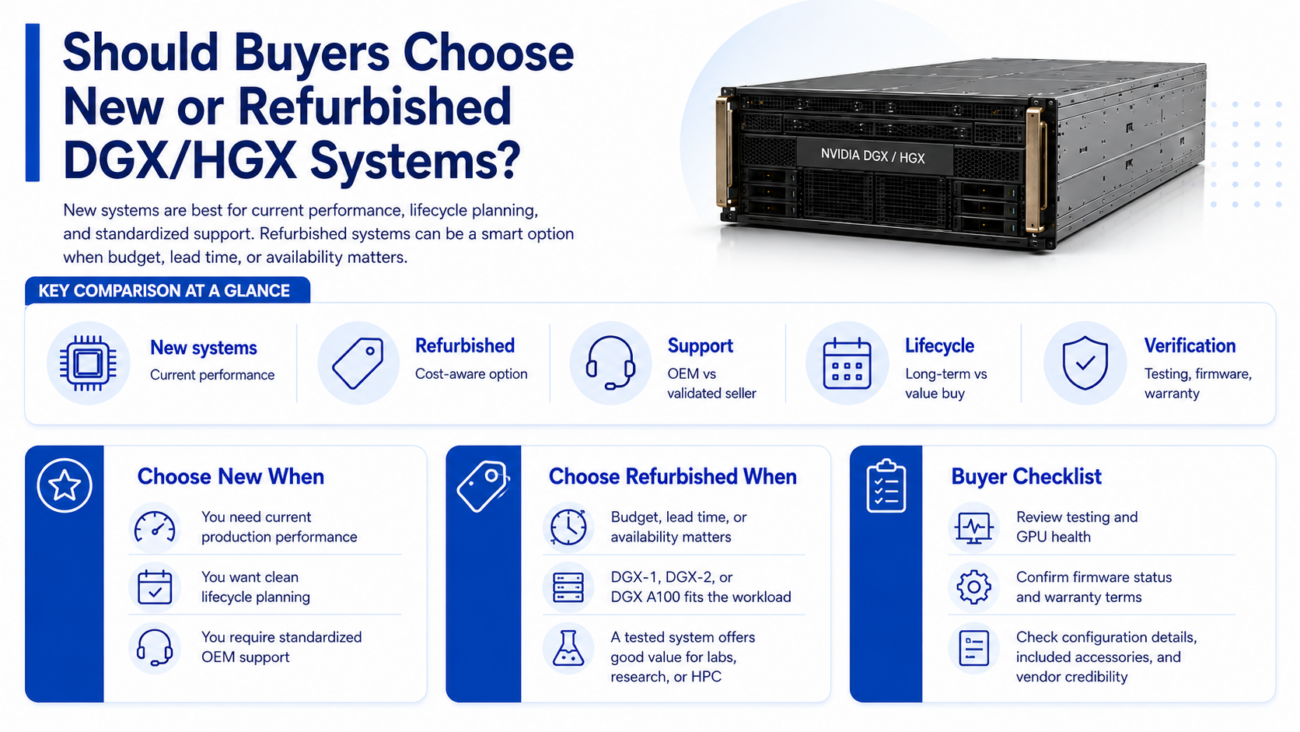
New DGX and HGX systems are best when buyers need current performance, clean lifecycle planning, OEM support paths, and standardized production deployment. New systems may also fit regulated environments or long-term platform roadmaps.
Refurbished DGX and HGX systems can make sense when budget, lead time, or availability matters. Refurbished DGX-1, DGX-2, and DGX A100 platforms may help labs, research teams, HPC groups, and budget-aware AI teams add GPU capacity without buying the newest system.
Buyers should review Catalyst’s refurbished hardware process when evaluating used systems. Testing, condition, firmware status, warranty, support options, and vendor credibility matter more with dense AI hardware than with simple commodity servers.
| Buying path | Best for | What to verify |
| New DGX/HGX | Production AI, long lifecycle, current workloads | Lead time, support, power, cooling, rack fit |
| Refurbished DGX A100 | Cost-aware enterprise AI and HPC | Testing, warranty, firmware, GPU health |
| Refurbished DGX-1/DGX-2 | Labs, legacy workloads, research | Condition, power draw, driver support |
| HGX H100/H200 | Dense modern training and inference | Server model, baseboard, cooling, network |
| Individual GPUs | Flexible builds and upgrades | Server compatibility and workload fit |
Refurbished hardware should not be treated as one category. A tested system from a credible vendor is different from unknown used inventory. Buyers should ask for configuration details, test results, warranty terms, included accessories, and compatibility guidance.
How Do Buyers Build a Quote-Ready DGX/HGX Configuration?
A quote-ready DGX or HGX request should describe the workload, GPU target, system count, storage needs, network speed, rack limits, condition preference, and deployment timeline. Clear details help the sourcing team avoid wrong parts and delayed projects.
Buyers should state whether they want a complete platform, a refurbished DGX system, an HGX server, or individual GPUs for an existing server. They should also include whether new, refurbished, or mixed inventory is acceptable.
A useful quote request includes:
- Target platform: DGX A100, DGX-1, DGX-2, HGX A100, HGX H100, HGX H200, or H100 8x SXM.
- Workload type: training, inference, HPC, simulation, analytics, or shared GPU access.
- Server count, GPU count, memory, storage, and networking needs.
- Switch, optic, DAC, AOC cable, rack power, and cooling requirements.
- Warranty, testing, delivery timeline, and condition preference.
Catalyst Data Solutions can help buyers turn a general GPU need into a complete bill of materials. That may include DGX or HGX servers, NVIDIA GPUs, DDR4 or DDR5 memory, NVMe SSDs, high-speed NICs, Arista or Cisco Nexus switches, optics, DAC cables, AOC cables, and supporting infrastructure.
Need a Complete NVIDIA DGX or HGX Infrastructure Bundle?
Selecting NVIDIA DGX or HGX hardware is only one part of the deployment. Buyers also need to verify workload fit, server architecture, GPU baseboard design, storage performance, network fabric, switch capacity, optics, cabling, power, cooling, and whether new or refurbished hardware fits the project.
Catalyst Data Solutions Inc helps organizations source NVIDIA GPUs, DGX systems, HGX servers, storage, networking, switches, optics, and cabling across new, refurbished, and hard-to-find inventory. Because AI deployments often require more than the accelerator itself, Catalyst can help build complete configurations based on workload, budget, compatibility, and availability.
Request a quote for NVIDIA DGX or HGX availability, ask Catalyst to verify compatibility, or contact Catalyst for a complete AI server bundle.
FAQs
What is the difference between NVIDIA DGX and HGX?
NVIDIA DGX is a complete NVIDIA AI server platform. NVIDIA HGX is a GPU baseboard platform used inside high-density AI servers from OEMs and integrators. DGX is more packaged, while HGX gives buyers more server configuration flexibility.
Is NVIDIA DGX A100 still worth buying?
Yes, NVIDIA DGX A100 can still make sense for enterprise AI, HPC, model training, and shared GPU environments. It is especially useful when buyers want strong A100 performance at a lower cost than newer H100 or H200 systems.
What is an HGX H100 or H200 baseboard system?
An HGX H100 or H200 system uses SXM GPUs mounted on a high-speed GPU baseboard. This design supports dense multi-GPU AI servers where GPU-to-GPU communication, memory capacity, power, and cooling matter.
When should I buy a complete DGX or HGX system?
Buy a complete DGX or HGX system when the workload needs dense multi-GPU performance, strong GPU interconnect, validated server design, and faster deployment. It is often better for AI training, HPC, and large shared GPU environments.
When should I build with individual NVIDIA GPUs?
Build with individual GPUs when the workload does not need dense 8-GPU performance. This can work for smaller AI training, inference, rendering, development, and budget-sensitive systems, as long as the server supports the GPU properly.
What should I buy with DGX or HGX systems?
Most deployments need high-speed storage, NICs, switches, QSFP optics, DAC or AOC cables, rack power planning, and cooling capacity. Multi-node environments may also need shared storage, monitoring, and a carefully planned network fabric.
Should I buy new or refurbished DGX/HGX hardware?
New systems are best for current production deployments, long lifecycle planning, and standardized support. Refurbished systems can make sense for labs, research, HPC, and budget-sensitive AI when testing, condition, firmware, warranty, and seller credibility are verified.