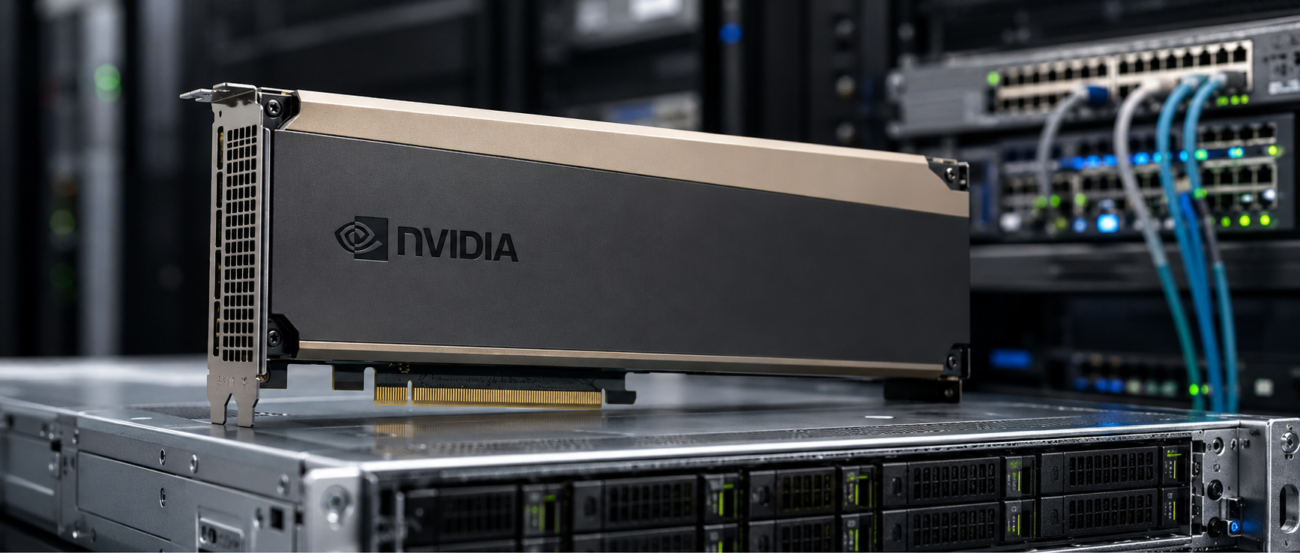
Organizations buying the NVIDIA H100 PCIe should not treat it as a standalone GPU purchase. The H100 PCIe is an accelerator that must fit into a qualified GPU server, connect to the right memory and storage, and communicate through a high-speed network fabric.
This is why an H100 buying decision should include the full system around the GPU. Buyers need to confirm the server platform, PCIe slot layout, CPU lane design, DDR5 memory, NVMe storage, NICs, Arista or Cisco Nexus switches, QSFP optics, DAC or AOC cables, rack power, and cooling capacity.
The NVIDIA H100 PCIe has become a leading option for AI training, inference, HPC, and analytics. Built on NVIDIA Hopper architecture, it gives buyers high-performance acceleration in a PCIe form factor that can fit more qualified server platforms than H100 SXM-based HGX systems.
This NVIDIA H100 PCIe review focuses on how the GPU fits into real infrastructure. We cover workload fit, server compatibility, H100 PCIe vs H100 SXM, related GPU options, and the complete hardware bundle usually needed to make the deployment work.
What Is the NVIDIA H100 PCIe?
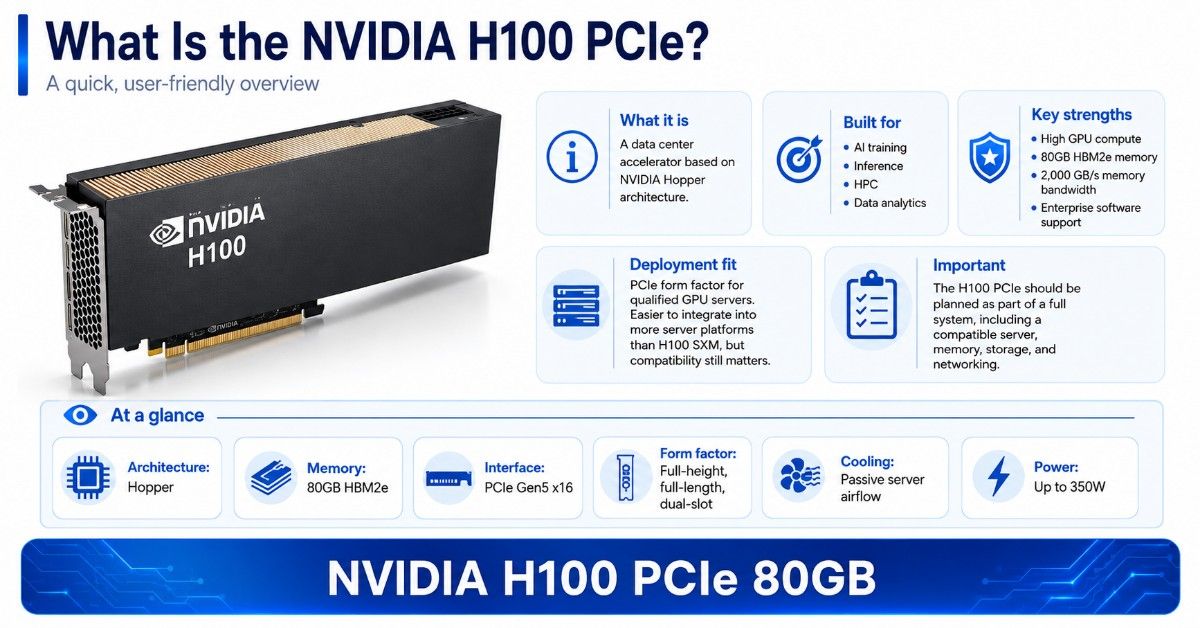
The NVIDIA H100 PCIe is a data center accelerator based on NVIDIA Hopper architecture. It is built for AI, HPC, and data analytics workloads that need high GPU compute, large memory capacity, strong memory bandwidth, and enterprise software support.
This review covers the NVIDIA H100 PCIe 80GB, including the 900-21010 H100 product family. Buyers may also see OEM versions, including the Dell H100 GPU, depending on server brand, inventory, and configuration needs.
The PCIe version gives enterprises a practical path to H100 performance in qualified GPU servers. It is different from H100 SXM, which is used in dense HGX platforms. PCIe is usually easier to integrate into more server models, but server fit still needs careful review.
| H100 PCIe buying point | Practical meaning for buyers |
| Product family | NVIDIA H100 PCIe 80GB data center GPU |
| Common SKU reference | NVIDIA 900-21010-0000-000 H100 PCIe |
| Architecture | NVIDIA Hopper |
| Memory | 80GB HBM2e |
| Memory bandwidth | 2,000 GB/s peak |
| Form factor | Full-height, full-length, dual-slot PCIe |
| Interface | PCIe Gen5 x16 support |
| Cooling | Passive server airflow required |
| Power | Up to 350W board power, depending on power mode |
| Best fit | AI training, inference, HPC, analytics, model tuning |
Is the NVIDIA H100 PCIe Good for AI Training and Inference?
Yes. The NVIDIA H100 PCIe is a strong GPU for AI training and inference when the workload needs Hopper Tensor Cores, large GPU memory, high memory bandwidth, and modern AI software support. It is especially useful for organizations that need high performance but do not require a full HGX system.
The H100 PCIe can support model training, fine-tuning, inference serving, RAG pipelines, computer vision, recommendation systems, simulation, and GPU-accelerated analytics. The best results come when the GPU is paired with the right CPUs, memory, NVMe storage, NICs, and network fabric.
AI Training Workloads
For AI training, H100 PCIe is best when teams need a major step up from A100, V100, or T4 systems. It can help reduce training time for transformer models, vision models, recommendation models, and scientific workloads that use supported NVIDIA software stacks.
Training workloads also depend on the rest of the server. Slow storage, limited system memory, weak PCIe topology, or low network bandwidth can reduce the value of the GPU. Buyers should size the full platform, not only the accelerator.
AI Inference and LLM Workloads
For inference, H100 PCIe can serve high-demand models where latency, throughput, and model size matter. It is useful for generative AI, chatbots, embeddings, speech AI, document intelligence, and vision AI when the workload needs stronger performance than L4, T4, or L40S.
H100 PCIe may also help teams consolidate inference workloads. With Multi-Instance GPU support, one GPU can be partitioned into smaller isolated GPU instances. That can improve utilization for mixed teams, development environments, and production services with different resource needs.
HPC and Shared GPU Use
HPC buyers may use H100 PCIe for simulation, scientific computing, genomics, finance, engineering, and accelerated analytics. The GPU supports a broad range of math formats, which makes it useful across mixed technical workloads.
Shared infrastructure teams should also consider H100 PCIe for multi-user GPU environments. MIG can help divide GPU resources, but server design, job scheduling, storage throughput, and network capacity still determine how well the platform performs under real use.
Who Should Buy the NVIDIA H100 PCIe?
The H100 PCIe is best for buyers who need high-end data center GPU performance but want more server flexibility than SXM platforms provide. It fits enterprise AI teams, HPC groups, cloud service providers, research labs, and data center teams building GPU nodes.
The GPU server should be chosen with the GPU count, airflow path, PCIe layout, power capacity, CPU lanes, and NIC placement in mind. A server that physically accepts the card may still be a poor match for production AI.
| Buyer type | Good H100 PCIe fit? | Why it fits |
| Enterprise AI team | Yes | Strong for training, tuning, inference, and internal AI platforms |
| HPC research group | Yes | Suitable for compute-heavy simulation and scientific workloads |
| Inference-only team | Sometimes | Good for large or demanding inference, but may be more than needed |
| VDI buyer | Usually no | L40S, L4, or T4 may be more cost-effective |
| Budget AI lab | Sometimes | Refurbished A100 or V100 may offer better value |
| HGX cluster buyer | Maybe not | H100 SXM or H200 HGX may be better for dense multi-GPU systems |
How Does the NVIDIA H100 PCIe Fit Into a Complete GPU Server Build?
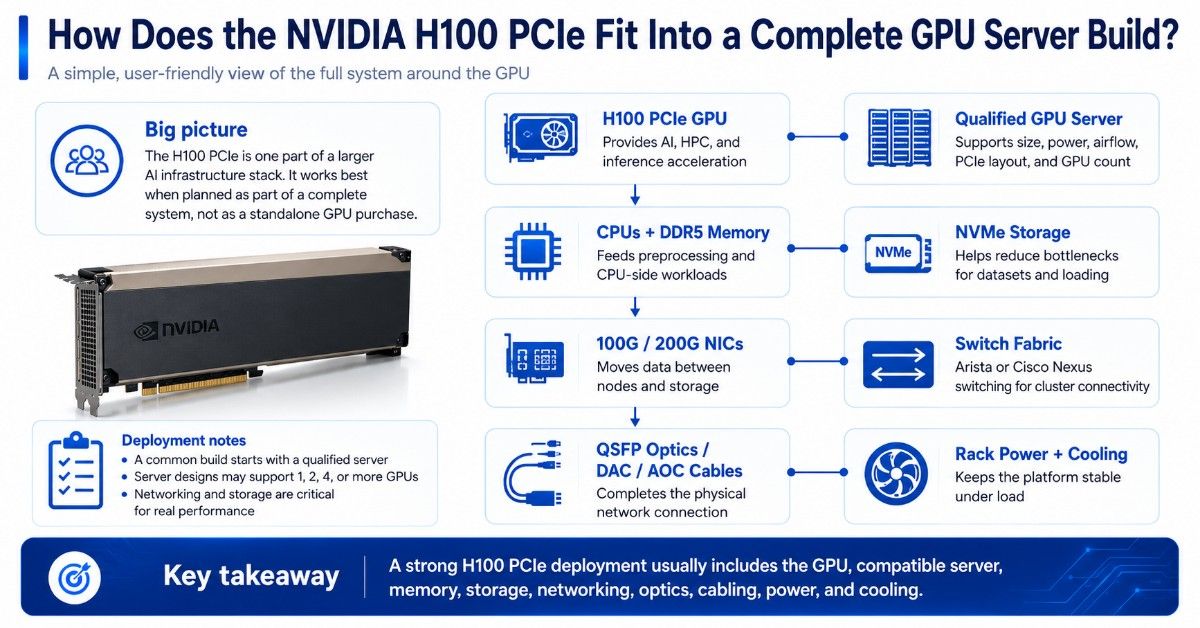
The NVIDIA H100 PCIe is one part of a larger AI infrastructure stack. It must be installed in a compatible GPU server with the right power delivery, airflow, PCIe slot spacing, CPU support, system memory, storage, and network connectivity.
A common H100 PCIe deployment starts with a qualified GPU server. That server may support one, two, four, or more GPUs depending on the chassis design. From there, buyers need DDR5 memory for CPU-side workloads, NVMe storage for datasets, and high-speed networking for moving data between servers, storage, and users.
The GPU also depends on external infrastructure. A single H100 server may connect to a 100G or 200G switch, and that switch may require matching QSFP optics, DAC cables, or AOC cables. In a cluster, several H100 servers may connect through Arista or Cisco Nexus switches to support east-west traffic and shared storage access.
| H100 PCIe system layer | What it connects to | Why it matters |
| NVIDIA H100 PCIe GPU | Qualified GPU server | Provides AI, HPC, and inference acceleration |
| GPU server | CPUs, DDR5 memory, storage, NICs, power supplies | Hosts and feeds the GPU |
| DDR5 memory | CPU and data pipeline | Supports preprocessing and model workflows |
| NVMe storage | Server and datasets | Reduces bottlenecks during training and loading |
| 100G / 200G NIC | Switch fabric | Moves data between nodes and storage |
| Arista / Cisco Nexus switch | GPU servers and network fabric | Connects the AI infrastructure |
| QSFP optics / DAC / AOC cables | NICs and switch ports | Completes the physical network connection |
| Rack power and cooling | Data center facility | Keeps the platform stable under load |
This is why many organizations evaluate the H100 PCIe as part of a complete infrastructure plan rather than as a standalone GPU purchase.
A project may begin with a GPU requirement, but the final deployment often includes servers, memory, storage, networking, optics, cabling, and compatibility validation to ensure all components work together effectively.
How Does H100 PCIe Compare With H100 SXM?
H100 PCIe and H100 SXM are both Hopper-generation data center GPUs, but they target different server designs. H100 PCIe is a card-based accelerator for qualified PCIe servers. H100 SXM is a module used in HGX systems with higher-density GPU baseboards.
The H100 SXM GPU is often the better option for large-scale training clusters, dense 4-GPU or 8-GPU HGX systems, and workloads that need maximum GPU-to-GPU communication. PCIe is better when flexibility, server availability, and simpler integration matter more.
| Decision point | H100 PCIe | H100 SXM |
| Form factor | PCIe dual-slot card | SXM module for HGX platforms |
| Typical server fit | Qualified PCIe GPU servers | HGX or DGX-style systems |
| GPU density | Commonly 1 to 8 GPUs, server dependent | Commonly 4 or 8 GPUs per baseboard |
| Cooling demand | Passive card needs strong server airflow | Platform-level thermal design required |
| Best use | Flexible AI, inference, HPC, analytics | Dense training, scale-up AI, HGX clusters |
| Buying complexity | Lower than SXM, but still needs validation | Higher platform dependency |
| Upgrade path | Easier in compatible PCIe servers | More tied to full system platform |
PCIe is not a low-end choice. It is still an H100-class accelerator. The difference is platform design. Buyers should choose SXM when they need dense scale-up performance, and choose PCIe when server compatibility and procurement flexibility are more important.
What Server Platforms and Components Must Support H100 PCIe?
The NVIDIA H100 PCIe must be installed in a server platform designed for high-power data center GPUs. A basic PCIe slot is not enough. The server must support the card’s size, power, passive cooling, firmware, BIOS, and PCIe topology.
Buyers should confirm whether the H100 PCIe will be installed in a Dell, HPE, Supermicro, Lenovo, or other qualified GPU server platform.
The exact server model matters because GPU slot spacing, riser layout, fan design, power supply capacity, and supported GPU count can vary by configuration.
The H100 PCIe also needs room for the rest of the system. If the server must support multiple GPUs, high-speed NICs, NVMe drives, and storage controllers, the buyer should confirm that all parts can fit and operate together without blocking airflow or reducing PCIe bandwidth.
Key compatibility checks before ordering:
- Confirm the exact server model supports NVIDIA H100 PCIe.
- Verify full-height, full-length, dual-slot GPU support.
- Check PCIe Gen5 x16 slot availability and CPU lane layout.
- Confirm GPU power cable support and power supply capacity.
- Verify passive airflow direction and chassis fan capacity.
- Confirm support for the target GPU count per server.
- Check BIOS, firmware, NVIDIA driver, and CUDA support.
- Leave room for NICs, storage controllers, and other PCIe cards.
- Confirm rack power and cooling capacity before deployment.
This is where the buyer’s GPU decision becomes a server decision. The H100 PCIe must match the platform, and the platform must match the workload.
What Should You Buy With H100 PCIe?
An H100 PCIe purchase usually needs more than the GPU. A production-ready build may require a compatible GPU server, high-core-count CPUs, enough DDR5 memory, fast NVMe storage, high-speed NICs, switches, transceivers, DAC cables, AOC cables, and rack power planning.
The right balance depends on workload. Training may need more network bandwidth and NVMe throughput. Inference may need memory capacity, redundancy, and service stability. HPC may need low-latency networking and predictable CPU-to-GPU topology.
| Component | Why it matters with H100 PCIe | Buying guidance |
| GPU server | Holds GPU, CPU, memory, NICs, storage, and power | Use a qualified platform |
| DDR5 memory | Feeds CPU-side data pipelines and preprocessing | Match workload and CPU channels |
| NVMe storage | Reduces data loading bottlenecks | Use enterprise SSDs for training data |
| 100G networking | Supports inference, data access, and cluster traffic | Minimum for many production builds |
| 200G networking | Better for multi-node AI and HPC | Consider for scale-out clusters |
| Switches | Connect GPU servers to data and cluster fabric | Use data center switching |
| QSFP optics | Needed for fiber-based high-speed links | Match speed, reach, and switch type |
| DAC/AOC cables | Useful for short rack and row links | Check port speed and length |
A strong H100 PCIe build often starts with a qualified server, server memory, NVMe SSDs, and high-speed networking hardware. From there, buyers can add switches, optics, and cabling based on rack layout.
What Networking, Optics, and Cabling Do H100 PCIe Servers Need?
AI servers can move large amounts of data between storage, nodes, users, and services. A strong GPU can sit idle if the network is too slow. Buyers should size networking around dataset movement, checkpointing, model serving, east-west cluster traffic, and storage access.
Many H100 PCIe environments use 100G or 200G Ethernet. Larger clusters may require a more detailed fabric design with leaf-spine switching, redundant uplinks, and carefully selected NICs. The right switch depends on port speed, oversubscription target, rack layout, and growth plan.
Many H100 PCIe deployments use data center switches from Arista or Cisco Nexus families to connect GPU servers, storage systems, and other network resources. Depending on the design, a build may require an Arista switch option, compatible NICs, QSFP optics, DAC cables, or AOC cables to complete the network path between servers and switches.
Cabling should not be left until the end of the order. A missing 100G transceiver or incorrect DAC length can delay deployment. Teams should map every port from GPU server to switch and confirm speed, connector type, fiber type, and cable reach.
When Is the NVIDIA H100 PCIe Overkill?
H100 PCIe is overkill when the workload does not need its compute, memory bandwidth, or Hopper features. Many inference, rendering, VDI, analytics, and development workloads can run well on lower-cost GPUs. Buying H100 without checking utilization can waste budget.
For mixed inference and visualization, the Dell L40S GPU may be a better fit. For budget AI training or mature HPC workloads, an A100 PCIe GPU can still make sense.
H100 may be more than needed when:
- Models fit comfortably on A100, L40S, L4, or T4.
- The team mainly runs light inference or batch jobs.
- The server cannot feed the GPU fast enough.
- Network and storage budgets are limited.
- Power and cooling headroom is tight.
- Software is not ready for Hopper features.
- The buyer needs many moderate GPUs instead of fewer top-end GPUs.
A practical buying decision should compare cost per workload, not only peak performance. If the system will run below capacity most of the time, the budget may be better spent on storage, networking, memory, or more balanced GPU nodes.
Should Buyers Choose New, Refurbished, or Hard-to-Find H100 PCIe?
New H100 PCIe hardware is the best choice when buyers need the latest support terms, predictable lifecycle, clean procurement records, and full confidence for production use. It may also be required for regulated environments, OEM support policies, or standardized fleet deployments.
Refurbished or hard-to-find H100 PCIe options may help when budgets, lead times, or supply constraints matter. Buyers should not treat every refurbished GPU the same. Testing, warranty, source credibility, firmware status, and server compatibility checks are critical.
Buyers evaluating new and refurbished inventory should compare factors such as workload requirements, budget, availability, warranty coverage, hardware condition, and expected lifecycle.
For refurbished GPUs, understanding the refurbished testing process is especially important because it helps verify functionality, reliability, firmware status, and overall readiness for deployment.
| Buying path | Best for | What to verify |
| New H100 PCIe | Production AI, enterprise standardization, long lifecycle | Lead time, warranty, OEM support, server fit |
| Refurbished H100 PCIe | Budget-sensitive deployments and lab expansion | Testing, condition, firmware, warranty, seller credibility |
| Hard-to-find inventory | Urgent projects and constrained supply chains | Exact SKU, availability, region, compatibility |
| A100 alternative | Mature AI and HPC workloads | Performance target, server support, budget |
| L40S alternative | Inference, rendering, visualization | Workload type, VRAM, power, software stack |
Procurement teams should request details before issuing a purchase order. Useful questions include GPU condition, part number, included accessories, cable needs, firmware level, return terms, test results, and whether the GPU has been validated in a compatible server.
What Related NVIDIA GPUs Should Buyers Compare?
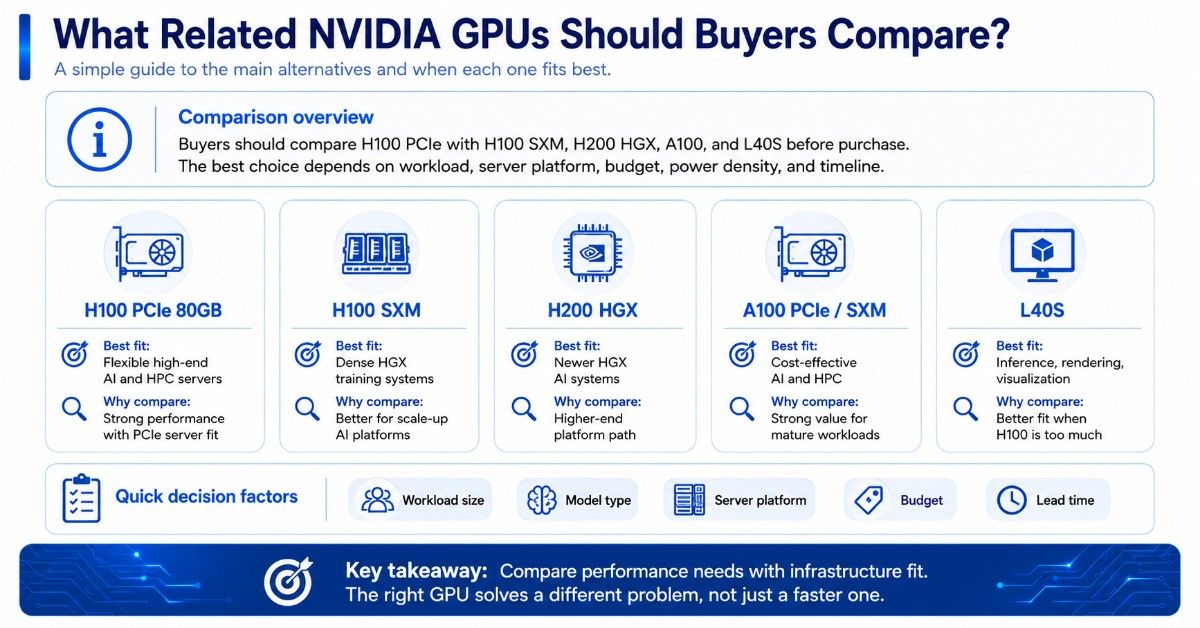
H100 PCIe should be compared with H100 SXM, H200, A100, and L40S before purchase. Each product solves a different infrastructure problem. The right GPU depends on workload size, model type, server platform, power density, budget, and lead time.
The H200 HGX option is a stronger fit for buyers planning a newer HGX platform with higher memory needs. It is not a simple drop-in replacement for H100 PCIe, so platform planning matters.
A100 remains useful for cost-aware AI and HPC. Buyers may compare H100 PCIe with an A100 80GB option or an A100 SXM model when they have older servers, known workloads, or a lower budget.
| GPU | Best fit | Main reason to compare |
| H100 PCIe 80GB | Flexible high-end AI and HPC servers | Strong performance with PCIe server fit |
| H100 SXM | Dense HGX training systems | Better for scale-up AI platforms |
| H200 HGX | Newer HGX AI systems | Higher-end platform path |
| A100 PCIe / SXM | Cost-effective AI and HPC | Strong value for mature workloads |
| L40S | Inference, rendering, visualization | Better fit when H100 is too much |
How Do Buyers Build a Quote-Ready H100 PCIe Configuration?
A quote-ready H100 PCIe request should describe the workload, target server count, GPU count per server, model size, storage needs, networking speed, rack limits, preferred condition, and timeline. A clear request helps avoid wrong parts and delayed projects.
Buyers should include whether they need only GPUs or a complete server bundle. The quote should also state whether new, refurbished, or hard-to-find inventory is acceptable. This helps the sourcing team compare realistic options across performance, availability, and budget.
A useful H100 PCIe quote request includes:
- NVIDIA H100 PCIe 80GB quantity.
- Exact SKU preference, if required.
- Preferred server brand, such as Dell or HPE.
- GPU count per server.
- CPU and memory requirements.
- NVMe or SAS storage needs.
- 100G or 200G networking requirements.
- Switch, optic, DAC, or AOC cable needs.
- Rack power and cooling limits.
- New, refurbished, or mixed inventory preference.
- Required warranty, testing, and delivery timeline.
Catalyst Data Solutions can help turn a general GPU need into a complete bill of materials. That may include GPUs, servers, DDR4 or DDR5 memory, SSDs, NICs, Arista or Cisco Nexus switches, optics, cabling, and supporting infrastructure.
Need a Complete NVIDIA H100 PCIe Infrastructure Bundle?
Selecting an NVIDIA H100 PCIe is only one part of the deployment process. Buyers also need to verify server compatibility, workload requirements, power and cooling capacity, memory sizing, storage performance, networking bandwidth, and whether new or refurbished hardware is the best fit for their budget and timeline.
Catalyst Data Solutions Inc helps buyers move from GPU selection to deployment. Whether you need H100 PCIe, H100 SXM, H200, A100, or L40S, Catalyst can help source compatible servers, DDR5 memory, NVMe storage, networking, switches, optics, and cables. Organizations can submit a quote request to work with the Catalyst team on complete AI, HPC, inference, and data center solutions that align with performance goals, compatibility requirements, and budget objectives.
FAQs
Does the NVIDIA H100 PCIe need other products to work in a data center?
Yes. The H100 PCIe must be installed in a compatible GPU server. Most deployments also need CPUs, DDR5 memory, NVMe storage, NICs, switches, QSFP optics, DAC or AOC cables, power capacity, and proper cooling. The GPU is only one part of the complete system.
Is the NVIDIA H100 PCIe good for AI training?
Yes. H100 PCIe is a strong choice for AI training when the workload needs high GPU compute, large memory, and modern NVIDIA AI acceleration. It works best in a qualified GPU server with enough CPU, memory, NVMe storage, and high-speed networking.
Is H100 PCIe better than H100 SXM?
Not always. H100 SXM is usually better for dense HGX systems and large scale-up training. H100 PCIe is better when buyers need more server flexibility, easier procurement, or compatibility with qualified PCIe GPU servers.
Can I install H100 PCIe in any server with a PCIe slot?
No. H100 PCIe needs more than a PCIe slot. The server must support the card’s size, power, passive cooling, firmware, BIOS, PCIe topology, and thermal requirements. Always verify server compatibility before purchase.
What should I buy with an H100 PCIe GPU?
Most deployments need a qualified GPU server, DDR5 memory, NVMe SSDs, high-speed NICs, 100G or 200G networking, switches, QSFP optics, and DAC or AOC cables. The exact bundle depends on workload, rack design, and growth plan.
When is H100 PCIe overkill?
H100 PCIe may be overkill for light inference, VDI, small models, basic rendering, or workloads that do not use Hopper features well. In those cases, A100, L40S, L4, or T4 may offer better value.
Should I buy a new or refurbished H100 PCIe?
New is best for standardized production deployments and long lifecycle planning. Refurbished can make sense when budget, lead time, or availability matters. Buyers should verify testing, condition, firmware, warranty, and seller credibility before ordering.