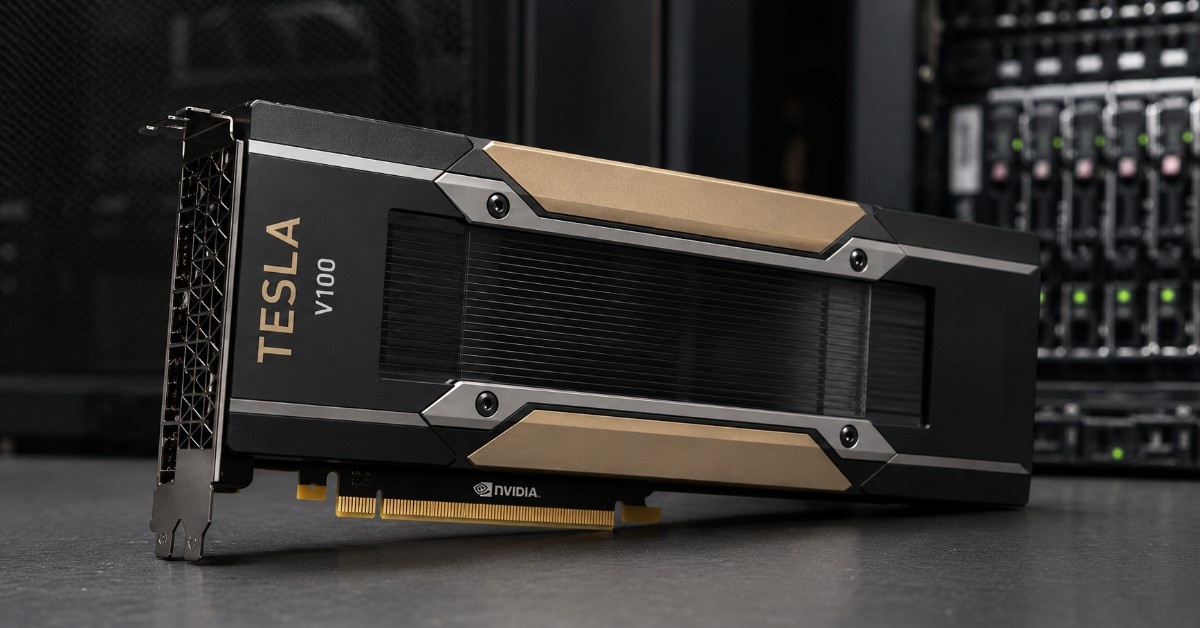
A refurbished NVIDIA Tesla V100 can still be a smart choice when the workload does not require the newest GPU generation. It gives AI labs, research teams, and HPC users a practical way to add GPU performance without the cost of newer A100 or H100 systems.
This NVIDIA Tesla V100 Review looks at where V100 still makes sense and where it falls short. We compare the V100 16GB, V100 32GB, and V100S 32GB, then explain refurbished buying risks, server fit, SAS/NVMe storage, 10G/25G networking, and related GPU alternatives.
Is the NVIDIA Tesla V100 Still Worth Buying Refurbished?
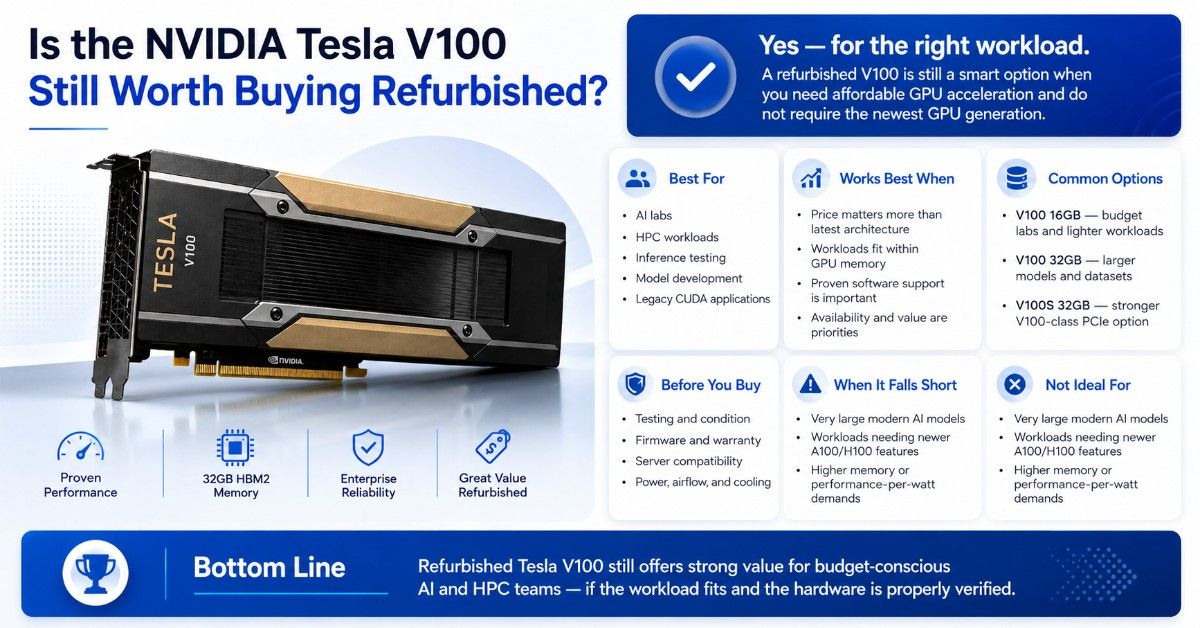
Yes, the NVIDIA Tesla V100 can still be worth buying refurbished when the buyer needs affordable GPU acceleration for AI labs, HPC workloads, inference testing, model development, or legacy CUDA-based applications. It works best when the workload fits within the GPU memory and does not need the newer features of A100 or H100.
A refurbished V100 is most useful when price, availability, and proven software support matter more than having the latest architecture. Buyers often consider the V100 16GB GPU for budget labs and the V100 32GB option when larger models or datasets need more memory.
| Buying question | Practical answer |
| Is V100 still useful? | Yes, for AI labs, HPC, inference testing, and mature workloads |
| Is refurbished V100 risky? | It can be, unless testing, condition, firmware, warranty, and server fit are verified |
| Is V100 better than A100? | Usually no, but it may offer better value for budget or legacy workloads |
| Is V100 good for modern large AI models? | Sometimes, but memory and performance limits can become a problem |
| What else is needed? | Refurbished GPU server, storage, networking, switches, power, and cooling |
The main advantage is value. A V100 can help teams add GPU compute without buying a full new AI server platform. The main risk is buying a card without checking condition, cooling needs, server compatibility, or warranty.
What Is the NVIDIA Tesla V100 and Why Does It Still Have Demand?
The NVIDIA Tesla V100 is a Volta-generation data center GPU built for deep learning, machine learning, HPC, and accelerated computing. It was widely used in enterprise servers, research systems, and AI infrastructure before newer GPUs such as A100 and H100 became common.
Demand continues because many workloads do not need the latest GPU. Research labs, universities, startups, and enterprise test teams may need reliable GPU compute at a lower cost. For those buyers, a refurbished V100 can be a practical middle ground between older P100 hardware and newer A100 systems.
The V100 also still fits many CUDA-based workflows. If a team already built code around V100-era systems, replacing or expanding with the same GPU family may reduce migration work. That matters for labs that need stable output, known performance, and predictable hardware behavior.
The V100 is also attractive for teams building a used or refurbished server stack. A budget AI project may pair V100 GPUs with a refurbished GPU server, SAS or NVMe storage, 10G or 25G networking, and used switches to keep the total project cost under control.
V100 16GB vs V100 32GB vs V100S 32GB
The main V100 buying choice is memory size and card type. The 16GB model can work for smaller models and legacy workloads. The 32GB model gives more room for larger datasets, training jobs, and HPC applications. The V100S 32GB is a stronger PCIe option when buyers want a higher-performing V100-class card.
| Product | Best fit | Buyer note |
| NVIDIA Tesla V100 16GB | Budget AI labs, inference testing, smaller HPC jobs | Lower-cost entry into V100 compute |
| NVIDIA Tesla V100 32GB | AI training, larger datasets, research workloads | Better memory headroom than 16GB |
| NVIDIA V100S 32GB | Higher-end PCIe V100 deployments | Useful when buyers want stronger V100-class performance |
| Related A100 | Newer AI and HPC workloads | Better upgrade path when budget allows |
Buyers considering the V100S 32GB PCIe should still confirm the exact server model, airflow path, power support, and PCIe layout. A server that accepts a card physically may still fail as a stable production platform.
Who Should Use a Refurbished NVIDIA Tesla V100?
A refurbished NVIDIA Tesla V100 is best for buyers who need proven GPU acceleration but do not need the newest generation. It fits organizations that want useful performance, lower acquisition cost, and faster access to hardware.
It can also help teams extend an existing GPU environment. If a lab already runs V100 nodes, adding similar refurbished GPUs may be easier than redesigning the full stack around a newer platform.
AI Lab and Budget AI Use Cases
AI labs still buy V100 GPUs because they can support model development, fine-tuning, inference testing, computer vision, recommendation models, and data science workflows. The V100 may not be ideal for very large foundation models, but it can still support practical AI work.
A V100 can make sense for:
- Small and mid-size model training
- AI classroom or research lab systems
- Inference testing and model comparison
- Computer vision and analytics pipelines
- Internal proof-of-concept AI projects
For teams planning a lab build, GPU deployment planning should include storage, networking, and cooling early. A low-cost GPU can lose value if the server cannot feed it with enough data.
HPC Workloads and Research Use Cases
The V100 still has a place in HPC because many scientific and engineering workloads value stable double-precision performance, mature software support, and known behavior across older GPU clusters. Research groups may use V100 for simulation, modeling, genomics, finance, computational chemistry, and engineering workloads.
HPC buyers should check memory size, application support, and node balance. A V100 server with weak CPUs, limited memory, slow SAS storage, or underbuilt networking may not perform well even if the GPUs are healthy.
For HPC clusters, the rest of the system matters as much as the card. CPU selection, memory capacity, storage throughput, PCIe topology, and network latency all affect real application speed.
NVIDIA Tesla V100 vs A100, P100, and T4: Which GPU Makes More Sense?
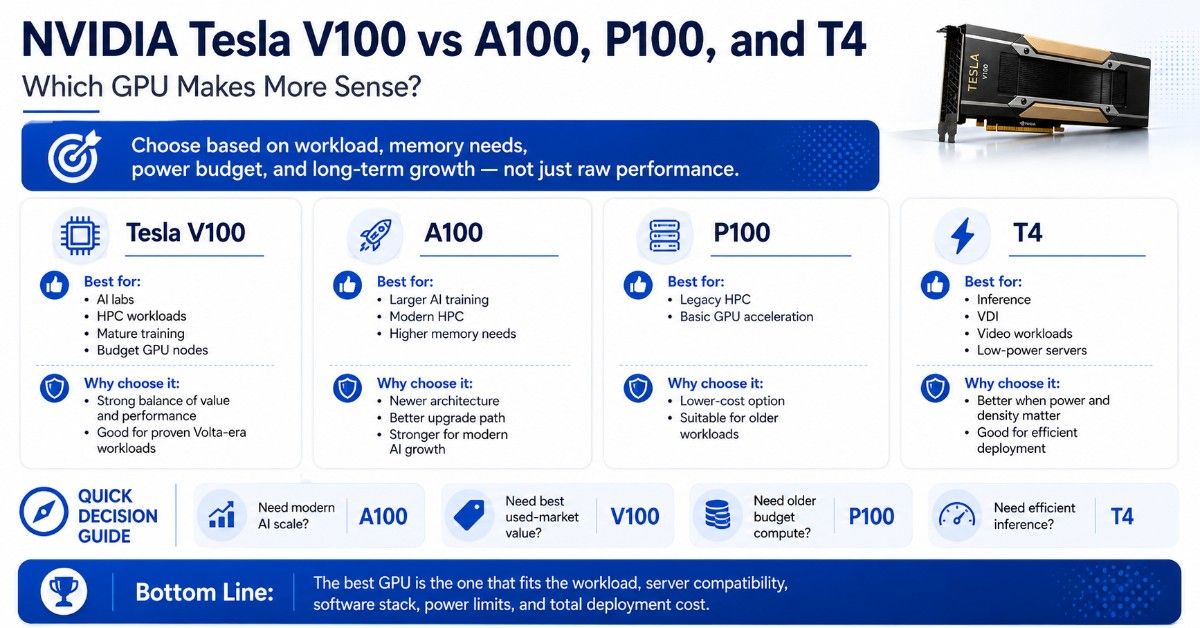
V100 is not the only refurbished or budget NVIDIA option. Buyers should compare it with A100, P100, and T4 before choosing. Each GPU solves a different problem.
The A100 is the stronger upgrade for modern AI and HPC. The P100 can still work for older HPC or budget compute jobs. The T4 is often better for low-power inference, video workloads, and virtualization-style deployments.
| GPU | Best fit | Why compare it with V100 |
| NVIDIA Tesla V100 | AI labs, HPC, mature training, budget GPU nodes | Strong balance of used-market value and performance |
| NVIDIA A100 | Larger AI training, modern HPC, higher memory needs | Newer architecture and stronger long-term path |
| NVIDIA P100 | Legacy HPC and basic GPU acceleration | Lower-cost option for older workloads |
| NVIDIA T4 | Inference, VDI, video, low-power servers | Better fit when power and density matter more than training |
The A100 80GB GPU usually makes more sense when the workload needs more memory, stronger performance, newer AI features, or a better growth path. The V100 makes more sense when cost is a major factor and the workload is already proven on Volta-class hardware.
The Tesla P100 option may be enough for older HPC workloads, but it does not offer the same AI value as V100. The Tesla T4 GPU may be better for efficient inference, low-profile servers, and workloads that do not need V100-class compute.
The practical question is not “Which GPU is best?” The better question is “Which GPU fits the workload, server, power budget, software stack, and total deployment cost?”
What Server, Storage, and Networking Do V100 Deployments Need?
A refurbished NVIDIA Tesla V100 works only when the surrounding platform is right. Buyers need a compatible GPU server with enough PCIe support, power delivery, airflow, firmware support, and physical space for the GPU.
A V100 deployment may also need SAS or NVMe storage, depending on workload. SAS can work for capacity-heavy lab storage, while NVMe is better when datasets, checkpoints, and training pipelines need faster access.
Networking also matters. A single lab server may run well with 10G, but multi-node GPU environments often need 25G or better. Used switches can help reduce cost, but buyers should verify port speed, optics, cables, and switch condition.
| Infrastructure layer | What to confirm | Why it matters |
| Refurbished GPU server | GPU support, airflow, PCIe layout, power supply | Keeps V100 stable under load |
| SAS/NVMe storage | Capacity, endurance, read/write speed | Supports datasets, checkpoints, and project files |
| 10G/25G networking | NICs, switch ports, optics, cables | Moves data between users, servers, and storage |
| Used switches | Port speed, licensing, condition, optics support | Reduces cost for lab or budget AI networks |
| Rack power and cooling | Power draw, airflow path, room capacity | Prevents throttling and downtime |
A complete GPU server build should balance CPU, memory, storage, and networking around the GPUs. Buying V100 cards without checking the server can lead to blocked airflow, missing cables, weak power delivery, or poor PCIe placement.
For HPE-based environments, HPE AI server planning can help teams think through server selection, GPU support, and infrastructure fit before buying refurbished hardware.
What Are the Risks and Benefits of Buying Refurbished V100 GPUs?
The biggest benefit of buying a refurbished NVIDIA Tesla V100 is cost control. Buyers can often build a useful AI or HPC node for less than the cost of a newer platform. That matters for labs, startups, internal pilots, and budget-sensitive enterprise teams.
The main risk is uncertainty. A used GPU may have unknown workload history, thermal stress, firmware issues, missing accessories, or poor documentation. Buyers should never treat every refurbished GPU as equal.
| Buying factor | Benefit | Risk | What to verify |
| Price | Lower entry cost | Cheap parts may hide issues | Test results and warranty |
| Availability | Faster sourcing | Exact model may vary | SKU, memory size, and condition |
| Compatibility | Good for legacy servers | Wrong server fit can delay deployment | Server support and airflow |
| Lifecycle | Useful for labs and test systems | Shorter support window than newer GPUs | Driver and software needs |
| Deployment | Good for budget bundles | Missing cables or optics can stall setup | Full bill of materials |
A strong refurbished purchase should include a clear condition report, functional testing, warranty terms, and compatibility review. The refurbished testing process matters because buyers need proof that the hardware can run reliably before it enters a lab or production environment.
Refurbished buying also fits broader lifecycle planning. Enterprises replacing older GPU assets can use enterprise ITAD planning to manage recovery, resale, recycling, and secure disposition as part of the same hardware strategy.
When Is the NVIDIA Tesla V100 Not Enough?
The NVIDIA Tesla V100 is not enough when the workload needs more GPU memory, newer AI features, better multi-instance sharing, faster interconnects, or stronger performance per watt. It can also fall short when buyers plan to scale a cluster for modern large model training.
V100 may not be the right fit when:
- Models need more memory than V100 can provide
- The team needs newer A100 or H100 platform features
- Inference requires higher density or better efficiency
- The server cannot support V100 power and airflow
- The project needs a longer lifecycle for production use
V100 can also be overkill for some buyers. Light inference, VDI, and video workloads may run better on T4 or newer low-power GPUs. In those cases, the team may save power, rack space, and cooling cost by avoiding a larger accelerator.
Networking and cooling can also limit a V100 build. Teams planning multi-node systems should address AI networking challenges before adding more GPUs. They should also plan data center cooling if the rack will run several GPU servers under load.
How to Build a Quote-Ready V100 Configuration
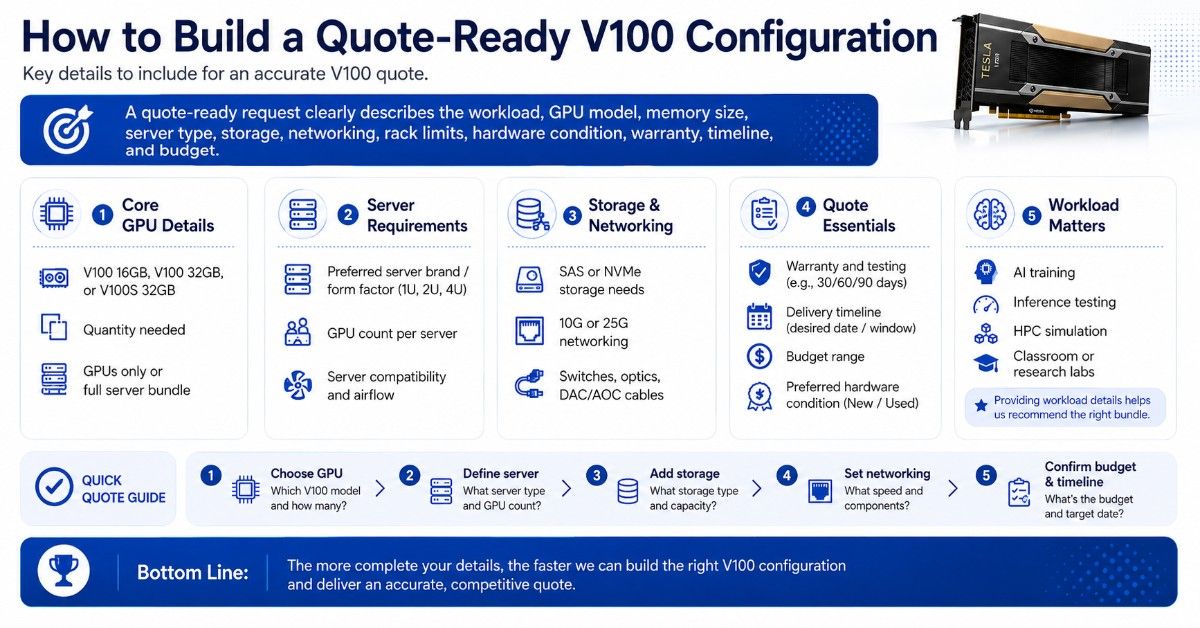
A quote-ready V100 request should describe the workload, GPU model, memory size, server type, storage needs, networking speed, switch requirements, rack limits, and preferred hardware condition. Clear details help avoid wrong parts and delayed projects.
Buyers should state whether they need GPUs only or a complete refurbished GPU server bundle. They should also mention whether they need SAS storage, NVMe storage, 10G or 25G networking, used switches, optics, DAC cables, or AOC cables.
A useful V100 quote request includes:
- NVIDIA Tesla V100 16GB, V100 32GB, or V100S 32GB quantity
- Preferred server brand, form factor, and GPU count per server
- SAS or NVMe storage capacity and performance needs
- 10G or 25G NIC, switch, optic, and cable requirements
- Warranty, testing, delivery timeline, and budget range
Buyers should also include the workload type. AI training, inference testing, HPC simulation, and classroom labs have different system needs. A clear workload description helps the sourcing team recommend the right bundle.
Need a Refurbished NVIDIA Tesla V100 Server Bundle?
Selecting a refurbished NVIDIA Tesla V100 is only one part of the deployment. Buyers also need to verify server compatibility, GPU memory needs, storage speed, networking bandwidth, rack power, cooling, warranty, and whether V100 is still the right fit for the workload.
Catalyst Data Solutions Inc helps organizations source NVIDIA GPUs, refurbished GPU servers, storage, networking, switches, optics, cables, and supporting infrastructure. That may include V100 16GB, V100 32GB, V100S 32GB, A100, P100, T4, SAS storage, NVMe SSDs, 10G or 25G networking, and used switches for lab or budget AI deployments.
FAQs
Is the NVIDIA Tesla V100 still good for AI?
Yes. The NVIDIA Tesla V100 is still useful for AI labs, model development, smaller training jobs, inference testing, and mature workloads. It may not be ideal for very large modern models that need more memory or newer GPU features.
Is a refurbished V100 worth buying?
A refurbished V100 can be worth buying when the seller verifies testing, condition, firmware, warranty, and compatibility. It is most useful for budget AI labs, HPC projects, and organizations extending older GPU environments.
Should I choose V100 16GB or V100 32GB?
Choose V100 16GB for lower-cost lab work, small models, and lighter workloads. Choose V100 32GB when the workload needs more memory for datasets, training jobs, or HPC applications.
How does V100 compare with A100?
A100 is newer, stronger, and better for modern AI and HPC growth. V100 can still make sense when cost matters, the workload is already proven on V100, or the team needs a refurbished GPU for a lab or legacy server.
What should I buy with a V100 GPU?
Most deployments need a compatible refurbished GPU server, enough CPU and system memory, SAS or NVMe storage, 10G or 25G networking, used switches, optics, cables, rack power, and proper cooling.
Can I install a V100 in any server?
No. A V100 needs a server that supports its form factor, power, passive airflow, PCIe layout, firmware, and cooling needs. Buyers should verify the exact server model before purchasing.
When is V100 not enough?
V100 may not be enough for very large AI models, newer production AI platforms, memory-heavy workloads, or teams that need a longer lifecycle. A100, H100, or newer GPUs may be better in those cases.