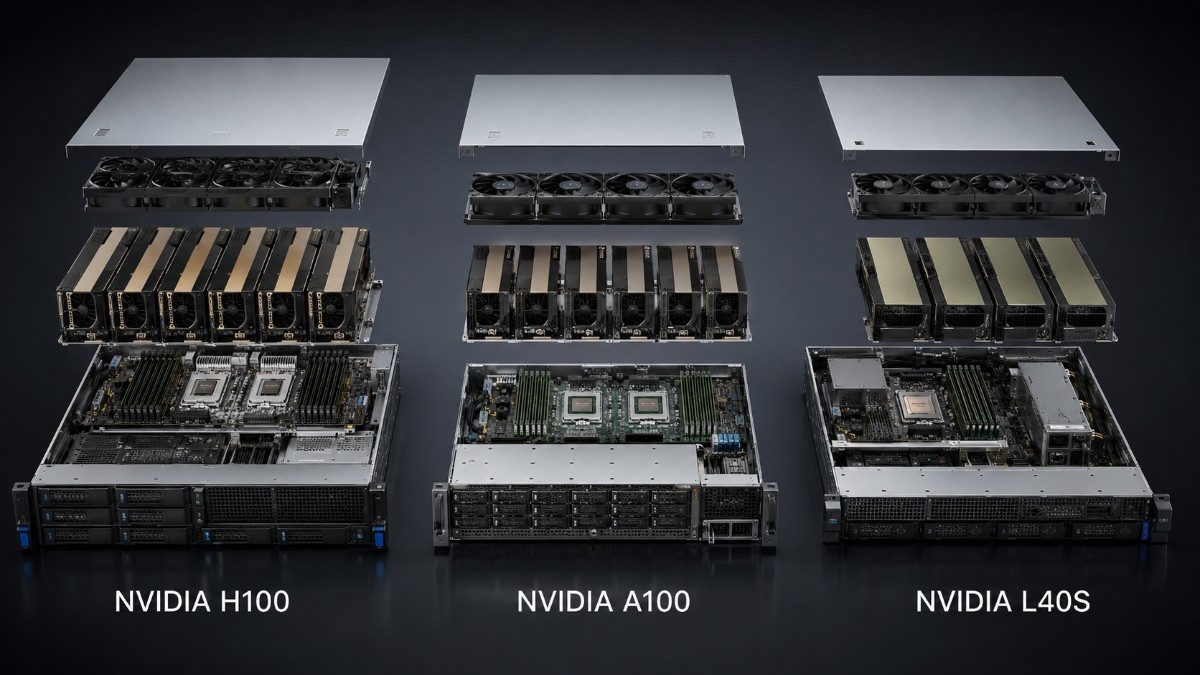
Choosing the best servers for NVIDIA H100, A100, and L40S GPUs starts with the GPU form factor. Power, cooling, memory, storage, networking, and accelerator count also shape the right choice.
A PCIe server may not support an SXM module. An open slot also does not prove the chassis has enough airflow, cabling, firmware support, or physical clearance.
This guide compares server options and key buying checks.
What Are the Best Servers for NVIDIA H100, A100, and L40S GPUs?
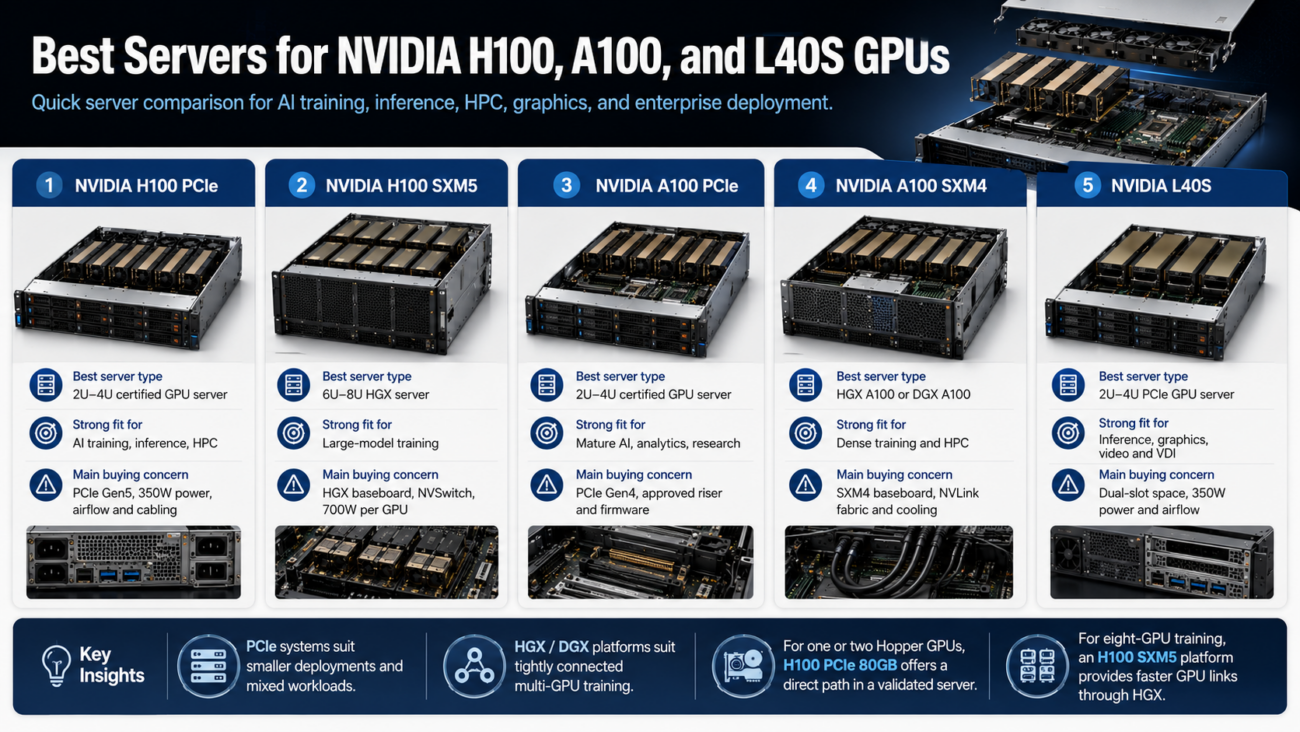
The best server depends on whether you need flexible PCIe expansion or a dense SXM platform. PCIe systems suit smaller deployments and mixed workloads, while HGX and DGX systems suit tightly connected multi-GPU training.
| GPU or platform | Best server type | Strong fit for | Main buying concern |
| NVIDIA H100 PCIe | 2U–4U certified GPU server | AI training, inference, HPC | PCIe Gen5, 350W power, airflow and cabling |
| NVIDIA H100 SXM5 | 6U–8U HGX server | Large-model training | HGX baseboard, NVSwitch, 700W per GPU |
| NVIDIA A100 PCIe | 2U–4U certified GPU server | Mature AI, analytics, research | PCIe Gen4, approved riser and firmware |
| NVIDIA A100 SXM4 | HGX A100 or DGX A100 | Dense training and HPC | SXM4 baseboard, NVLink fabric and cooling |
| NVIDIA L40S | 2U–4U PCIe GPU server | Inference, graphics, video and VDI | Dual-slot space, 350W power and airflow |
For one or two Hopper GPUs, the H100 PCIe 80GB offers a direct path in a validated server. For eight-GPU training, an H100 SXM5 platform provides faster GPU links through HGX.
Which NVIDIA GPU Is Best for Your Server Workload?
The GPU should match the job before the server is selected. H100, A100, and L40S overlap in AI use. They differ in memory, GPU links, graphics features, power draw, and server cost.
NVIDIA H100: Best for Large AI Training and Advanced Inference
H100 is the strongest option here for large language model training, advanced inference, and scientific computing. The PCIe and SXM5 versions carry 80GB of GPU memory, but they need different servers.
The PCIe model uses a standard accelerator card format and draws up to 350W. It needs a qualified full-height, full-length slot and passive airflow. The server also needs the right cable, firmware, and card spacing.
The SXM5 model mounts on an HGX baseboard instead of a normal PCIe slot. It can draw up to 700W and uses high-bandwidth NVLink. This helps models that run across several GPUs.
Teams planning an eight-GPU node should consider a complete H100 SXM server. It reduces the risk of mismatched baseboards, heat sinks, power parts, firmware, and internal cables.
NVIDIA A100: Best for Proven AI and HPC Infrastructure
A100 remains practical for established CUDA environments, training, inference, analytics, and HPC. It offers strong value when the workload does not need Hopper features.
The A100 80GB PCIe uses PCIe Gen4 and a passive dual-slot design. The A100 80GB SXM4 needs an HGX A100 baseboard or another platform designed for SXM4 modules.
A100 PCIe is easier to add to a qualified OEM server. A100 SXM4 offers faster links inside a multi-GPU node. Choose based on whether jobs use one GPU, two linked cards, or an eight-GPU fabric.
A DGX A100 server offers a validated appliance with eight GPUs plus matched CPUs, memory, storage, networking, power, and cooling.
NVIDIA L40S: Best for Mixed AI, Graphics, and Video
L40S is a 48GB PCIe GPU for AI inference, fine-tuning, rendering, video, and virtual workstations. Its graphics and media features set it apart from H100 and A100.
The Dell NVIDIA L40S is a full-height, full-length, dual-slot passive card with a 350W maximum power rating. The host must supply strong front-to-back airflow and the exact power connector listed for that OEM configuration.
L40S often fits teams that need one server for AI inference, 3D work, video, and virtual desktops. A detailed L40S workload review can help compare its role with pure compute accelerators.
Do You Need a PCIe or SXM GPU Server?
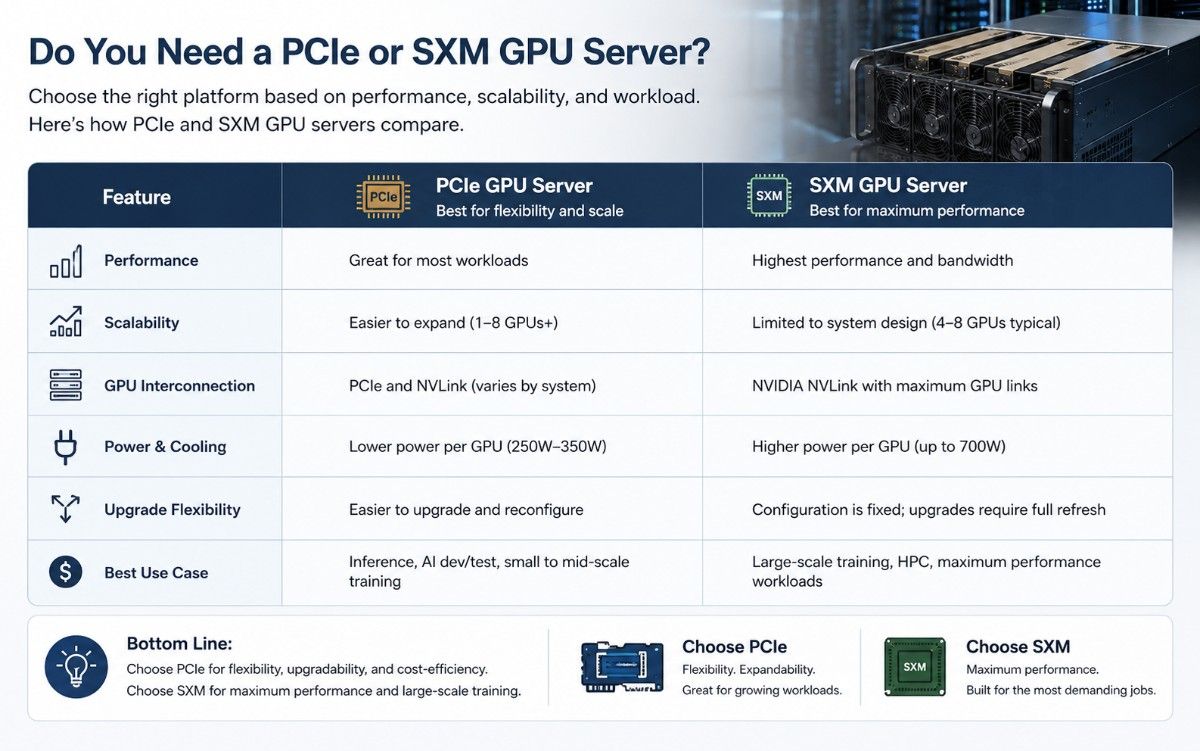
Choose PCIe for flexible card counts, easier replacement, or a lower-cost entry point. Choose SXM when large training jobs need fast communication among four or eight GPUs inside one server.
| Requirement | PCIe GPU server | SXM/HGX GPU server |
| Installation | Card fits an approved PCIe slot | Module mounts on an HGX baseboard |
| Typical GPU count | One to eight, based on chassis | Usually four or eight matched GPUs |
| GPU communication | PCIe, with limited NVLink options | NVLink and NVSwitch across the GPU set |
| Power and cooling | High, spread across card slots | Very high and concentrated |
| Upgrade flexibility | Better for individual card changes | GPU generation and platform are closely linked |
| Best use | Inference, mixed work, smaller training nodes | Large training, HPC and model parallel work |
PCIe compatibility requires more than the right connector. Confirm lane width, slot generation, card size, retainers, power leads, and airflow. Also check firmware and the OEM GPU list.
SXM modules are not standalone add-in cards. An H100 SXM5 cannot replace an A100 SXM4 in an older baseboard. A loose module also lacks NVSwitch, cooling, power, and control hardware.
HGX buyers must confirm whether a quote covers a baseboard, GPU tray, or complete server. A product like an HGX SXM baseboard shows why the scope must be clear before comparing prices.
Which GPU Server Form Factor Should You Choose?
GPU servers range from compact 2U systems to 8U training platforms. Larger chassis provide more room for accelerators, fans, power supplies, storage, network cards, and service access.
| Form factor | Typical GPU layout | Best use | Main limit |
| 1U | Low-power or limited-width GPUs | Management, storage, light inference | Limited power and airflow |
| 2U | One to four PCIe GPUs | Inference, analytics and visualization | Dense cooling and fewer expansion options |
| 4U | Four to eight PCIe GPUs | Mixed AI, rendering and medium training | Higher rack power and weight |
| 6U–8U | Eight SXM or dense PCIe GPUs | Large training and HPC | Facility power, cooling and rack depth |
| Integrated appliance | Fixed DGX or OEM design | Fast, validated deployment | Less component flexibility |
A 2U server can work for one or two H100 PCIe or L40S cards when the OEM validates that exact build. A 4U chassis often gives better airflow and more network or storage expansion for four to eight PCIe GPUs.
Dense HGX systems need deep racks, strong rails, rear clearance, and a safe installation plan. Rack placement and lift equipment may also be required.
The practical GPU server build guide explains why chassis size should follow the full component list, not only the GPU count.
Which HPE and Dell Servers Work Best for These GPUs?
Dell PowerEdge XE systems and selected HPE servers support high-end NVIDIA GPUs. Support still varies by model, generation, riser, and factory build.
Dell’s 6U PowerEdge XE9680 supports eight HGX H100 SXM5 or eight HGX A100 SXM4 GPUs in validated configurations. The design also includes high-capacity power supplies, DDR5 memory, NVMe storage, and expansion for fast network adapters.
The linked PowerEdge XE9680 specifications describe the 6U layout. Because the document focuses on Gaudi 3, request the exact NVIDIA configuration sheet and bill of materials.
HPE offers ProLiant and Apollo-class systems for accelerators, but not every ProLiant can host H100, A100, or L40S. Current HPE QuickSpecs must list the selected GPU. They should also list the enablement kit, power supplies, risers, fans, and operating system.
The HPE server catalog can help source compute, storage, management, and cluster nodes. However, the compact ProLiant DL360 Gen10 should not be assumed to support these full-power GPUs just because it has PCIe slots.
A DL360 Gen10 may still serve as a management, login, scheduler, or storage node. For accelerator hosting, use a larger HPE platform that lists the exact NVIDIA part number in its support matrix.
How Much Power and Cooling Does a GPU Server Need?
Plan from the complete server rating, not GPU power alone. CPUs, memory, drives, network cards, fans, and conversion losses add to the total.
H100 SXM5 can draw up to 700W per GPU, while H100 PCIe and L40S can draw up to 350W. A100 80GB power also varies by form factor, with PCIe at 300W and SXM at 400W in NVIDIA specifications.
| Deployment | GPU power alone | Facility concern | Cooling approach |
| 2× H100 PCIe | Up to 700W | Circuit headroom and hot exhaust | Strong air cooling |
| 4× L40S | Up to 1,400W | High fan demand in 2U–4U | High-airflow chassis |
| 8× A100 SXM | Up to 3,200W | Dense rack load and sustained heat | OEM air or liquid-assisted design |
| 8× H100 SXM5 | Up to 5,600W | High-voltage feeds and room capacity | Validated air or direct liquid cooling |
Check input voltage, plug type, power distribution units, redundant feeds, breaker limits, and rack capacity. Many dense AI servers work best with 200–240V power and several high-wattage supplies.
Cooling also depends on inlet temperature, altitude, rack blanking, cable placement, and nearby systems. A practical data center cooling plan should cover heat removal at both rack and room level.
How Much Memory, Storage, and Networking Should You Configure?
A balanced server keeps GPUs fed with data. Too little system memory, slow local storage, or limited network bandwidth can leave expensive accelerators waiting instead of computing.
| Component | Starting point | Increase it when |
| System memory | At least 2× total GPU memory | Large preprocessing, in-memory data or many users |
| Local storage | Mirrored boot plus enterprise NVMe | Datasets and checkpoints must stay local |
| CPU capacity | Two server CPUs with enough cores and PCIe lanes | Data loading or CPU-heavy code is common |
| Network | 25/100GbE for many single-node tasks | Multi-node training needs 200/400Gb or InfiniBand |
| Management | Separate BMC and management network | Clusters need remote recovery and automation |
Memory needs vary, but twice the combined GPU memory is a useful starting point. An eight-GPU H100 server may start around 1.5TB of system memory.
Storage should separate the operating system from active datasets and checkpoints. Enterprise NVMe supports high throughput. A parallel file system or fast network storage can serve larger clusters and protect data beyond one node.
Multi-node training also needs the right adapters, switches, transceivers, cables, and topology. The AI networking challenges become more important as GPU counts and model sizes grow.
What Should You Confirm Before Buying a GPU Server?
Ask for a written configuration that lists every major part. Do not approve a quote that only names the GPU and chassis.
- Confirm the GPU part number, form factor, memory, quantity, condition, and whether modules are matched.
- Verify the server model, risers, power cables, heat sinks, fans, rails, power supplies, and rack depth.
- Check CPUs, system memory, NVMe layout, boot design, network adapters, optics, and cables.
- Request the supported operating system, BIOS, BMC, firmware, NVIDIA driver, CUDA version, and licenses.
- Review warranty, test records, lead time, returns, export limits, installation scope, and support ownership.
For refurbished hardware, confirm that the seller tests the full system under sustained GPU load. The certified refurbishment process should include inspection, cleaning, firmware review, component validation, stress testing, and clear condition grading.
Also ask whether the quote covers installation and rack integration. Dense HGX systems may need special rails, lift equipment, qualified power connections, cluster cabling, and post-install GPU fabric tests.
Are Refurbished H100, A100, and L40S Servers Worth Buying?

Refurbished GPU hardware can offer strong value when the configuration is complete, tested, and supported. A100 platforms are especially attractive for mature AI and HPC workloads that do not require the newest Hopper features.
Risk rises when buyers combine loose GPUs, unknown baseboards, incomplete chassis, or unsupported OEM parts. Missing brackets, wrong power cables, locked firmware, and mismatched cooling parts can erase expected savings.
A trusted supplier like Catalyst Data Solution Inc provide serial details, test results, condition, warranty, and a full bill of materials. Review Catalyst Data Solution refurbished hardware inventory with workload fit ahead of price.
Final Recommendation
The best servers for NVIDIA H100, A100, and L40S GPUs are validated platforms built around the exact accelerator form factor. Choose PCIe servers for flexible card counts and mixed workloads. Choose HGX or DGX systems for dense multi-GPU training.
H100 fits advanced AI and HPC. A100 suits proven systems. L40S suits inference, graphics, and video. Confirm power, cooling, memory, storage, networking, software, warranty, and installation.
Frequently Asked Questions
Can any PCIe server run an NVIDIA H100 or L40S?
No. The server needs the correct slot, power delivery, airflow, clearance, firmware, and OEM approval for the exact GPU.
Can an SXM GPU go into a PCIe slot?
No. SXM modules mount on a purpose-built baseboard with matched cooling, power, management, and NVLink or NVSwitch hardware.
Is H100 always better than A100?
H100 offers newer AI features and higher performance. A100 can give better value when proven software does not need Hopper features.
Is L40S suitable for AI training?
Yes, especially for smaller models and fine-tuning. H100 or multi-GPU A100 systems are usually better for large training runs. L40S stands out for mixed AI, graphics, rendering, and video.
What is the safest way to buy an eight-GPU server?
Buy a complete, validated OEM system. It should document the GPU fabric, memory, storage, networking, cooling, firmware, and warranty.