Buying used NVIDIA GPU hardware can lower infrastructure costs, shorten sourcing time, and extend the life of existing AI, HPC, VDI, and professional workstation platforms. The savings only make sense when the GPU fits the workload, server, power budget, cooling plan, and support requirements.
Enterprise buyers should treat a used GPU as part of a full system decision. Price matters, but so do memory size, form factor, firmware, drivers, testing, warranty, networking, storage, and server support.
Used options such as the Tesla V100 32GB can still fit mature AI and HPC workloads when the platform supports that generation. The goal is proven, compatible hardware at a practical cost.
What Should Enterprises Check Before Buying a Used NVIDIA GPU?
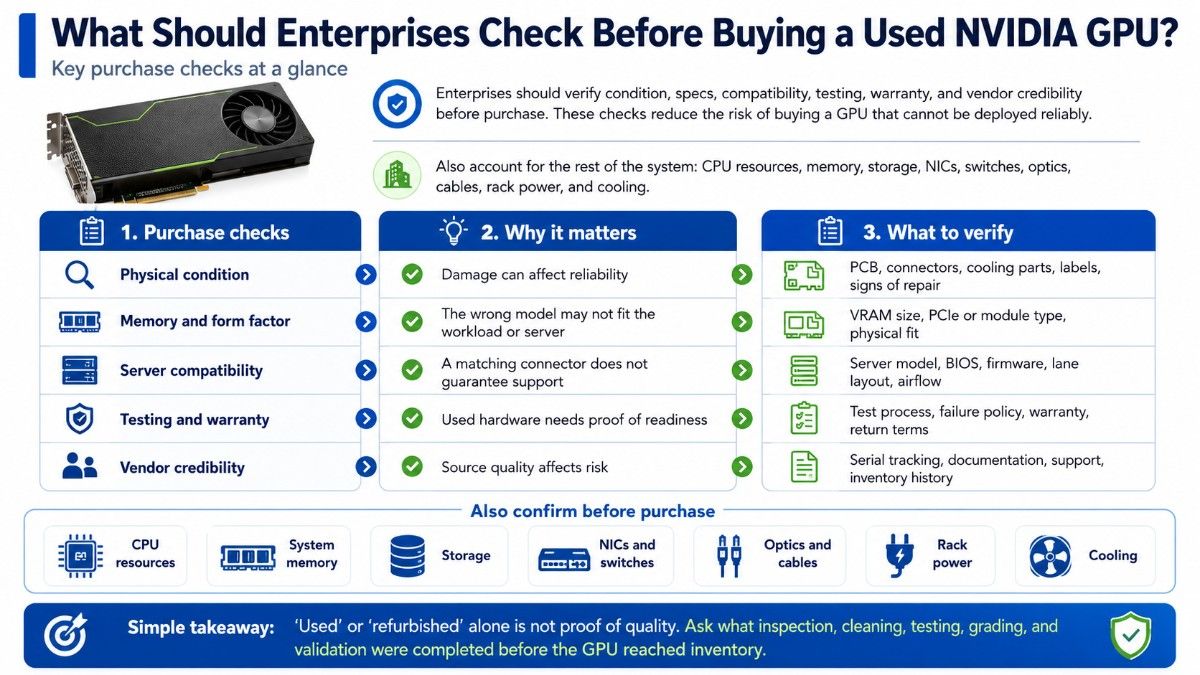
Enterprises should check condition, memory size, form factor, server compatibility, power and cooling, testing history, firmware and driver support, warranty terms, and vendor credibility before purchase. These checks reduce the risk of buying a GPU that cannot be deployed reliably.
A used GPU purchase should also account for CPU resources, system memory, storage, NICs, switches, optics, cables, rack power, and cooling.
| Purchase check | Why it matters | What to verify |
| Physical condition | Damage can affect reliability | PCB, connectors, cooling parts, labels, signs of repair |
| Memory and form factor | The wrong model may not fit the workload or server | VRAM size, PCIe or module type, physical fit |
| Server compatibility | A matching connector does not guarantee support | Server model, BIOS, firmware, lane layout, airflow |
| Testing and warranty | Used hardware needs proof of readiness | Test process, failure policy, warranty, return terms |
| Vendor credibility | Source quality affects risk | Serial tracking, documentation, support, inventory history |
The terms “used” and “refurbished” should not be treated as proof of quality by themselves. Buyers need to know what inspection, cleaning, testing, grading, and validation took place before the hardware reached inventory.
Enterprise teams should understand the supplier’s refurbished testing process before a large order. A clear process makes it easier to judge condition and expected reliability.
Which Used NVIDIA GPUs Make Sense for Enterprise Workloads?
The right used NVIDIA GPU depends on workload, memory needs, server generation, power limits, and project cost. V100, A100, T4, P40, RTX or Quadro cards, and DGX or HGX systems serve different needs.
Compare each GPU against its target environment. A100 can suit demanding AI workloads, T4 can fit inference or VDI, while RTX-class cards can make more sense for workstation visualization.
| GPU option | Common enterprise fit | Main buying question |
| V100 | Mature AI, HPC, research clusters | Does the workload still justify an older platform? |
| A100 | AI training, inference, HPC, analytics | Do memory and compute needs justify A100-class hardware? |
| T4 | Inference, VDI, transcoding, lower-power servers | Is low power more important than peak performance? |
| P40 | Legacy inference, labs, budget acceleration | Does software support still match the workload? |
| RTX / Quadro | CAD, rendering, simulation, AI development | Is this mainly a workstation workload? |
| DGX / HGX | Dense multi-GPU AI infrastructure | Is the complete system condition verified? |
The A100 40GB PCIe can fit teams that want stronger data center capability without moving to a current high-end platform. Confirm server model, GPU count, airflow, firmware, storage, and networking before purchase.
The Tesla T4 16GB can fit inference, virtualization, or media workloads where power efficiency matters. It works best when the server and software stack already support the card.
A Tesla P40 24GB may fit budget labs or older acceleration workloads. Check software support, driver requirements, server age, and remaining lifecycle closely.
For professional workloads, an RTX A6000 48GB can suit CAD, rendering, visualization, simulation, and AI development. These workloads may need a workstation GPU rather than a data center accelerator.
The RTX workstation review helps frame workstation versus data center use. That choice should follow software, memory, display, and deployment needs.
How Should You Inspect the Condition of a Used NVIDIA GPU?
Condition should be checked before performance claims or price. Enterprises need evidence that the GPU has been handled, stored, tested, and prepared correctly for resale.
Check physical condition and product identity
Confirm the exact model, part number, memory size, form factor, serial information, and visible condition. Labels should match the quoted product, and the seller should explain any replaced parts or repair history.
Look for signs that can raise risk:
- damaged connectors or brackets
- missing labels or unreadable identifiers
- corrosion, heavy dust, or heat damage
- modified cooling parts or unexplained repairs
- wear that does not match the seller’s description
Physical inspection should support, not replace, functional testing.
Verify memory size, form factor, and server fit
Memory size changes what a GPU can handle. Compare V100 32GB, A100 40GB, T4 16GB, P40 24GB, or RTX A6000 48GB against workload size and expected growth.
Form factor is just as important. PCIe cards, SXM modules, workstation cards, and complete DGX or HGX platforms require different chassis designs, power plans, cooling, firmware, and integration.
| Compatibility area | Questions to ask before purchase |
| Server model | Does the exact server support this GPU type and quantity? |
| Physical fit | Are slot width, card length, riser layout, and nearby slots suitable? |
| Power | Can the server and rack supply enough power under load? |
| Cooling | Does the chassis provide the airflow the GPU requires? |
| Platform support | Do BIOS, firmware, drivers, and the operating system support it? |
A physical PCIe slot does not prove compatibility. Teams planning a broader build should treat the accelerator as one part of the system, which is also the focus of Catalyst’s GPU server build guide.
Confirm testing, firmware, and warranty
A used GPU should pass a documented test process. The seller should explain what was checked and how failures are handled.
Testing should cover more than whether a server boots. Enterprises should ask about GPU detection, memory health, load stability, thermals, interfaces, and operation during sustained workloads.
Firmware and driver support also need review. Operating system, CUDA, hypervisor, or application updates can change compatibility.
Warranty terms should be written and specific. Confirm coverage length, replacement or refund process, return window, shipping responsibility, and any limits tied to product condition or delivery region.
How Do Power, Cooling, Storage, and Networking Affect a Used GPU Purchase?
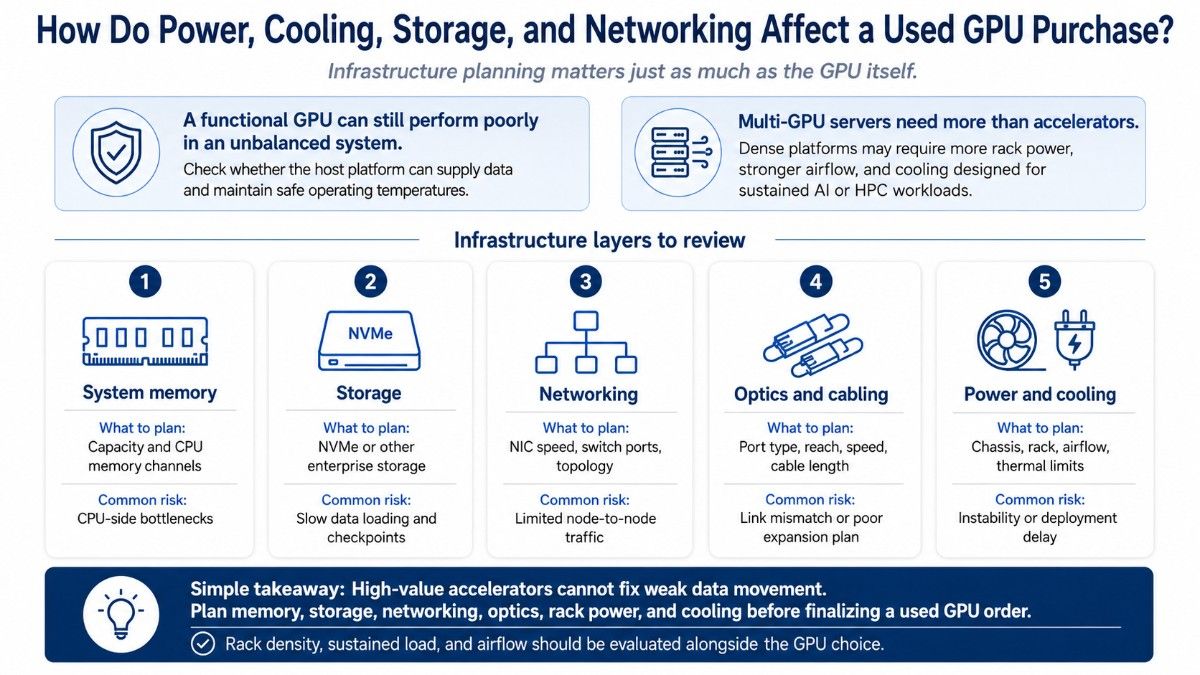
A functional GPU can still perform poorly in an unbalanced system. Check whether the host platform can supply data and maintain safe operating temperatures.
Power and cooling become especially important in multi-GPU servers. Dense platforms may need more rack power, stronger airflow, and cooling designed for sustained AI or HPC workloads.
The same principle applies to storage and networking. AI training can slow down when storage cannot feed data fast enough, while multi-node GPU systems may depend on high-bandwidth networks, suitable switches, optics, and cables.
| Infrastructure layer | What to plan | Common risk |
| System memory | Capacity and CPU memory channels | CPU-side bottlenecks |
| Storage | NVMe or other enterprise storage | Slow data loading and checkpoints |
| Networking | NIC speed, switch ports, topology | Limited node-to-node traffic |
| Optics and cabling | Port type, reach, speed, cable length | Link mismatch or poor expansion plan |
| Power and cooling | Chassis, rack, airflow, thermal limits | Instability or deployment delay |
Teams building AI clusters should consider GPU network planning before finalizing a used GPU order. High-value accelerators cannot fix weak data movement.
Cooling deserves the same attention. Catalyst’s AI cooling guidance explains why rack density, sustained load, and airflow need to be planned with the GPU choice.
What Should Enterprises Check When Buying Used DGX or HGX Systems?
Used DGX and HGX systems require a platform-level review, not only a GPU check. Buyers should evaluate the installed accelerators, system memory, storage, NICs, firmware, power supplies, cooling parts, and management health.
A used DGX A100 system can simplify deployment because the GPUs are part of one platform. The key risk shifts to the condition and support history of the full system.
Enterprises should ask whether installed parts match the expected configuration, whether components have been replaced, and whether the system passed full-load testing. Complete platforms can carry more value, but they also create more areas that require verification.
The DGX and HGX guide helps explain why these systems should be evaluated differently from individual PCIe GPUs. The server architecture is part of the buying decision.
How Can You Judge the Credibility of a Used GPU Vendor?
Vendor credibility can matter as much as hardware condition. Enterprise buyers need a supplier that can identify products correctly, explain condition, support compatibility checks, and stand behind the hardware after shipment.
A credible vendor should provide clear answers about:
- testing and grading process
- warranty and return terms
- serial or inventory tracking
- product condition and source history
- compatibility and configuration support
Price alone should not decide the purchase. A low quote becomes costly if the GPU is untested, incompatible, unsupported, or delays deployment.
The supplier should also understand related infrastructure. A vendor that can help source servers, memory, storage, networking, optics, and cables can reduce the risk of buying a GPU that does not fit the final build.
When Is Buying a Used NVIDIA GPU a Good Enterprise Decision?
Used NVIDIA GPUs make sense when the workload is known, the platform supports the hardware, and the savings justify the remaining lifecycle. They can fit lab expansion, mature AI, HPC, VDI, rendering, and budget-sensitive infrastructure.
Used hardware may be the wrong choice when the project requires the newest architecture, a long standardized lifecycle, strict manufacturer support, or features that older GPUs do not provide. A newer platform may lower operational risk even when its purchase cost is higher.
Buyers should focus on total project value rather than GPU price alone. The right choice meets workload, compatibility, support, power, cooling, and deployment needs at an acceptable total cost.
What Information Should Be Included in a Quote-Ready Used GPU Request?

A clear quote request reduces wrong parts and compatibility problems while making alternatives easier to compare.
Include:
- exact GPU model, memory size, and quantity
- preferred server brand, model, or existing platform
- workload, operating system, and software environment
- storage, networking, power, and cooling requirements
- warranty, condition preference, and delivery timeline
For multi-GPU builds, also include GPUs per server and any switch, NIC, optic, DAC, or AOC requirements. A useful quote should describe the planned deployment, not only the accelerator.
This information also helps the supplier compare several paths. The best answer may be the requested GPU, another used model, a refurbished server bundle, or a newer option with a better long-term fit.
Need a Complete Used NVIDIA GPU Configuration?
Catalyst Data Solutions Inc helps organizations source NVIDIA GPUs, GPU servers, storage, networking, and supporting infrastructure across new, refurbished, and hard-to-find inventory. The goal is to match hardware to workload, budget, compatibility, and availability instead of treating the accelerator as a standalone part.
Enterprise buyers can contact Catalyst Data Solution expert team directly to verify GPU availability, server compatibility, warranty needs, or complete bundle requirements. A clear workload and platform description helps narrow the right options.
The Catalyst hardware shop also lists current hardware options for enterprise sourcing. Buyers can compare available GPU, server, and infrastructure categories before requesting a configuration.
A complete request can include the GPU, server, memory, storage, NICs, switches, optics, cables, power, and cooling. That reduces the risk of buying hardware that cannot be deployed as planned.
FAQs
How do I choose an IT infrastructure partner?
Choose based on your actual operating conditions. Review technical fit, security controls, regulatory scope, support coverage, responsibility boundaries, third-party dependencies, audit evidence, change management, and lifecycle requirements.
The strongest provider is the one that can show how its delivery model fits those needs.
What compliance requirements should technology vendors meet?
A vendor should meet the requirements that apply to the work it performs.
First define which systems, data, locations, and processes the vendor will touch. Then map your regulatory, contractual, and internal requirements to that scope.
Avoid asking whether a provider is simply “compliant” without defining the requirement.
What certifications should an IT infrastructure provider have?
There is no universal list.
Relevant certifications may include information security, technical, OEM, government, ITAD, or sector-specific credentials. What matters most is whether the certification is current and whether its scope covers the service you plan to use.
How can I verify an IT vendor’s compliance claims?
Ask for supporting evidence and verify the scope.
Check which entity, system, service, and location the claim covers. Confirm dates, exclusions, assessment details, and any responsibilities that remain with your organization.
A broad claim without a defined scope should not be treated as complete evidence.
What security controls should an IT infrastructure provider have?
Relevant controls often include multifactor authentication, privileged-access management, network segmentation, secure configuration, vulnerability management, patching, logging, backup, recovery, encryption, and incident escalation.
The required controls should match the level of access and risk involved in the engagement.
How do I evaluate an IT vendor’s cybersecurity?
Do not evaluate only whether controls exist. Ask how they operate.