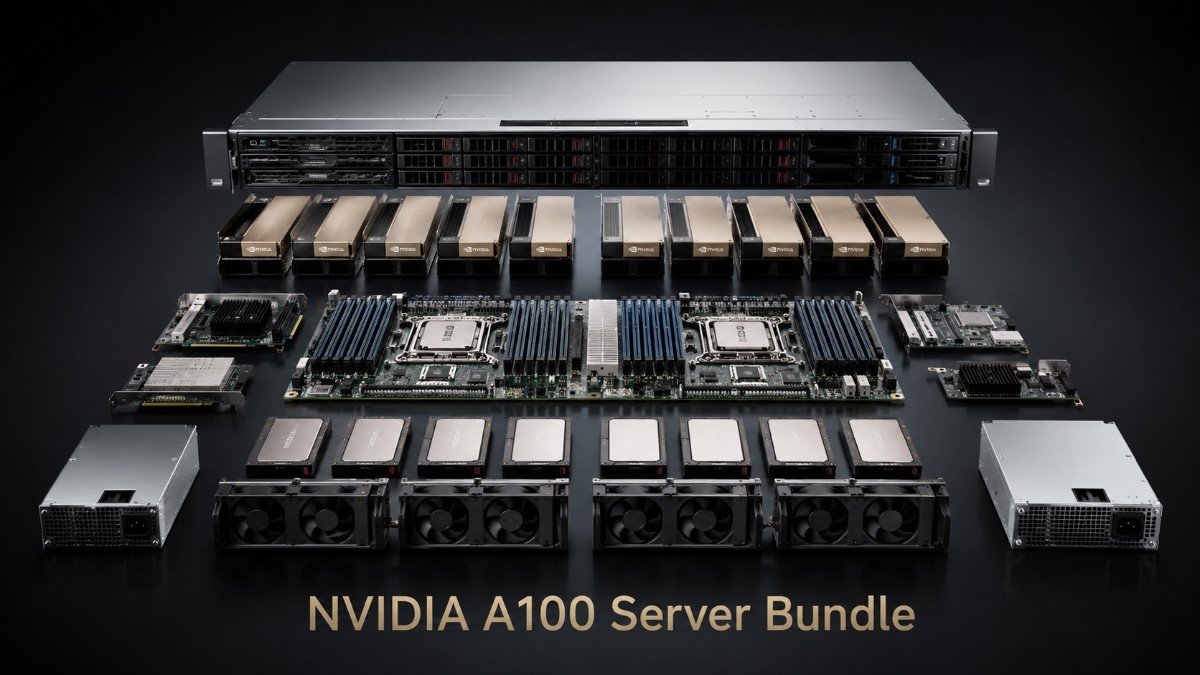
An NVIDIA A100 server bundle combines the GPU with the server, memory, NVMe storage, networking, switches, optics, cables, power, and cooling needed for a complete system.
The A100 still makes sense for many AI and HPC teams that need proven performance without the cost of the newest GPU platform. It should also leave room for growth without forcing buyers to replace working parts too soon.
What Does an NVIDIA A100 Server Bundle Include?
A complete bundle starts with an A100 40GB or A100 80GB GPU. It also needs a server that supports the exact card type, GPU count, power draw, cooling method, firmware, and PCIe layout.
Buyers can pair an A100 40GB PCIe GPU with a one-, two-, or multi-GPU system after checking server support. The card should never be ordered only because the chassis has an open PCIe slot.
The GPU server inventory can help buyers compare chassis types and full-system options. A typical A100 bundle includes:
- A100 40GB or 80GB GPUs
- A compatible GPU server and system memory
- NVMe storage for data, scratch space, and checkpoints
- 25G or 100G networking with switches, optics, and cables
- Rack power, cooling, software, and support planning
The A100 uses NVIDIA Ampere architecture and supports AI, data analytics, and high-performance computing. NVIDIA offers PCIe models with 40GB HBM2 or 80GB HBM2e memory, PCIe Gen4, and Multi-Instance GPU support. oes the NVIDIA A100 Still Make Sense?
The A100 remains a strong choice because many production workloads do not need a newer and more costly GPU platform. It works with mature CUDA software, common AI frameworks, science codes, and server designs that many IT teams already understand.
Teams moving from V100, P100, or CPU-only systems can gain a major step in speed and memory. The A100 workload review provides added context for training, inference, analytics, and HPC use.
A100 also supports mixed use. Multi-Instance GPU can divide one GPU into as many as seven isolated instances, helping teams share a server across inference, testing, development, and smaller research jobs. d You Choose A100 40GB or A100 80GB?
The choice depends on model size, dataset size, batch goals, and expected growth. The 40GB model lowers the entry cost, while the 80GB model offers more memory and bandwidth.
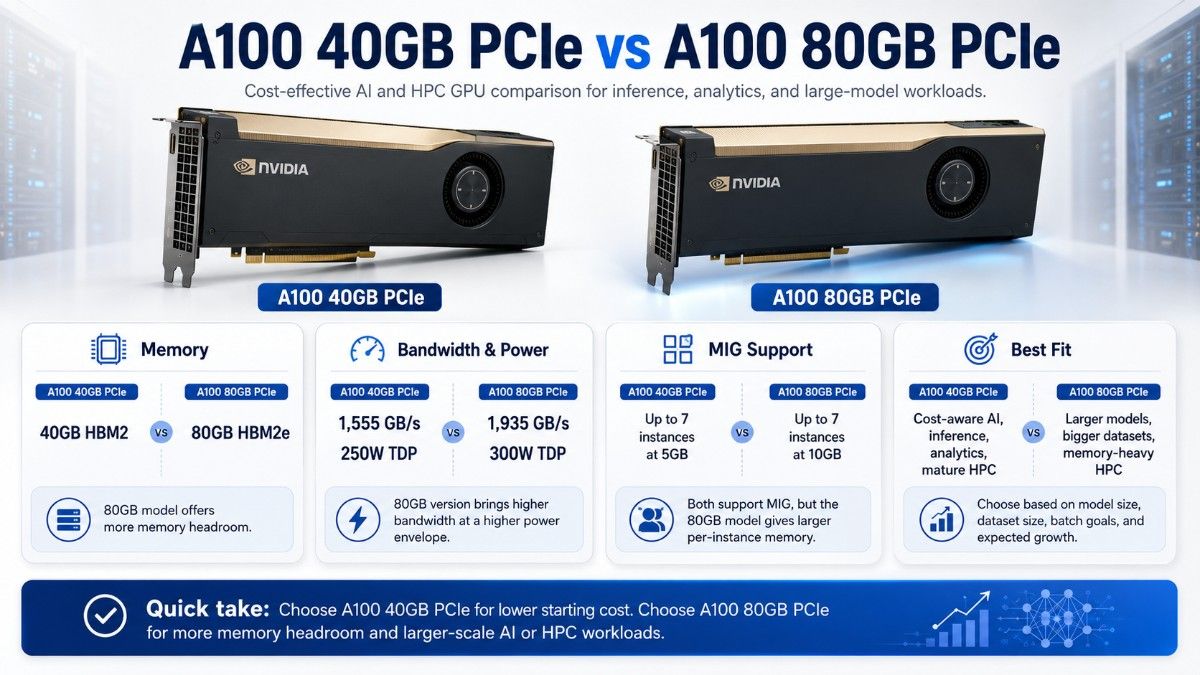
| Buying point | A100 40GB PCIe | A100 80GB PCIe |
| GPU memory | 40GB HBM2 | 80GB HBM2e |
| Memory bandwidth | 1,555 GB/s | 1,935 GB/s |
| Maximum TDP | 250W | 300W |
| MIG support | Up to 7 instances at 5GB | Up to 7 instances at 10GB |
| Best fit | Cost-aware AI, inference, analytics, mature HPC | Larger models, bigger datasets, memory-heavy HPC |
| Main benefit | Lower starting cost | More memory headroom |
These figures come from NVIDIA’s published A100 specifications. Real results still depend on the server, software, data flow, storage, and network. Is A100 40GB the Better Value?
A100 40GB fits models and datasets that stay within its memory limit. It can handle training, inference, simulation, analytics, and shared research while keeping the GPU cost lower.
It is often a good fit for known workloads and teams that plan to scale by adding more nodes. Buyers should still confirm whether 40GB leaves enough room for model growth, larger batches, and software overhead.
When Should Buyers Choose A100 80GB?
A100 80GB gives teams more room for large models, bigger batches, science data, and memory-heavy jobs. It may also reduce the need to split one task across several GPUs.
However, buyers should not pay for 80GB only as a safety margin when monitoring shows that the workload uses far less.
Should the Bundle Use PCIe or SXM?
PCIe cards fit supported GPU servers and often give buyers more choice across OEM and custom systems. SXM modules belong in HGX or DGX-style platforms with dedicated GPU baseboards and stronger GPU-to-GPU links.
PCIe often works well for flexible, budget-aware builds. SXM fits dense multi-GPU jobs where scale-up links matter. The two card types are not interchangeable, so the quote must name the exact format.
What Server Features Must Support the A100?
An open slot does not prove that a server can run an A100. The chassis must support the card size, power, passive airflow, firmware, BIOS, and PCIe topology.
The CPUs need enough PCIe lanes for every GPU, NIC, and storage controller. Host memory must also support data prep, simulation work, shared users, and other CPU-side tasks.
Buyers should verify:
- Exact A100 model, card type, and GPU count
- Slot spacing, risers, CPU lanes, and NIC placement
- Power supplies, GPU cables, fans, and airflow direction
- BIOS, firmware, driver, CUDA, and operating system support
- Rack power, heat load, and service access
The GPU server build guide connects these checks with CPU, memory, storage, network, and power planning.
What Should You Buy With an A100 GPU Server?

An A100 build needs balanced parts. If storage, memory, or networking cannot feed the GPUs, the system may lose time while costly hardware waits for data.
| Bundle part | Why it matters | Buying guidance |
| GPU server | Holds GPUs and controls lanes, power, and airflow | Validate the exact server build |
| System memory | Supports data prep and CPU-side work | Populate memory channels evenly |
| NVMe storage | Loads data and saves checkpoints | Separate boot, active data, and capacity tiers |
| 25G/100G NICs | Move data between nodes and storage | Match speed to workload and growth |
| Network switches | Connect servers and shared systems | Check port speed and oversubscription |
| Optics and cables | Complete every network link | Match speed, connector, reach, and fiber |
| Rack power and cooling | Keep the system stable | Check circuits, PDUs, airflow, and heat limits |
How Much NVMe Storage Does an A100 Server Need?
Storage size depends on datasets, checkpoints, scratch files, logs, and retention rules. Buyers should keep the operating system separate from active training data when the server design allows it.
A compact boot SSD may work for an operating system or appliance role. Its 128GB size is not meant for most AI datasets, so active work usually needs larger drives.
The enterprise SSD options can support higher-capacity data and scratch tiers. Teams should size usable space after RAID, file-system overhead, and data protection.
Storage planning should cover:
- Sustained read speed for training data
- Write speed and endurance for checkpoints
- Scratch space for HPC and temporary files
- Backup or shared storage for key results
A low-cost bundle still needs enough storage speed. Saving money on drives can waste the value of the GPUs if jobs wait for data.
Does an A100 Server Need 25G or 100G Networking?
A single server may use 25G when data movement is moderate and node-to-node traffic is low. Multi-node AI, HPC, and shared NVMe storage often benefit from 100G because they move more data between systems.
| Network choice | Good fit | Main limit | Buying approach |
| 25G Ethernet | Single nodes, inference, development | Less room for cluster growth | Use for controlled traffic and budgets |
| 100G Ethernet | Multi-node AI, HPC, shared storage | Higher switch and optic cost | Use for heavier data and scale-out jobs |
| Management network | Control, monitoring, user access | Not a compute fabric | Keep separate from GPU traffic |
| Faster cluster fabric | Large communication-heavy jobs | More design and support work | Size from tested workload needs |
The AI network planning resource explains how bandwidth, delay, topology, and storage traffic can affect GPU use.
Cisco Catalyst 9300 models fit access or management roles more naturally than a primary 25G or 100G GPU fabric. A Cisco C9300L access switch may support general devices and server management. Cisco presents the 9300 family mainly as campus access switching.
Which Switches, Optics, and Cables Complete the Bundle?
The main data switch must match the NIC speed, port count, and growth plan. Buyers should check oversubscription, airflow direction, power supplies, licenses, support status, and rack fit.
Refurbished switch inventory can lower bundle cost when the chosen model still meets the network design. Each switch should have clear test results, firmware details, and support terms.
Optics and cables must match both ends of every link. A 100G port may need a QSFP optic, DAC, or AOC based on distance and rack layout.
The network cabling options can help complete short rack and row links. Buyers should map every port, connector, speed, and cable length before the order.
Are Refurbished A100 GPUs a Good Option?
Refurbished A100 GPUs can fit labs, universities, pilot projects, mature HPC codes, and budget-sensitive production work. A lower GPU cost may leave more funds for memory, NVMe drives, networking, spare parts, or added nodes.
Buyers should verify the part number, memory size, PCIe or SXM format, test process, firmware, warranty, and server fit. Price alone does not show the true value or risk.
| Buying path | Best for | What to verify | Budget effect |
| New A100 | Standard production and longer plans | OEM support, lead time, server fit | Highest starting cost |
| Refurbished A100 | Labs, expansion, mature workloads | Testing, condition, firmware, warranty | Lower GPU cost |
| Mixed bundle | New core parts with used support gear | Terms and support for each part | Balances cost and risk |
| Newer GPU platform | Maximum speed or newer features | Server changes, power, cooling, software | Higher total project cost |
A clear refurbished testing process helps buyers judge function, condition, and readiness. Teams can also compare refurbished hardware options when cost, stock, or lead time drives the project.
How Can Buyers Build a Budget-Sensitive A100 System?
Start with measured needs. Record model memory, storage speed, network traffic, CPU use, job time, user count, and growth before choosing the GPU count.
A cost-aware build may use refurbished A100 GPUs and switches while keeping new NVMe drives for active data. It may also use a proven prior-generation server if the chassis has the right lanes, power, cooling, and firmware.
The GPU deployment planning process can help teams avoid excess GPU capacity and weak support parts. The goal is a balanced system, not the lowest price for each item.
Power and cooling can change the budget quickly. The AI cooling strategies guide can help teams check rack density, airflow, heat removal, and site limits before hardware arrives.
When Should Buyers Choose Another GPU?
A100 is not ideal for every job. H100 or a newer GPU may suit teams that need the highest training speed, newer features, or a longer future path.
L40S may give better value for inference, rendering, visual work, and mixed graphics use. The L40S workload guide helps separate these jobs from training-heavy A100 work.
V100 or T4 may still fit small labs and light inference. Buyers should compare job time, memory, power, software support, and server stock—not only GPU price.
What Makes an A100 Server Bundle Quote-Ready?
A quote should describe the workload and each major system layer. This reduces the risk of receiving a GPU that does not fit the server or a network that cannot support the job.
Include:
- A100 40GB or 80GB quantity and card type
- Server brand, GPU count, CPUs, and host memory
- NVMe size, endurance, and data protection needs
- 25G or 100G NICs, switches, optics, and cables
- New, refurbished, or mixed condition needs
Also state rack power, cooling limits, delivery date, warranty needs, and growth plans. For HPE systems, HPE AI planning can add useful platform context.
Can Catalyst Build a Complete A100 Server Bundle?
Yes. Catalyst Data Solutions can help source A100 GPUs, GPU servers, memory, NVMe storage, NICs, switches, optics, cables, and other system parts across new, refurbished, and hard-to-find stock.
Catalyst can turn workload, budget, fit, and timing needs into a complete bill of materials. This approach helps buyers plan the whole system instead of treating the GPU as a stand-alone order.
Request a quote for NVIDIA A100 stock, ask Catalyst to verify server fit, or compare new and refurbished options for a cost-effective AI or HPC build.
FAQs
What is an NVIDIA A100 server bundle?
It is a full system that combines A100 GPUs with a supported server, host memory, NVMe storage, network cards, switches, optics, cables, power, and cooling.
Is the NVIDIA A100 still good for AI training?
Yes. A100 remains a strong choice for mature training, fine-tuning, inference, data analysis, and HPC jobs that fit its memory and speed range.
Should I buy A100 40GB or 80GB?
Choose 40GB for known workloads and tighter budgets. Choose 80GB for larger models, larger datasets, bigger batches, or more memory headroom.
Can I install an A100 in any PCIe server?
No. The server must support the card size, power, passive airflow, firmware, BIOS, PCIe lane layout, and planned GPU count.
Does an A100 server need 100G networking?
Not always. A single inference or development server may work well on 25G. Multi-node training, HPC, and shared high-speed storage often gain more from 100G.
Are refurbished A100 GPUs reliable?
They can be a sound option when the seller provides test details, condition records, firmware checks, warranty terms, and server fit support.
What should I buy with an A100 GPU?
Buy a supported GPU server, enough host memory, enterprise NVMe storage, suitable NICs and switches, matched optics and cables, and enough rack power and cooling.