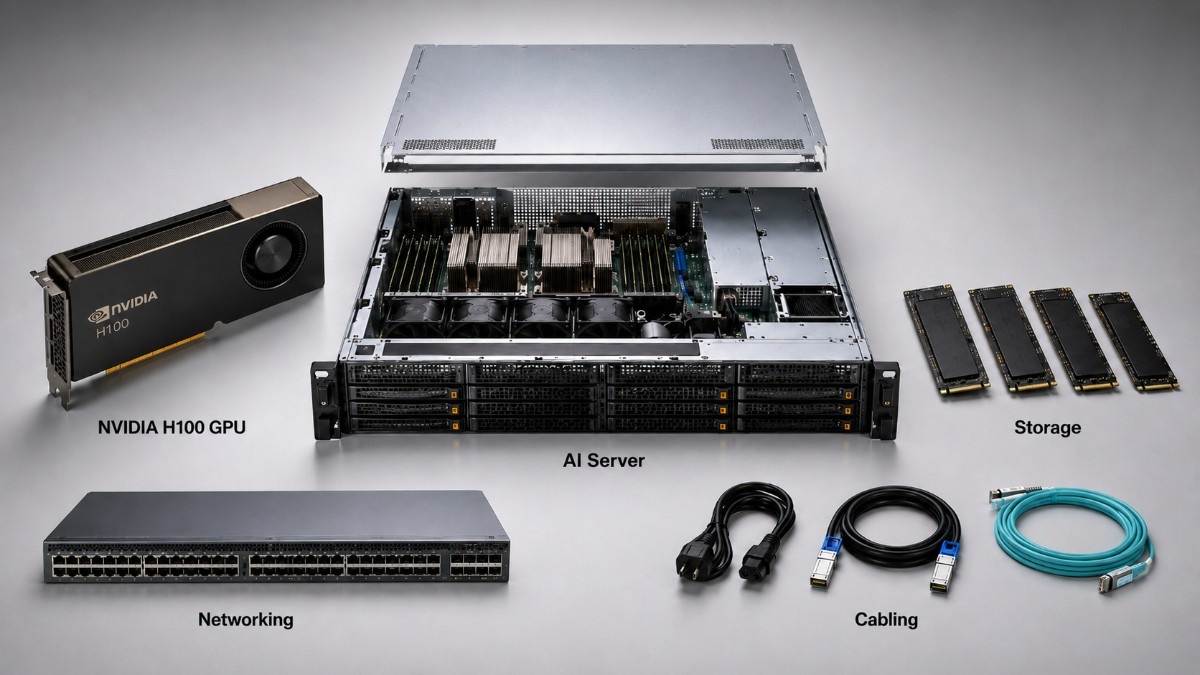
A GPU server is not complete when the GPUs arrive. This NVIDIA GPU server build guide explains why the system also needs qualified CPUs, balanced memory, fast storage, high-speed networking, reliable power, and sufficient cooling to run at full load.
It covers H100, A100, L40S, and V100 platforms and shows what buyers should verify before ordering a server or complete AI system.
Teams planning an NVIDIA GPU deployment should start with the workload, not the accelerator name. Model size, training method, user count, storage traffic, and network scale all shape the final build.
What Does an NVIDIA GPU Server Need?
An NVIDIA GPU server needs more than one or more accelerators. It needs a chassis that supports the GPU form factor, CPUs with enough PCIe lanes, sufficient DDR4 or DDR5 memory, enterprise storage, high-speed NICs, redundant power supplies, and planned airflow.
The server must also match the work it will perform. A single-node inference server has different needs from an eight-GPU training system, even when both run NVIDIA software.
The DGX and HGX platform guide explains why SXM modules belong in qualified baseboard systems rather than standard PCIe slots. PCIe GPUs also require approved slot spacing, power delivery, airflow, firmware, and server support.
A complete build should address four connected areas:
- GPU form factor, count, and server support
- CPU cores, PCIe lanes, and system memory
- Storage speed, capacity, and network bandwidth
- Rack power, airflow, cooling, and service access
Ignoring one area can lower the value of the entire system. A powerful GPU cannot fix slow storage, limited host memory, weak network links, or poor cooling.
Which NVIDIA GPU Fits the Server Workload?
The right GPU depends on model size, data type, graphics needs, deployment scale, and budget. The most expensive accelerator is not always the best choice.
When Does H100 Make Sense?
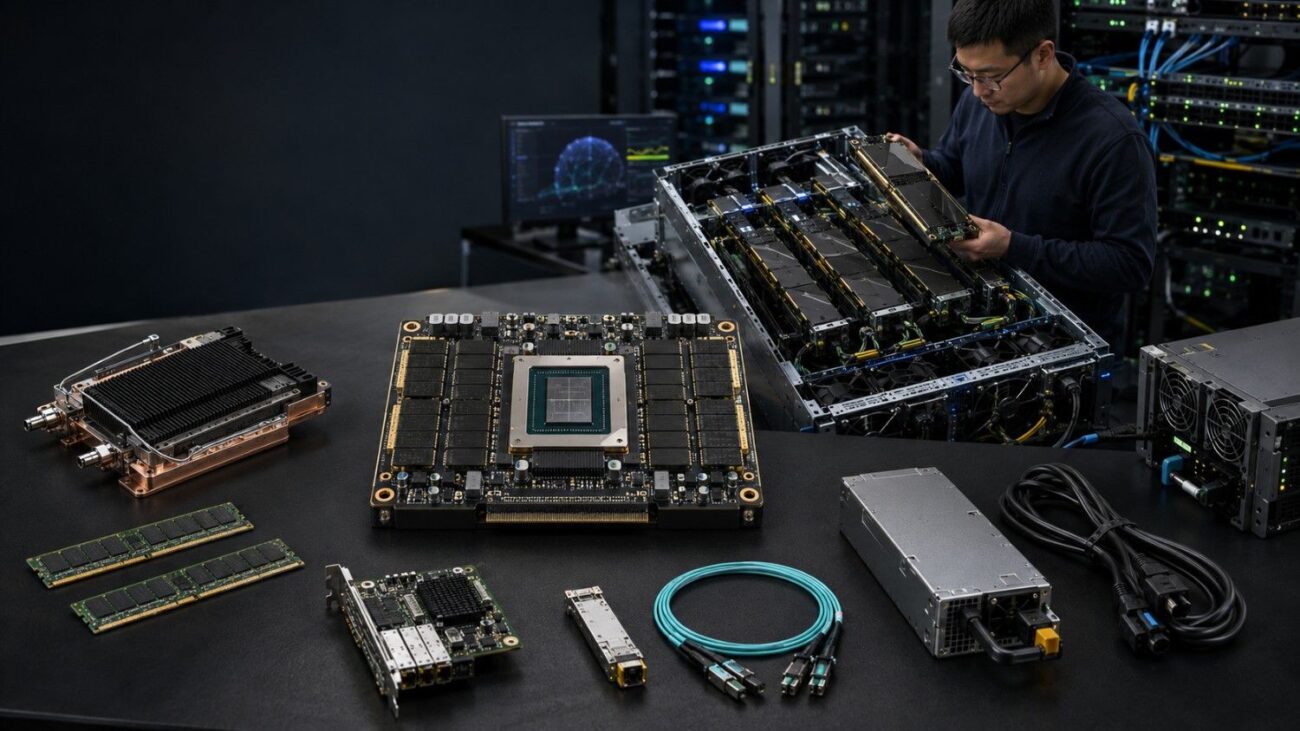
H100 fits demanding AI training, large-model inference, high-performance computing, and dense HGX systems. NVIDIA lists the H100 SXM with 80GB of GPU memory, a configurable power level of up to 700W, and support in four- or eight-GPU HGX platforms.
The H100 SXM5 accelerator therefore needs a purpose-built platform. Buyers must confirm the baseboard, NVLink design, power supplies, airflow, rack circuits, and data center cooling.
An eight-GPU H100 server can provide high compute density. It also puts a large power and heat load into a small rack space, so the facility plan should form part of the buying review.
H100 may be excessive for light inference, basic analytics, small models, or teams that cannot keep the GPUs busy. In those cases, A100 or L40S may produce a better return.
When Is A100 the Better Value?
A100 remains useful for AI training, inference, data analytics, and HPC when the workload does not require Hopper features. NVIDIA offers A100 in PCIe and SXM forms, with 40GB and 80GB memory options across the product family.
The A100 80GB SXM4 can fit mature HGX and DGX environments. Buyers should compare software support, expected job time, energy cost, and refurbished availability before replacing an existing A100 platform.
A100 may provide better total value for known models and budget-sensitive clusters. The decision should compare cost per completed workload, not only peak GPU speed.
A100 also makes sense when an organization already owns compatible servers, storage, networking, and spare parts. Keeping a stable platform may cost less than replacing the full system around the GPU.
Where Do L40S and V100 Fit?
L40S targets inference, rendering, media, visualization, and mixed enterprise workloads. NVIDIA specifies 48GB of memory and maximum power use of 350W, which can make it a more practical fit than H100 for many production services.
The L40S 48GB GPU uses a PCIe form factor. Buyers still need a qualified server with the correct power connectors, airflow, slot spacing, firmware, and driver support.
The L40S workload review provides more context for inference and graphics use. It can help buyers decide when H100-class compute would add cost without enough workload benefit.
V100 remains relevant in research labs, mature HPC systems, and lower-cost refurbished deployments. NVIDIA produced V100 SXM2 models with 16GB or 32GB of HBM2 memory and up to 300W maximum power use.
The Tesla V100 SXM2 uses an older platform design. Buyers must verify the baseboard, firmware, CUDA support, condition, and expected software life.
| GPU family | Strong use cases | Platform effect | Main buying concern |
| H100 | Large AI training, demanding inference, and HPC | Dense HGX or qualified PCIe systems | Power, cooling, networking, and cost |
| A100 | Mature AI, analytics, and HPC | PCIe or SXM platforms | Value compared with newer hardware |
| L40S | Inference, rendering, media, and visualization | Qualified PCIe GPU server | Airflow, slot space, and workload fit |
| V100 | Labs, legacy AI, and mature HPC | Older PCIe or SXM systems | Support, condition, and lifecycle |
How Should CPU and GPU Resources Stay Balanced?
The CPU prepares data, runs operating system tasks, manages storage and networking, and feeds work to the GPUs. An undersized CPU layer can reduce GPU use even when the accelerator has enough capacity.
Buyers should review CPU core count, clock speed, memory channels, PCIe lanes, and NUMA layout. The correct balance depends on data preparation, compression, simulation, and application design.
A balanced server should:
- Give each GPU and NIC enough PCIe bandwidth.
- Keep memory close to the CPU serving each device.
- Reserve CPU capacity for storage and network tasks.
- Leave expansion space for NICs and storage controllers.
Physical layout matters as much as CPU specifications. A server may have enough total PCIe lanes but still route some devices through a poor CPU or switch path.
Multi-socket systems need extra care. GPUs, NICs, and storage controllers should sit near the CPUs that handle their data whenever the server design allows it.
How Much DDR4 or DDR5 Memory Does a GPU Server Need?
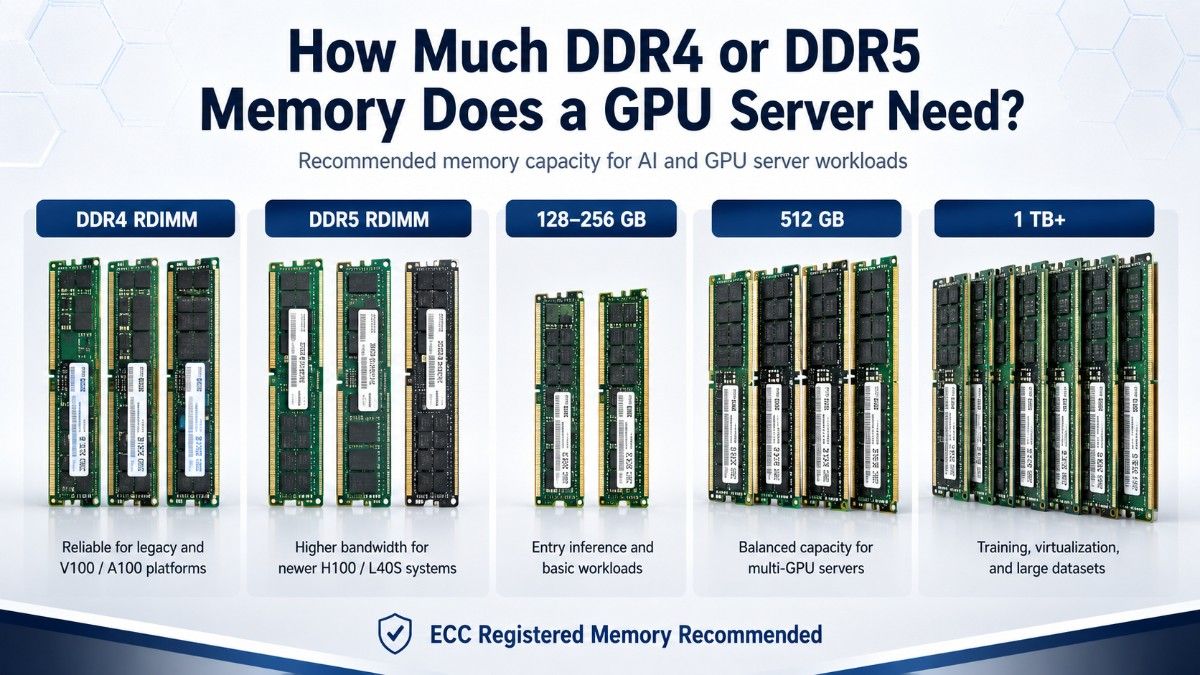
System memory supports data preparation, caching, model loading, virtualization, and CPU-side processing. GPU memory does not replace server RAM because the CPU and operating system still need their own working space.
DDR4 is common in V100 and many A100-era systems. DDR5 appears in newer server generations and can provide more memory bandwidth, but buyers must use modules approved for the exact platform.
The HPE DDR5 memory module is a 32GB DDR5-4800 registered server DIMM. HPE identifies P43328-B21 as an HPE SmartMemory kit, so buyers should match it to supported HPE server models rather than treat it as a universal module.
| Workload pattern | Memory planning approach | Why it matters |
| Inference server | Size for model services, caching, and active users | Prevents host memory pressure during demand spikes |
| Training server | Add capacity for data pipelines and preprocessing | Reduces repeated reads and CPU delays |
| Multi-GPU node | Balance capacity across CPU memory channels | Protects memory bandwidth and NUMA performance |
| Shared GPU system | Add headroom for each VM, container, or user | Supports isolation and stable service |
Do not select memory by total capacity alone. Confirm DIMM type, speed, rank, population rules, CPU support, and whether the chosen layout reduces memory speed.
Filling every available slot may increase capacity but lower the supported memory rate. Buyers should follow the server vendor’s memory population guide before ordering.
Memory should also leave room for growth. Adding capacity later can become difficult when the original build uses small DIMMs in every slot.
Should a GPU Server Use NVMe or SAS Storage?
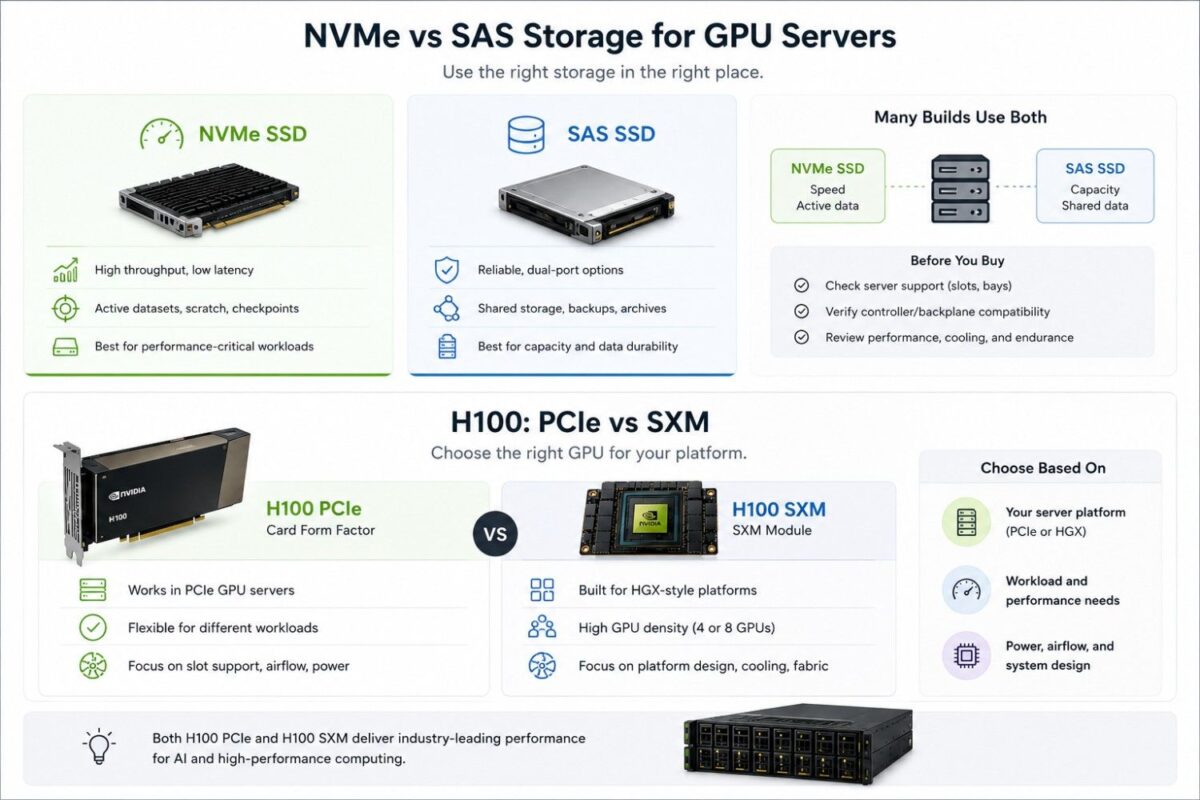
NVMe storage fits active datasets, local scratch space, model checkpoints, and work that needs high throughput or low delay. SAS storage fits enterprise environments that value dual-port access, established controllers, serviceability, and mature shared-storage designs.
Many builds use both types. NVMe may handle active training data, while SAS or networked storage holds durable datasets, archives, and backups.
The Samsung PM1653 SAS SSD provides 3.84TB of enterprise capacity through a 24G SAS interface. Samsung introduced the PM1653 family for enterprise servers, with capacities ranging from 800GB to 30.72TB.
| Storage tier | Best role | Main advantage | Check before buying |
| NVMe SSD | Active datasets, scratch, and checkpoints | High local throughput and low latency | PCIe lanes, drive bays, cooling, and endurance |
| SAS SSD | Durable data and shared arrays | Dual-port options and mature management | Controller, backplane, speed, and multipath support |
| Boot storage | Operating system and management tools | Separates system files from datasets | Mirroring and service access |
| External storage | Shared datasets and long-term capacity | Central access across several nodes | Network bandwidth and active load |
Storage capacity should include working data, checkpoints, temporary files, logs, and expected growth. Buyers should also review endurance, redundancy, drive replacement, and backup policy.
One fast local drive may perform well in a test but create a single point of failure. Production systems often need mirrored boot drives and a planned data protection method.
Storage should match the data pipeline. Adding more GPU compute will not shorten a job when the system spends most of its time waiting for data.
What Networking Does an NVIDIA GPU Server Need?
Networking connects GPU servers to users, shared storage, and other compute nodes. A fast GPU can remain idle when the network cannot move data or synchronization traffic quickly enough.
A small inference server may use 25G. Production AI, large storage flows, and multi-node jobs often require 100G or 200G links, depending on the workload and cluster design.
The guide to AI networking challenges explains how congestion, oversubscription, and poor visibility can affect GPU use. Buyers should size NICs, switches, optics, and cables as one connected path.
Confirm NIC form factor, PCIe width, switch speed, port count, optics, cable length, redundancy, and supported firmware. Every part of the path must support a common speed.
Multi-node training also requires careful east-west traffic planning. Servers exchange model updates and other data during a job, so weak uplinks can slow every node.
Inference systems may need a different balance. Stable latency, service uptime, and links to shared data can matter more than the highest possible node-to-node speed.
What Power and Cooling Capacity Does the Server Require?
GPU power is only one part of total server demand. CPUs, memory, drives, NICs, fans, and power-supply losses also add to the load.
NVIDIA lists H100 SXM at up to 700W configurable TDP, A100 80GB SXM at 400W, L40S at 350W, and V100 SXM2 at up to 300W. These figures show why GPU choice changes the whole server and facility plan.
Complete systems create much larger loads. NVIDIA documents up to 10.2kW maximum input and 38,557 BTU per hour of heat output for DGX H100/H200 systems.
DGX A100 documentation lists up to 6.5kW maximum input and 22,179 BTU per hour of heat output. It also specifies six power supplies and front-to-back airflow requirements.
The AI cooling strategy should cover rack density, supply air, return air, containment, fan capacity, and facility limits. It should also allow for growth before the first server reaches production.
Check these items before deployment:
- Rack circuit capacity, voltage, plugs, PDUs, and redundancy
- Power-supply count, rating, cables, and failover behavior
- Front-to-back airflow and hot-aisle alignment
- Room cooling capacity and expected rack heat load
- Spare fans and approved cooling accessories
Cable routing also affects airflow. NVIDIA warns that poor cable routing can block airflow and create cooling problems in dense systems.
A failed fan can reduce speed or take a system offline. A qualified DGX A100 cooling fan may support maintenance planning, but buyers must verify the exact part number and system.
What Should You Buy With an NVIDIA GPU Server?
A production build often needs server memory, local and shared storage, NICs, switches, optics, cables, rack power, and cooling accessories. The correct bill of materials depends on workload, GPU count, server platform, and deployment scale.
| Component | Why the server needs it | Buying guidance |
| DDR4 or DDR5 memory | Supports CPU-side data and services | Match the platform and populate channels evenly |
| NVMe or SAS storage | Holds datasets, models, and checkpoints | Separate active data from durable capacity |
| NICs and switches | Connect users, storage, and cluster nodes | Match speed across the full network path |
| Power and cooling parts | Keep the system stable under load | Confirm facility limits and approved replacements |
Do not order accessories from a generic list. Verify model numbers, firmware, connectors, cable reach, airflow direction, and vendor support for each component.
The build may also need rails, power cords, PDUs, transceivers, DAC or AOC cables, storage controllers, and spare parts. These smaller items can delay installation when teams leave them out of the first order.
Should Buyers Choose New or Refurbished GPU Server Hardware?
New systems fit standard production fleets, current support contracts, and long lifecycle plans. Refurbished hardware may lower costs for labs, mature workloads, expansions, and replacement systems.
The decision should review condition, testing, warranty, firmware, driver support, licenses, and server compatibility. A documented refurbished testing process gives buyers more confidence than a low price alone.
V100 and A100 often create strong refurbished opportunities because many organizations already understand their workload behavior. H100 and L40S purchases may focus more on availability, current platform support, and the value of newer features.
Refurbished memory, drives, switches, or accessories can also reduce cost. Buyers should use qualified parts and confirm that mixed hardware will not affect support or stability.
What Should Buyers Check Before Ordering?

A quote-ready request should describe the full build rather than list only a GPU model. This helps the supplier confirm that the server, memory, storage, network, power, and cooling parts work together.
Use this buying checklist:
- State the workload, software stack, model size, and user count.
- List GPU type, form factor, quantity, and preferred server brand.
- Define CPU, DDR4 or DDR5 memory, and storage needs.
- Include NIC speed, switch ports, optics, and cable needs.
- Confirm rack power, cooling, condition, warranty, and timeline.
Buyers should also state whether they need individual parts or a complete working bundle. Include any preferred OEM, exact SKU, delivery region, and support needs.
Catalyst Data Solutions can help turn those requirements into a complete bill of materials. Buyers can request a complete quote for GPUs, servers, memory, storage, networking, power accessories, and compatible supporting hardware.
Available products and hard-to-find components can also be sourced through the Catalyst hardware shop.
FAQs
Is the GPU the most important part of a GPU server?
The GPU defines much of the compute capacity, but it cannot perform well without balanced CPUs, memory, storage, networking, power, and cooling. The complete system determines real workload performance.
How much system memory should a GPU server have?
There is no fixed ratio for every workload. Size memory for preprocessing, caching, model services, virtual machines, and concurrent users, then populate the CPU memory channels correctly.
Is DDR5 required for H100 servers?
Not every H100 server uses the same memory design. Buyers should follow the qualified server specification and use approved memory for that exact CPU and system generation.
Is NVMe always better than SAS?
No. NVMe fits high-speed local data and scratch workloads, while SAS can suit durable enterprise storage and shared arrays. Many GPU deployments use both tiers.
What network speed does a multi-GPU server need?
The answer depends on storage traffic and whether the server joins a cluster. Many production systems use 100G or 200G, while smaller inference deployments may use 25G.
Why do GPU servers need special cooling?
High-power GPUs, CPUs, memory, and NICs create concentrated heat. The chassis and data center must remove that heat while maintaining approved airflow and component temperatures.
Can an older V100 server still support AI workloads?
Yes, when the workload, software, and performance target fit the platform. Buyers should verify firmware, CUDA support, condition, power use, and whether A100 or newer hardware offers better total value.