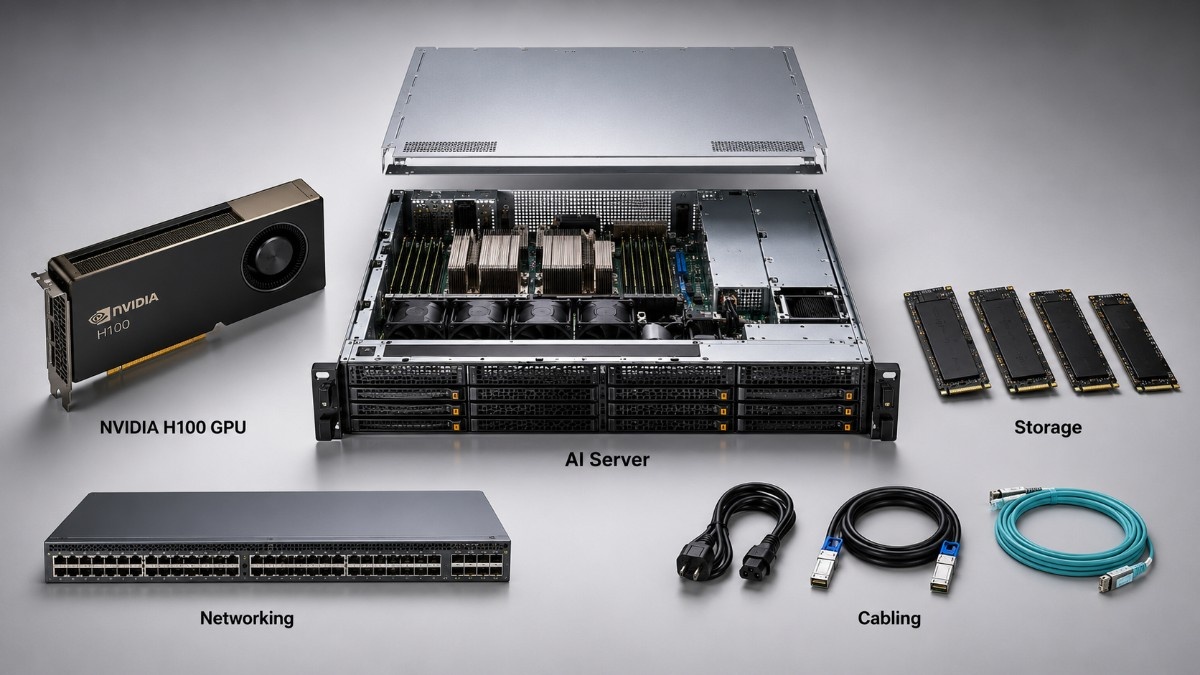
Buying an NVIDIA H100 is not only a GPU decision. A working AI platform also needs a qualified server, enough DDR5 memory, fast NVMe storage, high-speed networking, correct optics or cables, and enough power and cooling for sustained use.
A complete NVIDIA H100 AI server bundle brings these parts together before the order is placed. This lowers fit risk and helps avoid missing parts. It also gives buyers a clearer view of the full system cost.
The bundle may start with an H100 PCIe 80GB or an H100 SXM platform. The right choice depends on workload size and server design. GPU density, power limits, and scale-up needs also matter.
What Is Included in a Complete NVIDIA H100 AI Server Bundle?
A complete bundle includes every major part needed to install, connect, power, and use the GPU. It should also check that every part works together. This includes the server, GPU, memory, storage, NICs, switches, optics, cables, rack power, and cooling.
The bill of materials varies by workload. A single-server inference build may need a simpler network, while an eight-GPU training system may need 200G links and stronger cooling.
| Bundle layer | Typical components | Why it matters |
| GPU compute | H100 PCIe or H100 SXM | Runs AI, HPC, analytics, and model workloads |
| Server platform | Dell, HPE, or dedicated GPU server | Provides slots, airflow, power, CPU lanes, and management |
| Memory and storage | DDR5 ECC memory and NVMe SSDs | Supports data preparation, loading, checkpoints, and local datasets |
| Network fabric | NICs, Arista or Cisco switches, optics, DACs, and AOCs | Moves data between servers, storage, and users |
Plan the full system before ordering. Late storage, network, or power changes can delay setup.
Should Buyers Choose H100 PCIe or H100 SXM?
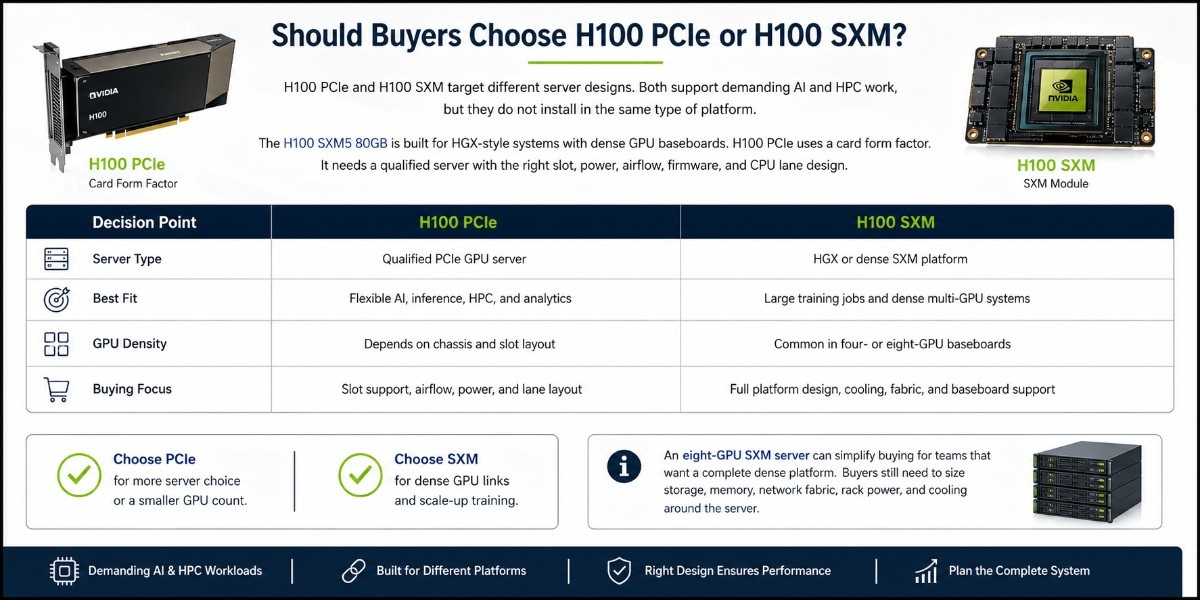
H100 PCIe and H100 SXM target different server designs. Both support demanding AI and HPC work, but they do not install in the same type of platform.
The H100 SXM5 80GB is built for HGX-style systems with dense GPU baseboards. H100 PCIe uses a card form factor. It needs a qualified server with the right slot, power, airflow, firmware, and CPU lane design.
| Decision point | H100 PCIe | H100 SXM |
| Server type | Qualified PCIe GPU server | HGX or dense SXM platform |
| Best fit | Flexible AI, inference, HPC, and analytics | Large training jobs and dense multi-GPU systems |
| GPU density | Depends on chassis and slot layout | Common in four- or eight-GPU baseboards |
| Buying focus | Slot support, airflow, power, and lane layout | Full platform design, cooling, fabric, and baseboard support |
Choose PCIe for more server choice or a smaller GPU count. Choose SXM for dense GPU links and scale-up training.
An eight-GPU SXM server can simplify buying for teams that want a complete dense platform. Buyers still need to size storage, memory, network fabric, rack power, and cooling around the server.
What Server Requirements Must Support NVIDIA H100 GPUs?
The server needs the right power, thermal design, firmware, BIOS support, PCIe topology, CPU lanes, and space for network and storage cards. Card fit alone does not confirm that the server is ready for live use.
Server Platform Checks
Before ordering, confirm the following items with the exact server build:
- Supported H100 model, GPU count, and form factor
- Slot spacing, risers, PCIe generation, and CPU lane layout
- Power supply capacity, GPU power cables, and rack input power
- Fan direction, airflow volume, cooling mode, and thermal limits
- BIOS, firmware, OS, driver, and management support
Dell and HPE systems can be part of an H100 setup, but exact model checks are essential. A Dell AI server may fit dense accelerator projects when its supported accelerator options match the plan.
The listed HPE rack server should not be treated as a confirmed H100 platform without a full build review.
The HPE listing is a configurable rack server, not a dedicated GPU-server listing. Verify GPU support, risers, power, cooling, and accelerator count before including it.
For broader sourcing, the GPU server catalog can support comparison across available chassis and builds. The final choice should match the GPU type, workload, rack limits, and growth plan.
How Much DDR5 Memory Does an H100 Server Need?
System memory supports preprocessing, data loading, orchestration, and caching. Capacity depends on GPU count, dataset size, CPU count, and the number of users or jobs.
A 64GB DDR5 RDIMM can form part of a larger ECC memory build. Match DIMM speed, rank, size, slot rules, and maker support to the exact server and CPU.
The HPE DDR5 Smart DIMM may suit supported HPE builds. It should not be mixed into an unverified system without checking server memory rules and firmware support.
The memory plan should cover GPU and CPU count, data caching, shared users, channel population, supported speed, and future growth.
The server memory category can support part selection after the platform and DIMM rules are known.
What NVMe Storage Does an H100 AI Server Need?
NVMe storage helps feed training data, load model files, write checkpoints, and support local scratch space. A fast GPU can sit idle when the storage path cannot deliver data at the required rate.
Match storage to workload behavior. Training needs strong checkpoint writes, while inference needs fast model loading and reliable reads.
| Storage role | Main need | Practical buying point |
| Boot and system | Reliability and simple service | Keep OS storage separate where possible |
| Local dataset | High read throughput and capacity | Match drive count and RAID design to the workload |
| Checkpoint or scratch | High write speed and endurance | Use enterprise NVMe for sustained activity |
| Shared data | Network or storage fabric speed | Confirm that the network can carry the storage load |
A small PCIe NVMe SSD may fit boot, utility, or light service roles, but it should not represent the main data tier for a large H100 workload. Training and analytics projects often need larger enterprise drives, more endurance, and several SSDs working together.
The SSD and NVMe range can support a broader storage plan. Buyers should confirm interface type, drive bays, backplane support, RAID or software storage design, endurance, capacity, and replacement strategy.
What Networking Does an H100 AI Server Bundle Need?
The network carries datasets, checkpoints, model traffic, shared storage, and east-west links between GPU systems.
Many H100 setups use 100G or 200G Ethernet. The right speed depends on node count, storage design, and training method. Future cluster growth also matters.
Switch and Fabric Choices
Select the switch after confirming server ports, NIC speeds, uplinks, cable reach, redundancy, and growth.
An Arista 100G switch can support high-density GPU server links. The DCS-7050SX3 family may suit mixed-speed access and uplink needs.
A Cisco Nexus 9300 can combine server-facing ports with high-speed uplinks. The EX model is another option when port layout and software needs align.
Do not choose a switch by port speed alone. Check airflow, buffers, breakout modes, optic support, software licenses, support life, and leaf-spine design.
Which 100G or 200G Optics and Cables Are Required?
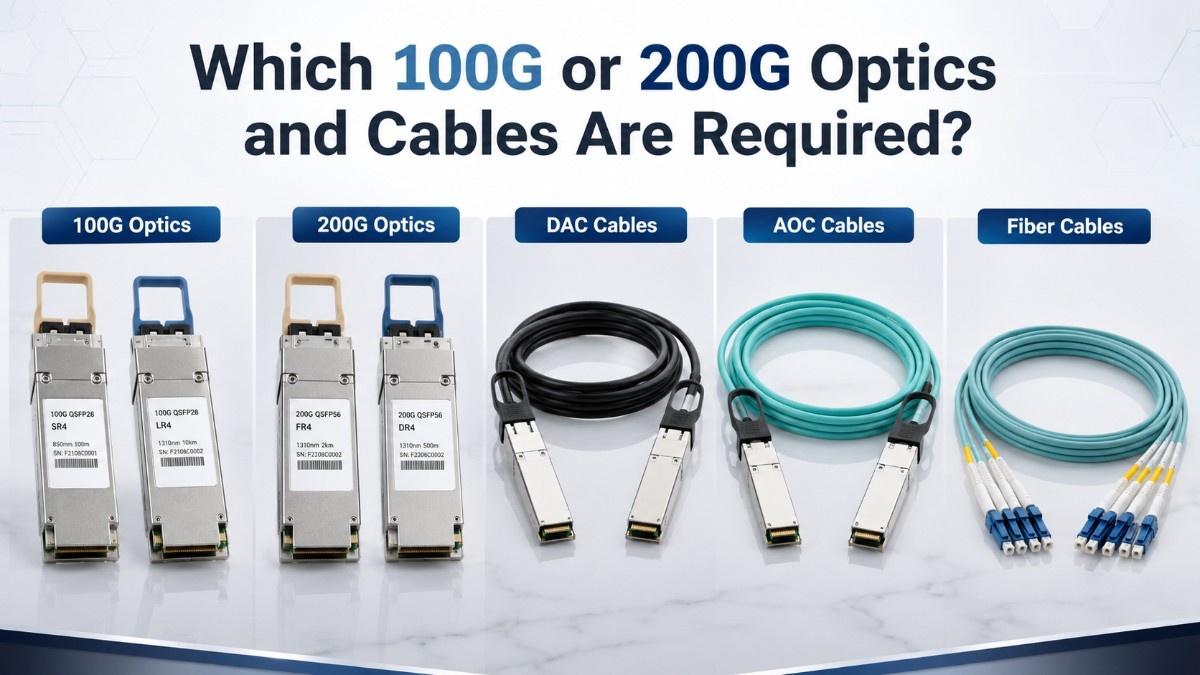
Optics and cables complete the path between the server NIC and switch. Speed, connector, fiber type, reach, and breakout format must match.
Use optics when the link needs fiber, longer reach, or fixed cabling. DAC cables often fit short in-rack copper links, while AOC cables can support longer lightweight links without separate transceivers.
| Link option | Best use | What to confirm |
| QSFP optics | Fiber links across racks or rows | Speed, wavelength, fiber type, reach, and vendor support |
| DAC cable | Short in-rack links | Length, gauge, port type, and supported speed |
| AOC cable | Medium short-reach links | Connector type, length, bend radius, and compatibility |
| MPO/MTP fiber | High-density multimode paths | Polarity, fiber count, connector type, and transceiver match |
An Arista 100G SR4 optic supports short-reach multimode designs when the switch, NIC, fiber, and connector plan align.
A Cisco 100G LR4 optic targets longer single-mode links.
The optical transceiver range supports other reach and speed needs.
The network cable range can cover short DAC or AOC links. OM4 trunks can support fixed multimode paths.
Map each port before ordering, including NIC, switch port, speed, connector, length, optic, breakout, and spare quantity.
How Should Buyers Plan Power and Cooling?
H100 systems can place heavy demands on rack power and cooling. CPUs, memory, drives, NICs, fans, and power supplies add to the GPU load.
Buyers should review both steady use and peak demand. A dense eight-GPU system may require a different rack, power feed, cooling method, and room layout than a one- or two-GPU PCIe server.
Power and Thermal Planning
A practical review should cover:
- Server input voltage, power supply size, and redundancy mode
- Rack power density, PDU capacity, and circuit headroom
- Front-to-back airflow and hot-aisle containment
- Inlet temperature, fan demand, and room cooling capacity
- Growth space for added servers, switches, and storage
Cooling problems can reduce speed, increase fan noise, or cause system shutdowns. The AI cooling strategies guide provides added context for dense data center planning.
Power and cooling should be approved before the server ships. This prevents a common problem where the hardware arrives before the rack, PDU, electrical feed, or cooling system can support it.
What Compatibility Checklist Should Buyers Use Before Ordering?

A complete fit review reduces the risk of wrong parts, blocked slots, unsupported firmware, weak airflow, and missing network components. The checklist should cover the full path from GPU to rack.
- Confirm H100 PCIe or SXM form factor and exact part number.
- Validate the server model, GPU count, risers, lanes, BIOS, and firmware.
- Match DDR5 DIMMs, NVMe drives, NICs, and storage controllers to the server.
- Match switch ports, optics, DACs, AOCs, fiber type, and cable lengths.
- Approve rack space, power, cooling, warranty, testing, and delivery timing.
Also document the workload, model size, users, storage need, network traffic, and growth plan.
The GPU deployment guide supports the wider system review.
The GPU server planning article adds guidance for server design and part selection.
Should Buyers Consider New or Refurbished H100 Infrastructure?
New hardware is often the best fit for standard production fleets, long-term planning, and projects that need current maker support. Refurbished or hard-to-find parts may help when budget, lead time, or availability matters.
The decision should cover the whole bundle. New and refurbished parts can be mixed when testing, support, and compatibility are clear.
Buyers should verify condition, test results, firmware, warranty, included accessories, support life, and return terms. The refurbished testing process explains how validation supports reliable setup.
The refurbished inventory program can help buyers compare cost and availability across servers, networking, storage, and supporting hardware. Each part should still meet the workload and service-life target.
What Alternatives Should Buyers Compare With H100?
H100 is not required for every AI project. Buyers should compare workload needs, model size, utilization, power, budget, and server fit before choosing the highest-end option.
The NVIDIA A100 remains useful for mature AI and HPC workloads where cost control matters. The A100 buying guide explains where it can still provide strong value.
The L40S may fit inference, rendering, visualization, and mixed enterprise work that does not need H100-class training speed. The L40S workload review covers those use cases in more detail.
A balanced system may offer better value. Some buyers should invest in storage, memory, networking, or more nodes instead of an underused H100.
How Can Buyers Request a Complete H100 Bundle?
A quote-ready request should include the H100 type, GPU quantity, server preference, workload, memory size, storage target, network speed, rack limits, and required delivery date. It should also state whether new, refurbished, or mixed inventory is acceptable.
Catalyst Data Solutions can help source NVIDIA GPUs, GPU servers, DDR5 memory, NVMe storage, Arista or Cisco Nexus switches, optics, DACs, AOCs, and related hardware. The goal is to build a complete system around workload, compatibility, budget, and availability.
Buyers can request only the missing parts or ask for a full NVIDIA H100 AI server bundle. A complete review can confirm the server, storage, network path, optics, cabling, power, cooling, and service-life plan before purchase.
Frequently Asked Questions
What comes in a complete NVIDIA H100 AI server bundle?
A complete bundle can include H100 PCIe or H100 SXM GPUs, a qualified server, DDR5 ECC memory, NVMe storage, high-speed NICs, Arista or Cisco switches, 100G or 200G optics, DAC or AOC cables, and a compatibility check.
Can H100 PCIe work in any server with a PCIe slot?
No. The server must support the GPU size, power, passive cooling, slot spacing, PCIe lanes, firmware, BIOS, driver stack, and target GPU count.
When should buyers choose H100 SXM instead of PCIe?
H100 SXM is usually better for dense HGX platforms, large training jobs, and scale-up systems that need strong GPU-to-GPU links. PCIe is often better when server flexibility and simpler integration matter more.
Does an H100 server need NVMe storage?
Most production AI systems benefit from NVMe storage because it improves model loading, dataset access, checkpoint writes, and scratch speed. The required capacity and endurance depend on the workload.
Are 100G and 200G networks always required?
Not always. A single server may work with less bandwidth, but multi-node training, large datasets, shared storage, and growth plans often justify 100G or 200G links.
Can buyers mix new and refurbished components?
Yes, when every part is tested, compatible, supported, and suitable for the planned lifecycle. Buyers should compare warranty, condition, firmware, lead time, and support terms before mixing inventory.
What information is needed for an H100 bundle quote?
Provide the GPU type and quantity, server preference, workload, memory, storage, network speed, rack power, cooling limits, warranty needs, condition preference, and delivery timeline.