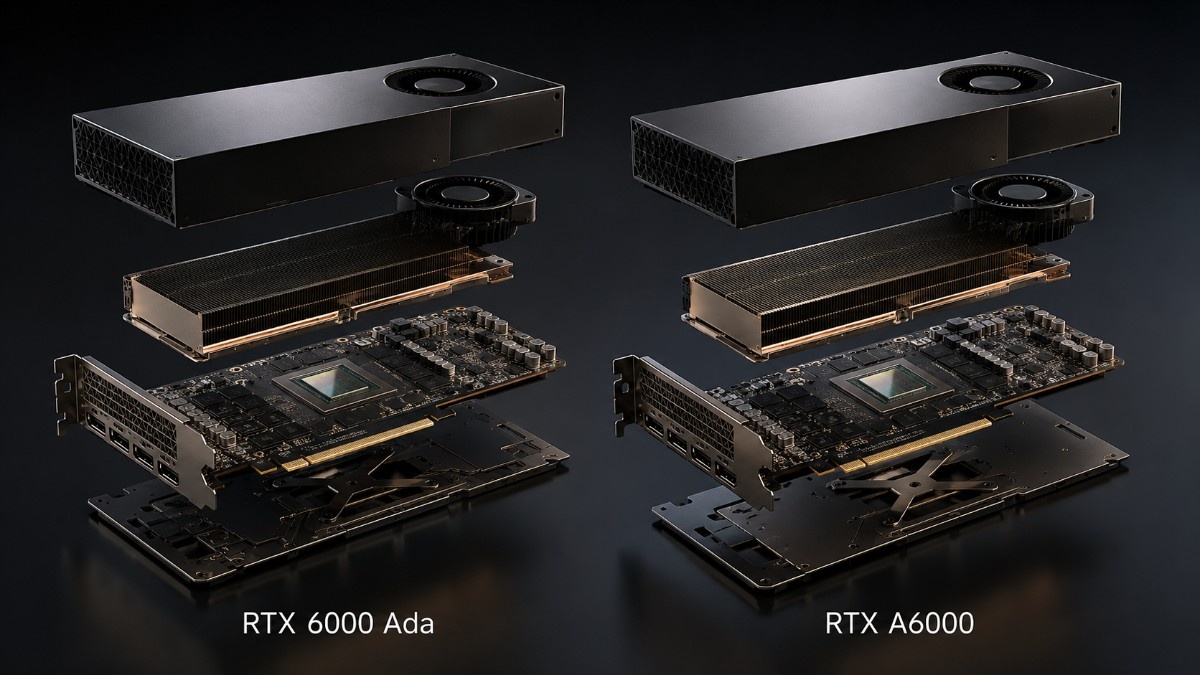
Choosing between the NVIDIA RTX 6000 Ada and RTX A6000 is not only a GPU decision. Buyers also need to check workstation power, airflow, CPU balance, system memory, storage speed, software support, and future upgrade plans.
The RTX 6000 Ada 48GB is the newer choice for advanced rendering, CAD, simulation, and local AI. It also offers more speed in many modern apps, while the RTX A6000 48GB still makes sense when price, NVLink, or current workstation support matters.
What Is the Main Difference Between RTX 6000 Ada and RTX A6000?
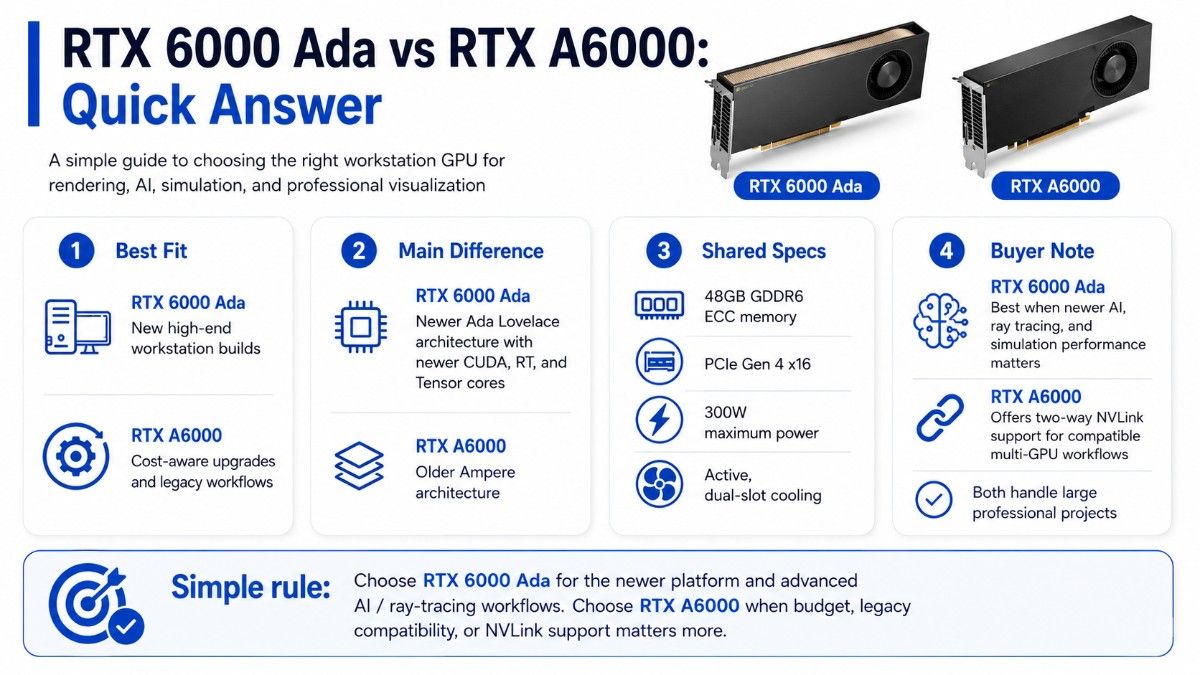
The main difference is architecture. RTX 6000 Ada uses NVIDIA Ada Lovelace architecture, while RTX A6000 uses the older Ampere architecture. Both provide 48GB of ECC GDDR6 memory, a PCIe Gen 4 x16 interface, active cooling, a dual-slot design, and a 300W maximum power rating.
RTX 6000 Ada adds newer CUDA, RT, and Tensor Core generations. This helps with ray-traced rendering, AI graphics, simulation, and local AI work. RTX A6000 offers lower-cost access to 48GB VRAM and supports two-way NVLink for compatible multi-GPU workflows.
| Feature | RTX 6000 Ada | RTX A6000 | Buyer impact |
| Architecture | Ada Lovelace | Ampere | Ada is the newer platform |
| GPU memory | 48GB GDDR6 ECC | 48GB GDDR6 ECC | Both handle large professional projects |
| Maximum power | 300W | 300W | Similar PSU planning |
| Interface | PCIe Gen 4 x16 | PCIe Gen 4 x16 | Fits modern full-size workstations |
| Cooling and size | Active, dual-slot | Active, dual-slot | Chassis airflow still matters |
| NVLink | Not listed for this model | Two-way NVLink support | A6000 may suit supported multi-GPU memory workflows |
| Best general fit | New high-end workstation builds | Cost-aware upgrades and legacy workflows | Match the GPU to software and budget |
NVIDIA lists NVLink support for RTX A6000 but does not list it in the RTX 6000 Ada specifications. Buyers who depend on a multi-GPU workflow should confirm application and driver support before placing an order.
Which GPU Is Better for Rendering, CAD, and AI Development?
The best choice depends on how the workstation earns its value. A rendering artist may focus on ray tracing and scene complexity, while an engineer may value stable CAD performance. An AI developer may care most about Tensor performance, VRAM, storage throughput, and software support.
Which GPU Is Better for Rendering?
RTX 6000 Ada is the stronger choice for most modern GPU rendering workflows. Its third-generation RT Cores and newer Ada architecture improve the foundation for ray tracing, denoising, viewport work, and photorealistic output.
This matters in architecture, media, product design, animation, and virtual production. Large textures and detailed scenes can use the 48GB frame buffer, while faster ray tracing can cut wait time for previews and final frames.
RTX A6000 still performs well in established rendering pipelines. It suits studios that already use Ampere workstations and need 48GB VRAM, while tested units may also lower the total cost. Its second-generation RT Cores still support professional ray-traced design and content workflows.
For mixed rendering and inference needs, some teams may also compare an L40S inference option when a server-based platform makes more sense than a desk-side workstation.
Which GPU Is Better for CAD and Engineering?
Both GPUs can support demanding CAD, CAE, 3D design, and engineering visualization. RTX 6000 Ada offers the better path for new workstations because it combines newer graphics hardware with the same 48GB VRAM class and 300W power level.
CAD speed still depends on the app, model size, displays, CPU speed, and driver. A faster GPU cannot fix a CPU-bound task, low system memory, or slow storage.
RTX A6000 remains a sound choice for teams with certified Ampere-era workstations. It may offer better value when the current workflow already runs well and users do not need the newer Ada feature set.
Teams planning larger AI, simulation, or shared compute projects should treat GPU deployment planning as part of the workstation decision, not as a later task.
Which GPU Is Better for AI Development?
RTX 6000 Ada is usually the better single-GPU choice for local AI development. NVIDIA positions it for AI training, inference, and data science. Its fourth-generation Tensor Cores support newer AI work than the third-generation cores in RTX A6000.
Both cards provide 48GB of ECC memory, which can support larger models, datasets, and batch sizes than lower-memory cards. Actual capacity depends on precision, framework overhead, context length, and other VRAM use.
RTX A6000 has one special advantage: a supported two-GPU NVLink setup can scale memory for compatible apps. Buyers must confirm support before treating two cards as one 96GB pool. NVIDIA states that RTX A6000 memory can scale to 96GB through NVLink.
For workloads that belong in a data center rather than under a desk, an A100 AI platform may provide a better enterprise path for sustained training, HPC, and shared access.
How Much VRAM Do Professional Workloads Need?
Both compared GPUs include 48GB of ECC GDDR6 memory. That is a major reason they remain attractive for professional workstations. It gives users room for complex scenes, large assemblies, high-resolution assets, simulation data, and local AI models.
More VRAM does not always mean faster performance. It mainly decides whether the workload fits on the GPU. Without enough VRAM, users may lower scene detail or batch size. Data may also spill into slower system memory.
| Workload | Typical VRAM pressure | Buying guidance |
| Standard CAD and design | Low to moderate | 48GB offers strong headroom |
| Complex rendering scenes | Moderate to high | Choose based on scene size and renderer |
| Engineering simulation | Moderate to very high | Confirm solver and dataset needs |
| Local AI inference | Varies by model and precision | Estimate model, cache, and framework use |
| AI fine-tuning | High | Check batch size and precision before buying |
| Multi-app workflows | High and unpredictable | Reserve headroom for several tools |
A buyer should review real project files before ordering. Usage data from current systems often gives a better answer than a generic memory rule.
Does RTX 6000 Ada Fit the Same Workstations as RTX A6000?
The two cards have similar basic requirements. Both are full-height, dual-slot PCIe Gen 4 x16 GPUs with active cooling. Each has a 300W maximum power rating, which can make RTX 6000 Ada a practical A6000 replacement in many full-size workstations.
Physical fit does not guarantee full compatibility. The workstation must support the card’s power connection, BIOS, airflow path, driver, slot location, and power supply. Nearby expansion cards must not block cooling.
Buyers should verify four items before an upgrade:
- The exact workstation model and supported GPU list
- Chassis clearance, slot spacing, and airflow
- Power supply capacity and correct GPU cable
- BIOS, operating system, driver, and application support
A balanced build also needs enough CPU power, system RAM, and NVMe storage. Detailed GPU system build guidance can help teams review the wider platform, even when the final system is a workstation rather than a server.
What Should You Buy With RTX 6000 Ada or RTX A6000?
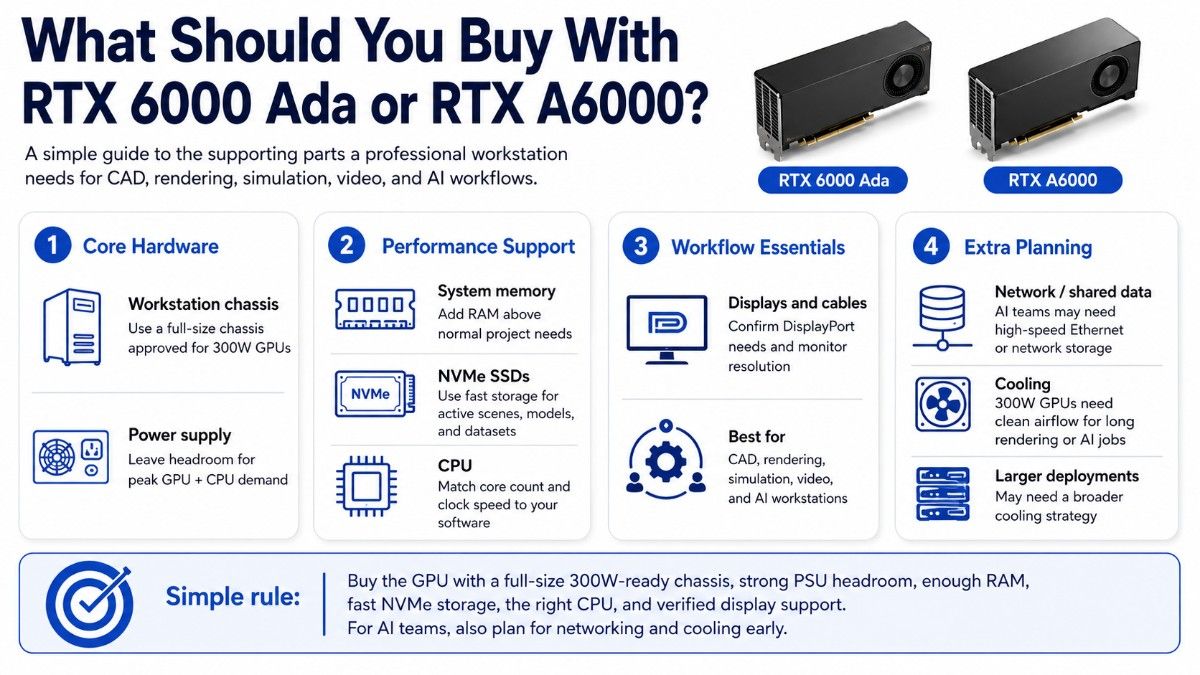
A professional GPU needs a workstation that can keep it supplied with data and operate safely under long workloads. The correct supporting parts depend on whether the system runs CAD, rendering, simulation, video, or AI.
| Component | Why it matters | Practical buying guidance |
| Workstation chassis | Holds the GPU and controls airflow | Use a full-size platform approved for 300W GPUs |
| Power supply | Supports GPU and CPU load | Keep headroom for peak system demand |
| System memory | Holds large assemblies and datasets | Size RAM above normal project use |
| NVMe SSDs | Load scenes, models, and datasets | Separate active projects from archive storage |
| CPU | Handles modeling, preprocessing, and app tasks | Match core count and clock speed to software |
| Displays and cables | Support visual output and color workflows | Confirm DisplayPort needs and monitor resolution |
AI developers may also need fast network storage or high-speed Ethernet for shared data. Team use adds new AI networking challenges. These limits can affect output as much as GPU speed.
Cooling also deserves early review. A 300W GPU can run long rendering or AI jobs for hours, so the chassis needs clean airflow and stable room conditions. Larger deployments may require a broader AI cooling strategy.
When Does RTX A6000 Still Make More Sense?
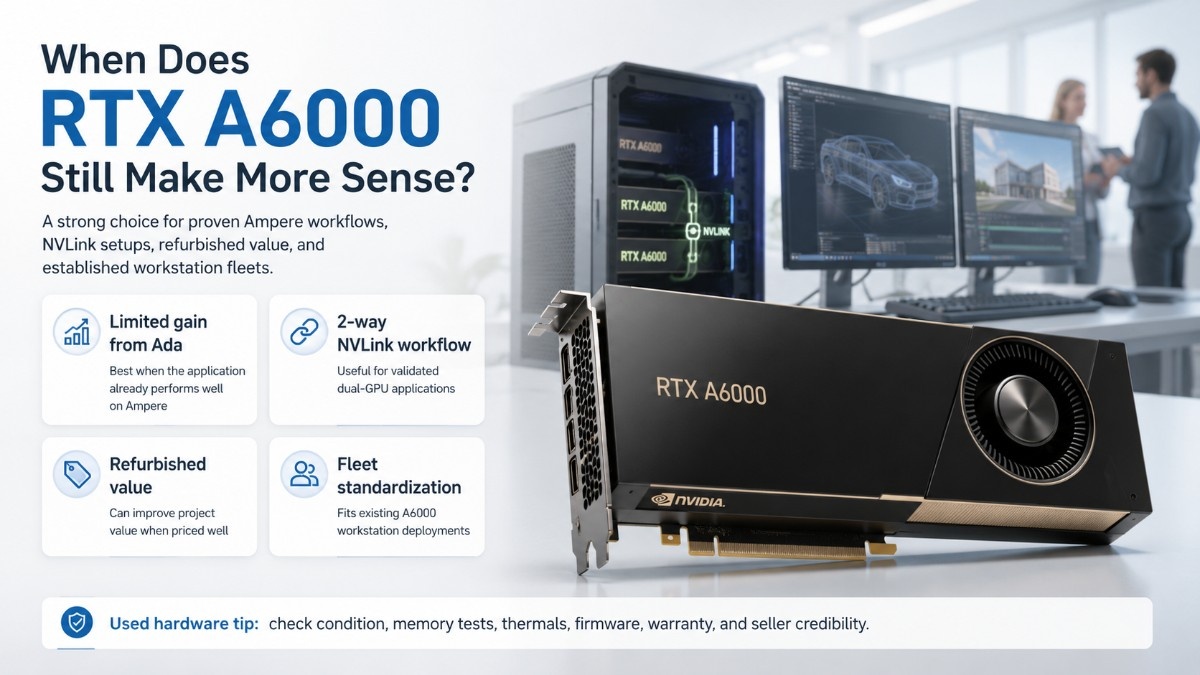
RTX A6000 can be the better buy when the workload already performs well on Ampere and the price gap is meaningful. It also suits organizations that need its listed NVLink support for a validated two-GPU application.
It may also fit an established workstation fleet more easily. Standardizing on a known model can reduce driver testing, spare-part complexity, and user retraining.
RTX A6000 makes sense when:
- The application does not gain much from Ada
- A tested two-GPU NVLink workflow is required
- Refurbished pricing improves project value
- The workstation fleet already uses A6000
Buyers considering used hardware should confirm condition, memory tests, thermal behavior, firmware, warranty, and seller credibility. A documented refurbished testing process is more important than a low price alone.
When Is RTX 6000 Ada Worth the Upgrade?
RTX 6000 Ada is worth the upgrade when it can cut project time. Faster rendering, newer AI features, and a better long-term path can all help.
The strongest case appears when users wait on GPU-bound tasks each day, since shorter render cycles and smoother large-scene work save time. Faster AI tests can add more value than the card price suggests.
| Upgrade question | Choose RTX 6000 Ada when | Keep or buy RTX A6000 when |
| Is the workload GPU-bound? | Newer GPU features can reduce delays | Current performance meets deadlines |
| Is 48GB VRAM enough? | Yes, but more speed is needed | Yes, and speed is already acceptable |
| Is NVLink required? | No | Yes, for a validated workflow |
| Is this a new workstation? | Ada offers the stronger current path | A6000 gives a clear cost advantage |
| Is lifecycle important? | Longer forward path matters | Shorter project life lowers the need |
Organizations retiring older workstations should also plan secure reuse, resale, or recycling. An IT asset disposition plan can protect data and recover value from replaced equipment.
How Does RTX PRO 6000 Blackwell Change the Upgrade Path?
The RTX PRO 6000 Blackwell is the forward-looking option beyond both cards. It provides 96GB of ECC GDDR7 memory, PCIe Gen 5 support, and newer RT and Tensor Cores. The Workstation Edition has a much higher 600W power rating.
RTX PRO 6000 Blackwell Workstation Edition is also larger and needs a system built for its size, power delivery, and double-flow-through cooling. NVIDIA lists a 5.4-inch by 12-inch dual-slot form factor for this version.
Buyers should not assume it is a drop-in upgrade for a 300W A6000 or RTX 6000 Ada workstation. Treat it as part of a new system plan for very large AI models, complex rendering, simulation, and data-heavy work.
Should You Buy New or Refurbished Workstation GPUs?
New GPUs are the safer choice for standardized fleets, current OEM support, predictable warranty coverage, and long lifecycle planning. They also reduce uncertainty for regulated or production-critical environments.
Refurbished GPUs can make sense for cost-aware studios, labs, backup systems, and projects with stable requirements. Buyers can compare refurbished GPU inventory when lead time or budget matters more than owning the newest generation.
Ask for the exact part number, test results, condition, included accessories, warranty, and return terms. The seller should also confirm that the card was tested under load, not only detected by a system.
Which GPU Should You Choose?
Choose RTX 6000 Ada for the stronger mix of rendering, CAD, simulation, and local AI speed. It fits a modern 300W workstation and is the best default when buyers do not need the higher power and system demands of Blackwell.
Choose RTX A6000 when cost, existing platform support, or validated NVLink use matters more than newer architecture. It remains a capable 48GB professional GPU for many established workflows.
Catalyst Data Solutions Inc can help compare condition, supply, workstation fit, memory, storage, and power needs. A quote may cover the GPU alone or a full workstation based on workload, budget, and upgrade plans.
Frequently Asked Questions
Is RTX 6000 Ada better than RTX A6000?
RTX 6000 Ada is better for most buyers who need faster modern rendering, CAD, simulation, and AI work. RTX A6000 may be better when its lower cost or NVLink support matches a validated workflow.
Do RTX 6000 Ada and RTX A6000 have the same VRAM?
Yes. Both include 48GB of ECC GDDR6 memory. Their performance differs because they use different GPU architectures and core generations.
Can RTX 6000 Ada replace RTX A6000 in the same workstation?
Often, but not automatically. Both are dual-slot 300W PCIe Gen 4 cards, yet buyers must confirm the workstation model, power cable, BIOS, airflow, driver, and application support.
Which GPU is better for CAD?
RTX 6000 Ada is the stronger choice for a new high-end CAD workstation. RTX A6000 still works well when the application is stable, the current system is certified, and the budget favors Ampere.
Which GPU is better for local AI development?
RTX 6000 Ada is usually better because it has newer Tensor Cores and stronger AI capability. Both provide 48GB VRAM, so model size and framework requirements still need review.
Should I wait for RTX PRO 6000 Blackwell?
RTX PRO 6000 Blackwell is already the newer-generation option, not a simple 300W replacement. Choose it when 96GB VRAM and top-end performance justify a new 600W-class workstation.
Can I buy RTX A6000 refurbished?
Yes, when the card has verified testing, clear condition details, suitable warranty coverage, and confirmed workstation compatibility. Refurbished hardware should be judged by validation and support, not price alone.
What should I buy with a workstation GPU?
Most professional builds need a compatible chassis, adequate power supply, strong CPU, enough system memory, NVMe storage, correct display cables, and reliable cooling. AI teams may also need fast network and shared storage.