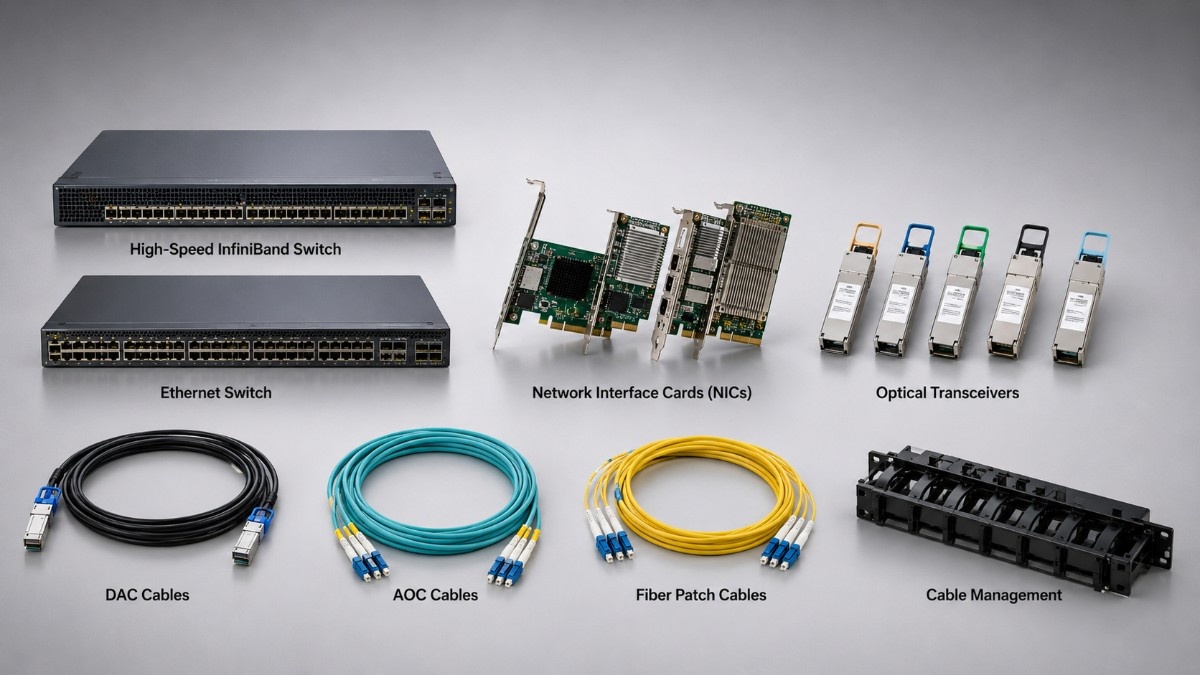
An AI cluster needs more than powerful NVIDIA GPUs. It also needs a network that moves training data, model updates, checkpoints, and storage traffic without leaving expensive accelerators idle.
This AI Cluster Networking Guide explains how switches, NICs, optics, and cables work together in NVIDIA GPU server environments. It also shows when 25G, 100G, or 200G networking makes sense and how buyers can avoid common compatibility mistakes.
A small inference environment may run well on 25G links. Multi-node training often needs 100G or 200G connections and a balanced leaf-spine fabric.
What Does an AI Cluster Network Need to Support?
An AI cluster network must support fast communication between GPU servers, shared storage, management systems, and user-facing services. It should also keep latency stable when many nodes exchange data at the same time.
North-south traffic moves between the cluster and outside users, applications, or data sources. East-west traffic moves between servers, storage systems, and switches inside the data center.
East-west traffic becomes critical during distributed training. GPU nodes exchange gradients, parameters, and synchronization data, while storage systems deliver datasets and receive checkpoints. Oversubscribed uplinks can slow the entire job even when each server contains high-end accelerators.
Teams planning NVIDIA GPU deployments should size the network before the servers arrive. The design should include NIC speed, switch capacity, optics, cable reach, redundancy, and room for expansion.
| Network layer | Main role | Common buying question |
| GPU server NIC | Connects each node to the fabric | Does the server support the adapter, speed, and PCIe bandwidth? |
| Leaf switch | Connects servers within a rack or row | Are there enough 25G, 100G, or 200G access ports? |
| Spine switch | Connects leaf switches | Can the uplinks carry peak east-west traffic? |
| Optics and cables | Complete each physical link | Do speed, connector, fiber type, and reach match? |
Why Is East-West Traffic Important for NVIDIA GPU Servers?
East-west traffic is the internal flow of data between cluster nodes. It matters because distributed AI jobs divide work across several GPUs or servers, and those systems must exchange information throughout training or inference.
The network carries collective communication, storage reads, checkpoint writes, and service traffic. A balanced design checks link speed, uplink ratios, routing, congestion control, and how traffic spreads across equal-cost paths.
A GPU server build plan should connect compute, memory, storage, and networking decisions. For inference clusters, stable latency and service availability may matter more than maximum node-to-node bandwidth.
How Do GPUs Communicate Across an AI Cluster?
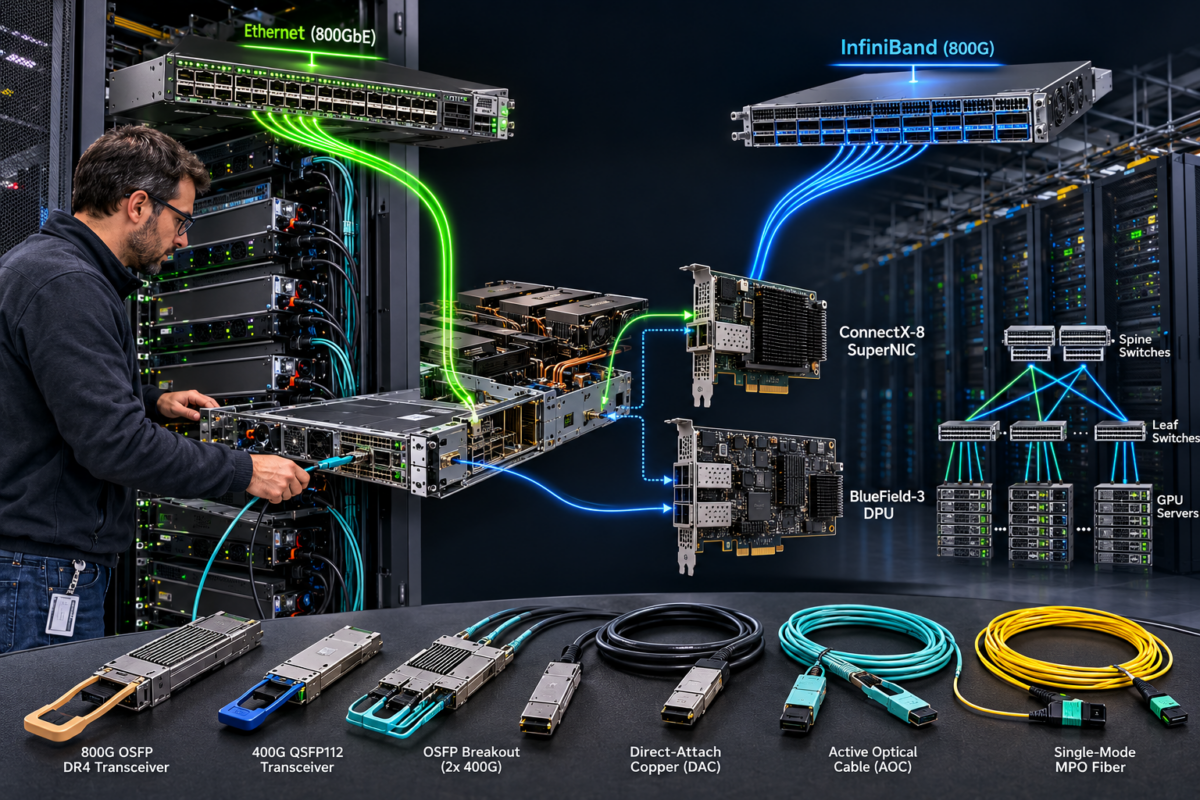
GPUs communicate inside one server and across multiple servers. Inside a qualified platform, PCIe and NVIDIA NVLink can support local GPU communication. Across servers, the network fabric carries data through NICs, switches, optics, and cables.
Multi-node training uses communication libraries that exchange data between processes and GPUs. The network needs enough throughput and low enough latency to stop these exchanges from becoming the main bottleneck.
The NIC also needs a suitable PCIe connection. Buyers should confirm PCIe generation, lane width, CPU attachment, NUMA layout, airflow, firmware, and available space before ordering.
An older node built around an NVIDIA Tesla V100 may not need the same network as a new multi-node H100 environment. However, storage speed and cluster scale can still justify a network upgrade.
Should an AI Cluster Use Ethernet or InfiniBand?
Ethernet is often the practical choice for broad compatibility, familiar operations, and integration with existing data center networks. InfiniBand is often selected for HPC and tightly coupled AI training where low latency and strong RDMA support matter.
Both can support accelerated computing. The choice should follow workload behavior, team skills, software support, scale, and budget. NVIDIA supports both Ethernet and InfiniBand for accelerated networking.
| Decision point | Ethernet | InfiniBand |
| Best fit | Enterprise AI, mixed services, and storage access | HPC and large distributed training |
| Operations | Familiar to many network teams | Often a dedicated high-performance fabric |
| Integration | Fits common IP data center designs | Strong fit for specialized AI and HPC |
| Main planning need | Congestion control, routing, and oversubscription | Fabric management and platform compatibility |
| Buying question | Can the design meet latency and throughput targets? | Does the workload justify a dedicated fabric? |
Ethernet AI designs may use RDMA over Converged Ethernet, or RoCE. It supports efficient data movement but requires careful congestion control and monitoring.
InfiniBand was designed for high-throughput, low-latency computing. Buyers still need to match adapter type, switch generation, cable standard, port speed, and management tools.
Organizations comparing GPU platforms should also review H100 PCIe and SXM. The server platform affects local GPU communication, NIC placement, and the external network design.
What NICs Should NVIDIA GPU Servers Use?
The right NIC should match the server, switch fabric, workload, and target speed. NVIDIA ConnectX and Mellanox adapters include Ethernet and InfiniBand options for high-performance server networking.
A current option is the ConnectX-7 200GbE adapter. NVIDIA documents dual-port ConnectX-7 configurations that support up to 200Gb/s per port, depending on the exact model and mode.
The ConnectX-5 SmartNIC may fit established 100G-class environments or refurbished builds. Buyers should verify the exact port speed, connector, firmware, driver support, PCIe lane width, airflow, and server compatibility.
How Should Buyers Check Server-to-NIC Compatibility?
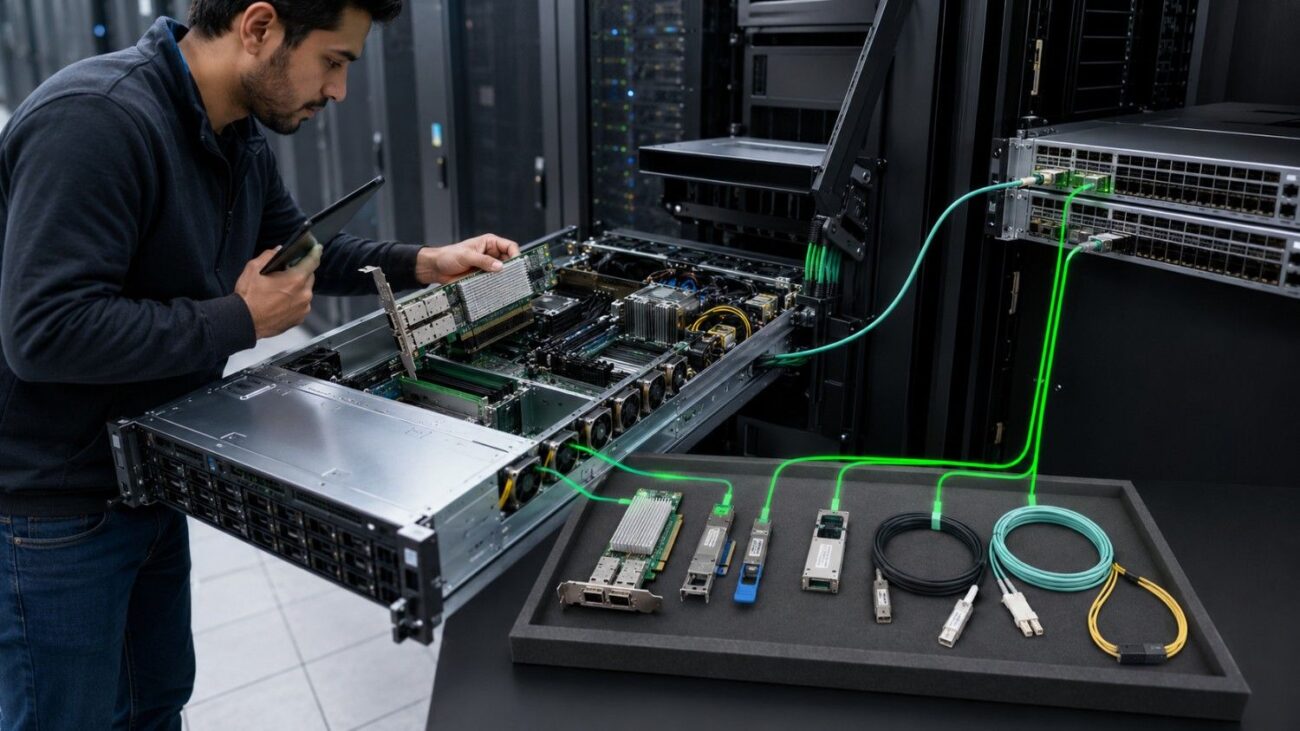
Confirm that the slot provides the required PCIe lanes and power. Also check whether the adapter shares CPU lanes with storage controllers or other expansion cards.
Match the NIC port, switch port, optic, and cable to the same supported speed and form factor. A 200G adapter does not create a 200G link when another part supports only 100G.
Dual-port NICs can connect to separate leaf switches for resilience. They may also separate storage and compute traffic when the wider architecture supports that design.
What Switch Speeds Make Sense for AI Clusters?
The correct switch speed depends on server traffic and total fabric load. Buyers should review port speed, uplink capacity, oversubscription, airflow, power, and supported optics.
| Link speed | Practical role | Typical fit | Main caution |
| 25G | Entry server access or light inference | Smaller clusters and mixed workloads | May limit multi-node training |
| 100G | Common production GPU server link | AI training, inference, HPC, and NVMe storage | Uplinks must scale with active nodes |
| 200G | Higher-bandwidth compute fabric | Larger training clusters | Requires matching NICs, ports, optics, and cables |
| Mixed 25G/100G | 25G access with 100G uplinks | Cost-aware leaf-spine designs | Calculate oversubscription carefully |
The Arista 7050SX3 switch provides dense 25G access with 100G uplinks. Arista positions the 7050X3 family for 25G and 100G leaf-spine networks.
The Arista 7060SX2 platform supports a similar access-and-uplink pattern.
Cisco environments may use a Nexus 93180YC-FX switch with 48 10/25G ports and six 40/100G uplinks.
The Nexus 93180YC-EX can support related data center access roles. Buyers should still verify software, licenses, airflow, optics, and the exact deployment design.
How Does Leaf-Spine Switching Support GPU Clusters?
Leaf-spine switching gives each leaf switch a path to every spine switch. GPU servers connect to leaf switches, while spine switches provide the high-capacity layer between racks or groups of nodes.
This layout supports predictable hop counts and spreads traffic across equal-cost paths. It suits east-west traffic because communication does not depend on one large aggregation point. Arista identifies dense 25G and 100G switching as a common fit for leaf and spine roles.
What Does the Leaf Layer Do?
The leaf layer provides server-facing ports. Buyers should confirm port density, breakout support, uplink count, airflow direction, and whether each GPU server connects to one or two leaf switches.
What Does the Spine Layer Do?
The spine layer carries traffic between leaves. Its capacity should reflect the combined workload, not only the nominal speed of one server link.
A small cluster may use a collapsed design. A larger cluster may need dedicated leaf and spine tiers, redundant paths, and separate management or storage networks. The DGX and HGX guide adds platform context for dense GPU systems.
How Should Buyers Select 25G, 100G, and 200G Optics?
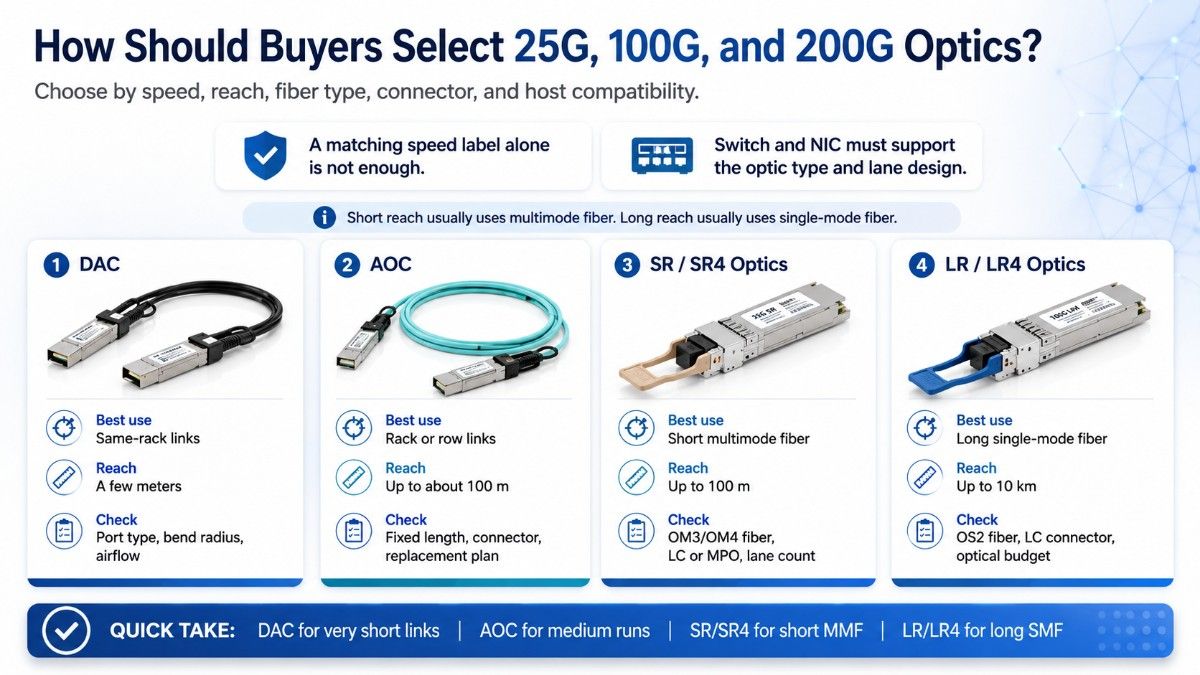
Optics selection starts with speed, reach, fiber type, connector, and host compatibility. A matching speed label alone is not enough.
Short-reach optics often use multimode fiber, while long-reach optics use single-mode fiber. The switch and NIC must support the optic type and lane design.
| Link option | Best use | Typical reach | Buying checks |
| DAC | Short same-rack links | Usually a few meters | Port type, bend radius, and airflow |
| AOC | Longer rack or row links | Several meters to about 100 meters | Fixed length, connector, and replacement plan |
| SR/SR4 optics | Short multimode fiber | Commonly up to 100 meters | OM3/OM4 fiber, LC or MPO, and lane count |
| LR/LR4 optics | Long single-mode fiber | Commonly up to 10 kilometers | OS2 fiber, LC connector, and optical budget |
NVIDIA guidance describes DAC as the lowest-cost short-reach choice, AOC for longer optical runs, SR optics for short multimode links, and LR optics for longer single-mode links.
For 25G links, a Mellanox 25G transceiver may fit short multimode designs.
An Arista 25G SR optic provides another short-reach option when both endpoints support the module.
For 100G, an Arista 100G SR4 module supports short multimode runs.
A Cisco 100G LR4 optic supports links up to 10 km over single-mode fiber.
When Should an AI Cluster Use DAC or AOC Cables?
Use DAC cables for short, cost-sensitive links where copper reach and cable weight are acceptable. Use AOC cables when the link is longer, lighter cabling is useful, or copper signal limits become a concern.
DAC is common inside a rack because it combines the connectors and copper cable into one assembly. Thick cables can affect routing and airflow when many high-speed links fill the rack.
AOC also arrives as a fixed assembly, but it uses optical fiber. It offers longer reach and lower cable weight, although a failed end usually means replacing the full cable.
Pluggable optics with separate fiber offer more flexibility for structured cabling. They simplify transceiver replacement but require clean fiber connectors and careful compatibility checks.
What Compatibility Checks Prevent Networking Mistakes?
A complete compatibility review should map every link from the GPU server to the switch. The plan must identify port speed, connector, optic or cable type, reach, firmware, and supported breakout mode at both ends.
Before ordering, confirm:
- Exact NIC model, server support, PCIe width, and airflow
- Switch ports, software support, licenses, and cooling direction
- Optic speed, wavelength, fiber type, connector, and reach
- DAC or AOC length, bend radius, coding, and compatibility
- Redundancy, spare ports, growth capacity, and replacement stock
A fast compute fabric cannot prevent delays when datasets arrive through a slower storage path. Common AI networking challenges include congestion, poor visibility, mismatched speeds, and incomplete capacity planning.
When Should Buyers Choose New or Refurbished Networking Hardware?

New hardware fits buyers who need current support, a standard lifecycle, and fleet consistency. Refurbished switches, NICs, and optics may provide strong value for labs, expansions, mature platforms, and budget-controlled deployments.
Buyers should verify test results, firmware, licenses, software support, power supplies, airflow direction, optic compatibility, warranty, and return terms. A documented refurbished testing process helps procurement teams assess readiness.
What Should Be Included in an AI Cluster Networking Quote?
A quote-ready request should describe the compute platform and the full network path. Clear requirements reduce the risk of receiving switches, adapters, and optics that cannot operate together.
Include:
- GPU server model, node count, and GPU count
- Ethernet or InfiniBand choice and target speed
- NIC quantity, port count, and redundancy plan
- Leaf and spine switch port requirements
- Optic, DAC, AOC, fiber, reach, and airflow needs
Catalyst Data Solutions can help source NVIDIA GPUs, ConnectX or Mellanox NICs, Arista switches, Cisco Nexus switches, optics, DACs, AOCs, servers, storage, and related infrastructure. Buyers can request a complete quote based on workload, compatibility, condition, budget, and availability.
Available components and related infrastructure can also be reviewed through the Catalyst hardware store.
FAQs
What network speed do NVIDIA GPU servers need?
Smaller inference workloads may use 25G, while many production GPU servers use 100G. Larger distributed training clusters may need 200G or faster links.
Is Ethernet good enough for AI training?
Yes, when the fabric is designed for the workload. High-performance Ethernet may require RoCE, congestion control, low oversubscription, and suitable NICs.
Is InfiniBand always better than Ethernet?
No. InfiniBand is strong for tightly coupled AI and HPC, while well-designed Ethernet supports many enterprise and cloud-style clusters.
Why does east-west traffic matter?
Distributed jobs exchange data between servers throughout training. Slow or congested internal links leave GPUs waiting and increase job time.
Do 200G NICs work with 100G switches?
Only when the adapter, switch, port settings, and cable or optic support a common speed. Buyers must verify downshift or breakout support.
Should buyers use DAC, AOC, or optics?
DAC fits short copper links, AOC fits longer fixed optical links, and pluggable optics fit structured fiber. Distance and serviceability guide the choice.
Can refurbished switches support AI clusters?
Yes, when speed, software, licenses, airflow, and optics match the design. Testing, warranty, and vendor credibility remain important.