The best refurbished NVIDIA GPUs can give AI labs, research teams, and enterprises useful compute capacity without the cost of a current-generation platform. The right choice depends on the workload, GPU memory, server support, power, cooling, software, and hardware condition.
A refurbished GPU should never be treated as a simple add-in card. Buyers must plan the server, system memory, storage, networking, optics, cabling, drivers, and rack limits around the accelerator. Catalyst’s refurbished hardware process supports this complete-system approach.
What Are the Best Refurbished NVIDIA GPUs?
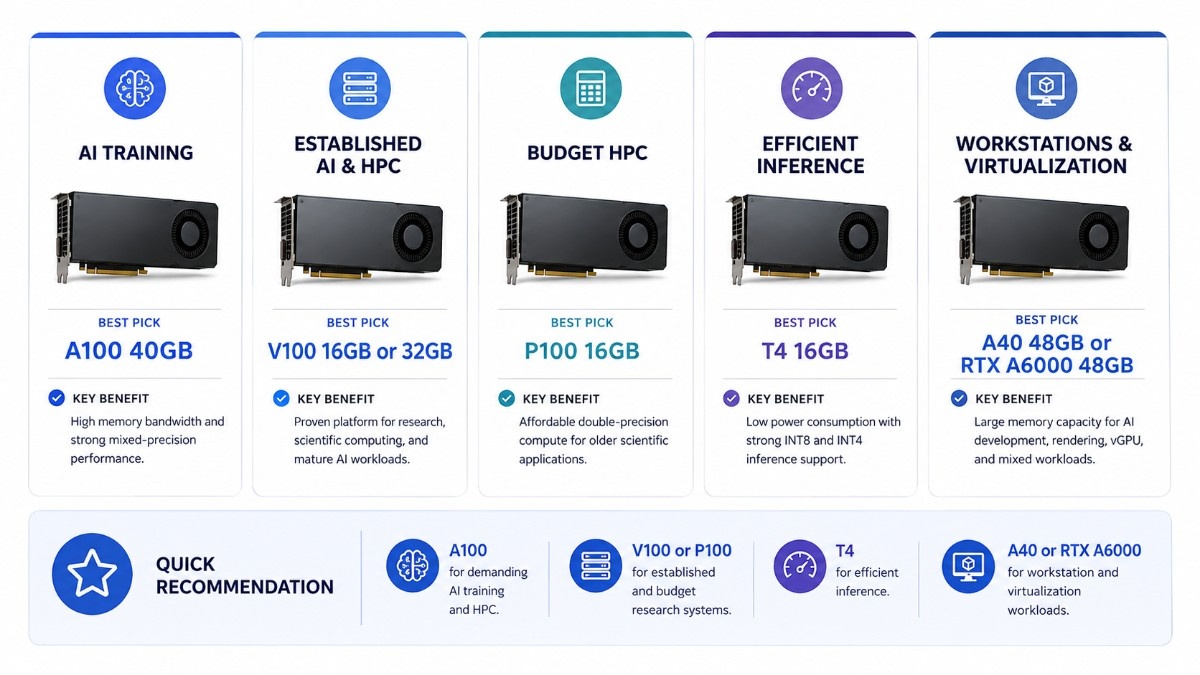
The best overall refurbished option is the A100 for demanding AI and HPC. The V100 offers strong value for established research workloads, while the T4 is a practical choice for inference, virtualization, and low-power servers.
| Use case | Best refurbished option | Why it fits |
| AI training and mixed research | A100 40GB | Modern data center features, strong memory bandwidth, and MIG support |
| Established AI and HPC | V100 16GB or 32GB | Proven Volta platform with HBM2 and Tensor Cores |
| Budget HPC | P100 16GB | Useful double-precision capability and HBM2 for older scientific codes |
| Efficient inference | T4 16GB | Low-power PCIe design with INT8 and INT4 support |
| Throughput inference | P40 24GB | Large memory pool for stable legacy inference workloads |
| Virtual workstations and mixed compute | A40 48GB | Data center design, large memory, graphics, AI, and vGPU support |
| AI development and rendering | RTX A6000 48GB | Active-cooled workstation card with graphics and compute flexibility |
No single GPU wins every category. A lower-cost card can become expensive if it needs a server upgrade, more power, special cooling, or major software changes.
How Should Buyers Evaluate a Refurbished NVIDIA GPU?
Start with the workload, not the model name. Confirm whether the project needs AI training, inference, double-precision HPC, visualization, virtual desktops, rendering, or a mix of these tasks.
Next, check memory capacity, form factor, power, thermal design, driver support, and server validation. A GPU deployment plan helps teams connect the accelerator to the full infrastructure stack.
The condition of the card also matters. Buyers should ask how the GPU was tested, whether firmware and product identifiers match, what warranty applies, and whether the seller can verify compatibility with the exact server model.
Which Refurbished NVIDIA GPUs Fit AI, HPC, and Inference?
Best Options for AI Training and HPC
NVIDIA A100 40GB PCIe:
The A100 is the strongest option in this group for modern AI training, shared inference, analytics, and HPC. NVIDIA’s Ampere-based A100 supports Multi-Instance GPU, which can divide one card into as many as seven isolated GPU instances.
The A100 40GB accelerator makes sense when a lab needs newer data center features and stronger performance than older Volta or Pascal cards.
The A100 PCIe SKU also gives buyers a specific part option for quote and compatibility checks. Buyers must still confirm power, airflow, PCIe lanes, firmware, and server support.
NVIDIA Tesla V100:
The V100 remains a practical refurbished GPU for AI training, scientific computing, and mature HPC applications. NVIDIA lists Volta architecture, Tensor Cores, and 16GB or 32GB HBM2 configurations.
The V100 32GB accelerator suits memory-heavy legacy workloads. It can also support teams that need more memory per GPU without moving to an A100-class platform.
The V100 16GB model may offer better value when models and datasets fit within the smaller memory limit.
NVIDIA Tesla P100:
The P100 is a budget-focused HPC choice for older CUDA applications and scientific codes that use double-precision compute. NVIDIA’s PCIe datasheet lists Pascal architecture, 16GB HBM2, PCIe Gen3, passive cooling, and a 250-watt maximum power rating.
The P100 data center GPU can work in validated passive-cooled servers. It is less suitable for teams that need newer AI features or a long production lifecycle.
Buyers who need a defined part number can consider the P100 PCIe SKU. The server must support its power, full-length form factor, cooling, and software requirements.
Best Options for Inference and Virtualization
NVIDIA Tesla T4: The T4 is one of the best refurbished NVIDIA GPUs for efficient inference, video processing, and virtualized compute. NVIDIA specifies 16GB GDDR6, a 70-watt power envelope, PCIe Gen3 x16, and support for FP16, INT8, and INT4 workloads.
The T4 enterprise GPU fits servers where power and space are limited. It can support inference services, virtual desktops, media processing, and shared development environments.
The T4 PCIe option may also suit compact inference nodes. Buyers should confirm airflow because its low power rating does not remove the need for proper server cooling.
NVIDIA Tesla P40: The P40 is a legacy inference accelerator with 24GB GDDR5 memory. NVIDIA designed it for high-throughput inference and listed 47 INT8 TOPS and a 250-watt power rating at launch.
The P40 24GB accelerator can still serve stable, older inference stacks. Its larger memory may help when model capacity matters more than modern power efficiency.
Avoid the P40 when a project needs current Tensor Core features, lower power use, or broad support for newer AI frameworks. T4, A40, L4, or L40S may offer a safer path for a new deployment.
NVIDIA A40: The A40 is a strong mixed-workload card for virtual workstations, server-based graphics, simulation, and AI inference. NVIDIA specifies 48GB GDDR6 ECC memory, passive cooling, PCIe Gen4, NVLink, and support for several vGPU software products.
The Dell NVIDIA A40 makes sense when a data center needs graphics and compute from one platform. Confirm OEM support, firmware, power connectors, airflow, and vGPU licensing before purchase.
Best Option for Workstation AI and Visualization
NVIDIA RTX A6000:
The RTX A6000 fits AI development, rendering, CAD, simulation, and professional visualization in a workstation. NVIDIA lists 48GB GDDR6 ECC, PCIe Gen4 x16, a dual-slot active thermal design, and a 300-watt maximum power rating.
The RTX A6000 workstation card gives users display outputs and active cooling. It is a practical option for local AI development that also requires professional graphics.
A data center buyer should not assume it can replace a passive server GPU. The chassis, airflow, support policy, display needs, and workload design must match the card.
How Do Cost and Performance Compare?
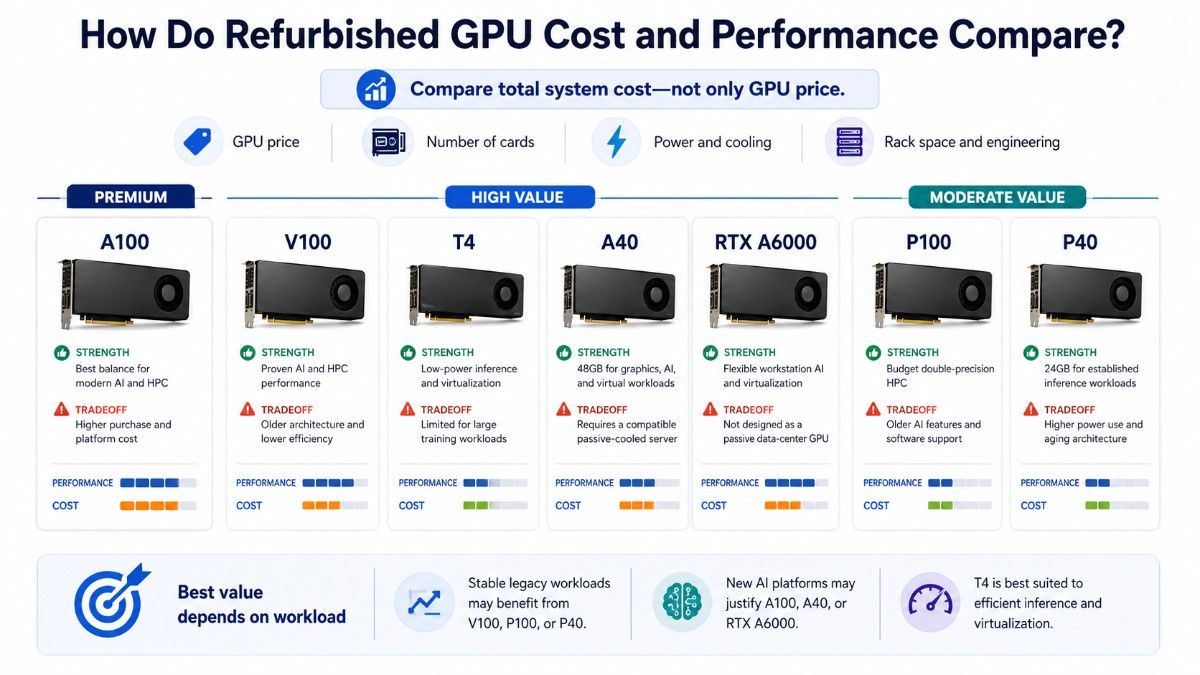
Cost versus performance should include the whole system, not only the card price. A cheaper GPU may require more cards, more rack space, higher power use, or extra engineering time to meet the same target.
| GPU | Relative refurbished value | Main strength | Main tradeoff |
| A100 | Premium | Best balance for modern AI and HPC | Higher purchase and platform cost |
| V100 | High | Proven AI and HPC capability | Older architecture and lower efficiency |
| T4 | High | Low-power inference and virtualization | Limited for large training jobs |
| P100 | Moderate | Budget double-precision HPC | Older AI features and software path |
| P40 | Moderate | 24GB for legacy inference | High power and aging feature set |
| A40 | High | 48GB mixed graphics and compute | Requires a qualified passive-cooled server |
| RTX A6000 | High | Workstation AI and visualization | Not designed like a passive data center card |
The best value often comes from matching the GPU to a known workload. Labs with stable code may gain more from V100 or P100 capacity, while teams building new AI services may save time and reduce risk with A100, A40, or a newer platform.
When Does Buying a Refurbished NVIDIA GPU Make Sense?
Refurbished GPUs make sense when the workload is stable, the software stack is known, and the buyer can validate the server. They also fit labs that need more parallel capacity, replacement cards, or a lower entry cost for development and testing.
Refurbished hardware can reduce lead-time pressure when new inventory is limited. A structured refurbished sourcing program should include testing, clear condition details, warranty terms, and part-level verification.
Choose refurbished when:
- The workload already runs on that GPU generation.
- The budget favors more capacity over the newest features.
- The server platform has documented support.
- The seller provides testing and warranty details.
- The project can accept a shorter remaining lifecycle.
Should Buyers Choose New or Refurbished NVIDIA GPUs?
Choose new hardware when the project needs standard fleet builds, formal manufacturer support, predictable lifecycle planning, or strict procurement records. New equipment may also make sense for regulated and high-risk production environments.
Choose refurbished hardware when cost, availability, or replacement compatibility matters more than using the newest generation. The buyer should receive clear testing, warranty, condition, firmware, and return information.
A mixed approach may work for some teams. Production systems can use newer GPUs, while development, testing, teaching, and overflow capacity use validated refurbished cards.
When Is a Newer NVIDIA GPU the Better Choice?
A newer GPU is the better choice when the workload needs larger memory, stronger training speed, better energy efficiency, or features that older generations lack. It may also reduce integration risk for new production platforms.
| Requirement | Older refurbished risk | Better direction |
| Large modern model training | V100 or P100 may limit memory and throughput | A100, H100, or newer |
| Efficient current inference | P40 may use too much power | T4, L4, or L40S |
| Modern mixed graphics and AI | Older Tesla cards lack newer graphics features | A40, RTX A6000, or newer RTX |
| Long production lifecycle | Legacy support may end sooner | Current supported platform |
| Dense multi-GPU scaling | Legacy PCIe cards may limit topology | HGX, DGX, or validated modern servers |
Teams considering high-end AI platforms should compare H100 form factors. That decision affects server architecture, GPU density, networking, power, and cooling.
Mixed inference and visualization projects may benefit from the L40S workload guide. Workstation buyers can also review the RTX 6000 Ada analysis.
What Should Buyers Avoid With Refurbished GPUs?
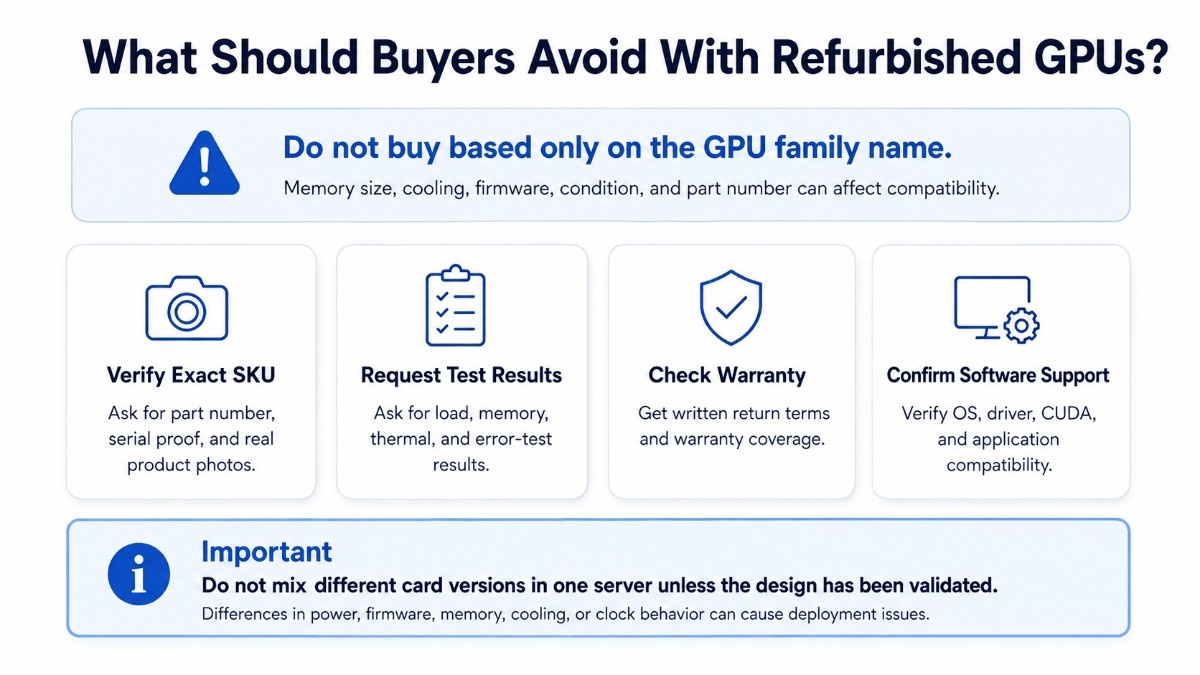
Avoid buying from a listing that gives only the GPU family name. The exact memory size, board type, cooling design, part number, firmware status, and condition can change compatibility.
| Warning sign | Why it matters | What to request |
| No exact SKU or photos | The delivered card may not match the listing | Part number and serial evidence |
| No test details | Basic detection does not prove stability | Load, memory, thermal, and error testing |
| Unknown server history | Heat or heavy use may affect reliability | Condition grading and usage notes |
| No return or warranty terms | Deployment risk moves to the buyer | Written warranty and return policy |
| Unverified software support | Drivers or frameworks may not work | OS, CUDA, driver, and application checks |
Avoid cards with unclear physical damage, missing labels, altered cooling parts, or inconsistent product identifiers. Buyers should also avoid sellers who cannot explain how they test GPU memory, thermal stability, and sustained workloads.
Do not mix different card versions in one server without a clear design. Differences in power, firmware, memory, cooling, or clock behavior can create deployment and support problems.
What Should You Buy With a Refurbished NVIDIA GPU?
A complete GPU deployment needs a qualified server, enough system memory, fast storage, suitable networking, power capacity, and cooling. The exact bundle changes with training, inference, HPC, visualization, and virtualization workloads.
| Bundle layer | Why it matters | Buying check |
| GPU server | Provides slots, lanes, power, and airflow | Validate the exact GPU and quantity |
| System memory and CPU | Feed preprocessing and host-side tasks | Balance channels, cores, and PCIe lanes |
| NVMe or SAS storage | Supplies datasets, checkpoints, and results | Size for speed, endurance, and capacity |
| NICs, switches, and optics | Move data between users, storage, and nodes | Match speed, ports, reach, and topology |
| Power and cooling | Keep passive GPUs stable under load | Check rack power, airflow, and heat output |
A practical GPU server build should confirm component balance before ordering. A powerful GPU can remain underused when the CPU, memory, or storage cannot supply data fast enough.
Cluster projects also need a clear AI networking design. Network speed, NIC placement, switches, optics, and cables affect data movement between GPU nodes and storage.
Power and heat must be checked before shipment. A realistic data center cooling strategy can prevent throttling, instability, and rack-level capacity problems.
How Can Buyers Verify Server Compatibility Before Purchase?
First, confirm the server make, model, generation, risers, power supplies, BIOS, firmware, and airflow design. A physical PCIe slot does not prove that the server supports the card.
Next, verify GPU quantity, PCIe lane layout, NIC placement, storage controllers, and cable routing. Passive data center GPUs depend on directed server airflow, while the RTX A6000 uses active cooling.
Finally, confirm the operating system, NVIDIA driver, CUDA version, framework, vGPU licensing, and target application. A working GPU may still fail the project if the software stack no longer supports it.
Key details to provide before requesting a quote include:
- The exact workload and applications
- Preferred GPU model and quantity
- Server make, model, and GPU count
- Storage and networking requirements
- Power, cooling, warranty, and delivery limits
Which Refurbished GPU Should an AI Lab Choose?
An AI lab should choose A100 when it needs the strongest modern capability and shared GPU use. V100 often gives better budget value for mature training workloads, while T4 works well for inference services and teaching environments with lower power limits.
P100 can suit scientific courses and older HPC codes. RTX A6000 fits researchers who also need local displays, rendering, CAD, or workstation-based AI development.
The final choice should reflect the software students or researchers will use. A lower purchase price offers little value when the team must rewrite applications or replace the server.
Which Refurbished GPU Should an HPC Team Choose?
HPC teams should start with precision, memory, and application requirements. A100 offers the broadest modern option, V100 remains strong for established AI-HPC workflows, and P100 can provide economical double-precision capacity for supported legacy codes.
The server and interconnect may matter as much as the card. Multi-GPU workloads need enough PCIe lanes, CPU capacity, system memory, storage speed, and network performance to keep accelerators working.
Which Refurbished GPU Is Best for Inference?
T4 is often the best choice for efficient inference because it uses less power and supports several reduced-precision formats. It fits compact servers, video pipelines, virtual environments, and services that do not need large training-class GPUs.
P40 can provide useful throughput and 24GB memory for older inference stacks. A40 is the stronger choice when the project also requires visualization, vGPU, larger memory, or modern mixed workloads.
A100 fits high-demand inference when model size, throughput, or shared GPU use justifies the higher cost. Its MIG capability can help separate multiple users or services on one card.
How Can Catalyst Help Source a Complete GPU Configuration?
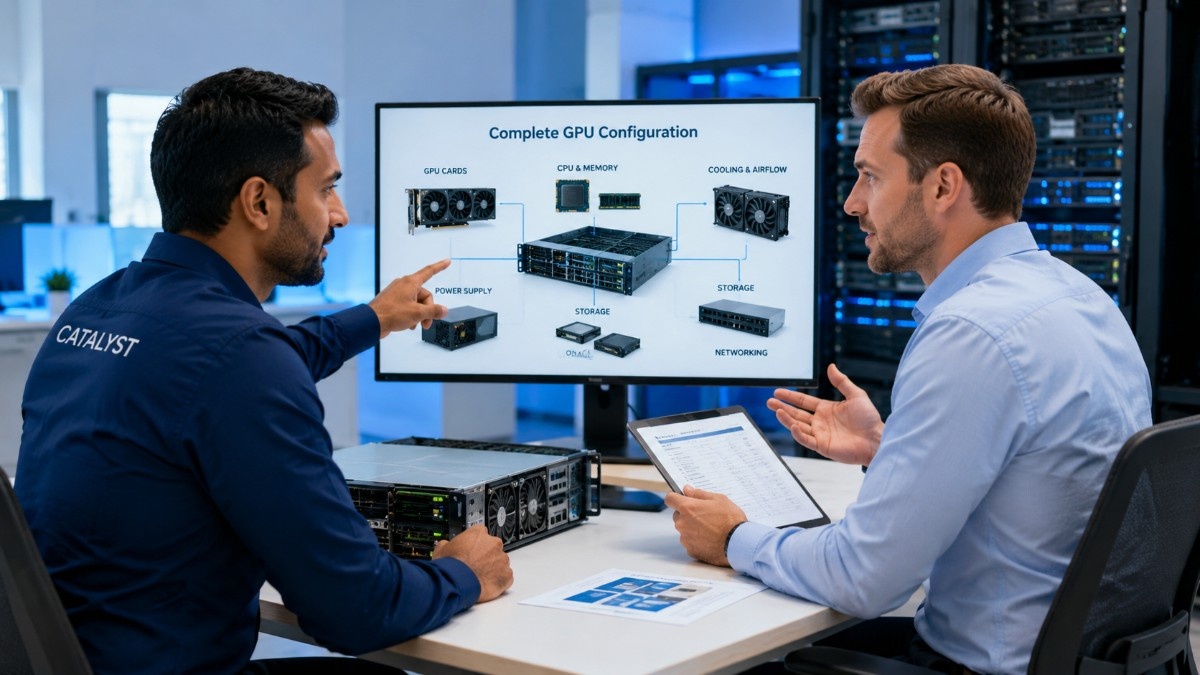
Catalyst Data Solutions Inc helps organizations source NVIDIA GPUs, GPU servers, storage, memory, networking, optics, and cabling across new, refurbished, and hard-to-find inventory. The team can compare workload fit, condition, budget, compatibility, and availability before building a quote.
Buyers can request GPU availability or review the wider NVIDIA hardware catalog. A complete request should include the workload, GPU quantity, server model, storage, networking, power limits, condition preference, warranty needs, and delivery timeline.
Frequently Asked Questions
What is the best refurbished NVIDIA GPU for AI training?
The A100 is the best option in this group for modern AI training. The V100 can offer better budget value when the model, framework, and server already support Volta.
Is a refurbished V100 still worth buying?
Yes, when the workload uses mature AI or HPC software and fits within 16GB or 32GB of memory. Buyers should verify testing, server support, drivers, warranty, and total power cost.
Is the T4 good for AI inference?
Yes. The T4 suits efficient inference, video processing, and virtualized workloads because it combines 16GB memory with a 70-watt design and reduced-precision support.
Should I buy a P100 or P40?
Choose P100 for older HPC and double-precision scientific workloads. Choose P40 for stable legacy inference tasks that benefit from 24GB memory, provided power and software support remain acceptable.
Is A40 better than RTX A6000?
A40 is usually better for qualified passive-cooled servers and data center virtualization. RTX A6000 is often better for active-cooled workstations that need display outputs, rendering, and local professional applications.
What should I check before buying a used GPU?
Confirm the exact SKU, memory, form factor, condition, testing method, firmware, driver support, warranty, return terms, and server compatibility. Also verify power, cooling, networking, and storage requirements.
When should I buy new instead of refurbished?
Buy new when the project needs the longest lifecycle, current support, strict vendor terms, maximum efficiency, or the latest AI features. New hardware also makes sense when integration risk costs more than the savings.