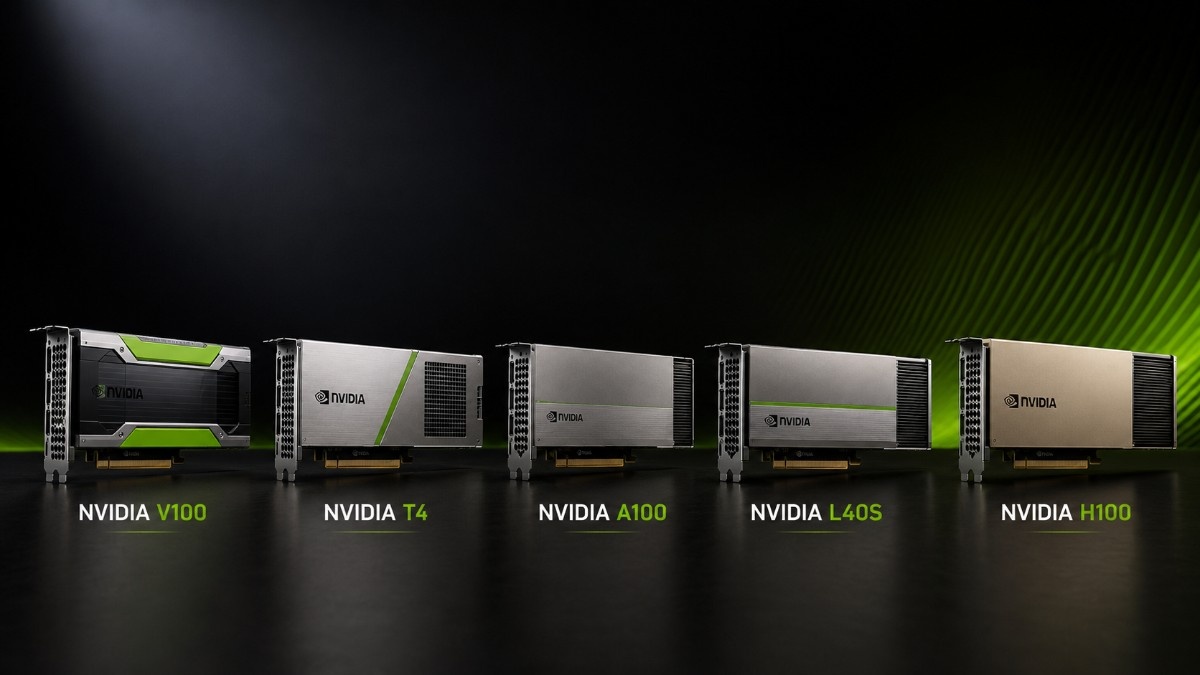
An NVIDIA GPU upgrade path should start with the workload, not the age of the card. V100 and T4 GPUs can still provide useful performance, but A100, L40S, and H100 offer better options for larger models, higher throughput, newer software, and long-term growth.
The GPU is only one part of the upgrade. A practical GPU deployment plan must also account for server support, memory, storage, networking, optics, cabling, power, cooling, drivers, and migration costs.
What Is the Best NVIDIA GPU Upgrade Path?
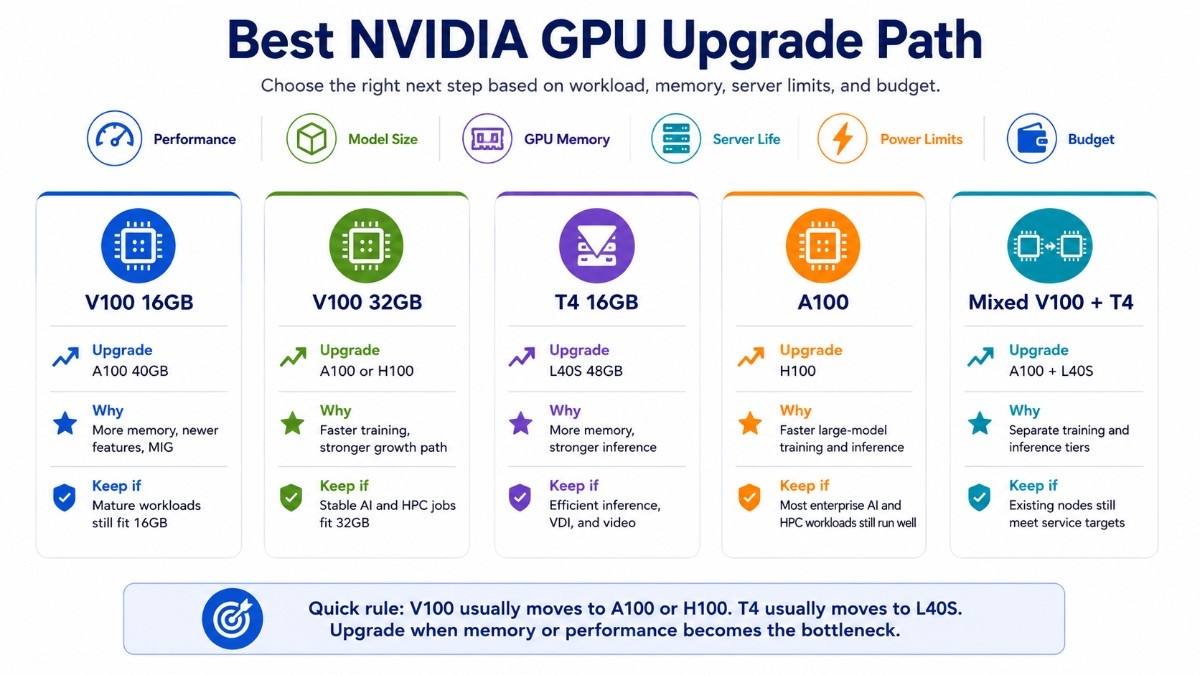
The best general path is V100 to A100 or H100 for AI training and HPC. T4 users should consider L40S for stronger inference, graphics, and media workloads or A100 when training and shared GPU use become more important.
The right choice depends on current performance, model size, GPU memory, server life, power limits, and available budget.
| Current GPU | Recommended upgrade | Main reason | When the older GPU still works |
| V100 16GB | A100 40GB | More memory, newer features, and MIG | Mature workloads that fit 16GB |
| V100 32GB | A100 or H100 | Faster training and a stronger growth path | Stable AI and HPC jobs that fit 32GB |
| T4 16GB | L40S 48GB | More memory and stronger inference | Efficient inference, VDI, and video |
| A100 | H100 | Faster large-model training and inference | Most enterprise AI and HPC workloads |
| Mixed V100 and T4 | A100 plus L40S | Separate training and inference tiers | Existing nodes still meet service targets |
An upgrade should solve a clear problem. Replacing a working GPU may not improve results when storage, networking, CPU resources, or software remain the main bottleneck.
When Do NVIDIA V100 and T4 GPUs Still Work?
Older NVIDIA GPUs still work when they meet required training times, inference latency, memory needs, and software support targets. A fully used V100 or T4 can provide more value than a newer GPU that remains idle because the rest of the system cannot supply data fast enough.
When Should You Keep NVIDIA V100?
The V100 16GB accelerator remains useful for established AI training, fine-tuning, simulation, and scientific applications that fit its memory. NVIDIA designed V100 for AI, HPC, and graphics and offered both 16GB and 32GB versions.
The V100 32GB option provides more room for mature models and datasets. It can suit research labs that have validated Volta-based software and do not need the added cost of an A100 or H100 platform.
Keep V100 when the applications remain stable, GPU memory is sufficient, and training time does not delay research or production. It also makes sense when the current server has several years of useful life and replacement costs would exceed the expected performance benefit.
When Should You Keep NVIDIA T4?
A T4 PCIe GPU can still provide strong value for inference, virtual desktops, video processing, and light shared compute. NVIDIA specifies 16GB GDDR6, PCIe Gen3 x16, and a 70-watt power design.
The T4G single-slot card may fit compact or dense systems when the exact server supports it. Buyers must still verify airflow, firmware, slot placement, and operating system support.
Keep T4 when inference response times remain acceptable and models fit within 16GB. It is also practical where low power use, compact servers, video engines, or virtualized workloads matter more than maximum training performance.
When Should an Organization Upgrade Its NVIDIA GPUs?
Upgrade when the current GPUs block normal work rather than during a temporary demand spike. Clear warning signs include repeated memory limits, slow experiment cycles, missed inference targets, aging drivers, and high operating costs for the amount of useful work completed.
Common upgrade triggers include:
- Models no longer fit GPU memory.
- Training time delays projects or releases.
- Inference latency misses service targets.
- Current software requires newer GPU features.
- Power and support costs are no longer practical.
High GPU utilization alone does not always justify replacement. A busy GPU may show efficient use, while low utilization may point to slow storage, limited system memory, poor CPU balance, or weak network links.
A balanced GPU server design should identify those limits before a buyer orders new cards. The upgrade should address the actual bottleneck rather than move it to another component.
How Does the Upgrade Path Differ for Training and Inference?
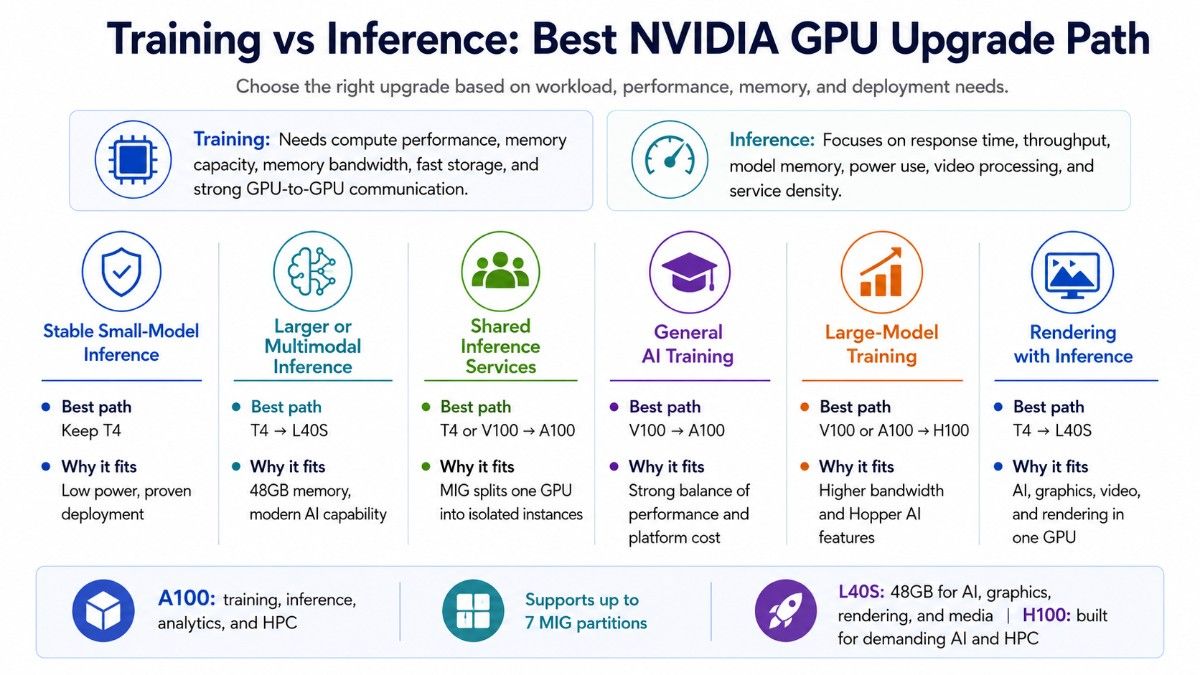
Training and inference place different demands on the GPU platform. Training usually needs high compute performance, memory capacity, memory bandwidth, fast storage, and strong communication between GPUs.
Inference often focuses on response time, throughput, model memory, power use, video processing, and the number of services that one server can support.
| Workload | Best path | Why it fits |
| Stable small-model inference | Keep T4 | Low power and proven deployment |
| Larger or multimodal inference | T4 to L40S | 48GB memory and modern AI capability |
| Shared inference services | T4 or V100 to A100 | MIG can divide one GPU into isolated instances |
| General AI training | V100 to A100 | Strong balance of performance and platform cost |
| Large-model training | V100 or A100 to H100 | Higher bandwidth and Hopper AI features |
| Rendering with inference | T4 to L40S | AI, graphics, video, and rendering in one GPU |
NVIDIA positions A100 for AI training, inference, analytics, and HPC and supports up to seven Multi-Instance GPU partitions. L40S combines 48GB memory with AI, graphics, rendering, and media acceleration, while H100 targets demanding AI and HPC workloads.
Should V100 Users Upgrade to A100 or H100?
A100 is the more practical upgrade for most V100 users. H100 makes more sense when faster training, larger models, or dense multi-GPU scaling can justify a higher platform cost.
| Upgrade choice | Best fit | Main benefit | Main consideration |
| V100 to A100 PCIe | Enterprise AI, HPC, analytics, and shared GPU use | More memory options, MIG, PCIe Gen4, and newer Tensor Cores | Server power, cooling, firmware, and PCIe support |
| V100 to H100 PCIe | Large-model training and demanding inference | Hopper features, FP8 support, and higher performance | Higher GPU and infrastructure cost |
| V100 to H100 SXM5 | Dense AI training and scale-up HPC | Strong GPU-to-GPU communication and platform density | Requires an HGX or DGX-style system |
| Keep V100 | Stable AI and HPC workloads | Avoids migration and server replacement costs | Limited memory, efficiency, and long-term growth |
The A100 40GB accelerator suits buyers who need a clear performance step beyond V100 without moving directly to an H100-class platform.
A100 is often the better choice when:
- Existing workloads need more memory or speed.
- Teams want MIG-based GPU sharing.
- The budget cannot support a full H100 deployment.
- A qualified PCIe server can support the upgrade.
- Mature software remains important.
The A100 PCIe SKU gives buyers a specific part option for compatibility and quote checks. Buyers should compare 40GB and 80GB versions based on model size, batch size, datasets, and expected workload growth.
H100 is the stronger choice when training time has a direct business cost. NVIDIA H100 adds Hopper architecture, Transformer Engine, FP8 support, high memory bandwidth, and MIG for demanding AI and HPC workloads.
The H100 PCIe accelerator fits qualified card-based GPU servers. However, a server that supports V100 or A100 may not support H100 power, cooling, firmware, or physical requirements.
Choose H100 PCIe when:
- The workload needs faster large-model training.
- Inference throughput must increase.
- A card-based server offers enough power and airflow.
- The organization wants more flexibility than an SXM platform.
The H100 SXM5 module belongs in an HGX or DGX-style system. It is not a direct replacement for a PCIe V100 card.
SXM5 is the better option when:
- Dense multi-GPU training is required.
- GPU-to-GPU communication is a priority.
- The project can support platform-level power and cooling.
- The buyer plans to purchase or replace the full server.
A detailed PCIe and SXM comparison explains how form factor affects server design, density, cooling, networking, and upgrade cost.
Choose A100 for a balanced V100 upgrade with lower infrastructure risk. Choose H100 when its training speed, newer features, and growth potential can justify the higher total project cost.
Should T4 Users Upgrade to L40S or A100?
T4 users should choose L40S when modern inference, generative AI, rendering, video, or virtual graphics needs have grown. Choose A100 when the environment is moving toward training, HPC, larger shared workloads, or MIG-based GPU partitioning.
The L40S 48GB GPU offers three times the memory capacity of T4. NVIDIA specifies 48GB GDDR6 ECC, PCIe Gen4 x16, passive cooling, and a maximum power level of 350 watts.
A Dell L40S accelerator may fit validated Dell servers. Buyers should confirm the approved GPU list, risers, power supplies, thermal kit, firmware, and warranty requirements.
L40S works well for inference that also needs graphics, rendering, or media acceleration. It does not support MIG or NVLink, so it does not replace A100 in every shared-compute or multi-GPU workload.
A100 may provide a better upgrade when several T4 nodes have become difficult to manage. One larger GPU with MIG can divide capacity among isolated workloads, although the final value depends on model size, utilization, licensing, and server cost.
The L40S workload review adds context for environments that combine inference and visualization. Training-first buyers should focus more closely on A100 or H100.
How Does Server Compatibility Affect the Upgrade?
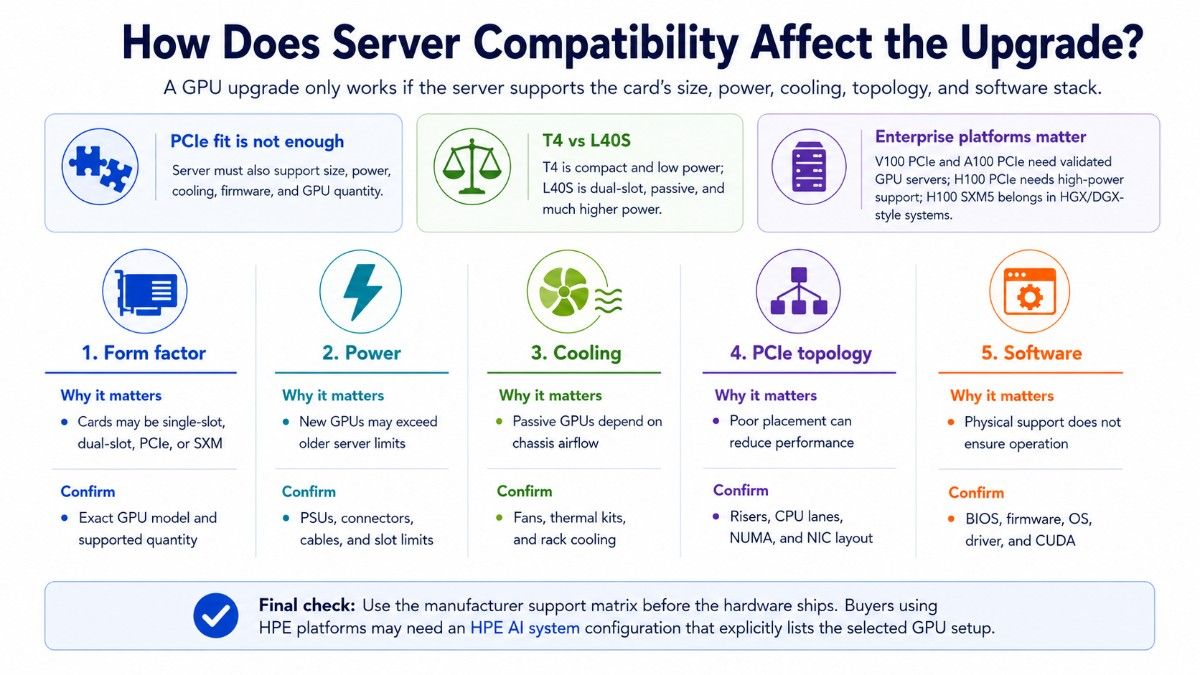
Server compatibility can decide whether an upgrade is practical. A matching PCIe connector is not enough because the server must support the card’s size, power, cooling, lane layout, firmware, drivers, and approved GPU quantity.
T4 uses a compact 70-watt design, while L40S is a dual-slot passive GPU rated for as much as 350 watts. A server that supports T4 may lack the airflow, connectors, slot spacing, or power supplies required for L40S.
V100 PCIe and A100 PCIe also require validated GPU servers. H100 PCIe needs a qualified high-power platform, while H100 SXM5 belongs in an HGX or DGX-style architecture.
| Compatibility check | Why it matters | What to confirm |
| Form factor | Cards may be single-slot, dual-slot, PCIe, or SXM | Exact GPU and supported quantity |
| Power | New GPUs may exceed old server limits | PSUs, connectors, cables, and slot limits |
| Cooling | Passive GPUs depend on chassis airflow | Fans, thermal kits, and rack cooling |
| PCIe topology | Poor placement can reduce performance | Risers, CPU lanes, NUMA, and NIC layout |
| Software | Physical support does not ensure operation | BIOS, firmware, OS, driver, and CUDA |
Buyers using HPE platforms may need an HPE AI system that lists the selected GPU configuration. The manufacturer’s support matrix should guide the purchase before hardware ships.
What Should You Buy With a GPU Upgrade?
A GPU upgrade may require a qualified server, more system memory, faster storage, new network adapters, switches, optics, cables, and cooling changes. Buyers should plan the full configuration before selecting the accelerator.
| Bundle layer | Why it matters | Main buying check |
| GPU server | Provides slots, lanes, power, and airflow | Validate the exact GPU and quantity |
| CPU and memory | Feed preprocessing and host-side work | Balance cores, channels, and PCIe lanes |
| NVMe storage | Supplies datasets and checkpoints | Check speed, endurance, and capacity |
| Networking | Moves data between storage and GPU nodes | Match NICs, switches, optics, and cables |
| Power and cooling | Keeps GPUs stable under sustained load | Check rack limits and thermal capacity |
Training clusters may need 100G, 200G, or faster networking based on GPU count and scaling goals. An AI networking plan should match NIC speed, switch ports, optics, and cable reach to the workload.
Power and heat can rise sharply when moving from T4 or V100 to L40S or H100. A rack-level cooling capacity review can identify airflow and facility limits before installation.
How Should Buyers Plan the Upgrade Budget?
Budget planning should compare total project cost rather than GPU price alone. Include server changes, memory, storage, networking, software, support, installation, power, cooling, downtime, and staff time.
A100 may provide the best balance when H100 performance is not essential. L40S may combine inference, visualization, and media tasks that previously required separate systems.
Keeping T4 or V100 may remain the lowest-cost choice when service targets are stable. The budget should account for the value of faster training, better inference, reduced management time, and lower risk—not only benchmark improvements.
Refurbished hardware can reduce acquisition cost for V100-to-A100 upgrades or capacity expansion. A documented refurbished testing process should cover condition, memory tests, thermal stability, firmware, warranty, and return terms.
Should Buyers Choose New or Refurbished GPUs?
Choose new GPUs when the project requires a standard fleet, formal manufacturer support, a long lifecycle, or strict procurement records. New hardware may also reduce risk for critical production services.
Choose refurbished GPUs when the workload is proven, compatibility is clear, and cost or availability matters. Tested V100, T4, or A100 hardware can support research, development, expansion nodes, and replacement systems.
A mixed approach can also work. New H100 or L40S systems may handle priority workloads, while validated older GPUs support testing, teaching, development, and overflow capacity.
An IT asset plan can connect the upgrade with reuse, resale, data handling, and responsible removal of older systems.
How Can Buyers Build a Quote-Ready Upgrade Plan?

A quote-ready request should explain the current system, performance problem, target workload, preferred GPU, condition, and timeline. Clear details reduce the risk of receiving hardware that does not fit the server or project.
Include:
- Current GPU, server model, and GPU quantity
- Training, inference, HPC, or graphics workload
- Required memory and performance targets
- Storage, networking, power, and cooling limits
- New, refurbished, or mixed inventory preference
Dense H100 or A100 projects may require a full platform instead of a card replacement. A DGX and HGX guide can help buyers compare complete system architecture with individual PCIe GPU builds.
How Can Catalyst Support an NVIDIA GPU Upgrade?
Catalyst Data Solutions helps organizations source NVIDIA GPUs, compatible servers, memory, storage, networking, optics, and cabling across new, refurbished, and hard-to-find inventory.
The team can compare V100, T4, A100, L40S, and H100 options based on workload, budget, server compatibility, condition, and availability.
Buyers can request upgrade pricing or review the wider GPU hardware catalog. A complete request should include the server model, GPU count, workload, storage, networking, power, cooling, warranty, and delivery needs.
Frequently Asked Questions
What is the best NVIDIA GPU upgrade path from V100?
A100 is the balanced upgrade for most V100 users because it improves memory options, training performance, software support, and shared GPU use. H100 is better when large-model training or high-end HPC justifies a more expensive platform.
What is the best upgrade from NVIDIA T4?
L40S is a strong upgrade for modern inference, rendering, video, and mixed graphics workloads. A100 is a better fit when the project needs heavier training, HPC, or MIG-based GPU sharing.
When should an organization keep V100 or T4?
Keep them when workloads meet speed, memory, latency, software support, and power targets. Older GPUs can still offer good value in stable environments with known applications and compatible servers.
Can A100 replace V100 in the same server?
Not automatically. Buyers must verify slot size, power, cooling, PCIe lanes, BIOS, firmware, drivers, and the server manufacturer’s approved GPU list.
Is L40S better than A100 for inference?
L40S can be better when inference also needs graphics, rendering, video, or 48GB memory. A100 may be better for MIG, HPC, training, and workloads that depend on high memory bandwidth.
Should buyers choose H100 PCIe or H100 SXM5?
H100 PCIe fits qualified card-based GPU servers and provides more deployment flexibility. H100 SXM5 requires an HGX or DGX-style platform and better suits dense multi-GPU training.
What costs should an upgrade budget include?
Include GPUs, servers, memory, storage, NICs, switches, optics, cables, software, migration, support, power, cooling, rack space, and downtime. The GPU price represents only one part of the project.