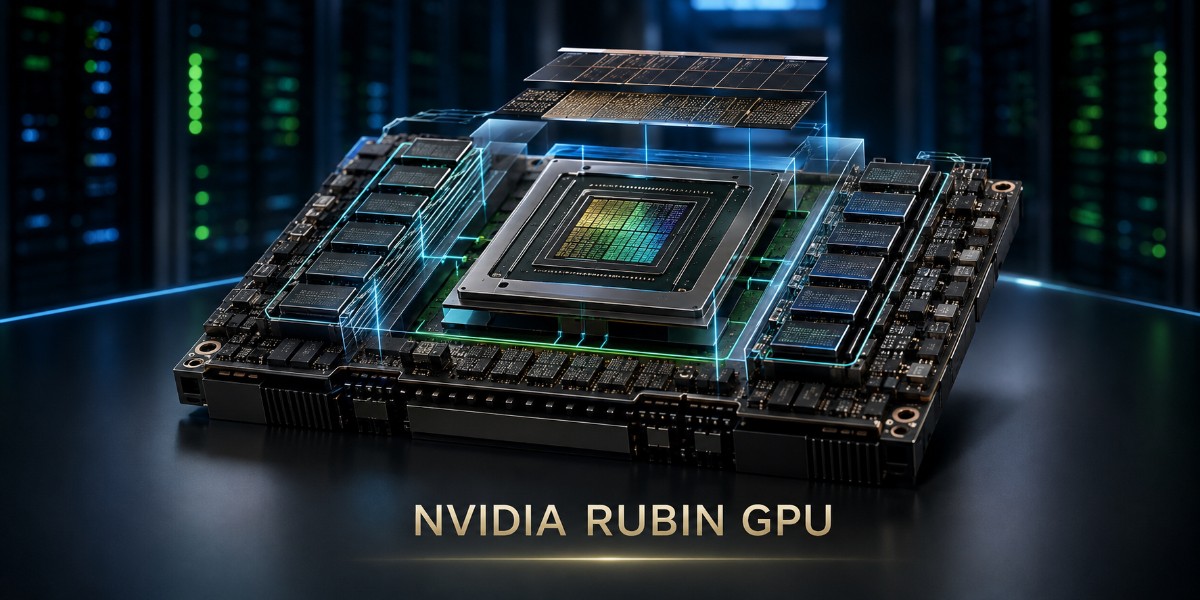
NVIDIA Rubin is more than a new data center GPU generation. It is designed as the compute foundation of NVIDIA’s next AI infrastructure platform, pairing high-bandwidth HBM4 memory with NVLink 6 and tightly integrated CPU, networking, storage, power, and cooling technologies.
For AI teams, data center architects, and infrastructure buyers, the key question is not just whether Rubin is faster than Blackwell. What really matters is where Rubin fits in your AI stack, how it connects across systems, and what it takes to deploy it at scale.
This guide breaks down the Rubin GPU architecture, HBM4, NVLink 6, Vera Rubin systems, workloads, specifications, and the full AI data center stack in clear, practical terms.
What Is the NVIDIA Rubin GPU?
The NVIDIA Rubin GPU is NVIDIA’s post-Blackwell data center accelerator and the main GPU compute engine in the Vera Rubin platform. It combines HBM4 memory, sixth-generation NVLink, a new Transformer Engine, and higher compute density for AI training, reasoning, inference, agentic AI, and large mixture-of-experts models.
Rubin is not designed as an isolated accelerator. NVIDIA integrates it into systems that combine CPUs, scale-up interconnects, scale-out networking, storage, power, and liquid cooling. That system approach extends the role already familiar in DGX and HGX platforms.
As of August 2026, NVIDIA says Vera Rubin is ramping into full production, with Rubin-based systems being manufactured and shipped through its OEM ecosystem. Exact configurations, orderability, and lead times still depend on the system vendor and deployment.
How Does the NVIDIA Rubin GPU Work?
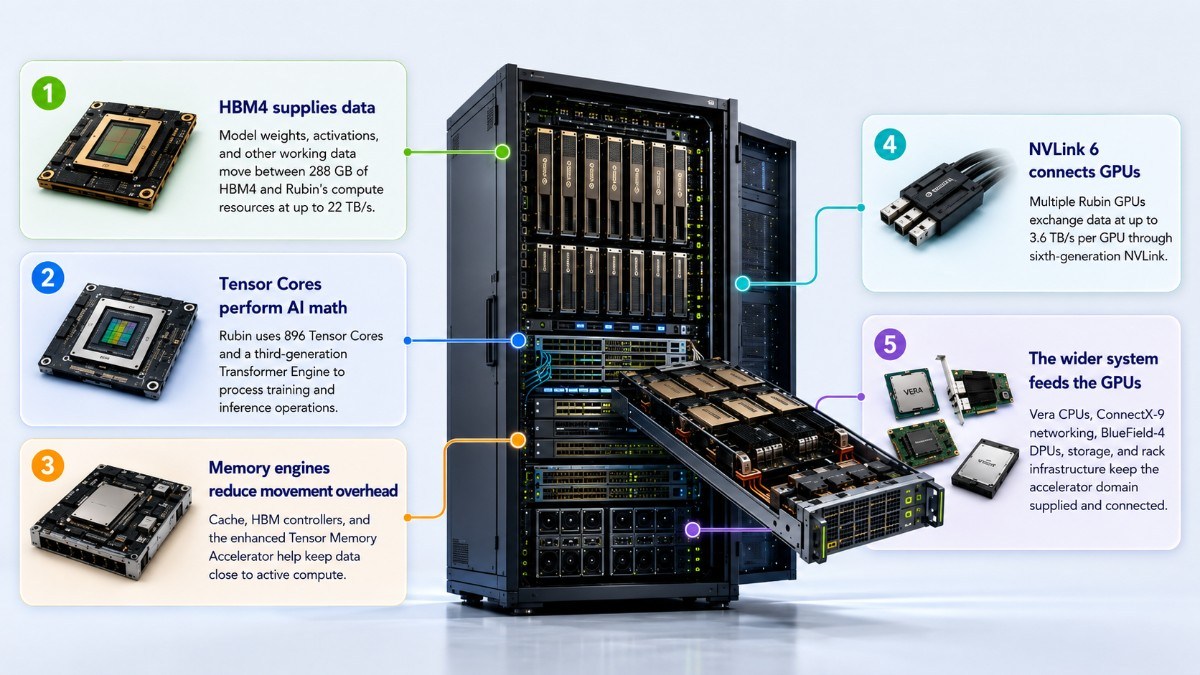
The easiest way to understand how the NVIDIA Rubin GPU works is to follow the path of data through the system. Rubin must keep compute, memory, and communication working together instead of letting expensive Tensor Cores wait for data.
- HBM4 supplies data: Model weights, activations, and other working data move between 288 GB of HBM4 and Rubin’s compute resources at up to 22 TB/s.
- Tensor Cores perform AI math: Rubin uses 896 Tensor Cores and a third-generation Transformer Engine to process training and inference operations.
- Memory engines reduce movement overhead: Cache, HBM controllers, and the enhanced Tensor Memory Accelerator help keep data close to active compute.
- NVLink 6 connects GPUs: Multiple Rubin GPUs exchange data at up to 3.6 TB/s per GPU through sixth-generation NVLink.
- The wider system feeds the GPUs: Vera CPUs, ConnectX-9 networking, BlueField-4 DPUs, storage, and rack infrastructure keep the accelerator domain supplied and connected.
That final step matters. A powerful GPU can still spend time waiting when CPU processing, storage throughput, or networking cannot keep pace. A balanced GPU server design therefore matters as much as accelerator selection at production scale.
What Is Different About Rubin GPU Architecture?
The NVIDIA Rubin GPU architecture targets sustained AI execution rather than peak compute alone. NVIDIA designed the chip around the changing behavior of reasoning models, long-context inference, reinforcement learning, and mixture-of-experts workloads.
Rubin uses two reticle-limited compute dies joined through NVIDIA’s high-bandwidth NV-HBI interface. NVIDIA lists 336 billion transistors, 224 streaming multiprocessors, and 896 Tensor Cores, along with a third-generation Transformer Engine.
The architecture focuses on four connected goals:
- Keep more Tensor Core capacity actively processing useful work.
- Move model data through memory with less waiting.
- Improve communication among GPUs during distributed AI operations.
- Handle changing precision, context, and execution patterns more efficiently.
The third-generation Transformer Engine adds adaptive compression and broader precision handling. NVIDIA lists up to 50 PFLOPS of sparse NVFP4 inference performance per Rubin GPU, although NVIDIA marks its individual Rubin specifications as preliminary and subject to change.
How Does HBM4 Help the NVIDIA Rubin GPU?
HBM4 is the high-bandwidth memory generation attached directly to Rubin. Each NVIDIA Rubin GPU carries up to 288 GB of HBM4 with 22 TB/s of peak memory bandwidth, using 12-high memory stacks and dedicated HBM controllers.
Why Does Memory Bandwidth Matter?
AI processors constantly move weights, activations, attention data, and intermediate results between memory and compute units. When that movement becomes slower than the GPU’s ability to calculate, the GPU waits instead of producing useful output.
Rubin’s 22 TB/s HBM4 bandwidth gives its compute engines more opportunity to stay busy. This becomes especially important for large language models where memory movement can limit performance as much as mathematical throughput.
How Does HBM4 Affect Large AI Models?
Large reasoning and MoE models may move substantial amounts of model state while routing tokens among experts. Long-context inference also increases pressure on working memory and KV-cache management.
The Rubin GPU HBM4 memory subsystem helps by providing:
- 288 GB of local high-speed GPU memory.
- Up to 22 TB/s of memory bandwidth.
- More room for model data and active inference state.
- Faster movement between memory and Rubin’s execution resources.
Teams upgrading from earlier generations should evaluate memory capacity and bandwidth alongside compute. Existing H100 data center GPU environments can remain appropriate when their capacity, cost, and workload requirements do not justify a new rack architecture.
What Is NVLink 6 and Why Does Rubin Need It?
NVIDIA NVLink 6 is the sixth generation of NVIDIA’s high-speed scale-up interconnect. On Rubin, NVIDIA specifies 3.6 TB/s of bidirectional NVLink bandwidth per GPU, twice the bandwidth of the previous NVLink generation.
NVLink solves a different problem from ordinary data center Ethernet. It lets multiple GPUs exchange data at very high bandwidth inside a tightly coupled compute domain.
That communication becomes critical because modern AI rarely runs entirely on one GPU. Large models may split parameters, tensors, experts, and intermediate results across many accelerators.
NVLink 6 helps with:
- GPU-to-GPU tensor and model communication.
- MoE expert routing and collective operations.
- Synchronization during distributed training.
- Multi-GPU reasoning and inference at low latency.
In Vera Rubin NVL72, NVLink 6 connects 72 Rubin GPUs in an all-to-all scale-up domain with 260 TB/s of aggregate rack-level NVLink bandwidth. NVIDIA also adds in-network compute for collective operations.
NVLink does not replace the external AI network. Rubin systems still need scale-out fabrics to connect servers and racks, which makes AI data center networking part of accelerator planning rather than a separate afterthought.
How Does Rubin Fit Into NVIDIA Vera Rubin?
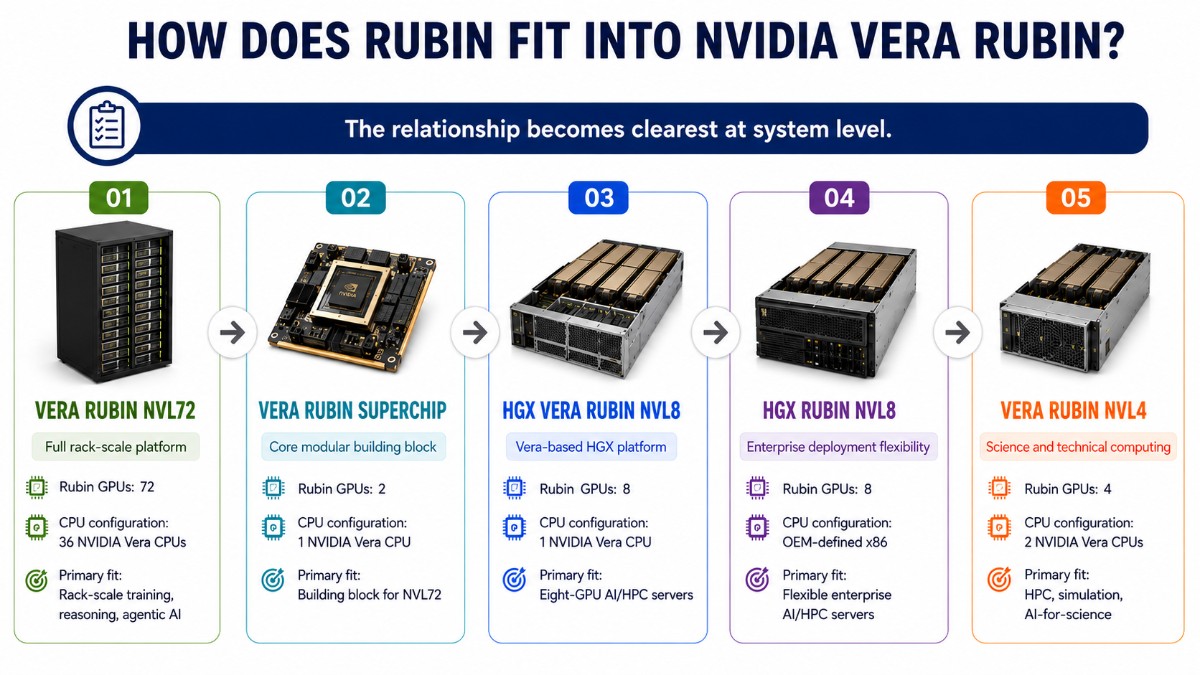
Rubin provides the accelerated compute, while Vera provides CPU-side orchestration, memory, and data movement. NVLink-C2C connects Vera and Rubin, and NVLink 6 connects Rubin GPUs to one another.
The relationship becomes clearest at system level.
| Platform | Rubin GPUs | CPU configuration | Primary fit |
| Vera Rubin NVL72 | 72 | 36 NVIDIA Vera CPUs | Rack-scale training, reasoning, agentic AI |
| Vera Rubin Superchip | 2 | 1 NVIDIA Vera CPU | Building block for NVL72 |
| HGX Vera Rubin NVL8 | 8 | 1 NVIDIA Vera CPU | Eight-GPU AI/HPC servers |
| HGX Rubin NVL8 | 8 | OEM-defined x86 | Flexible enterprise AI/HPC servers |
| Vera Rubin NVL4 | 4 | 2 NVIDIA Vera CPUs | HPC, simulation, AI-for-science |
NVIDIA’s current documentation shows that Rubin is not limited to NVL72. HGX Rubin NVL8 can use a Vera CPU or OEM x86 host architecture, while NVL4 targets scientific computing and AI-for-science.
Inside Vera Rubin NVL72
A Vera Rubin NVL72 rack combines:
- 72 NVIDIA Rubin GPUs.
- 36 NVIDIA Vera CPUs.
- Sixth-generation NVLink scale-up networking.
- ConnectX-9 SuperNICs and BlueField-4 DPUs.
- Spectrum-X Ethernet or Quantum-X800 InfiniBand for scale-out connectivity.
The Vera CPU also provides 1.5 TB of LPDDR5X memory and up to 1.8 TB/s of coherent NVLink-C2C bandwidth in a Vera Rubin Superchip configuration. This gives applications high-bandwidth access across CPU and GPU memory domains.
Where Does the NVIDIA Rubin GPU Fit in AI Infrastructure?
A NVIDIA Rubin data center GPU should be evaluated as one layer of a complete deployment. Buying the accelerator without planning the server, fabric, storage, rack, power, and cooling can leave part of the investment underutilized.
| Infrastructure layer | Rubin-era role | Typical technology |
| Accelerator | AI computation | NVIDIA Rubin GPU |
| Host compute | Orchestration and data processing | Vera CPU or supported x86 CPU |
| Scale-up fabric | GPU-to-GPU communication | NVLink 6 |
| Server/rack platform | Integrates compute | HGX Rubin NVL8, NVL72, NVL4 |
| Scale-out network | Links systems and racks | ConnectX-9 + Spectrum-X or Quantum-X800 |
| Infrastructure offload | Network, storage, security | BlueField-4 DPU |
| Storage | Datasets, checkpoints, context | Validated AI storage / BlueField-4 STX architecture |
| Facilities | Sustains dense compute | Liquid cooling, rack power, CDUs |
NVIDIA describes Vera Rubin as a co-designed architecture spanning compute, networking, storage, security, cooling, and power rather than a collection of independent devices.
GPU Servers and Rack-Scale Systems
Organizations that do not need an NVL72 rack can use Rubin through HGX Rubin NVL8. NVIDIA supports eight Rubin GPUs with either a Vera CPU or an OEM-defined x86 CPU baseboard.
Dell has announced PowerEdge XE9880L, XE9882L, and XE9885L systems based on HGX Rubin NVL8, while HPE has announced Compute XD700. Supermicro also supports liquid-cooled HGX Rubin NVL8 configurations.
At rack scale, Dell has already reported shipping PowerEdge XE9812 systems built around Vera Rubin NVL72 to CoreWeave. NVIDIA also says Dell, HPE, Lenovo, Supermicro, and other partners are in full-scale Vera Rubin production.
Infrastructure teams can use existing GPU deployment planning practices as a starting point, but Rubin raises the importance of liquid cooling, high-speed fabric design, and rack-level integration.
Networking
Inside the rack, NVLink 6 handles scale-up GPU communication. Outside that domain, ConnectX-9 SuperNICs connect GPUs to scale-out fabrics using NVIDIA Spectrum-X Ethernet or Quantum-X800 InfiniBand.
This distinction matters: NVLink scales GPUs together; Ethernet or InfiniBand scales systems and racks together.
Storage
Rubin’s HBM4 can process data quickly only when the rest of the pipeline supplies it. Training datasets, model checkpoints, retrieval data, and inference context therefore need storage architectures sized for the workload.
NVIDIA positions BlueField-4 STX as part of its Rubin-era AI-native storage architecture, while BlueField-4 DPUs can offload networking, storage, and security functions from host compute.
Cooling and Power
Vera Rubin NVL72 uses a fully liquid-cooled MGX architecture. NVIDIA specifies support for 45°C warm-water inlet temperatures and adds dynamic power steering and rack-level power smoothing to manage rapidly changing AI loads.
These requirements make facility design part of the GPU decision. Existing AI cooling strategies need review before a data center commits to dense Rubin racks.
Practical Rubin AI Infrastructure Example
Example configuration only: A neocloud building a frontier training service could deploy Vera Rubin NVL72 compute racks, ConnectX-9 endpoints, Spectrum-X Ethernet or Quantum-X800 InfiniBand, high-throughput AI storage, BlueField DPUs, and redundant liquid-cooling infrastructure.
The compute racks would handle model execution. NVLink 6 would coordinate GPUs inside each rack, while the scale-out fabric would connect racks and storage systems.
This configuration is not mandatory. Enterprise inference, smaller training projects, and HPC environments may fit HGX Rubin NVL8 or Vera Rubin NVL4 more effectively.
What Workloads Is Rubin Designed For?
The Rubin GPU for AI targets workloads that combine large compute demands with heavy memory movement and frequent communication among GPUs.
- LLM training: Large dense and mixture-of-experts model development.
- AI inference: High-throughput generation and interactive model serving.
- Reasoning and agentic AI: Multi-step inference, tool use, retrieval, and repeated model calls.
- Multimodal AI: Models combining text, image, video, and other data.
- HPC and AI-for-science: Scientific simulation, domain AI, and accelerated computing through Rubin NVL4 and HGX platforms.
Agentic AI is particularly important to Rubin’s design. These applications can repeatedly retrieve information, use tools, evaluate results, and invoke models, making CPU processing, context memory, storage, networking, and GPU compute all part of one workflow.
Rubin vs Blackwell: What Changes?
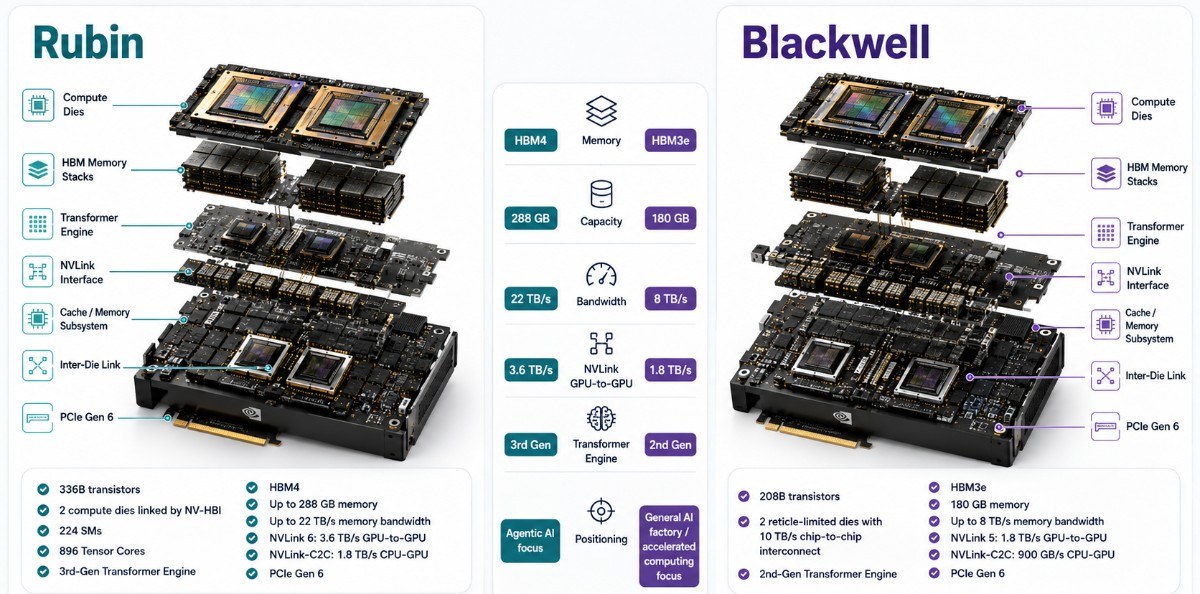
“Blackwell” includes several GPU products, so a direct comparison needs a defined reference. The table below uses Blackwell Ultra where individual GPU memory and interconnect specifications provide the clearest late-generation comparison.
| Area | NVIDIA Rubin | Blackwell Ultra | What changes |
| Architecture generation | Rubin | Blackwell | New compute and execution architecture |
| Transformer Engine | Third generation | Second generation | More focus on agentic and adaptive execution |
| GPU memory | 288 GB HBM4 | Up to 288 GB HBM3E | New memory generation |
| Peak memory bandwidth | 22 TB/s | Up to 8 TB/s | Much higher data movement capacity |
| Scale-up link | NVLink 6 | NVLink 5 | New interconnect generation |
| NVLink bandwidth/GPU | 3.6 TB/s | 1.8 TB/s | 2x GPU communication bandwidth |
NVIDIA documents Rubin with 288 GB HBM4 and 22 TB/s, while Blackwell Ultra supports up to 288 GB HBM3E at up to 8 TB/s. NVLink rises from 1.8 TB/s on Blackwell Ultra to 3.6 TB/s on Rubin.
The larger change happens at system level. Vera Rubin combines new GPUs, Vera CPUs, NVLink 6, ConnectX-9, BlueField-4, Spectrum-X networking, and new rack engineering into one generation.
NVIDIA reports significant Rubin performance gains in specific training and inference workloads, but buyers should not interpret those vendor results as a universal “Rubin is X times faster” claim. Performance changes with model, precision, software, batch size, network, and system configuration.
NVIDIA Rubin GPU Specs: What Matters Most?
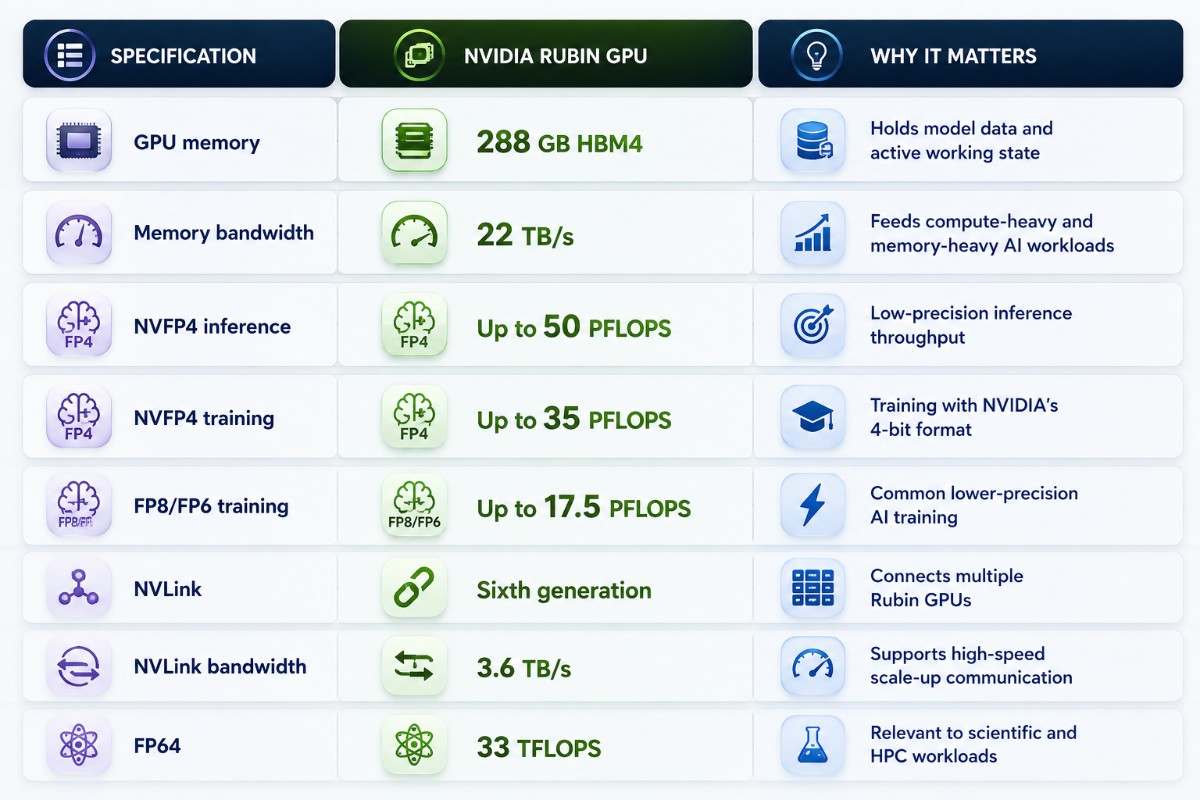
The following NVIDIA Rubin GPU specs come from NVIDIA’s June 2026 Vera Rubin datasheet. NVIDIA labels the individual Rubin values as preliminary, “up to,” and subject to change.
| Specification | NVIDIA Rubin GPU | Why it matters |
| GPU memory | 288 GB HBM4 | Holds model data and active working state |
| Memory bandwidth | 22 TB/s | Feeds compute-heavy and memory-heavy AI workloads |
| NVFP4 inference | Up to 50 PFLOPS | Low-precision inference throughput |
| NVFP4 training | Up to 35 PFLOPS | Training with NVIDIA’s 4-bit format |
| FP8/FP6 training | Up to 17.5 PFLOPS | Common lower-precision AI training |
| NVLink | Sixth generation | Connects multiple Rubin GPUs |
| NVLink bandwidth | 3.6 TB/s | Supports high-speed scale-up communication |
| FP64 | 33 TFLOPS | Relevant to scientific and HPC workloads |
NVIDIA also lists 336 billion transistors, 224 SMs, 896 Tensor Cores, PCIe Gen 6 host connectivity, and a third-generation Transformer Engine.
The most important numbers depend on the workload. A large inference deployment may care heavily about HBM4 capacity, memory bandwidth, and NVLink, while scientific workloads may place more weight on FP64 performance and platform topology.
What Should Be Bought With a Rubin GPU?
Rubin usually belongs inside a validated server or rack architecture rather than an independent accelerator purchase.
- Server or rack platform: HGX Rubin NVL8, Vera Rubin NVL72, NVL4, or an OEM implementation.
- Host CPU: NVIDIA Vera or a validated x86 platform, depending on system design.
- Networking: ConnectX-9 plus the appropriate Ethernet or InfiniBand fabric.
- Storage: High-throughput storage sized for datasets, checkpoints, retrieval, and inference context.
- Facilities: Compatible optics, cabling, rack power, liquid cooling, CDU capacity, and management infrastructure.
Compatibility should come from the selected OEM’s validated configuration. Similar connectors, form factors, or bandwidth ratings do not prove that two components work together.
Who Is Rubin For and Who Might Not Need It?
| Likely Rubin fit | May not need Rubin yet |
| Hyperscalers training frontier models | Small inference deployments |
| Neocloud GPU service providers | Teams with lightly utilized existing GPUs |
| Sovereign AI operators | Workloads that fit one or a few GPUs |
| Large model developers | Projects limited by budget rather than compute |
| HPC and AI-for-science organizations | Environments without suitable cooling/power |
| Enterprises with high-scale reasoning workloads | Organizations whose current Blackwell/Hopper systems meet requirements |
Rubin should not become the automatic recommendation simply because it is newer. Workload, software compatibility, data center readiness, power, cooling, availability, deployment schedule, and budget should drive the final architecture.
A mature eight-GPU H100 server can still make more operational or financial sense when an organization does not need Rubin-level scale or infrastructure change.
How Can Catalyst Support a Rubin AI Infrastructure Deployment?
Catalyst Data Solutions Inc works across OEM, channel, and distribution ecosystems to help organizations source AI, HPC, and data center infrastructure. Rubin deployments can involve much more than GPUs, including compatible servers, networking, storage, optics, cabling, rack power, and cooling infrastructure.
The right configuration depends on workload, software requirements, facility capacity, budget, availability, and deployment timeline. Catalyst can help compare NVIDIA and OEM options without assuming that the newest or largest platform fits every organization.
Buyers can request current availability or review the broader GPU hardware catalog when planning a configuration. A useful request should include workload, GPU quantity, target platform, networking, storage, power, cooling, support, and delivery requirements.
FAQs
How does the Rubin GPU work?
Rubin combines Tensor Core compute, HBM4 memory, high-speed data movement, and NVLink 6 communication. HBM4 feeds the GPU, its compute engines process model operations, and NVLink connects multiple Rubin GPUs into larger systems.
Does NVIDIA Rubin use HBM4?
Yes. NVIDIA lists 288 GB of HBM4 per Rubin GPU with up to 22 TB/s of memory bandwidth. The published specification remains preliminary and subject to change.
What is NVLink 6?
NVLink 6 is NVIDIA’s sixth-generation GPU scale-up interconnect. Rubin supports 3.6 TB/s of bidirectional NVLink bandwidth per GPU, while Vera Rubin NVL72 provides 260 TB/s across its 72-GPU NVLink domain.
Is Rubin faster than Blackwell?
Rubin improves several published architecture metrics, including memory bandwidth and NVLink bandwidth. NVIDIA also reports large gains for specific Rubin system workloads, but there is no single multiplier that applies to every model or configuration.
What is Vera Rubin NVL72?
Vera Rubin NVL72 is a rack-scale AI system containing 72 Rubin GPUs and 36 Vera CPUs, connected through NVLink 6 and supported by ConnectX-9 SuperNICs, BlueField-4 DPUs, scale-out networking, and liquid-cooled MGX infrastructure.
Is Rubin for training or inference?
Rubin supports both. NVIDIA positions it for large-model training, post-training, reasoning, inference, agentic AI, MoE models, and, in appropriate platform configurations, HPC and AI-for-science.
When is Rubin used in AI data centers?
Rubin fits data centers that need high-density AI training, large-scale inference, reasoning, agentic AI, or HPC. NVIDIA says Vera Rubin is ramping into full production, and Rubin-based OEM systems have started shipping, although availability and lead times vary by configuration and supplier.