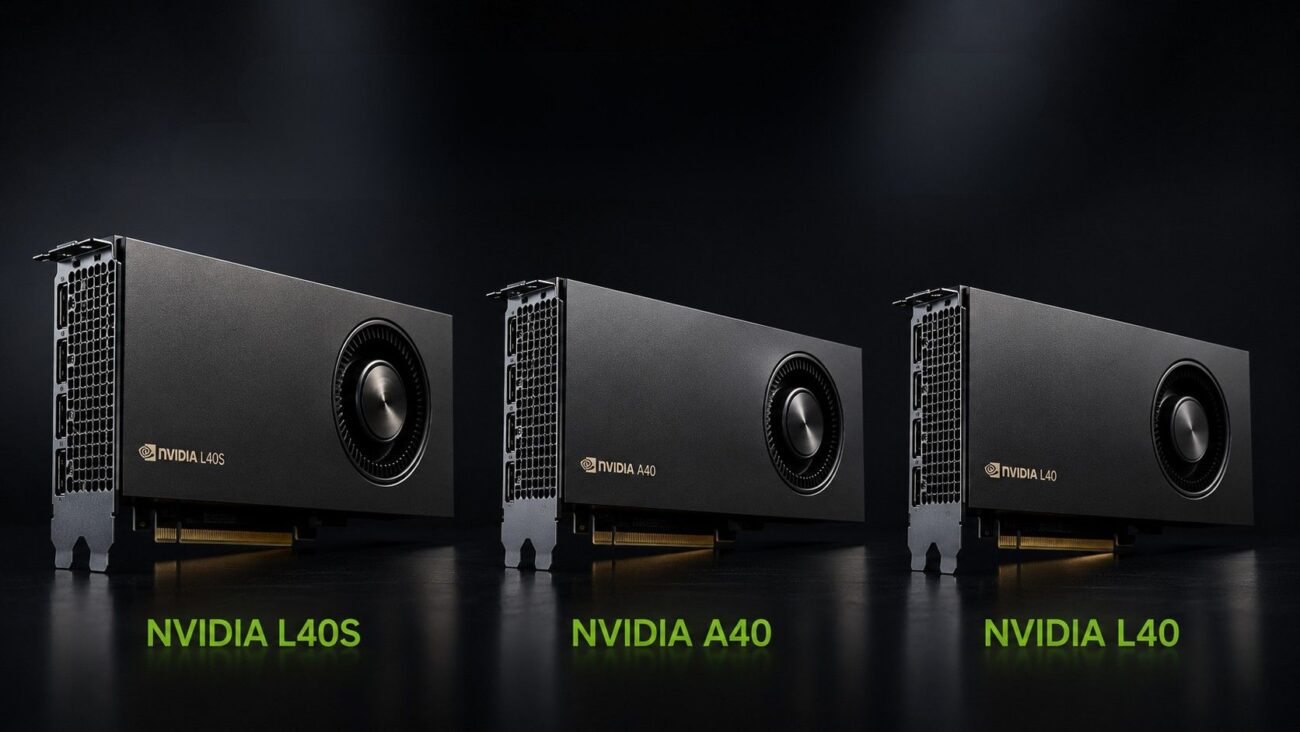
Choosing between the NVIDIA L40S, L40, and A40 requires more than comparing peak performance. Each GPU needs a qualified server, enough system memory, fast storage, correct power delivery, strong airflow, and networking sized for the workload.
For most mixed AI and graphics deployments, the L40S 48GB option is the strongest overall choice. It supports modern AI inference while delivering the graphics performance needed for rendering, simulation, and professional visualization.
The L40 favors advanced rendering and data center visualization. The A40 remains useful for established virtual workstation environments, Ampere-based systems, and buyers seeking a potentially lower-cost option.
Which GPU Is Best: NVIDIA L40S, L40, or A40?
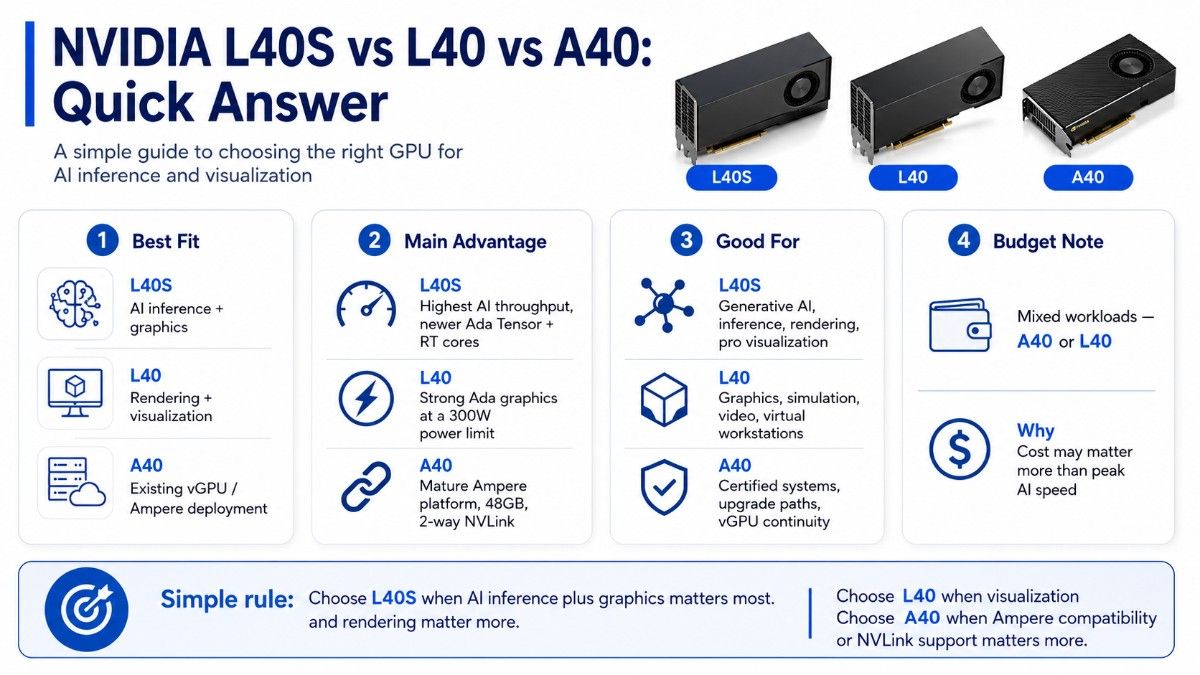
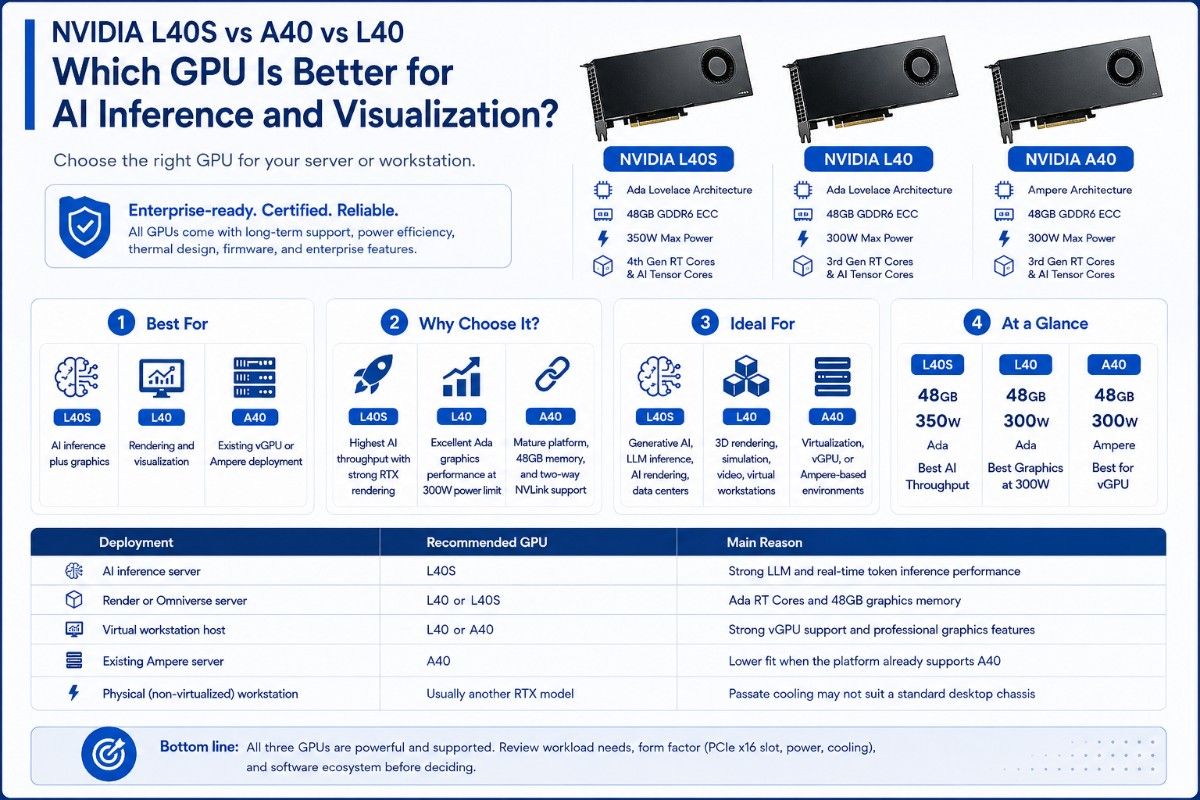
The L40S is best for organizations that want one data center GPU for AI inference, generative AI, rendering, and professional visualization. It combines 48GB of memory with newer Ada Lovelace Tensor and RT Cores.
The NVIDIA L40 48GB is a strong fit when graphics, rendering, simulation, video, and virtual workstation workloads matter more than maximum inference throughput. It offers Ada graphics performance within a 300W maximum power limit.
The A40 48GB accelerator makes sense when buyers need an Ampere platform, two-GPU NVLink support, or an upgrade for existing certified systems.
| Buyer priority | Best fit | Why |
| AI inference plus graphics | L40S | Highest AI throughput of the three with strong RTX rendering |
| Rendering and visualization | L40 | Excellent Ada graphics performance at a 300W power limit |
| Existing vGPU or Ampere deployment | A40 | Mature platform, 48GB memory, and two-way NVLink support |
| Budget-sensitive mixed workloads | A40 or L40 | Acquisition cost may matter more than peak AI speed |
Buyers considering L40S can use a detailed L40S review to examine its individual workload fit before comparing complete server configurations.
What Is the Difference Between L40S, L40, and A40?
The main difference is architecture and workload balance. L40S and L40 use NVIDIA Ada Lovelace architecture, while A40 uses the older Ampere architecture.
All three provide 48GB of ECC GDDR6 memory. They also use full-height, full-length, dual-slot PCIe designs with passive cooling. However, their memory speed, AI performance, graphics performance, power needs, and interconnect features differ.
| Specification | NVIDIA L40S | NVIDIA L40 | NVIDIA A40 |
| Architecture | Ada Lovelace | Ada Lovelace | Ampere |
| GPU memory | 48GB GDDR6 ECC | 48GB GDDR6 ECC | 48GB GDDR6 ECC |
| Memory bandwidth | 864GB/s | 864GB/s | 696GB/s |
| PCIe interface | PCIe 4.0 x16 | PCIe 4.0 x16 | PCIe 4.0 x16 |
| FP32 performance | 91.6 TFLOPS | 90.5 TFLOPS | 37.4 TFLOPS |
| RT Core performance | 212 TFLOPS | 209 TFLOPS | 73.1 TFLOPS |
| Maximum power | 350W | 300W | 300W |
| NVLink support | No | No | Yes, two-way |
| Cooling | Passive | Passive | Passive |
L40S raises the maximum power limit to 350W and places more emphasis on AI inference and mixed AI workloads. L40 stays at 300W and remains highly capable for visual computing. A40 also uses up to 300W, but it provides lower memory bandwidth and older Tensor and RT Core generations.
NVIDIA lists 568 fourth-generation Tensor Cores and 142 third-generation RT Cores for both Ada models. L40S provides much higher FP8 Tensor performance than L40, which helps explain why L40S is the better inference-focused option.
The A40 uses 336 third-generation Tensor Cores and 84 second-generation RT Cores. Its 696GB/s memory bandwidth and 37.4 TFLOPS of FP32 performance trail both Ada GPUs.
However, the A40 supports two-way NVLink. Organizations can connect two compatible A40 cards for workloads designed to use that connection.
How Do L40S, L40, and A40 Perform for AI and Graphics?
Which GPU Is Better for AI Inference?
L40S is the first choice for AI inference among these three GPUs. Its fourth-generation Tensor Cores support FP8 and target generative AI, large language model inference, multimodal applications, image generation, recommendation systems, and computer vision.
Its 48GB memory can hold many production inference models. However, model size alone should not decide the purchase.
Teams must also measure batch size, latency targets, concurrent users, model precision, and the throughput needed from each server. Storage speed and network performance can also affect how well the system uses the GPU.
L40 can run inference well, especially when the same server handles rendering, digital twins, video, or visualization. It supports modern Ada features and 48GB of memory, but L40S offers a better balance when AI serving is the primary workload.
A40 remains practical for mature inference pipelines, computer vision, virtualized AI, and workloads already validated on Ampere. It may offer better value when the application does not need FP8 performance or the organization plans to reuse an existing server.
Which GPU Is Better for Rendering?
L40 and L40S are both strong rendering GPUs. Their third-generation RT Cores speed up ray tracing, real-time rendering, virtual production, 3D design, simulation, and high-resolution content creation.
NVIDIA positions L40 for data center visual computing. It positions L40S for combined AI and graphics workloads.
Choose L40 when the environment mainly supports render nodes, remote creative applications, digital twins, Omniverse workloads, or graphics-heavy virtual workstations. Its 48GB memory can support complex scenes, large textures, and detailed visual models.
Choose L40S when the same infrastructure must handle AI-assisted rendering, generative content, or inference. The extra AI performance gives it an advantage in workflows that combine graphics and machine learning.
A40 still supports professional rendering, simulation, broadcast, and large visual displays. However, its older RT Cores and lower FP32 performance make it less attractive for a new high-end render farm unless price or server support gives it an advantage.
Which GPU Is Better for Visualization and Virtual Workstations?
L40 is often the most balanced choice for enterprise visualization. It supports vGPU software, four DisplayPort 1.4a outputs, 48GB of memory, and round-the-clock data center operation.
These features suit remote design teams, digital twins, 3D collaboration, and secure virtual workstations.
L40S also supports vGPU and four DisplayPort outputs. It works well when visualization teams also need AI inference, generative design, or other machine learning functions.
A40 supports vGPU, three DisplayPort outputs, Quadro Sync, and professional display workflows. Those features can matter in established broadcast, video wall, virtual workstation, or large-display environments.
Organizations that need a tower or desktop card instead of a passive server accelerator should compare a professional workstation GPU. L40S, L40, and A40 require chassis airflow and server-level compatibility checks.
Should You Use L40S, L40, or A40 in a Server or Workstation?
These GPUs work best in qualified rack servers, GPU servers, or enterprise workstation platforms designed for passive cards. A PCIe x16 slot alone does not guarantee compatibility.
The chassis must support the card size, power connector, thermal design, firmware, and required airflow.
| Deployment | Recommended GPU | Main reason |
| AI inference server | L40S | Strong FP8 and mixed-precision inference performance |
| Render or Omniverse server | L40 or L40S | Ada RT Cores and 48GB graphics memory |
| Virtual workstation host | L40 or A40 | Strong vGPU support and professional graphics features |
| Existing Ampere server | A40 | Easier fit when the platform already supports A40 |
| Physical tower workstation | Usually another RTX model | Passive cooling may not suit a standard desktop chassis |
Before ordering, confirm the exact server model and supported GPU count. Buyers should review slot spacing, riser layout, CPU PCIe lanes, power supplies, fan zones, BIOS support, and room for NICs or storage controllers.
A complete GPU server planning process should also check whether the server can sustain performance when every GPU runs at full load.
When Is an NVIDIA H100 Not Necessary?
H100 is not necessary when the workload centers on inference, rendering, visualization, VDI, video, or moderate AI development. L40S often provides a better fit because it combines strong AI acceleration with RTX graphics in a standard PCIe data center card.
H100 becomes more relevant for large-scale model training, demanding HPC, high-bandwidth AI workloads, or dense HGX systems.
Buyers comparing H100 platforms should review the H100 platform differences before paying for performance their applications may not use.
L40 or A40 may also make more sense when graphics quality, vGPU density, display functions, or purchase cost has greater value than maximum Tensor performance. A balanced server can produce better results than an expensive GPU limited by weak storage, networking, or CPU resources.
For dense multi-GPU training, the system design may move beyond these PCIe cards toward DGX and HGX systems. That decision changes the server baseboard, cooling plan, network fabric, and purchasing model.
What Infrastructure Do L40S, L40, and A40 Require?
The GPU is only one part of the build. A production system needs CPUs that can feed the cards, enough system memory for data preparation, fast storage for models and assets, and network links that prevent idle GPU time.
| System layer | What to confirm | Why it matters |
| GPU server | Qualified model, slot spacing, BIOS, GPU count | Prevents fit, firmware, and airflow problems |
| System memory | Capacity and memory-channel balance | Supports preprocessing, caching, and virtual users |
| Storage | Enterprise NVMe capacity and throughput | Reduces model, scene, and dataset loading delays |
| Networking | NIC speed, switches, optics, and cables | Moves data between users, storage, and GPU nodes |
| Power and cooling | PSU headroom, rack power, fan capacity | Keeps passive 300W to 350W cards stable |
For a single server, 25G networking may support many visualization or inference uses. Multi-node inference, shared storage, large media files, or clustered rendering may justify 100G links and a stronger switch fabric.
Teams should map the NIC, switch port, optic, and cable as one path. A wrong transceiver type, connector, or cable length can delay deployment even when the GPU and server are correct.
The same rule applies to storage. NVMe drive speed, controller layout, RAID design, and available PCIe lanes must work together.
An AI network design should account for east-west traffic, model distribution, shared datasets, remote visualization streams, and future node growth.
Power planning should include facility limits, not only the server power-supply rating. L40S can use up to 350W per card, while L40 and A40 can use up to 300W.
Because these cards use passive cooling, chassis fan design matters. A review of data center cooling can help teams plan airflow, rack density, inlet temperature, and sustained operation before deployment.
What Should You Buy With an L40S, L40, or A40?
Start with a qualified server that lists the exact GPU as supported. Add enough CPU cores, system memory, and enterprise NVMe storage for the workload rather than using a fixed ratio for every deployment.
Inference servers may need fast storage for model loading and high network throughput for requests. Render servers may need large asset storage and reliable remote display delivery.
Virtual workstation hosts need enough CPU, RAM, licensing, and network capacity for the planned user count.
For broader enterprise GPU deployment, buyers should prepare a bill of materials that includes:
- Qualified GPU server and supported accelerators
- Server memory and enterprise storage
- NICs, switches, optics, and cables
- Power, cooling, software, and support terms
HPE buyers can also compare HPE AI server options when they need an OEM platform with validated GPU, memory, storage, and management choices.
Should You Buy New or Refurbished NVIDIA GPUs?
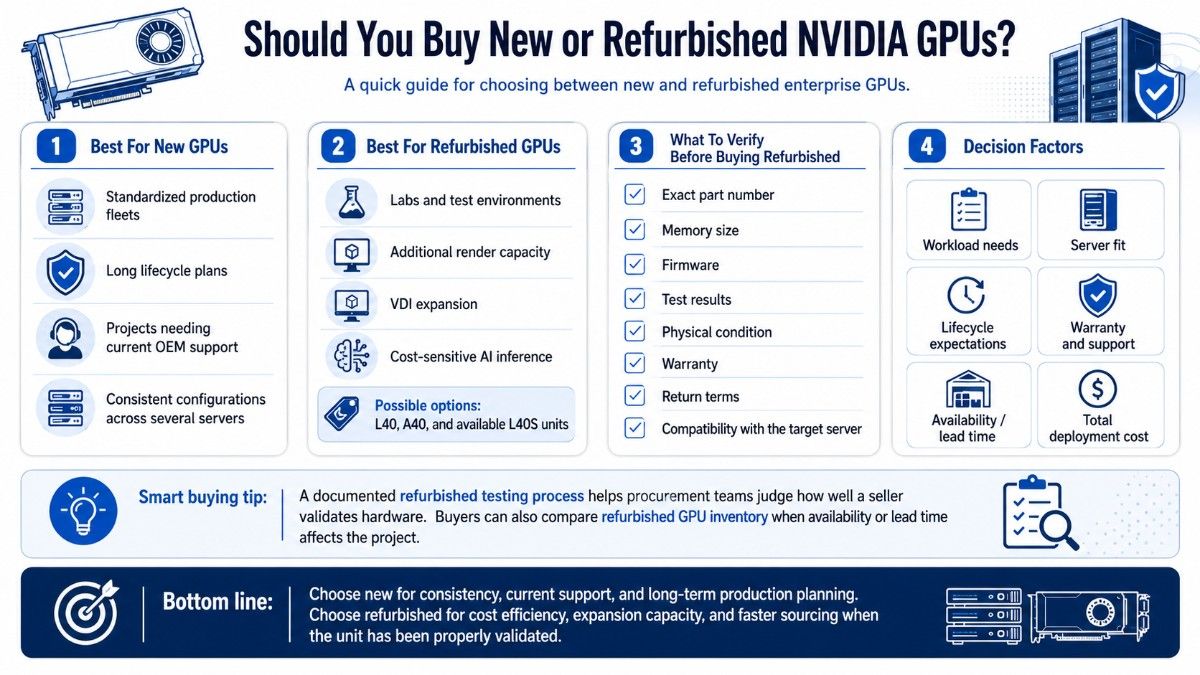
New GPUs suit standardized production fleets, long lifecycle plans, and projects that require current OEM support. They may also fit buyers who need consistent configurations across several servers.
Refurbished L40, A40, or available L40S units can make sense for labs, additional render capacity, VDI expansion, and cost-sensitive inference.
Condition alone does not define a good refurbished purchase. Buyers should verify the exact part number, memory size, firmware, test results, physical condition, warranty, return terms, and compatibility with the target server.
A documented refurbished testing process helps procurement teams judge how a seller validates hardware.
Buyers can also compare refurbished GPU inventory when availability or lead time affects the project. The final choice should consider workload needs, server fit, lifecycle, warranty, and total deployment cost.
Which GPU Should You Choose?
Choose L40S when AI inference is the main goal but the system also needs rendering, visualization, or media acceleration. It offers the strongest overall performance mix and the best path for new multi-workload servers.
Choose L40 when visual computing, rendering, virtual workstations, and Omniverse-style workloads lead the project. It delivers nearly the same graphics-class FP32 and RT performance as L40S while staying within a 300W maximum power limit.
Choose A40 when the server already supports Ampere, NVLink matters, or a lower-cost refurbished option meets the workload. It remains useful, but buyers should not expect it to match Ada performance in modern inference or rendering.
The final decision should follow four checks:
- Match the GPU to the main workload and software stack.
- Confirm the exact server, power, airflow, and PCIe layout.
- Size memory, storage, and networking around real data flow.
- Compare new and refurbished options by lifecycle and budget.
Need a Complete NVIDIA GPU Server Configuration?
Catalyst Data Solutions Inc helps organizations source NVIDIA GPUs, compatible servers, memory, storage, networking, switches, optics, and cables across new, refurbished, and hard-to-find inventory.
Catalyst can help verify compatibility and build a complete configuration for AI inference, rendering, visualization, virtual workstations, and mixed enterprise workloads.
Frequently Asked Questions
Is L40S better than L40 for AI inference?
Yes. L40S offers much higher FP8 Tensor performance and targets generative AI and inference. L40 remains capable, but it is better suited to deployments where graphics and visualization carry more weight.
Is L40 better than A40 for rendering?
In most new deployments, yes. L40 uses newer Ada RT Cores, provides higher FP32 performance, and has greater memory bandwidth. A40 can still offer good value in existing Ampere or virtual workstation systems.
Do L40S, L40, and A40 all have 48GB of memory?
Yes. All three use 48GB of ECC GDDR6 memory. L40S and L40 provide 864GB/s of memory bandwidth, while A40 provides 696GB/s.
Can these GPUs go into any PCIe server?
No. The server must support the card’s full-height, full-length, dual-slot size, passive cooling, power connector, firmware, and PCIe layout. Always verify the exact server configuration before purchase.
Which GPU is best for virtual workstations?
L40 is a strong modern choice for high-end virtual workstations and visualization. A40 remains useful for established vGPU environments, while L40S is better when users also need substantial AI inference performance.
Does A40 have an advantage over L40S or L40?
A40 supports two-way NVLink, while L40S and L40 do not. It may also cost less on the refurbished market and fit servers already certified for Ampere GPUs.
When should a buyer choose H100 instead?
Choose H100 when large-scale training, demanding HPC, high-bandwidth AI compute, or HGX-class density justifies the added cost and infrastructure. For mixed inference, rendering, and visualization, L40S often provides a more balanced choice.