DDR4 vs DDR5 server memory is not only a speed comparison. The real decision is whether higher bandwidth, newer server architecture, greater memory capacity, and future platform support justify the cost of moving to DDR5.
DDR5 is the better fit for many new server deployments. DDR4 can still offer strong value when an existing server meets workload requirements and only needs more memory capacity.
Before choosing memory, teams should confirm CPU support, DIMM type, memory channels, firmware, and server-generation requirements. Good server upgrade planning helps prevent buying memory that cannot be used in the target platform.
DDR4 vs DDR5 Server Memory: What Are the Main Differences?
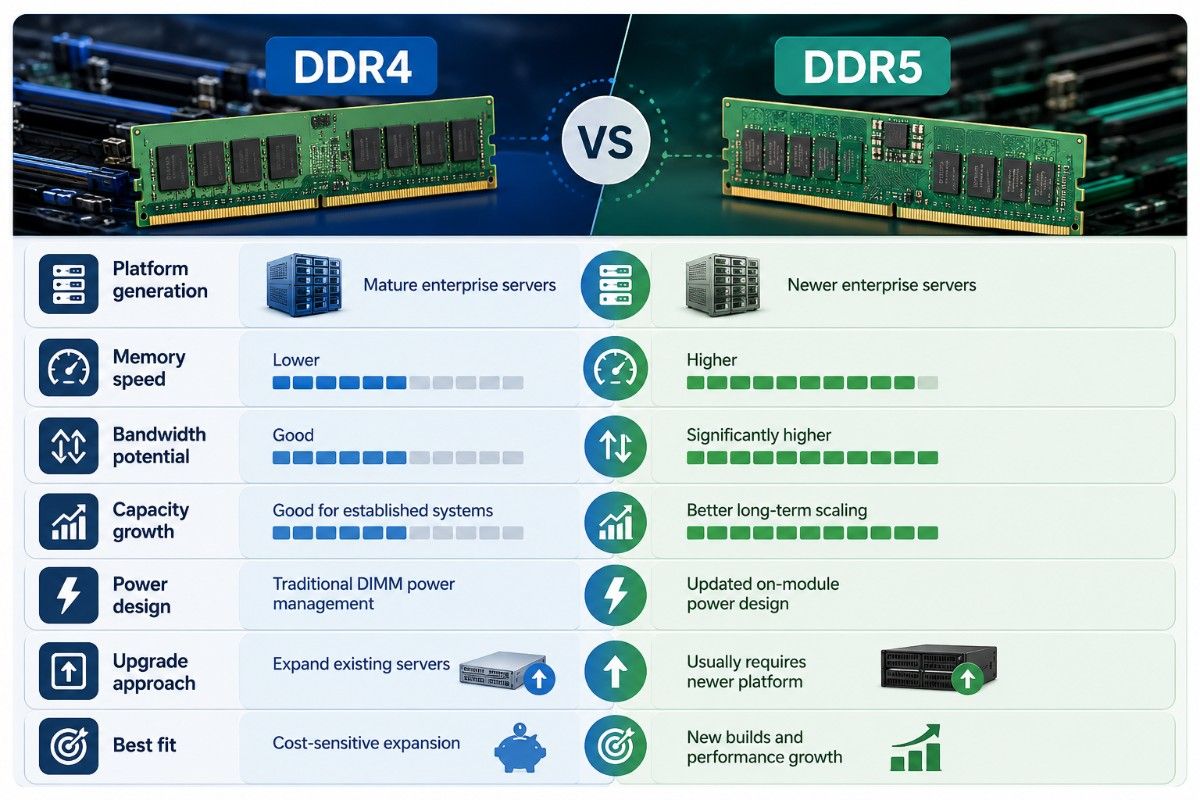
DDR5 is the newer enterprise memory generation. It provides higher memory speeds, more bandwidth potential, updated power management, and a stronger path toward high-capacity server configurations.
DDR4 remains widely useful in established enterprise servers. It is often the more economical choice when the existing CPU and server platform still provide enough performance.
| Comparison | DDR4 Server Memory | DDR5 Server Memory |
| Platform generation | Mature enterprise servers | Newer enterprise servers |
| Memory speed | Lower | Higher |
| Bandwidth potential | Good | Significantly higher |
| Capacity growth | Good for established systems | Better long-term scaling |
| Power design | Traditional DIMM power management | Updated on-module power design |
| Upgrade approach | Expand existing servers | Usually requires newer platform |
| Best fit | Cost-sensitive expansion | New builds and performance growth |
The key point is that DDR5 should normally be viewed as part of a server-platform upgrade. It is not simply a faster replacement DIMM for an existing DDR4 server.
For supported HPE environments, options such as HPE DDR4 ECC memory can still be practical when the goal is increasing capacity without replacing the full server.
DDR4 vs DDR5 Server RAM Performance: How Much Faster Is DDR5?
DDR5 supports higher transfer rates than DDR4. That gives newer server platforms more memory bandwidth for CPUs with large core counts and workloads that move large amounts of data through system memory.
However, memory speed alone does not determine application performance. Storage, CPU architecture, network bandwidth, software design, memory-channel population, and workload behavior can all affect the final result.
| Performance Area | DDR4 | DDR5 | Practical Impact |
| Transfer rate | Lower | Higher | Faster movement of memory data |
| Memory bandwidth | Lower | Higher | Helps multi-core workloads |
| Workload scaling | Good | Better potential | Useful for dense servers |
| Latency behavior | Mature and predictable | Different timing structure | Depends on workload |
| CPU utilization | Can be bandwidth-limited | More bandwidth available | Helps memory-bound applications |
DDR5 delivers the strongest gains when memory throughput is already limiting server performance. Light workloads may show little benefit even when the installed memory has a much higher rated speed.
DDR4 vs DDR5 Memory Bandwidth: Why Does It Matter?
Memory bandwidth measures how much data the processor can move to and from system memory over time. Higher bandwidth becomes increasingly important as modern server CPUs add more cores and run more workloads simultaneously.
A server with many cores can still underperform if the memory subsystem cannot provide data quickly enough. DDR5 helps newer platforms increase the amount of memory traffic that can be handled at the same time.
| Workload | Bandwidth Importance | DDR5 Benefit |
| Basic file services | Low | Usually limited |
| General applications | Moderate | Workload dependent |
| Virtualization | Moderate to high | Better at high VM density |
| Databases | Moderate to high | Useful for memory-heavy workloads |
| Analytics | High | Stronger potential benefit |
| AI preprocessing | High | Helps feed CPUs and accelerators |
| HPC | High | Often benefits from greater bandwidth |
Memory population also matters. Installing fast DDR5 modules without populating enough memory channels can reduce the total bandwidth available to the CPUs.
DDR4 vs DDR5 Latency: Is DDR5 Always Faster?
DDR5 should not be judged only by CAS latency values. DDR5 can have higher timing numbers than DDR4 while still delivering much greater effective bandwidth because its transfer rates are higher.
Server buyers should therefore evaluate application-level performance rather than comparing one latency specification.
| Latency Question | What Matters |
| Is DDR4 lower latency? | It can have lower timing values in some configurations |
| Does that make DDR4 faster? | Not necessarily |
| Can DDR5 offset higher timings? | Yes, through higher transfer rates and bandwidth |
| What should enterprises measure? | Application response time and workload throughput |
| Which is better for memory-bound workloads? | DDR5 often has the stronger platform advantage |
Database response time, VM performance, CPU utilization, NUMA behavior, and application throughput provide more meaningful information than memory timing values alone.
DDR4 vs DDR5 ECC Memory: What Changes?
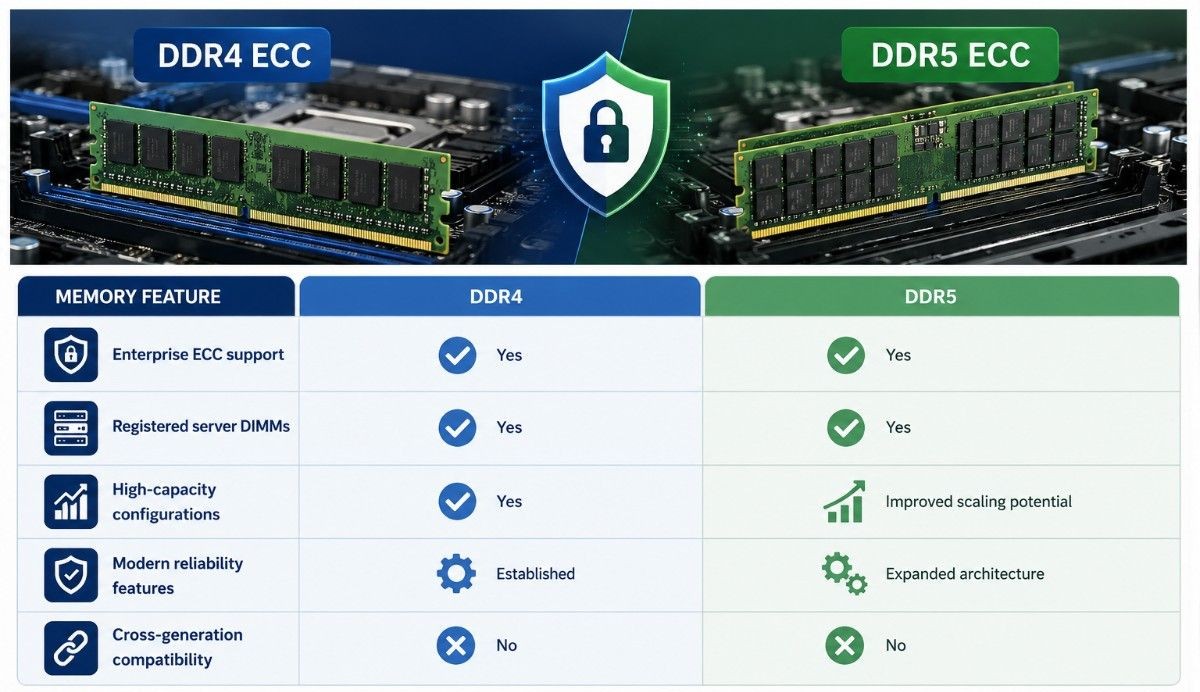
Both DDR4 and DDR5 enterprise server platforms can support ECC technologies designed to protect data integrity. Buyers still need to verify that the exact memory module is supported by the CPU and server.
DDR5 also introduces additional reliability mechanisms within the memory architecture. These features do not remove the need to use the server vendor’s supported ECC memory configuration.
| Memory Feature | DDR4 | DDR5 |
| Enterprise ECC support | Yes | Yes |
| Registered server DIMMs | Yes | Yes |
| High-capacity configurations | Yes | Improved scaling potential |
| Modern reliability features | Established | Expanded architecture |
| Cross-generation compatibility | No | No |
ECC support should always be validated against the exact server model. A DIMM having the correct capacity and DDR generation does not automatically mean the server supports it.
DDR4 vs DDR5 RDIMM and LRDIMM
RDIMMs are common in enterprise servers because they reduce electrical loading on the memory controller. This helps servers support larger memory configurations while maintaining stability.
LRDIMMs can support very high-capacity configurations in platforms designed for them. Support varies by CPU, motherboard, server generation, and memory population.
| DIMM Type | Purpose | DDR4 Availability | DDR5 Availability |
| RDIMM | Standard registered server memory | Common | Common |
| LRDIMM | High-capacity enterprise memory | Platform dependent | Platform dependent |
| ECC UDIMM | Entry server/workstation use | Platform dependent | Platform dependent |
| Consumer UDIMM | Desktop-focused memory | Not typical for enterprise servers | Not typical for enterprise servers |
A DDR4 LRDIMM cannot simply be replaced with a DDR5 LRDIMM. DDR5 requires a platform specifically designed around the newer memory generation.
DDR4 vs DDR5 Memory Capacity
Capacity matters when a server must host more virtual machines, larger databases, bigger caches, analytics workloads, or memory-heavy AI applications.
DDR5 provides newer platforms with a stronger path toward high-capacity configurations. The exact maximum still depends on DIMM size, CPU architecture, socket count, memory channels, and vendor qualification.
| Capacity Scenario | DDR4 | DDR5 |
| Small application server | Usually sufficient | Often more than required |
| Moderate virtualization host | Strong fit | Strong fit |
| Dense virtualization | May reach platform limits | Better growth path |
| Large database | Platform dependent | Better scaling potential |
| AI data pipeline | Can work well | Better for new platforms |
| Long-term expansion | Limited by older platform | Stronger future path |
More memory is not automatically better. Capacity should be balanced with memory bandwidth and proper channel population.
DDR4 vs DDR5 Power Consumption
DDR5 introduces updated power-management architecture and operates differently from DDR4. These improvements support higher data rates while helping manage power more efficiently at the memory-module level.
However, moving to DDR5 often means moving to newer CPUs and server platforms. Total server power can therefore increase even if the memory subsystem becomes more efficient.
| Power Consideration | DDR4 | DDR5 |
| Memory architecture | Mature | Newer design |
| Power management | Platform based | More functionality on DIMM |
| Performance per memory channel | Lower | Higher |
| Full server power | Depends on platform | Depends on newer CPU/server design |
| Cooling planning | Required | Especially important in dense platforms |
Power comparisons should be made at the complete server level. CPU count, GPU count, storage, NICs, DIMM quantity, and workload utilization all affect rack power and cooling.
Can a DDR4 Server Use DDR5 RAM?
In most cases, no. DDR4 and DDR5 have different electrical requirements, DIMM designs, platform signaling, and CPU memory-controller support.
A DDR4 server therefore cannot normally become a DDR5 server through a memory swap.
| Compatibility Question | Answer |
| Can DDR5 fit a DDR4 server? | No |
| Can a DDR4 CPU control DDR5? | Normally no |
| Can firmware add DDR5 support? | No |
| Is the motherboard different? | Yes |
| Is a new CPU often required? | Yes |
| Is DDR5 usually a platform upgrade? | Yes |
This makes server generation planning important when comparing mature DDR4 systems with newer DDR5 platforms.
The correct comparison is often not simply DDR4 RAM versus DDR5 RAM. It is existing DDR4 server versus newer DDR5 server.
Which Servers Support DDR5 Memory?
DDR5 support is tied to newer server CPUs and motherboards. Exact speeds, DIMM capacities, and supported memory types vary across HPE, Dell, Lenovo, Supermicro, and other enterprise systems.
Buyers should verify platform documentation before ordering memory.
| Compatibility Check | Why It Matters |
| Server model | Confirms DDR generation |
| CPU generation | Determines memory controller support |
| RDIMM/LRDIMM support | Prevents DIMM-type mismatch |
| Maximum DIMM capacity | Determines expansion limits |
| Channel population | Affects bandwidth and speed |
A DIMM should never be selected only because the capacity and speed appear correct.
Where Does DDR5 Deliver Meaningful Workload Gains?
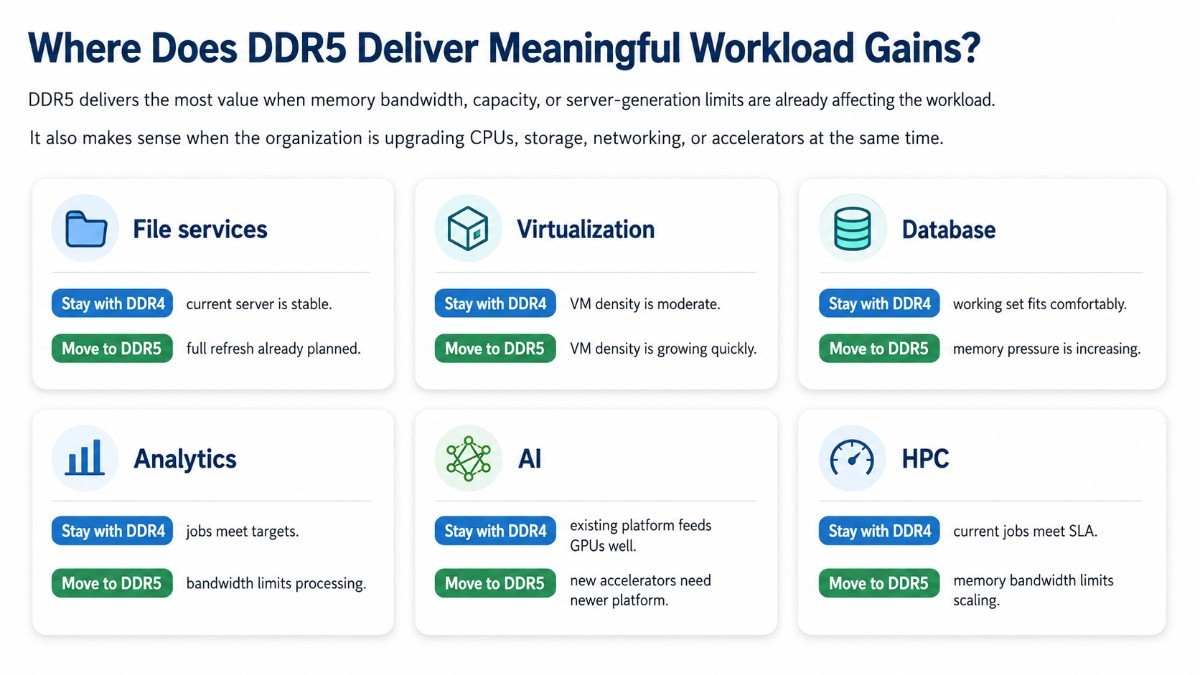
DDR5 delivers the most value when memory bandwidth, capacity, or server-generation limits are already affecting the workload.
It also makes sense when the organization is upgrading CPUs, storage, networking, or accelerators at the same time.
| Workload | Stay With DDR4 When | Move to DDR5 When |
| File services | Current server is stable | Full refresh already planned |
| Virtualization | VM density is moderate | VM density is growing quickly |
| Database | Working set fits comfortably | Memory pressure is increasing |
| Analytics | Jobs meet targets | Bandwidth limits processing |
| AI | Existing platform feeds GPUs well | New accelerators need newer platform |
| HPC | Current jobs meet SLA | Memory bandwidth limits scaling |
This workload-first approach prevents organizations from upgrading simply because DDR5 is newer.
DDR4 vs DDR5 for Virtualization and VMware
Virtualization depends heavily on memory capacity. As VM density grows, memory bandwidth also becomes more important because many virtual machines compete for access to the same memory subsystem.
DDR4 remains practical for stable VMware and virtualization environments. DDR5 becomes more attractive when consolidation targets are increasing.
| Virtualization Requirement | DDR4 | DDR5 |
| Moderate VM density | Strong fit | Strong fit |
| High VM density | Platform dependent | Better growth path |
| Large memory footprint | Possible | Better newer-platform scaling |
| New host deployment | Budget option | Preferred future platform |
| Existing host expansion | Usually more economical | Requires platform change |
The ROI improves if moving to DDR5 allows fewer physical hosts to support the same workload.
DDR4 vs DDR5 for Database Servers
Database workloads can depend on CPU speed, memory bandwidth, cache size, storage latency, and software behavior. DDR5 helps most when the database is already placing significant pressure on system memory.
A smaller transactional database may perform well on DDR4. Large in-memory databases, analytics engines, and cache-heavy applications can have a stronger reason to move to DDR5.
| Database Scenario | Better Fit |
| Mature small database | DDR4 |
| Stable ERP database | DDR4 or DDR5 |
| Large cache-heavy database | DDR5 |
| In-memory analytics | DDR5 |
| New high-core-count platform | DDR5 |
Database benchmarks should be performed against the actual application whenever possible.
DDR4 vs DDR5 for AI Servers
AI servers need system memory for preprocessing, model loading, caching, storage pipelines, operating-system tasks, and feeding GPU workloads.
For new AI deployments, GPU server memory planning should be coordinated with CPUs, GPUs, NVMe storage, networking, and PCIe topology.
| AI Requirement | DDR4 | DDR5 |
| Older GPU platform | Often appropriate | Usually not supported |
| New GPU server | Less common | Common fit |
| Heavy preprocessing | Can be limiting | Higher bandwidth helps |
| Large host-memory requirement | Platform dependent | Better scaling potential |
| Long-term AI expansion | Limited by server generation | Better future platform |
Teams deploying newer accelerators should also consider qualified GPU servers because memory choice is tied closely to CPU generation and system architecture.
Dense DGX and HGX platforms reinforce the same principle. Memory, accelerators, networking, storage, power, and cooling should be planned as one infrastructure design.
DDR4 vs DDR5 Server Memory Price and Cost per GB
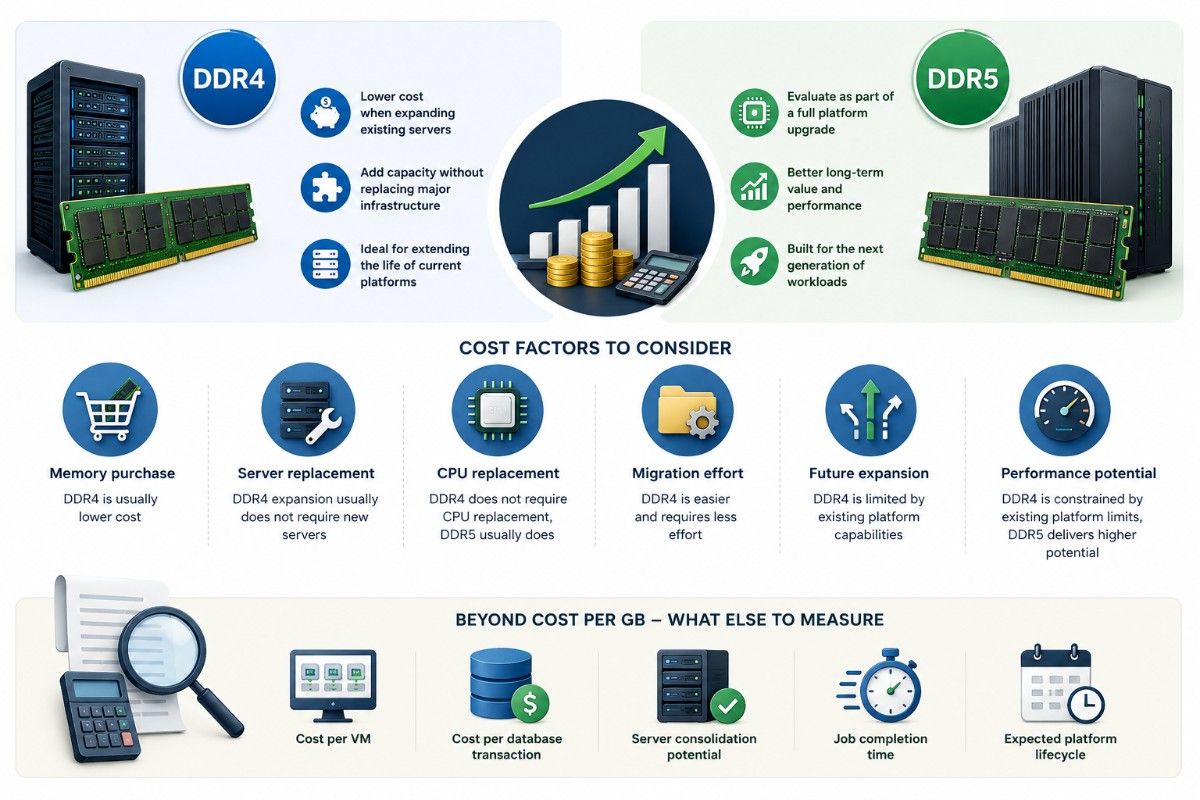
DDR4 usually has a cost advantage when a company already owns compatible servers. Adding DDR4 can increase capacity without replacing CPUs, motherboards, chassis, or other infrastructure.
DDR5 should be evaluated as part of the full cost of a newer platform.
| Cost Area | DDR4 Expansion | DDR5 Upgrade |
| Memory purchase | Usually lower | Platform dependent |
| Server replacement | Usually not needed | Often required |
| CPU replacement | No | Usually yes |
| Migration effort | Lower | Higher |
| Future expansion | Limited by existing platform | Better long-term path |
| Performance potential | Existing-platform limit | Higher |
Cost per GB alone can therefore be misleading.
Organizations should also measure:
- Cost per VM
- Cost per database transaction
- Server consolidation potential
- Job completion time
- Expected platform lifecycle
The same principle applies to accelerator upgrade economics. A newer component creates value when the full workload becomes faster, denser, or more efficient.
Should I Upgrade From DDR4 to DDR5 Server Memory?
Upgrade when DDR5 solves an actual platform limitation or when a server refresh is already required.
Stay with DDR4 when the existing system remains reliable and the workload can be improved through a lower-cost memory expansion.
| Decision Point | Stay With DDR4 | Move to DDR5 |
| Current performance | Meets targets | Cannot meet targets |
| Capacity | Expansion available | Platform capacity is limiting |
| Bandwidth | Adequate | Workload is memory-bound |
| CPU generation | Still useful | Upgrade already needed |
| Server lifecycle | Several useful years remain | Replacement approaching |
| Budget | Cost control is priority | Performance/scale justifies investment |
Stay With DDR4 When:
- Existing applications meet performance targets
- Additional DDR4 capacity solves the problem
- The platform remains supported
- Server consolidation is not required
- Full replacement provides limited ROI
Move to DDR5 When:
- Memory bandwidth is limiting performance
- VM or database density is increasing
- New CPUs or GPUs are already required
- Capacity requirements exceed DDR4 platform limits
- Consolidation can reduce physical server count
Is DDR5 Worth Upgrading From DDR4?
DDR5 is worth upgrading when it produces measurable workload or infrastructure benefits. Higher rated memory speed alone is not enough reason to replace a healthy server.
The strongest business case combines memory improvements with newer processors, higher PCIe bandwidth, larger memory capacity, improved I/O, and a longer platform lifecycle.
| Upgrade Situation | Recommendation |
| Existing DDR4 server works well | Keep DDR4 |
| Only more capacity is needed | Expand DDR4 |
| CPU is also outdated | Consider DDR5 platform |
| Memory bandwidth is a bottleneck | DDR5 may be worthwhile |
| New AI/HPC server is planned | Favor DDR5 |
| Major data-center refresh is planned | Evaluate DDR5 |
DDR4 vs DDR5 Upgrade Decision Checklist
Before buying server memory, confirm the workload problem first.
| Question | Why It Matters |
| Is capacity the bottleneck? | DDR4 expansion may solve it |
| Is bandwidth the bottleneck? | DDR5 can provide more value |
| Does the current server have free DIMM slots? | May reduce upgrade cost |
| Does the CPU support DDR5? | Determines compatibility |
| Is a server refresh already planned? | Strengthens DDR5 ROI |
| Will consolidation offset cost? | Helps justify migration |
A quote-ready memory request should include the server model, processor, current DIMM layout, required capacity, workload, memory type, and preferred condition.
Which Server Memory Should You Buy?
Choose DDR4 when expanding a supported server is the most economical way to meet capacity and workload requirements.
Choose DDR5 when deploying a newer server generation or when bandwidth, capacity, consolidation, CPU upgrades, or platform longevity justify the additional investment.
| Buyer Situation | Recommended Direction |
| Existing server needs more RAM | DDR4 |
| Budget-sensitive infrastructure | DDR4 |
| New enterprise server | DDR5 |
| Dense virtualization | DDR5 |
| High-memory database | DDR5 |
| New AI or HPC platform | DDR5 |
| Mature workload with predictable demand | DDR4 |
The best server memory is not automatically the newest generation. It is the memory configuration that gives the required performance, capacity, compatibility, and lifecycle value at the lowest practical total cost.
For many organizations, that means expanding DDR4 today and moving to DDR5 during the next planned server refresh.
FAQs
Is DDR5 Server Memory Faster Than DDR4?
Yes. DDR5 supports higher transfer rates and gives newer server platforms more potential memory bandwidth.
The real workload improvement depends on CPU architecture, channel population, memory capacity, and whether the application is memory-bound.
Can I Replace DDR4 RDIMM With DDR5 RDIMM?
No. A DDR5 RDIMM requires a DDR5-compatible CPU, motherboard, DIMM slot design, firmware, and validated server platform.
Moving from DDR4 to DDR5 is normally a server-platform upgrade rather than a memory-only replacement.
Is DDR5 Better for VMware?
DDR5 can be better for dense VMware hosts where many VMs compete for memory bandwidth or where significantly more RAM is required.
DDR4 can still provide strong value for stable VMware environments that already meet utilization and performance targets.
Is DDR5 Better for Database Servers?
DDR5 is more useful when database performance depends heavily on memory bandwidth, large caches, or in-memory processing.
Databases limited by storage, locking, CPU frequency, or software design may receive less benefit from changing memory generation.
Is DDR5 Worth It for AI Servers?
DDR5 often makes sense in new AI server platforms because those systems also use newer CPUs, PCIe generations, storage, networking, and accelerators.
The memory upgrade should still be evaluated as part of the complete AI infrastructure design rather than as an isolated component.
Should I Buy DDR4 or DDR5 Server RAM?
Buy DDR4 when expanding a supported existing server provides the required capacity at a lower total cost.
Buy DDR5 when moving to a newer server generation or when greater bandwidth, capacity growth, consolidation, and platform longevity justify the full upgrade.